Pros
- QHD Fast IPS image with up to 180Hz refresh for compatible PCs.
- Adaptive-Sync and ELMB Sync gaming features.
- Ergonomic stand includes height, swivel, tilt and pivot.
- USB hub, speakers and two HDMI inputs are built in.

All categories
 New condition
Monitors
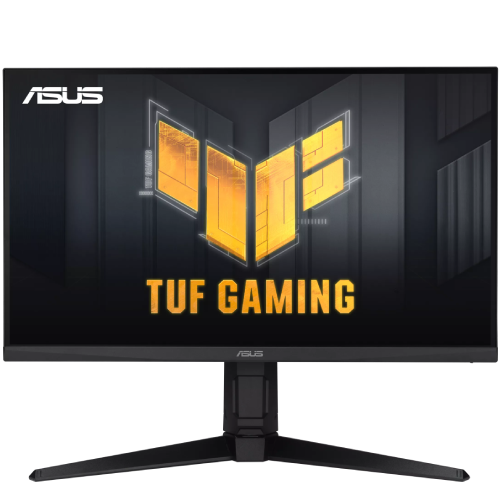
ASUS · TUF Gaming VG27AQL3A
27-inch QHD Fast IPS gaming monitor with 180Hz, ELMB Sync, Adaptive-Sync, HDR, USB hub and ergonomic stand.
Price unavailable
Price range updating
No verified price is available yet. Store offers will appear when merchants publish them.
Compare store prices
No live offers for this variant
Offers will appear when merchants publish them.
Loading history…
Product story
The ASUS TUF Gaming VG27AQL3A is a 27-inch QHD gaming monitor built around a Fast IPS panel. ASUS lists 2560 × 1440 resolution, a maximum 180Hz refresh rate, 1ms GTG response, ELMB Sync, Adaptive-Sync, HDR support, stereo speakers and an adjustable stand. This combination is designed for fast PC gaming while retaining a detailed desktop image. Verify local stock, package contents and serial-specific warranty with the seller. The correct model suffix is important when checking accessory fit and support information. Use the on-screen information page after installation to confirm that the source is sending the intended resolution and refresh timing.
The 27-inch screen has a native 2560 × 1440 resolution, 16:9 aspect ratio and approximately 596.74 × 335.66mm viewing area. QHD can display more detail and workspace than Full HD at this size, while a high frame rate still depends on the graphics hardware. Choose the native resolution in the operating system for crisp text and images, then use scaling if needed to keep menus comfortable to read.
ASUS specifies Fast IPS technology and 178-degree horizontal and vertical viewing angles. The model lists 130% sRGB color space, 96% DCI-P3, 16.7 million colors and an anti-glare surface. Gamut coverage figures do not establish calibration accuracy or uniformity for a particular physical unit. For color-critical work, calibrate the display and confirm output on the destination device; gaming presets may change color and contrast.
The maximum refresh rate is 180Hz according to the ASUS specification. To use it, the graphics output, selected resolution, driver and connection must support the requested mode. ASUS lists DisplayPort 1.4 with up to 180Hz vertical frequency, while HDMI vertical frequency is listed up to 144Hz. Connect through DisplayPort for the highest listed QHD refresh and verify the active refresh in system settings after configuration.
The 1ms gray-to-gray response time is a manufacturer specification and is distinct from input lag or MPRT. Actual motion appearance depends on refresh, pixel transitions, overdrive and content. ASUS Extreme Low Motion Blur can affect perceived motion, but the 1ms rating does not promise zero blur in every scene. Test response settings with the content you use and choose a balance that avoids distracting artifacts.
ELMB Sync is listed as a feature that combines ASUS Extreme Low Motion Blur with variable-refresh-rate operation. Feature behavior depends on the selected mode, refresh, graphics output and monitor settings. Check the on-screen display and manual for available combinations and limitations. Motion technologies can change brightness and appearance, so compare the image with settings enabled and disabled instead of assuming one mode is best for all games.
The monitor lists Adaptive-Sync, AMD FreeSync support and G-SYNC compatibility. Variable refresh can coordinate updates between a compatible GPU and display to reduce tearing within supported modes. Enable it in both the monitor OSD and graphics settings, use a suitable cable and current driver, and confirm active operation. Compatibility can vary by graphics card and connection; these technologies do not make an unsupported source output 180Hz.
ASUS lists 350cd/m² typical brightness, 400cd/m² peak HDR brightness and a 1000:1 typical contrast ratio. The product page states VESA DisplayHDR 400 compliance and HDR-10 support. HDR results depend on source, content and system settings; HDR support alone does not guarantee the performance of a display with advanced local dimming. Use compatible HDR content and confirm the operating system recognizes the display correctly.
ASUS specifies 130% sRGB and 96% DCI-P3 color-space figures, four color-temperature modes and GameVisual presets. These settings can tailor appearance for games, video and general use. Wide gamut is not the same as color accuracy, and preset modes may oversaturate standard content. Select an appropriate profile and calibrate for color-managed work. Confirm the required color space with the actual unit when delivering work for print or a controlled display pipeline.
Connectivity includes one DisplayPort 1.4, two HDMI 2.0 inputs, a USB hub with two USB 3.2 Gen 1 Type-A downstream ports, USB-B upstream and an earphone jack. The USB hub needs the upstream cable connected to the PC. ASUS lists QHD 180Hz over DP and up to 144Hz vertical frequency over HDMI. The listed ports do not provide USB-C video or laptop charging; confirm cables included in the regional box.
Two integrated 2W speakers are listed for basic sound, along with an earphone jack. Built-in audio is useful for alerts, calls and casual media but is not a substitute for a dedicated speaker setup. HDMI or DisplayPort sound requires the source to route audio to the monitor. For headphones, connect to the audio jack and verify the monitor volume and computer output device. The integrated speakers are specified as 2W each, not a high-power sound system.
The stand supports tilt from -5° to +20°, swivel from -20° to +20°, pivot from -90° to +90° and 0–130mm height adjustment. These adjustments can position the screen for seated play, portrait reading or shared viewing. Change height and rotation while supporting the monitor and allow cable slack. The 27-inch screen and stand need adequate desk space; check width and depth before setup.
A 100 × 100mm VESA mount and Kensington lock are specified; ASUS also lists a 1/4-inch tripod socket. Confirm mounting hardware compatibility and load rating before installation. Keep the panel supported while attaching an arm, avoid pressure on the LCD and route cables so the stand or mount can move without pulling connectors. Follow the product manual for screw depth and setup instructions.
For maximum listed QHD refresh, use DisplayPort 1.4 from a compatible graphics card, select 2560 × 1440 and choose 180Hz in system display settings. ASUS lists HDMI up to 144Hz vertical frequency. Use a suitable cable, current GPU driver and monitor OSD mode. If 180Hz is unavailable, inspect port, cable, resolution, display mode and driver settings before troubleshooting the monitor itself.
The 180Hz Fast IPS panel, Adaptive-Sync and ELMB Sync features are aimed at responsive gaming. A compatible PC must render enough frames to benefit from the high refresh rate. GamePlus, GameVisual, Shadow Boost and GameFast Input options are listed by ASUS; settings can change the displayed image and should be selected per game. High refresh does not raise game frame rate if the graphics hardware is the limiting factor.
The HDMI inputs can connect consoles and media devices. The monitor’s HDMI timing limit is listed up to 144Hz vertical frequency, but console output depends on console model, game and supported resolution. Do not assume every console can use the monitor’s maximum PC refresh. HDR-10 operation requires compatible content and source configuration. Check the active resolution and refresh in the console settings and use the earphone output if private listening is needed.
QHD resolution, IPS viewing angles and broad listed gamut can support office work, study, streaming and creative previews as well as gaming. Use operating-system scaling for readable text, and adjust height and tilt to a comfortable eye line. The 130% sRGB and 96% DCI-P3 values describe gamut, not measured calibration accuracy. For professional color decisions, calibrate the unit and review output on the intended device or media.
ASUS lists Flicker-Free and Low Blue Light features, along with an anti-glare surface. Adjust brightness to the room and choose a color temperature appropriate to the task. Eye-care modes may shift image color, so use a neutral profile when accurate color matters. Comfortable viewing also depends on breaks, screen distance and posture; product features cannot replace a suitable workstation setup.
ASUS lists power consumption below 23W, power-saving below 0.5W and off mode below 0.3W, with 100–240V 50/60Hz input. Approximate dimensions with stand are 615 × 534 × 215mm, and estimated net weight is 6.9kg. The package dimensions and regional accessories can differ; check supplied cables, stand components and warranty card at delivery. Ensure the desk can support the display and has room for full adjustment.
Install the monitor on a stable desk, connect power and signal cables without tension, and keep ventilation clear. Use a soft microfiber cloth for cleaning and avoid solvents or spraying liquid onto the screen. Support the frame when rotating or raising the stand. Save the serial number, invoice and packaging until return checks are complete, and photograph delivery damage before installation if any is present.
Helpful answers
Product-specific answers maintained with the catalog information.
The VG27AQL3A is a 27-inch QHD 2560 × 1440 monitor.
ASUS lists up to 180Hz; HDMI vertical frequency is listed up to 144Hz.
ASUS specifies a Fast IPS panel.
Yes. Adaptive-Sync, FreeSync support and G-SYNC compatibility are listed.
One DisplayPort 1.4, two HDMI 2.0, a USB hub and an earphone jack are listed.
Yes, two 2W speakers are specified.
It supports height, tilt, swivel and pivot adjustment.
ASUS lists VESA DisplayHDR 400 compliance and HDR-10 support.
Confirm serial-specific local warranty and service terms with the seller.
Customer community
Become a merchant
Join BiponiBD, publish accurate offers and start free.