Pros
- 4K resolution with up to 160Hz refresh.
- Fast IPS panel and broad 178° viewing angles.
- HDMI 2.1 ×2, DP 1.4 DSC and adaptive sync features.
- Integrated 2W × 2 speakers.

All categories
 New condition
Monitors
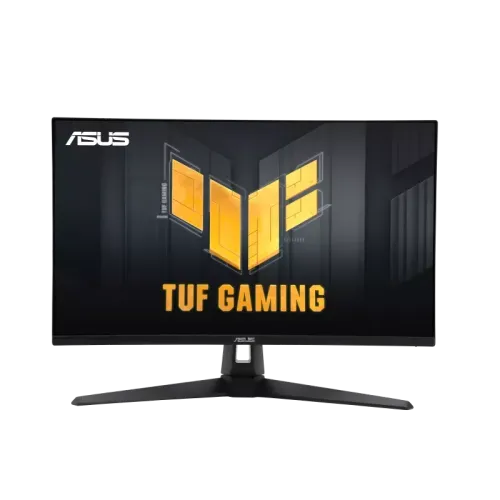
ASUS · TUF Gaming VG27UQ1A
27-inch 4K Fast IPS gaming monitor with 160Hz, HDMI 2.1, ELMB Sync, HDR10 and FreeSync Premium.
Price unavailable
Price range updating
No verified price is available yet. Store offers will appear when merchants publish them.
Compare store prices
No live offers for this variant
Offers will appear when merchants publish them.
Loading history…
Product story
The ASUS TUF Gaming VG27UQ1A is a 27-inch 3840 × 2160 4K Fast IPS monitor with a maximum 160Hz refresh rate. ASUS specifies HDR10, 1ms GTG, ELMB Sync, Adaptive-Sync, AMD FreeSync Premium, NVIDIA G-SYNC Compatible, DisplayPort 1.4 DSC, two HDMI 2.1 inputs and built-in 2W × 2 speakers. Use ASUS's VG27UQ1A specification and manual for model-specific setup. Performance depends on the source, port, cable, settings and content. Current Bangladesh price, stock, warranty and return conditions are seller-specific and should be confirmed before purchase.
Verify the complete model name VG27UQ1A on the chassis and invoice. ASUS's exact technical specification lists a 27-inch 4K panel and 160Hz maximum refresh. This differs from similar TUF VG27 models with QHD resolution or other refresh/stand specifications. Regional accessories and service terms vary; confirm the local package before purchase. Use ASUS's VG27UQ1A specification and manual for model-specific setup. Performance depends on the source, port, cable, settings and content. Current Bangladesh price, stock, warranty and return conditions are seller-specific and should be confirmed before purchase.
The 27-inch screen has a 16:9 aspect ratio and native 3840 × 2160 resolution. 4K offers detailed images and a large desktop canvas, but gaming at 160Hz in 4K requires a capable GPU and high-bandwidth signal path. Set the display to native resolution for clear output. Text scaling and viewing distance can help keep small interface elements comfortable. Use ASUS's VG27UQ1A specification and manual for model-specific setup. Performance depends on the source, port, cable, settings and content. Current Bangladesh price, stock, warranty and return conditions are seller-specific and should be confirmed before purchase.
ASUS lists a Fast IPS panel, anti-glare surface and 178-degree horizontal and vertical viewing angles. Typical contrast is 1000:1 and typical brightness is 300 cd/m². IPS viewing angles help retain image appearance off-axis, while room lighting and panel uniformity affect the perceived result. These specifications do not constitute an individual calibration report. Use ASUS's VG27UQ1A specification and manual for model-specific setup. Performance depends on the source, port, cable, settings and content. Current Bangladesh price, stock, warranty and return conditions are seller-specific and should be confirmed before purchase.
The maximum refresh is 160Hz. ASUS's signal frequency table lists 48–160Hz vertical through the available HDMI and DisplayPort paths. To use 4K at high refresh, the graphics card, cable, selected port, driver and game must all support the timing. Select 3840 × 2160 and 160Hz in system settings, then verify the monitor's information display. Use ASUS's VG27UQ1A specification and manual for model-specific setup. Performance depends on the source, port, cable, settings and content. Current Bangladesh price, stock, warranty and return conditions are seller-specific and should be confirmed before purchase.
ASUS lists 1ms GTG. ELMB Sync combines motion blur reduction and variable refresh support in compatible modes; feature availability depends on the OSD settings and selected refresh. Response-time settings can create artifacts on some content, so compare image quality at the available levels. A panel response figure is not total computer input latency. Use ASUS's VG27UQ1A specification and manual for model-specific setup. Performance depends on the source, port, cable, settings and content. Current Bangladesh price, stock, warranty and return conditions are seller-specific and should be confirmed before purchase.
The monitor supports HDR10 and multiple HDR modes. The technical specification lists 300 cd/m² typical brightness and 1000:1 typical contrast. This listing does not specify a DisplayHDR certification. HDR image quality depends on source content, mode, GPU output and room conditions; HDR10 support alone does not establish local dimming or premium HDR performance. Use ASUS's VG27UQ1A specification and manual for model-specific setup. Performance depends on the source, port, cable, settings and content. Current Bangladesh price, stock, warranty and return conditions are seller-specific and should be confirmed before purchase.
ASUS lists 95% DCI-P3 color space, 16.7 million colors and four color-temperature selections. GameVisual provides presets for different content. Gamut coverage is a reference for color range, not a factory calibration certificate. Color-critical work should use measured calibration and an output profile appropriate to the delivery format. Use ASUS's VG27UQ1A specification and manual for model-specific setup. Performance depends on the source, port, cable, settings and content. Current Bangladesh price, stock, warranty and return conditions are seller-specific and should be confirmed before purchase.
Adaptive-Sync is listed, with AMD FreeSync Premium and NVIDIA G-SYNC Compatible certification. Configure the display and GPU control panel, then confirm VRR operation at the selected resolution and refresh. Variable refresh can reduce tearing within the supported range but does not increase game frame output or guarantee stable performance. Use ASUS's VG27UQ1A specification and manual for model-specific setup. Performance depends on the source, port, cable, settings and content. Current Bangladesh price, stock, warranty and return conditions are seller-specific and should be confirmed before purchase.
Two built-in speakers rated at 2W each and an earphone jack are specified. Integrated audio is useful for basic desktop sound and calls without separate equipment. Speaker loudness and clarity depend on content and room acoustics; use headphones or external speakers when stronger audio is needed. Ensure the correct HDMI or DP audio device is selected in the operating system. Use ASUS's VG27UQ1A specification and manual for model-specific setup. Performance depends on the source, port, cable, settings and content. Current Bangladesh price, stock, warranty and return conditions are seller-specific and should be confirmed before purchase.
Inputs are one DisplayPort 1.4 with DSC and two HDMI 2.1 ports supporting FRL, plus an earphone jack. ASUS lists HDCP 2.3. Choose a certified cable and compatible source for the desired 4K refresh mode. Check the manual's port timing table because input capabilities can differ between PC and console configurations. Use ASUS's VG27UQ1A specification and manual for model-specific setup. Performance depends on the source, port, cable, settings and content. Current Bangladesh price, stock, warranty and return conditions are seller-specific and should be confirmed before purchase.
ASUS specifies tilt from -5° to +20° and no height adjustment. The stand does not list swivel or pivot in the official technical specification. Use a desk riser or compatible 100 × 100mm VESA arm if height adjustment is important. Keep the 27-inch display stable, and confirm bracket capacity and screw requirements before mounting. Use ASUS's VG27UQ1A specification and manual for model-specific setup. Performance depends on the source, port, cable, settings and content. Current Bangladesh price, stock, warranty and return conditions are seller-specific and should be confirmed before purchase.
For PC gaming, connect through DisplayPort 1.4 DSC or a compatible HDMI 2.1 output, select native 3840 × 2160 and up to 160Hz, then verify the active signal. Update graphics drivers and tune game quality to the frame rate the GPU can sustain. Enable VRR and ELMB Sync only in supported combinations and inspect the image for artifacts. Use ASUS's VG27UQ1A specification and manual for model-specific setup. Performance depends on the source, port, cable, settings and content. Current Bangladesh price, stock, warranty and return conditions are seller-specific and should be confirmed before purchase.
The two HDMI 2.1 inputs can connect compatible consoles, but console refresh modes are limited by each console and game. Many games use 60Hz or 120Hz rather than 160Hz. Confirm 4K, HDR and VRR compatibility for the exact console. The monitor's maximum PC refresh should not be represented as a console frame-rate guarantee. Use ASUS's VG27UQ1A specification and manual for model-specific setup. Performance depends on the source, port, cable, settings and content. Current Bangladesh price, stock, warranty and return conditions are seller-specific and should be confirmed before purchase.
ASUS lists 100–240V, 50/60Hz input, consumption below 32W, under 0.5W in power-saving mode and under 0.3W powered off. VESA mounting is 100 × 100mm. Listed dimensions are 61.48 × 45.5 × 21.38cm with stand and 61.48 × 36.65 × 5.7cm without; net weight is 4.8kg with stand. Use ASUS's VG27UQ1A specification and manual for model-specific setup. Performance depends on the source, port, cable, settings and content. Current Bangladesh price, stock, warranty and return conditions are seller-specific and should be confirmed before purchase.
Benefits include 4K detail, 160Hz refresh, Fast IPS, two HDMI 2.1 inputs, adaptive sync and built-in audio. Trade-offs include the GPU demand for 4K high refresh, 300-nit typical brightness, no height adjustment and HDR10 without a listed HDR certification. Consider these limits alongside the desired screen size, desk fit and game requirements. Use ASUS's VG27UQ1A specification and manual for model-specific setup. Performance depends on the source, port, cable, settings and content. Current Bangladesh price, stock, warranty and return conditions are seller-specific and should be confirmed before purchase.
The 4K canvas suits detailed gaming, high-resolution video and multi-window work. At 27 inches, scaling may be useful for smaller text. The anti-glare surface and low-blue-light options can support a range of lighting conditions, but no display feature prevents eye fatigue. Set comfortable brightness and take breaks during long sessions. Use ASUS's VG27UQ1A specification and manual for model-specific setup. Performance depends on the source, port, cable, settings and content. Current Bangladesh price, stock, warranty and return conditions are seller-specific and should be confirmed before purchase.
Inspect the display surface, stand tilt, speakers, ports, adapter, power cord and included DisplayPort cable on delivery. Keep the invoice, serial label and packaging until the return period ends. Clean with a soft microfiber cloth and avoid spraying liquid on the panel. Test 4K resolution, refresh modes, HDMI/DP, audio, HDR and adaptive sync with compatible devices. Use ASUS's VG27UQ1A specification and manual for model-specific setup. Performance depends on the source, port, cable, settings and content. Current Bangladesh price, stock, warranty and return conditions are seller-specific and should be confirmed before purchase.
Before purchasing in Bangladesh, confirm current price, inventory, exact VG27UQ1A code, regional accessory bundle, return/dead-pixel policy, delivery and serial-specific ASUS warranty provider and duration. The global product specification does not establish local coverage. Retain invoice and serial details and confirm service terms with the seller before ordering. Use ASUS's VG27UQ1A specification and manual for model-specific setup. Performance depends on the source, port, cable, settings and content. Current Bangladesh price, stock, warranty and return conditions are seller-specific and should be confirmed before purchase.
ASUS lists 27-inch 4K Fast IPS, 160Hz, HDR10, 1ms GTG, ELMB Sync, FreeSync Premium, G-SYNC Compatible, HDMI 2.1 ×2, DP 1.4 DSC and 2W × 2 speakers. The official spec says the stand tilts but has no height adjustment. Confirm source compatibility, local warranty and package with the seller. Use ASUS's VG27UQ1A specification and manual for model-specific setup. Performance depends on the source, port, cable, settings and content. Current Bangladesh price, stock, warranty and return conditions are seller-specific and should be confirmed before purchase.
Helpful answers
Product-specific answers maintained with the catalog information.
3840 × 2160 4K UHD on a 27-inch Fast IPS panel.
ASUS lists up to 160Hz.
Adaptive-Sync, AMD FreeSync Premium and NVIDIA G-SYNC Compatible.
Two HDMI 2.1 FRL, one DisplayPort 1.4 DSC and an earphone jack.
Yes, ASUS specifies two 2W speakers.
No. ASUS lists tilt adjustment but no height adjustment.
HDR10 and multiple HDR modes are listed; no VESA DisplayHDR certification is stated here.
Console refresh depends on the console and game; many use 60Hz or 120Hz.
Confirm serial-specific local ASUS coverage, provider and duration with the seller.
Customer community
Become a merchant
Join BiponiBD, publish accurate offers and start free.