Pros
- Wide 21:9 screen can increase immersion and desktop width.
- 200Hz refresh is useful with a compatible high-frame-rate PC.
- 1500R curve suits centered ultrawide viewing.
- FreeSync Premium and gaming motion features are listed by ASUS.

All categories
 New condition
Monitors
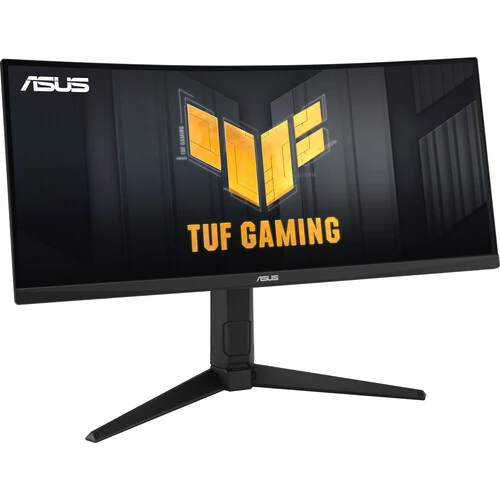
ASUS · TUF Gaming VG30VQL1A
29.5-inch WFHD 200Hz curved ultrawide monitor with a 1500R VA panel and FreeSync Premium.
Price unavailable
Price range updating
No verified price is available yet. Store offers will appear when merchants publish them.
Compare store prices
No live offers for this variant
Offers will appear when merchants publish them.
Loading history…
Product story
ASUS TUF Gaming VG30VQL1A is a curved ultrawide gaming monitor. ASUS lists a 29.5-inch 2560 × 1080 VA panel, 200Hz refresh, 1500R curvature and 1ms MPRT response. This description uses the exact VG30VQL1A code and treats local connectivity and warranty claims separately. Follow the ASUS VG30VQL1A specification page and user manual for precise technical and regional requirements. Price, stock, warranty, delivery and return rules are controlled by the seller and need separate confirmation.
Check the rear label and carton for the complete model code VG30VQL1A. Similar TUF monitor names can have different sizes, refresh rates and panel technology. ASUS regional spec pages and manuals are the reference for technical details. Confirm the delivered unit matches the invoice and this model. Follow the ASUS VG30VQL1A specification page and user manual for precise technical and regional requirements. Price, stock, warranty, delivery and return rules are controlled by the seller and need separate confirmation.
The screen measures 29.5 inches diagonally and uses a 21:9 ultrawide format. Its wide shape can make games and movies more immersive, while also taking more desk width than a standard 16:9 screen. Check viewing distance and desk clearance before installation. Follow the ASUS VG30VQL1A specification page and user manual for precise technical and regional requirements. Price, stock, warranty, delivery and return rules are controlled by the seller and need separate confirmation.
Native resolution is 2560 × 1080 WFHD. It offers horizontal workspace but fewer vertical pixels than QHD. Set the display to native resolution for sharp text. Game performance depends on the PC and chosen quality settings; the wide pixel area still requires adequate graphics performance. Follow the ASUS VG30VQL1A specification page and user manual for precise technical and regional requirements. Price, stock, warranty, delivery and return rules are controlled by the seller and need separate confirmation.
ASUS specifies a 200Hz maximum refresh. The manual’s timing table indicates 2560 × 1080 at 200Hz over DisplayPort, while HDMI timing limits should be checked in the manual. Use a suitable cable and verify the active refresh in system settings and the monitor OSD. Follow the ASUS VG30VQL1A specification page and user manual for precise technical and regional requirements. Price, stock, warranty, delivery and return rules are controlled by the seller and need separate confirmation.
The monitor uses a VA panel with strong native contrast typical of this panel class. ASUS publishes the model’s technical values on the official page. Black-level appearance, uniformity and motion transitions can vary by unit and setting. Do not infer measured performance solely from the VA label. Follow the ASUS VG30VQL1A specification page and user manual for precise technical and regional requirements. Price, stock, warranty, delivery and return rules are controlled by the seller and need separate confirmation.
ASUS lists a 1500R curve. The curved shape wraps the ultrawide field toward the user and can suit centered gaming. Some users prefer a flat display for line-based design tasks. Position the screen centrally at an appropriate distance and assess reflections and comfort in the intended room. Follow the ASUS VG30VQL1A specification page and user manual for precise technical and regional requirements. Price, stock, warranty, delivery and return rules are controlled by the seller and need separate confirmation.
The product supports HDR input and ASUS advertises HDR functionality. HDR format compatibility does not alone guarantee high peak brightness, local dimming or a particular certification. Verify the regional spec page for brightness and certification details. Compare actual SDR/HDR modes with intended content. Follow the ASUS VG30VQL1A specification page and user manual for precise technical and regional requirements. Price, stock, warranty, delivery and return rules are controlled by the seller and need separate confirmation.
ASUS lists 1ms MPRT, which differs from gray-to-gray response and total input lag. Extreme Low Motion Blur (ELMB) is a motion feature described for this product family; available combinations with variable refresh depend on settings. Test modes for clarity and artifacts rather than assuming every setting works simultaneously. Follow the ASUS VG30VQL1A specification page and user manual for precise technical and regional requirements. Price, stock, warranty, delivery and return rules are controlled by the seller and need separate confirmation.
ASUS product materials identify FreeSync Premium for this model. Variable refresh requires compatible source hardware, driver and supported range. Enable it at both display and GPU if appropriate. Confirm the actual connection and firmware support; branded VRR does not promise compatibility with every graphics source. Follow the ASUS VG30VQL1A specification page and user manual for precise technical and regional requirements. Price, stock, warranty, delivery and return rules are controlled by the seller and need separate confirmation.
The monitor has HDMI and DisplayPort inputs; the existing catalog lists two HDMI ports and one DisplayPort. Check ASUS manual port counts and the signal timing table for the supplied revision. Use DisplayPort for the published 200Hz mode when required. Do not assume every port supports maximum refresh. Follow the ASUS VG30VQL1A specification page and user manual for precise technical and regional requirements. Price, stock, warranty, delivery and return rules are controlled by the seller and need separate confirmation.
The catalog lists ergonomic adjustment details, but verify height, tilt and swivel range against the exact ASUS specification and unit. Place the screen with the center aligned to the seating position. Ensure the stand and desk can safely support the ultrawide monitor and allow cable clearance. Follow the ASUS VG30VQL1A specification page and user manual for precise technical and regional requirements. Price, stock, warranty, delivery and return rules are controlled by the seller and need separate confirmation.
For a PC, connect using the port and cable that support 2560 × 1080 at 200Hz. Select the resolution and refresh in the OS, then confirm the signal on-screen. Update graphics drivers and adjust settings to reach high frame rates. Enable Adaptive-Sync only with compatible settings. Follow the ASUS VG30VQL1A specification page and user manual for precise technical and regional requirements. Price, stock, warranty, delivery and return rules are controlled by the seller and need separate confirmation.
Console output depends on the console and game, and consoles often use 16:9 output rather than filling 21:9. Black bars or scaling may appear. Most consoles will not use 200Hz. Confirm supported resolution, HDR and VRR for the specific console before purchase. Follow the ASUS VG30VQL1A specification page and user manual for precise technical and regional requirements. Price, stock, warranty, delivery and return rules are controlled by the seller and need separate confirmation.
The ultrawide canvas can support racing and PC games, wide spreadsheets and side-by-side windows. Many videos are 16:9 and may show side bars or require cropping. For color-critical work, use the exact ASUS color specifications and calibrate the unit rather than relying on gaming presets. Follow the ASUS VG30VQL1A specification page and user manual for precise technical and regional requirements. Price, stock, warranty, delivery and return rules are controlled by the seller and need separate confirmation.
Advantages include a wide curved field, 200Hz refresh, VA contrast and FreeSync Premium. Trade-offs include WFHD vertical resolution, wide desk footprint and the need for compatible PC hardware to reach 200Hz. HDR performance depends on the actual panel capabilities and signal settings. Follow the ASUS VG30VQL1A specification page and user manual for precise technical and regional requirements. Price, stock, warranty, delivery and return rules are controlled by the seller and need separate confirmation.
Keep the monitor stable and avoid blocking vents. Clean the panel with microfiber and never spray cleaner directly onto it. Inspect the screen, ports, stand and accessories during the return period. Keep packaging, serial label and invoice. Support the screen when moving or adjusting the stand. Follow the ASUS VG30VQL1A specification page and user manual for precise technical and regional requirements. Price, stock, warranty, delivery and return rules are controlled by the seller and need separate confirmation.
Exact port timing, included cables, stand adjustments and regional software can vary. Use the manual for the actual VG30VQL1A unit. Claims from another model or retailer should not override the ASUS timing table. Confirm which connector reaches 200Hz and required cable specifications. Follow the ASUS VG30VQL1A specification page and user manual for precise technical and regional requirements. Price, stock, warranty, delivery and return rules are controlled by the seller and need separate confirmation.
Before buying in Bangladesh, confirm current offer, stock, delivery, return/dead-pixel terms and the serial-specific warranty provider and service location. The catalog warranty entry is not proof of local coverage. Ask the seller to confirm the unit’s exact model code and serial on the invoice. Follow the ASUS VG30VQL1A specification page and user manual for precise technical and regional requirements. Price, stock, warranty, delivery and return rules are controlled by the seller and need separate confirmation.
ASUS specifies a 29.5-inch WFHD curved monitor with 200Hz refresh and 1ms MPRT. The format is 2560 × 1080 at 21:9, with a 1500R curve. Confirm supported port timings in the manual and verify local warranty directly with the seller. Follow the ASUS VG30VQL1A specification page and user manual for precise technical and regional requirements. Price, stock, warranty, delivery and return rules are controlled by the seller and need separate confirmation.
Helpful answers
Product-specific answers maintained with the catalog information.
The ASUS VG30VQL1A native resolution is 2560 × 1080 WFHD.
ASUS lists the monitor as 29.5 inches with a 21:9 ultrawide format.
ASUS lists up to 200Hz; verify the input timing in the product manual.
Yes, ASUS specifies a 1500R curved panel for VG30VQL1A.
ASUS lists 1ms MPRT; this is not the same as total input lag.
ASUS lists FreeSync Premium; confirm source and settings compatibility.
Console support varies and many consoles output 16:9 rather than 21:9.
Refer to the model manual timing table; it lists 200Hz at 2560 × 1080 via DisplayPort.
Confirm serial-specific local coverage and service terms with the seller.
Customer community
Become a merchant
Join BiponiBD, publish accurate offers and start free.