Pros
- QHD resolution corrected from the erroneous Full HD value.
- Large VA panel with 3000:1 contrast and 170Hz DP mode.
- FreeSync Premium, ELMB and built-in 2W speakers.
- Two HDMI ports support multiple sources.

All categories
 New condition
Monitors
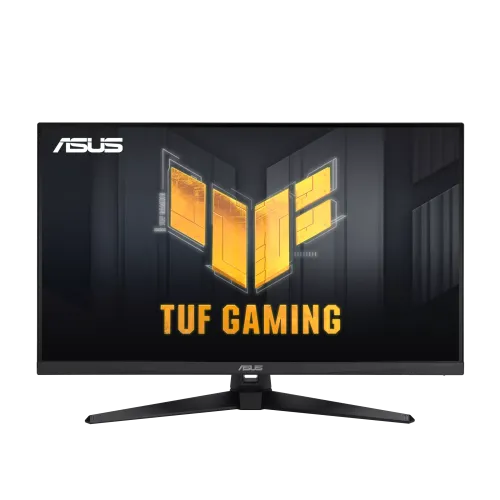
ASUS · TUF Gaming VG32AQA1A
31.5-inch QHD VA gaming monitor with 170Hz DisplayPort overclock, FreeSync Premium, 1ms MPRT and dual 2W speakers.
Price unavailable
Price range updating
No verified price is available yet. Store offers will appear when merchants publish them.
Compare store prices
No live offers for this variant
Offers will appear when merchants publish them.
Loading history…
Product story
The ASUS TUF Gaming VG32AQA1A is a 31.5-inch QHD VA gaming monitor with a native 2560 × 1440 resolution. ASUS lists up to 170Hz through DisplayPort overclocking, 1ms MPRT, Adaptive-Sync/FreeSync Premium, two 2W speakers and a 100 × 100mm VESA mount. The included stand supports tilt but not height adjustment. The existing catalog had a Full HD resolution value; that was incorrect for this model and has been corrected using ASUS specifications.
The monitor has a 31.5-inch viewable screen and native QHD resolution of 2560 × 1440 pixels in a 16:9 aspect ratio. This is not 1920 × 1080 Full HD. QHD provides more workspace and detail, although high-frame-rate gaming at native resolution requires a capable graphics card. ASUS lists an active display area of 697.344 × 392.256mm and 0.272mm pixel pitch. Set the source to native QHD for the intended sharpness.
ASUS specifies a VA LCD panel with a typical 3000:1 contrast ratio and 300cd/m² typical brightness. VA technology can create deeper native blacks than many IPS displays, which can benefit dark scenes. Viewing angles are listed at 178 degrees, though contrast and color can shift away from center. The anti-glare surface helps with reflections. These numbers are manufacturer specifications and do not replace independent calibration or uniformity testing.
The VG32AQA1A is a flat panel according to ASUS product specifications; do not confuse it with ASUS curved VA models such as other TUF lines. Sit centered at a comfortable distance from the large 31.5-inch screen. Desk depth, stand placement and viewing height affect comfort. The broad QHD panel can suit gaming and general use, while a user seeking an immersive curve should compare a different model rather than assume curvature from its size.
ASUS lists a maximum refresh of 170Hz, and product materials describe this as an overclocked DisplayPort mode above 144Hz. The monitor may default to a lower rate until the overclock is enabled in its OSD and selected in the source operating system. The GPU, cable and signal mode must support the setting. Verify the active resolution and refresh in the monitor information menu. Overclock availability is specific to DisplayPort and this model.
The monitor includes one DisplayPort 1.2 and two HDMI 2.0 inputs. HDMI supports QHD modes up to 144Hz according to ASUS signal specifications; DisplayPort provides the 170Hz overclock. Use DP for the highest PC refresh and HDMI for consoles or additional sources. A cable connector alone does not guarantee the maximum timing. Check the source output, cable quality, selected input and OSD settings when the desired refresh is absent.
ASUS specifies 1ms MPRT response and Extreme Low Motion Blur. MPRT is a motion-picture response measure and differs from GtG pixel response and input lag. Motion-blur reduction may change brightness and may not operate with every refresh or VRR setting. Try the mode in real content and disable it if flicker or artifacts are uncomfortable. The response label does not guarantee every pixel transition looks identical in all games.
ASUS lists Adaptive-Sync and AMD FreeSync Premium support. Variable refresh can align screen updates with changing GPU frame output to reduce tearing and judder in compatible modes. Support depends on graphics card, driver, cable, selected input and settings. Enable it in the monitor OSD and GPU control panel, then test in a game. The certification does not mean every console mode or third-party graphics configuration behaves identically.
ASUS describes HDR-10 support and multiple HDR modes. The technical specifications reviewed do not list VESA DisplayHDR 400 certification for this model. HDR playback needs compatible content, application, source and system settings. With typical 300-nit brightness, do not promise premium HDR impact or local-dimming behavior. Choose an HDR mode for compatible content and return to SDR when the source or application does not support HDR.
The monitor supports 16.7 million display colors and includes color-temperature selection and GameVisual picture modes. Presets can change gamma, saturation and white balance. ASUS does not provide the color gamut percentages in the specification excerpt reviewed, so do not invent a coverage value. For color-critical work, calibrate the display and verify the output. For gaming, choose the mode that preserves readable shadows and comfortable brightness.
ASUS lists two 2W speakers and an earphone jack. The integrated speakers provide basic audio for desktop use but are not a replacement for larger speakers or headphones. Audio over HDMI or DisplayPort depends on the source device and selected audio output. Check the computer or console sound settings and monitor volume. The headphone jack can support wired headphones or powered speakers.
The included stand supports tilt from approximately -5 to +20 degrees. ASUS does not list height adjustment, swivel or pivot for this model. A stable riser or compatible monitor arm can help if the screen height is unsuitable. Adjust chair and desk position so the large screen can be viewed without leaning or tilting the neck. Confirm the exact stand in the box before purchase; related ASUS monitors have different ergonomics.
The VG32AQA1A supports 100 × 100mm VESA mounting. Use an arm rated for the monitor’s weight and the proper screw length. ASUS lists a Kensington lock provision. Leave room for rear ports, power cable and ventilation. Support the chassis during installation and avoid pressing on the LCD. Keep the original stand hardware if the display may be returned or moved later.
The video interfaces are one DisplayPort 1.2 and two HDMI 2.0, with an earphone jack. There is no USB-C input listed. Select the right source in the OSD and connect a cable capable of the desired mode. For 170Hz, use DisplayPort and enable the overclock setting; HDMI QHD is listed up to 144Hz. Verify audio routing separately if the source uses HDMI or DP audio.
QHD at up to 170Hz can deliver detailed, responsive PC gaming when the graphics card renders enough frames. 31.5 inches provides a large image, while Adaptive-Sync can help with variable frame pacing. Demanding titles may need reduced graphics settings to approach the display’s maximum. Console modes depend on the console and game. A monitor refresh rate cannot increase the GPU’s frame output or eliminate every game-specific delay.
The two HDMI inputs support multiple connected devices. ASUS lists FreeSync Premium and HDR-10 features, but console modes depend on device generation and game support. HDMI QHD refresh is limited to 144Hz according to ASUS timing information. Set the console’s resolution, VRR, HDR and audio options and confirm the active signal on the monitor. Do not expect the 170Hz DisplayPort overclock mode to be available over HDMI.
The large QHD panel provides room for multiple windows, documents, spreadsheets and media. The included speakers can play basic audio without an external system. A 31.5-inch display may need more desk depth than a 24- or 27-inch screen; confirm the viewing distance and stand footprint. For long use, adjust brightness to room lighting and take breaks. For color work, calibrate settings and verify them on other displays.
ASUS specifies 100–240V, 50/60Hz input. Use the power cord supplied for the regional package and connect to a suitable outlet. Keep ventilation openings clear. Clean the panel with a soft microfiber cloth, avoid harsh cleaners and never spray liquid directly on the screen. Disconnect power before cleaning. Protect the screen from impact during movement and retain the packaging until inspection and return periods end.
The catalog currently says three years, but global ASUS specifications do not verify coverage for a particular Bangladesh serial. Ask the seller to confirm the warranty provider, period, service location, dead-pixel policy and invoice requirements. Match the serial on the monitor, box and invoice, and request written coverage terms. The current price, availability, shipping and included cables also need live-offer confirmation.
The VG32AQA1A suits buyers who want a large 31.5-inch QHD VA display with FreeSync Premium, built-in speakers and a high-refresh DisplayPort mode. It is not a Full HD monitor, and 170Hz requires DisplayPort overclocking. It is less suitable for users who need USB-C docking, height adjustment, a curved panel or verified DisplayHDR certification. Check desk space, GPU capability, local warranty and package contents before purchase.
Helpful answers
Product-specific answers maintained with the catalog information.
The ASUS VG32AQA1A is QHD 2560 × 1440; the prior catalog Full HD value was incorrect.
ASUS lists 170Hz overclock via DisplayPort; HDMI QHD is up to 144Hz.
ASUS specifies a VA LCD panel.
ASUS lists the VG32AQA1A as flat.
Yes, ASUS lists two 2W speakers and an earphone jack.
ASUS lists AMD FreeSync Premium and Adaptive-Sync.
ASUS lists tilt only; height adjustment, swivel and pivot are not specified.
ASUS lists HDR-10 and multiple HDR modes; the reviewed specs do not list DisplayHDR 400 certification.
Confirm serial-specific local warranty and service with the seller.
Customer community
Become a merchant
Join BiponiBD, publish accurate offers and start free.