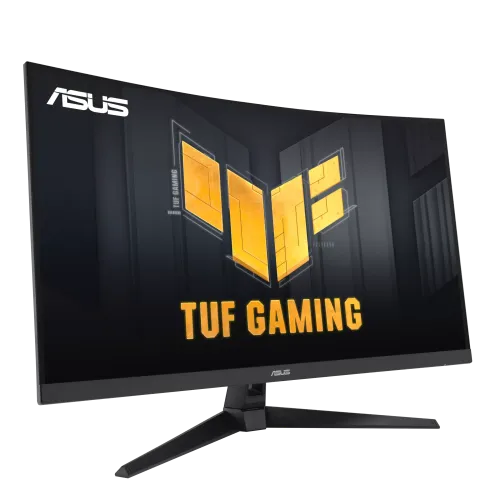
Verified model overview
The ASUS TUF Gaming VG32VQM5B is a 31.5-inch Full HD curved gaming monitor with a Fast VA panel. ASUS specifies 1920 × 1080 resolution, 1500R curvature, 3500:1 typical contrast, 300 cd/m² typical brightness and a maximum refresh rate of 250Hz. The 250Hz mode is an overclock. It supports 0.5ms minimum GtG, HDR10, Adaptive-Sync, AMD FreeSync Premium, ELMB Sync and two 2W speakers. Connections include two HDMI 2.0, DisplayPort 1.2 and an earphone jack. The stand tilts; VESA 100 × 100mm mounting is listed.
31.5-inch Full HD curved screen
The 31.5-inch panel has native 1920 × 1080 Full HD resolution and a 16:9 aspect ratio. ASUS lists a 698.4 × 392.85mm viewing area and 0.363mm pixel pitch. This large screen can make game elements and desktop controls easier to see, while Full HD at 31.5 inches is less dense than QHD or 4K. Set the monitor to its native resolution and tune game UI scaling and viewing distance for readable text. QHD-class detail should not be inferred from the screen size.
1500R curvature and viewing angles
The 1500R curve is designed to bring the left and right sides of the wide 31.5-inch screen toward the viewer. ASUS lists 178-degree horizontal and vertical viewing angles. Whether the curvature feels immersive depends on desk depth and viewing distance. Sit centered and leave room for the panel’s width and stand. The flat viewing angle specification does not mean perceived image is identical at every position; lighting, display settings and individual panel behavior can affect the result.
Fast VA contrast
ASUS specifies a Fast VA panel with 3500:1 typical contrast and a much higher maximum dynamic/HDR contrast figure. The typical ratio describes static panel contrast; a dynamic value is not a direct measurement of native black level. VA contrast can help dark scenes appear deeper, while motion response can vary by transition and overdrive mode. The display surface is anti-glare. Position it to reduce reflections and avoid treating a contrast marketing figure as guaranteed image quality in every room.
250Hz overclock refresh
ASUS lists maximum 250Hz and describes the mode as overclocked. The monitor may require enabling OC in the on-screen menu, and the graphics card, cable, input and driver must support the selected timing. A high refresh rate can make motion smoother when the computer supplies enough frames. If the OC mode causes instability or artifacts, return to a lower stable rate. Do not interpret the overclocked 250Hz label as a guarantee that every source or input operates at that mode by default.
0.5ms minimum GtG response
The specification lists 0.5ms GtG as a minimum response time. This is a best-case minimum rather than the time for every pixel transition; actual response depends on settings and transition. Trace Free and GameFast features can alter motion behavior. More aggressive overdrive may create inverse ghosting or overshoot. Compare the available settings in real gameplay and use the one with the clearest motion. Response time is not input lag and does not guarantee that game frames arrive faster.
Adaptive-Sync and FreeSync Premium
ASUS lists Adaptive-Sync and AMD FreeSync Premium. Variable refresh can synchronize supported monitor updates with GPU frame output, helping reduce tearing within compatible conditions. FreeSync Premium may require supported graphics hardware, drivers and refresh behavior. Enable the matching option in the monitor menu and graphics control panel. VRR cannot raise rendering performance. If flicker occurs, test a stable frame-rate range, a different refresh or cable, or compare with VRR disabled.
ELMB Sync and gaming tools
ASUS lists ELMB Sync, which combines motion blur reduction with variable refresh capability on supported settings. GamePlus, GameVisual, Shadow Boost, Trace Free and GameFast input features are also listed. These tools change display behavior and do not affect the game engine or online latency. Some modes may trade brightness or create artifacts. Configure one feature at a time and compare image quality in the games you play. DisplayWidget Center can control supported monitor settings from a computer.
HDR10 and typical brightness
The monitor supports HDR10 and has 300 cd/m² typical brightness. ASUS lists an HDR maximum contrast figure, but does not list a VESA DisplayHDR certification tier on the specifications page. HDR10 input support alone does not promise local dimming or a specific certified peak brightness. HDR appearance depends on content, system settings and selected mode. Compare familiar SDR and HDR material and use the setting that retains detail. A display with HDR10 is not automatically a bright-room HDR reference screen.
Color space and bit depth
ASUS lists 120% sRGB color space and 16.7 million display colors. Color-space saturation percentage is not the same as measured gamut coverage or factory accuracy. For games, select a picture mode that keeps colors natural. For design, photo or video work, calibrate the individual unit and use color-managed software; the published sRGB figure alone does not establish a Delta E tolerance. Four color-temperature modes are listed for adjusting the display to personal preference.
HDMI, DisplayPort and audio
The monitor includes two HDMI 2.0 ports, one DisplayPort 1.2 input and an earphone jack. Supported refresh can depend on input, source hardware and cable. The ASUS signal-frequency table lists vertical timings up to 250Hz for digital inputs; verify the selected mode for the exact graphics connection. Use a direct GPU connection when troubleshooting missing refresh options. The earphone jack can connect headphones or external audio gear and is not a microphone input.
Built-in speakers
ASUS lists two integrated 2W speakers. They can provide convenient audio for casual gaming, video and system sounds without separate desk speakers. A small monitor speaker pair may not provide the bass or loudness of a headset or dedicated system. Check the operating-system playback output and monitor volume if sound is missing. The earphone jack can connect headphones or powered speakers when preferred. Speaker output is 2W per channel according to the specification.
Tilt stand and VESA mount
The included stand supports tilt from about -5 to +23 degrees. ASUS lists VESA 100 × 100mm wall mounting and a Kensington lock. Height, swivel and pivot movement are not listed on the tech specification page for this model, so do not assume the full ergonomic stand range of other TUF displays. For an arm, check its load rating, screw compatibility and placement. Support the monitor during installation and leave enough cable slack through its tilt range.
Dimensions and desk fit
ASUS lists physical dimensions of approximately 71.0 × 50.7 × 21.4cm with stand and 71.0 × 42.6 × 8.7cm without stand. Net weight is about 6.8kg with stand and 5.8kg without. Measure desk width, depth and viewing distance for the 31.5-inch curved panel. Keep room for cable bends and ventilation. Regional dimensions and package contents can vary, so use the delivered unit’s label and documentation for a close-fit installation.
Power and consumption
ASUS lists 28.6W consumption, less than 0.5W in power-saving mode and less than 0.3W when off. Input is 100–240V at 50/60Hz. Power draw varies with brightness, refresh and picture mode. Use the supplied cable and power equipment, keep ventilation clear and connect to a properly grounded outlet. Disconnect power before moving or cleaning. Do not confuse the maximum power figure with typical energy usage.
Low-blue-light and flicker-free modes
The specification lists low-blue-light mode and flicker-free technology. These are display features, not medical treatment claims. Comfort depends on brightness, ambient light, viewing distance, text size and breaks. Lower blue-light modes can shift color, so use a neutral profile for color-sensitive work. The curved large panel may need careful placement to avoid light reflections. Adjust the tilt and viewing distance for posture and keep the image brightness comfortable for the room.
Strengths and trade-offs
The VG32VQM5B combines a large 1500R Fast VA screen, high typical contrast, 250Hz overclock, FreeSync Premium, ELMB Sync and built-in speakers. It remains a Full HD display at 31.5 inches, so fine-detail density is lower than QHD. The stand is listed with tilt only, and the 250Hz rate is an OC mode. HDR10 is supported without a VESA DisplayHDR tier listed. Buyers should check the PC’s ability to reach the desired frame rate and the exact regional input configuration.
Bangladesh warranty and seller terms
ASUS regional specification pages do not establish warranty coverage for a specific Bangladesh serial or current BiponiBD offer. Ask the seller to confirm local serial eligibility, warranty start, authorized service location and panel defect terms. The existing listing says three years; verify before purchase. Check that the exact model is VG32VQM5B rather than a similarly named VG32VQ or other TUF monitor. Price, stock, delivery, returns and payment conditions can change; confirm them at checkout and retain the invoice.
Setup and troubleshooting
Connect power and use HDMI 2.0 or DisplayPort 1.2. Set 1920 × 1080 and select a stable refresh mode; enable the 250Hz overclock only if desired and supported by source, cable and input. If the high mode is missing, check GPU output, driver and OSD settings. Enable Adaptive-Sync or FreeSync to reduce tearing, then compare ELMB Sync and response settings for artifacts. For audio, select the monitor playback device or connect headphones.
Who should consider this monitor
The ASUS TUF VG32VQM5B can suit a gamer who wants a large curved screen, high refresh and VA contrast for Full HD play. Check that the 31.5-inch Full HD pixel density suits your distance and that the PC can render high frame rates. The model has built-in speakers and VESA mounting, while its stand is tilt-only. Buyers seeking a height-adjustable stand, higher resolution, certified HDR or USB-C docking should compare those requirements. Confirm local warranty and full model code before purchase.
Specification summary
ASUS TUF VG32VQM5B: 31.5-inch Fast VA, 1500R, 1920 × 1080, 16:9, 250Hz maximum overclock, 0.5ms minimum GtG, 300 cd/m² typical, 3500:1 typical contrast, 120% sRGB, 16.7M colors, HDR10. Adaptive-Sync, AMD FreeSync Premium and ELMB Sync. Ports: 2 × HDMI 2.0, DP 1.2, earphone jack; speakers 2 × 2W. Stand tilt -5°/+23°; VESA 100 × 100mm; 6.8kg with stand.