Pros
- Choose detailed WQHD 200Hz or high-refresh HD 400Hz mode.
- 34-inch curved ultrawide format supports immersive compatible games.
- Fast VA, ELMB Sync and HDR400 features are listed by ASUS.
- Flexible mode choice can suit different game genres.

All categories
 New condition
Monitors
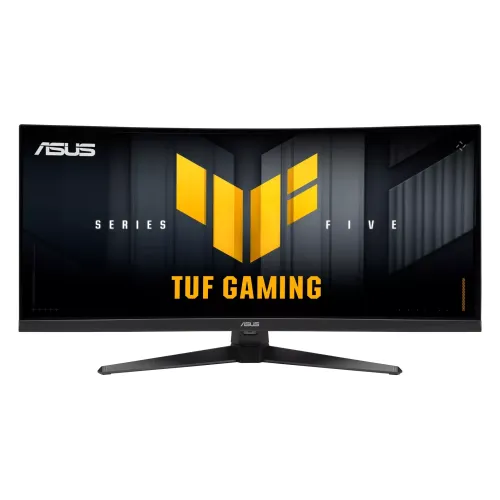
ASUS · TUF Gaming VG34WQ5A
34-inch curved Fast VA ultrawide with WQHD 200Hz or HD 400Hz dual modes, ELMB Sync and DisplayHDR 400.
Price unavailable
Price range updating
No verified price is available yet. Store offers will appear when merchants publish them.
Compare store prices
No live offers for this variant
Offers will appear when merchants publish them.
Loading history…
Product story
The TUF Gaming VG34WQ5A is a 34-inch curved Fast VA gaming monitor with an unusual dual-mode feature. ASUS lists WQHD 3440 × 1440 at 200Hz or HD at 400Hz, plus ELMB Sync and VESA DisplayHDR 400. Select the right mode for the game and confirm exact regional port timing. Check the ASUS VG34WQ5A product page and regional manual for exact input timing and setup steps. Product capabilities depend on source, cable, firmware and selected mode. Current price, stock, local warranty and return terms require confirmation from the Bangladesh seller.
This is VG34WQ5A, not VG34WQML5A or older VG34VQL models. Similar model codes have different refresh limits and features. Check the full code on the carton and rear label and compare with ASUS product information before relying on any spec. Check the ASUS VG34WQ5A product page and regional manual for exact input timing and setup steps. Product capabilities depend on source, cable, firmware and selected mode. Current price, stock, local warranty and return terms require confirmation from the Bangladesh seller.
The monitor is 34 inches and uses a curved ultrawide panel. Its 21:9 format provides a broad gaming view and desktop canvas. Check desk width and viewing distance. Some games and videos use 16:9 and may show side bars or use cropping. Check the ASUS VG34WQ5A product page and regional manual for exact input timing and setup steps. Product capabilities depend on source, cable, firmware and selected mode. Current price, stock, local warranty and return terms require confirmation from the Bangladesh seller.
In its WQHD mode the panel runs 3440 × 1440 at up to 200Hz. This gives a detailed wide image and is demanding for a GPU. The alternative HD mode trades resolution for a much higher listed refresh. These are distinct modes; do not imply WQHD and 400Hz operate together. Check the ASUS VG34WQ5A product page and regional manual for exact input timing and setup steps. Product capabilities depend on source, cable, firmware and selected mode. Current price, stock, local warranty and return terms require confirmation from the Bangladesh seller.
WQHD 200Hz mode suits detailed games, immersive single-player titles and general ultrawide use. Source, input, cable and GPU must support the timing. Select the mode in OSD/software if required and confirm the active resolution and refresh in system settings. Check the ASUS VG34WQ5A product page and regional manual for exact input timing and setup steps. Product capabilities depend on source, cable, firmware and selected mode. Current price, stock, local warranty and return terms require confirmation from the Bangladesh seller.
The HD 400Hz mode prioritizes motion refresh over resolution. ASUS describes it as HD; verify exact mode resolution in the regional manual before marketing more specific pixel dimensions. It can suit competitive games where frame rate matters more than detail, but needs compatible signal timing and a fast source. Check the ASUS VG34WQ5A product page and regional manual for exact input timing and setup steps. Product capabilities depend on source, cable, firmware and selected mode. Current price, stock, local warranty and return terms require confirmation from the Bangladesh seller.
ASUS identifies Fast VA panel technology and a curved design. VA typically emphasizes native contrast, while dark transitions and overdrive behavior vary by panel. The exact curvature, contrast and stand values should be confirmed from the regional technical specification. Sit centered to assess the curve. Check the ASUS VG34WQ5A product page and regional manual for exact input timing and setup steps. Product capabilities depend on source, cable, firmware and selected mode. Current price, stock, local warranty and return terms require confirmation from the Bangladesh seller.
VESA DisplayHDR 400 is listed. HDR performance depends on source content, mode and brightness; DisplayHDR 400 does not imply local dimming or OLED-like contrast. Confirm peak brightness and certification for the exact revision. Compare HDR and SDR output in the room where the display will be used. Check the ASUS VG34WQ5A product page and regional manual for exact input timing and setup steps. Product capabilities depend on source, cable, firmware and selected mode. Current price, stock, local warranty and return terms require confirmation from the Bangladesh seller.
ASUS lists ELMB Sync and a 0.5ms GTG response claim. Motion features depend on mode and settings; response time is not total input lag. Test overdrive and blur reduction for artifacts. Some motion-blur options may interact with VRR, so consult the manual for compatible combinations. Check the ASUS VG34WQ5A product page and regional manual for exact input timing and setup steps. Product capabilities depend on source, cable, firmware and selected mode. Current price, stock, local warranty and return terms require confirmation from the Bangladesh seller.
The product supports variable refresh and AMD FreeSync Premium per ASUS product materials. VRR needs compatible GPU/console, port, cable and driver settings. Confirm range for each dual-resolution mode. Do not assume VRR and 400Hz work together on every input. Check the ASUS VG34WQ5A product page and regional manual for exact input timing and setup steps. Product capabilities depend on source, cable, firmware and selected mode. Current price, stock, local warranty and return terms require confirmation from the Bangladesh seller.
The maximum signal timing can differ by connector and mode. Check the official VG34WQ5A manual for which input supports WQHD 200Hz and HD 400Hz, and cable requirements. Select the input and refresh explicitly; verify the OSD signal information after setup. Check the ASUS VG34WQ5A product page and regional manual for exact input timing and setup steps. Product capabilities depend on source, cable, firmware and selected mode. Current price, stock, local warranty and return terms require confirmation from the Bangladesh seller.
ASUS advertises Gaming AI and DisplayWidget Center for adjusting display features. Software availability and supported controls may vary by OS and region. Download utilities only from ASUS support for this exact model. On-screen gaming tools do not replace application-level settings or guarantee a gameplay advantage. Check the ASUS VG34WQ5A product page and regional manual for exact input timing and setup steps. Product capabilities depend on source, cable, firmware and selected mode. Current price, stock, local warranty and return terms require confirmation from the Bangladesh seller.
Confirm stand height, tilt and swivel adjustment with the exact regional specification. Place the curved screen at comfortable eye height and leave room for the wide base and cables. Verify VESA pattern, screw depth and monitor weight before installing an arm. Check the ASUS VG34WQ5A product page and regional manual for exact input timing and setup steps. Product capabilities depend on source, cable, firmware and selected mode. Current price, stock, local warranty and return terms require confirmation from the Bangladesh seller.
Connect a capable PC using a cable and input that support the chosen mode. Choose WQHD 200Hz for detail or HD 400Hz for the fast mode. Update graphics drivers and verify signal info. GPU performance determines game frame rate; the monitor’s maximum refresh does not create frames. Check the ASUS VG34WQ5A product page and regional manual for exact input timing and setup steps. Product capabilities depend on source, cable, firmware and selected mode. Current price, stock, local warranty and return terms require confirmation from the Bangladesh seller.
Console output and game support vary. Consoles may not use the HD 400Hz mode and might output 16:9 rather than fill 21:9. Confirm console resolution, refresh, HDR and VRR support for the selected input. The dual-mode headline primarily addresses compatible PC signals. Check the ASUS VG34WQ5A product page and regional manual for exact input timing and setup steps. Product capabilities depend on source, cable, firmware and selected mode. Current price, stock, local warranty and return terms require confirmation from the Bangladesh seller.
WQHD ultrawide can work well for wide timelines, multitasking and games that support 21:9. The HD 400Hz mode may suit fast competitive titles. Video content is often 16:9. Check app support and color specifications before using this gaming display for color-critical production. Check the ASUS VG34WQ5A product page and regional manual for exact input timing and setup steps. Product capabilities depend on source, cable, firmware and selected mode. Current price, stock, local warranty and return terms require confirmation from the Bangladesh seller.
Benefits include flexible choice between detailed 200Hz ultrawide and high-refresh HD mode, Fast VA, ELMB Sync and HDR400. Trade-offs include lower detail in HD mode, GPU demand at WQHD and the need to confirm port/mode compatibility. Consider which titles will benefit from each mode. Check the ASUS VG34WQ5A product page and regional manual for exact input timing and setup steps. Product capabilities depend on source, cable, firmware and selected mode. Current price, stock, local warranty and return terms require confirmation from the Bangladesh seller.
Unpack the monitor on a stable surface, inspect the curved panel, stand, ports and accessories, and keep the serial label and invoice. Clean with a soft microfiber cloth without spraying liquid on the screen. Keep vents clear and retain packaging through the return window. Check the ASUS VG34WQ5A product page and regional manual for exact input timing and setup steps. Product capabilities depend on source, cable, firmware and selected mode. Current price, stock, local warranty and return terms require confirmation from the Bangladesh seller.
For Bangladesh, confirm current stock, price, delivery, included cables, dead-pixel/return policy and serial-specific warranty provider and service location. The catalog warranty field does not prove local coverage. Get confirmation of the exact VG34WQ5A dual-mode version and serial in writing. Check the ASUS VG34WQ5A product page and regional manual for exact input timing and setup steps. Product capabilities depend on source, cable, firmware and selected mode. Current price, stock, local warranty and return terms require confirmation from the Bangladesh seller.
ASUS lists 34-inch WQHD 3440 × 1440 at 200Hz or HD at 400Hz, Fast VA, ELMB Sync, 0.5ms GTG and DisplayHDR 400. The modes trade resolution for refresh. Check the exact manual for input timing, regional details, stand and local warranty. Check the ASUS VG34WQ5A product page and regional manual for exact input timing and setup steps. Product capabilities depend on source, cable, firmware and selected mode. Current price, stock, local warranty and return terms require confirmation from the Bangladesh seller.
Helpful answers
Product-specific answers maintained with the catalog information.
ASUS lists WQHD 3440 × 1440 at 200Hz or HD at 400Hz.
No; the listed modes trade resolution for refresh: WQHD 200Hz or HD 400Hz.
ASUS identifies a Fast VA panel with a curved 34-inch format.
ASUS lists VESA DisplayHDR 400; exact regional certification should be checked.
It is an ASUS motion feature; consult the manual for supported modes and settings.
WQHD 200Hz favors detail; HD 400Hz favors very high refresh in compatible titles.
Console output varies and typically will not use this high-refresh PC mode.
ASUS lists adaptive sync/FreeSync Premium; verify mode and input support.
Confirm serial-specific provider, service location and coverage with the seller.
Customer community
Become a merchant
Join BiponiBD, publish accurate offers and start free.