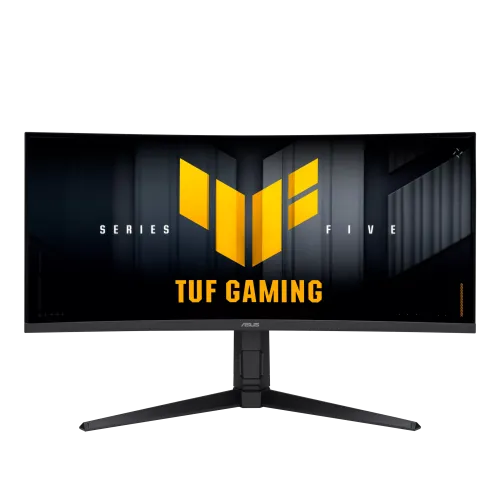
ASUS TUF VG34WQML5A overview
The ASUS TUF Gaming VG34WQML5A is a 34-inch 21:9 curved gaming monitor with 3440 × 1440 UWQHD resolution and a VA panel. ASUS specifies a 1500R curve, maximum 250Hz refresh rate (overclocked), 1ms GTG with 0.5ms minimum response, Adaptive-Sync, FreeSync Premium, ELMB Sync and VESA DisplayHDR 400. It also includes two DisplayPort inputs, two HDMI 2.1 inputs and a three-port USB hub. Confirm the exact model and regional manual, and check the connected source, cable, input and monitor settings together. The maximum mode depends on the full signal chain and configuration; actual stock, price, package and warranty must be confirmed with the local seller.
Exact model identity
Confirm the rear label and invoice specify TUF Gaming VG34WQML5A. ASUS has other 34-inch TUF displays with similar model codes and different refresh rates or ports. For this model, ASUS lists 250Hz as an overclocked maximum. Verify local suffix, package, firmware and supplied cables rather than relying on a shortened seller title. Confirm the exact model and regional manual, and check the connected source, cable, input and monitor settings together. The maximum mode depends on the full signal chain and configuration; actual stock, price, package and warranty must be confirmed with the local seller.
34-inch UWQHD ultrawide resolution
The panel measures 34 inches diagonally with a 21:9 aspect ratio and native 3440 × 1440 resolution. This UWQHD format offers a broad desktop workspace for compatible games, editing timelines and multiple windows. Set native resolution for crisp text. Some games may not support ultrawide output and can show side bars or a cropped image. Confirm the exact model and regional manual, and check the connected source, cable, input and monitor settings together. The maximum mode depends on the full signal chain and configuration; actual stock, price, package and warranty must be confirmed with the local seller.
Fast VA panel and contrast
ASUS specifies a VA panel with typical 4000:1 contrast and 178-degree horizontal and vertical viewing angles. VA technology can show deep dark scenes, while perceived color and contrast depend on viewing position, ambient lighting and the individual panel. The anti-glare finish helps manage reflections but does not replace good room placement. Confirm the exact model and regional manual, and check the connected source, cable, input and monitor settings together. The maximum mode depends on the full signal chain and configuration; actual stock, price, package and warranty must be confirmed with the local seller.
1500R curved display
The monitor uses a 1500R curvature across its wide panel. The curve can help keep the screen edges within a comfortable viewing arc at a suitable distance. Check desk depth and width before purchase, since the display is about 81cm wide with its stand. Curvature preference is personal; users who need perfectly flat lines may prefer a flat monitor. Confirm the exact model and regional manual, and check the connected source, cable, input and monitor settings together. The maximum mode depends on the full signal chain and configuration; actual stock, price, package and warranty must be confirmed with the local seller.
250Hz overclocked refresh and response
ASUS lists 250Hz maximum with overclocking and a 48–250Hz digital signal range. The standard mode and overclock controls can vary with input and settings. The response specification is 1ms GTG and 0.5ms minimum; minimum is not a guaranteed result across every pixel transition. Use a capable graphics output and set the desired refresh in the operating system. Confirm the exact model and regional manual, and check the connected source, cable, input and monitor settings together. The maximum mode depends on the full signal chain and configuration; actual stock, price, package and warranty must be confirmed with the local seller.
Adaptive sync and ELMB Sync
Adaptive-Sync and AMD FreeSync Premium support variable refresh when paired with a compatible graphics source. ASUS ELMB Sync is designed to combine motion blur reduction with variable refresh in supported configurations. Mode compatibility and image behavior depend on refresh, frame rate and OSD settings. Enable features deliberately and compare motion clarity with brightness and artifacts in mind. Confirm the exact model and regional manual, and check the connected source, cable, input and monitor settings together. The maximum mode depends on the full signal chain and configuration; actual stock, price, package and warranty must be confirmed with the local seller.
VESA DisplayHDR 400 and HDR10
ASUS lists VESA DisplayHDR 400 compliance and HDR10 support, with 400 cd/m² typical brightness and 400 cd/m² peak HDR brightness in its tech specifications. HDR results still depend on content, operating system, graphics output and display settings. DisplayHDR 400 is an entry HDR tier and does not imply local dimming or premium contrast control. Confirm the exact model and regional manual, and check the connected source, cable, input and monitor settings together. The maximum mode depends on the full signal chain and configuration; actual stock, price, package and warranty must be confirmed with the local seller.
Color coverage and bit depth
The specifications list 95% DCI-P3, 130% sRGB and 1.073 billion colors at 10-bit signal support. Gamut percentage does not certify calibration accuracy for an individual unit. For photo or video color work, use a calibrated, color-managed workflow and check the selected picture mode. HDR and gaming modes may change color and brightness behavior. Confirm the exact model and regional manual, and check the connected source, cable, input and monitor settings together. The maximum mode depends on the full signal chain and configuration; actual stock, price, package and warranty must be confirmed with the local seller.
DisplayPort and HDMI inputs
Two DisplayPort 1.4 inputs and two HDMI 2.1 FRL inputs are listed. Maximum refresh depends on the chosen source, output mode and connection. For 250Hz UWQHD, confirm the graphics card, cable and monitor OSD support that configuration. If the refresh option is missing, check the input, resolution, cable, GPU driver and overclock settings. Confirm the exact model and regional manual, and check the connected source, cable, input and monitor settings together. The maximum mode depends on the full signal chain and configuration; actual stock, price, package and warranty must be confirmed with the local seller.
USB hub and audio
The monitor has three USB 3.2 Gen 1 Type-A downstream ports and a 3.5mm earphone jack. The USB ports act as a hub and require the appropriate upstream connection to a computer for peripheral data. ASUS specifications list two 2W speakers. Use headphones or external audio for louder or fuller sound. Confirm the exact model and regional manual, and check the connected source, cable, input and monitor settings together. The maximum mode depends on the full signal chain and configuration; actual stock, price, package and warranty must be confirmed with the local seller.
Gaming features and ASUS tools
GameVisual, GamePlus, Shadow Boost, GameFast Input, Trace Free, Low Blue Light and DisplayWidget Center are among the ASUS software and display functions listed. ELMB Sync and AI-related options such as Dynamic Crosshair, Dynamic Shadow Boost and AI Visual may require specific modes. Consult the manual and use manufacturer software from ASUS support. Confirm the exact model and regional manual, and check the connected source, cable, input and monitor settings together. The maximum mode depends on the full signal chain and configuration; actual stock, price, package and warranty must be confirmed with the local seller.
Stand adjustment and VESA mounting
The stand supports tilt from -5 to +20 degrees, swivel from -10 to +10 degrees and height adjustment up to 130mm. A 100 × 100mm VESA mount and Kensington lock are listed, along with a 1/4-inch tripod socket. Ensure enough room for swivel and curve clearance; check arm load and mounting hardware before removing the stand. Confirm the exact model and regional manual, and check the connected source, cable, input and monitor settings together. The maximum mode depends on the full signal chain and configuration; actual stock, price, package and warranty must be confirmed with the local seller.
Dimensions and power
ASUS lists approximate dimensions of 807.8 × 540.6 × 250mm with stand and 807.8 × 363.9 × 111mm without. Approximate net weight is 8.1kg with stand and 5.8kg without. Power input is 100–240V, 50/60Hz; consumption is listed below 31W with low standby and off-mode values. Specifications may vary by region. Confirm the exact model and regional manual, and check the connected source, cable, input and monitor settings together. The maximum mode depends on the full signal chain and configuration; actual stock, price, package and warranty must be confirmed with the local seller.
PC setup and refresh rate
Connect a PC using DisplayPort or HDMI 2.1, then select 3440 × 1440 and the required refresh in the GPU control panel. 250Hz is an overclocked setting, so enable it in the monitor OSD if necessary and confirm signal stability. Use a high-quality compatible cable and keep graphics drivers current. Confirm the exact model and regional manual, and check the connected source, cable, input and monitor settings together. The maximum mode depends on the full signal chain and configuration; actual stock, price, package and warranty must be confirmed with the local seller.
Console compatibility
HDMI 2.1 can connect current game consoles, but a console will use only modes supported by its own output and the game. The display’s 250Hz maximum is a PC overclock feature and does not mean consoles output 250Hz. Check console signal information and game-specific resolution or frame-rate modes. Confirm the exact model and regional manual, and check the connected source, cable, input and monitor settings together. The maximum mode depends on the full signal chain and configuration; actual stock, price, package and warranty must be confirmed with the local seller.
Strengths and trade-offs
Advantages include UWQHD detail, 250Hz overclocked refresh, high VA contrast, adaptive sync, DisplayHDR 400, HDMI 2.1, USB hub and a broadly adjustable stand. Trade-offs include a large footprint, dependence on PC and cable capabilities for top refresh, HDR limits of the 400 tier, and possible game compatibility issues with ultrawide aspect ratio. Confirm the exact model and regional manual, and check the connected source, cable, input and monitor settings together. The maximum mode depends on the full signal chain and configuration; actual stock, price, package and warranty must be confirmed with the local seller.
Care and delivery inspection
Inspect the curved panel, stand, screws, power cable, USB connections and included accessories at delivery. Keep the serial label, invoice and packaging through the return period. Follow the ASUS manual when cleaning; use a soft cloth and avoid pressure on the curved panel. Record any transit damage before accepting the item. Confirm the exact model and regional manual, and check the connected source, cable, input and monitor settings together. The maximum mode depends on the full signal chain and configuration; actual stock, price, package and warranty must be confirmed with the local seller.
Bangladesh purchase checklist
Before buying in Bangladesh, ask the seller to confirm live stock, price, exact VG34WQML5A model and regional suffix, whether the offer is new or open-box, included cables, dead-pixel and return rules, delivery terms and serial-specific ASUS warranty provider and duration. The catalog warranty entry is not proof of local coverage; have the seller write the terms on the invoice. Confirm the exact model and regional manual, and check the connected source, cable, input and monitor settings together. The maximum mode depends on the full signal chain and configuration; actual stock, price, package and warranty must be confirmed with the local seller.
Frequently asked questions
ASUS TUF Gaming VG34WQML5A is a 34-inch 3440 × 1440, 1500R VA display with 250Hz overclocked refresh, HDMI 2.1, DisplayPort 1.4, FreeSync Premium and DisplayHDR 400. Check PC output, local package and serial-specific Bangladesh warranty before purchase. Confirm the exact model and regional manual, and check the connected source, cable, input and monitor settings together. The maximum mode depends on the full signal chain and configuration; actual stock, price, package and warranty must be confirmed with the local seller.