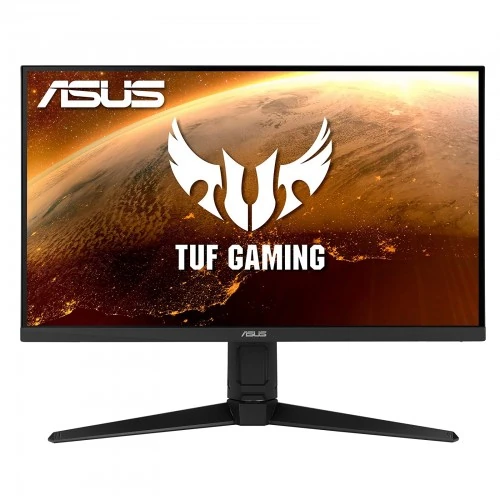
Exact model overview
The ASUS TUF Gaming VG279QL1A is a 27-inch Full HD IPS gaming monitor with 1920 × 1080 resolution and a 165Hz maximum refresh rate. ASUS exact-model specifications list 350 cd/m² typical brightness and 400 cd/m² HDR peak, 1000:1 typical contrast, 1ms MPRT, HDR10, VESA DisplayHDR 400, Adaptive-Sync, FreeSync Premium, G-SYNC Compatible operation and two 2W speakers. It includes two HDMI 2.0 ports, DisplayPort 1.2, a headphone jack and a height-adjustable stand. This is model VG279QL1A; do not substitute specifications for the similar VG279Q1A.
27-inch Full HD screen
The flat 27-inch display has a 16:9 aspect ratio and native resolution of 1920 × 1080. Full HD is widely supported by computers and consoles and can require less graphics power than QHD at the same size. At 27 inches, pixel density is lower than a 1440p display; text and fine detail may look less crisp from close range. Use native resolution for direct pixel mapping, adjust scaling for readability and choose a comfortable viewing distance.
IPS panel and viewing angles
ASUS specifies an IPS panel with 178° horizontal and vertical viewing angles, anti-glare surface, 0.311mm pixel pitch and 16.7 million colors. The wide viewing-angle figure describes the point where contrast remains above a defined threshold; it is not a guarantee of identical color or brightness from every seat. The typical contrast ratio is 1000:1. For color-sensitive design, calibrate the specific monitor and use color-managed software.
165Hz refresh and overclock note
ASUS lists 165Hz maximum refresh and the manual describes 1920 × 1080 at 165Hz as an overclocked mode. DisplayPort and HDMI signal ranges in the technical specifications support up to 165Hz at Full HD. Connect a compatible source, select native resolution and choose the available refresh in the operating system. If 165Hz is missing, check the input, graphics output, cable, driver and OSD overclock setting. The display cannot raise the frame rate produced by the computer.
Gaming performance and computer requirements
A 165Hz screen can display more frequent updates than a 60Hz panel when the PC or console supplies additional frames. Actual game frame rate depends on CPU, GPU, game engine, settings and thermal conditions. Full HD can be less demanding to render than QHD, which can help systems reach higher frame rates. For consoles, check the output modes supported by the exact console and the monitor input. Very demanding titles may run below 165 frames per second even when connected to a 165Hz monitor.
Response time and motion clarity
ASUS lists 1ms MPRT on the product specification; the VG279QL1A manual separately lists 2ms gray-to-gray and 1ms MPRT. These measures describe different behavior and are not input-lag figures. ASUS Extreme Low Motion Blur can reduce perceived persistence but may affect brightness and its combinations with adaptive sync depend on settings. Overdrive/Trace Free can also change transition behavior. Choose a mode that avoids distracting overshoot and test real content rather than assuming every pixel transition takes one millisecond.
Brightness and contrast
ASUS lists 350 cd/m² typical brightness and 400 cd/m² HDR peak, with 1000:1 typical contrast. Typical SDR output and HDR peak are different measurements and should not be interchanged. Set brightness to suit the room and avoid assuming the peak is sustained across the entire panel. The 1000:1 ratio is a static typical specification; it does not describe every image or guarantee deep blacks in a bright room.
HDR10 and DisplayHDR 400
The monitor supports HDR10 input and carries VESA DisplayHDR 400 certification according to ASUS. DisplayHDR 400 describes a baseline certification tier, not an OLED-like black level or high-zone local dimming. ASUS lists ELMB and HDR features separately, so picture behavior can depend on selected mode and content. Enable HDR in the source and operating system only when the content and connection support it. Compare familiar HDR and SDR content and use the mode that preserves highlight and shadow detail.
Color gamut and color modes
ASUS lists 125% sRGB and 95% DCI-P3 color-space figures for this model. These published gamut values are not a unit-specific calibration report and should not be read as exact coverage unless the measurement method says so. The monitor offers GameVisual presets and four color-temperature selections. Vivid gaming modes may increase saturation; a neutral or calibrated profile is preferable for photo, video or web color work. Calibrate the display if repeatable color decisions matter.
Adaptive-Sync, FreeSync Premium and G-SYNC Compatible
ASUS lists Adaptive-Sync, AMD FreeSync Premium and G-SYNC Compatible support. Variable refresh can synchronize display updates with compatible GPU output to reduce tearing in supported conditions. It does not create frames or eliminate all stutter and latency. Enable the feature in the graphics driver and monitor settings, then verify the selected input and timing. ELMB/Extreme Low Motion Blur and adaptive sync may have mode dependencies; consult the manual before enabling them together.
Inputs and source compatibility
The monitor includes two HDMI 2.0 inputs and one DisplayPort 1.2 input, plus a headphone jack. ASUS specifies a 48–165Hz vertical range through HDMI and DisplayPort. HDMI supports HDCP 2.2, and the monitor can receive sound from HDMI. Use a suitable direct cable from the graphics card to troubleshoot missing refresh modes. Docks and adapters can reduce available bandwidth. There is no USB-C input or USB hub listed for this model.
Built-in speakers and headphone output
ASUS specifies two integrated 2W speakers and a headphone output. The speakers are convenient for basic desktop sound, calls and notifications; a dedicated speaker system or headphones may provide fuller audio. HDMI audio can play through the monitor when it is selected as the computer’s output device. Connect headphones to the jack when needed and check volume/mute controls. The headphone jack is an audio output, not a microphone input.
Stand adjustments and posture
The supplied stand provides 0–120mm height adjustment, tilt from -5° to +23°, swivel from -15° to +15° and pivot from -90° to +90°. These adjustments can help align the display with desk and seating position, including portrait orientation for documents. Support the panel while adjusting, leave cable slack and avoid forcing the joints. Set the screen at a comfortable height and reduce glare by adjusting tilt and room lighting.
VESA mounting and security
ASUS lists a 100 × 100mm VESA wall-mount pattern and a Kensington lock provision. Before attaching an arm, verify its load rating, screw size and permitted screw depth against the manual. Secure the monitor while mounting and use suitable hardware. Route cables with enough slack for height, tilt, swivel and pivot movement. A Kensington slot can secure a compatible cable but is not a substitute for a stable desk or properly installed arm.
Dimensions, weight and desk fit
ASUS lists dimensions of approximately 614.1 × 533.7 × 213.8mm with the stand and 614.1 × 364.0 × 57.0mm without it. Estimated net weight is 6.2kg with stand and 3.9kg without; gross carton weight is about 9.5kg. Values can vary by region. Measure desk width, depth, height range and rear clearance before purchase. Leave room for the stand base, HDMI/DisplayPort connectors and cable bends, and check the carton dimensions if planning delivery through a tight staircase or shelf.
Power and energy use
The VG279QL1A uses a 19V, 3.42A power adapter. ASUS lists power consumption below 18W under its stated conditions and below 0.5W in power-saving and off modes. Actual use depends on brightness, HDR, refresh and connected sources. Use the supplied adapter and a suitable outlet; do not select a replacement based only on connector fit. Keep ventilation unobstructed and disconnect power before moving or cleaning the display.
Eye care and OSD tools
ASUS includes Flicker-free and Low Blue Light features, GamePlus overlays, GameVisual presets, Trace Free, ELMB and GameFast Input technology. These controls can change motion, color or visibility but do not improve the computer’s performance. Low Blue Light changes color temperature; GamePlus overlays can be disabled when unwanted. Adjust brightness for the room and take breaks during long sessions. Use a neutral picture mode when color fidelity matters, and consult the manual for supported combinations.
Advantages and practical trade-offs
The VG279QL1A combines 27-inch IPS, Full HD, 165Hz, Adaptive-Sync/FreeSync Premium, DisplayHDR 400, integrated 2W speakers and a fully adjustable stand. HDMI × 2 plus DisplayPort provide common PC and console connections. Trade-offs include lower pixel density than QHD at 27 inches, HDR 400 being an entry certification tier and the need for a capable PC to make use of 165Hz. Match the monitor to the games, desk and preferred resolution, and verify regional warranty terms.
Bangladesh warranty and seller terms
ASUS technical specifications document features but do not establish warranty for a Bangladesh serial sold through BiponiBD. The existing catalog says three years; confirm coverage with the seller and ASUS authorized service channel for the actual serial. Ask when coverage starts, which panel defects qualify, who provides service and what invoice or serial evidence is required. Price, stock, delivery, payment and return terms can change. Check the live BiponiBD offer at checkout and retain the invoice and packaging.
Setup and troubleshooting
Connect the supplied 19V adapter and a compatible HDMI 2.0 or DisplayPort 1.2 cable. Set 1920 × 1080 and choose up to 165Hz if the source exposes the mode. If the refresh is missing, verify the OSD overclock setting, cable, port, driver and GPU output. For tearing, enable FreeSync/Adaptive-Sync if supported. If ELMB makes the screen dim or the sync option unavailable, check the manual’s combination limits. For audio, select the monitor as playback device and adjust speaker/headphone volume.
Who should consider this monitor
The ASUS TUF VG279QL1A can suit a PC gamer who wants a 27-inch IPS screen, Full HD rendering and a 165Hz refresh ceiling with adaptive sync. Integrated speakers and a height-adjustable, pivoting stand can also support a general-purpose desk. It may not suit users who want QHD detail at 27 inches, USB-C laptop docking or high-end local-dimming HDR. Check that the GPU can render the games you play and confirm the local serial warranty before ordering.
Specification summary
ASUS TUF Gaming VG279QL1A: 27-inch IPS, 16:9, 1920 × 1080, 165Hz maximum (manual identifies 165Hz overclock), 350 cd/m² typical, 400 cd/m² HDR peak, 1000:1 contrast, 16.7M colors, 1ms MPRT / 2ms GtG, HDR10 and VESA DisplayHDR 400. Ports: HDMI 2.0 × 2, DP 1.2 × 1, headphone out; speakers 2W × 2. Stand: height 0–120mm, tilt, swivel and pivot. VESA 100 × 100mm. Confirm serial-specific Bangladesh warranty and current seller terms.