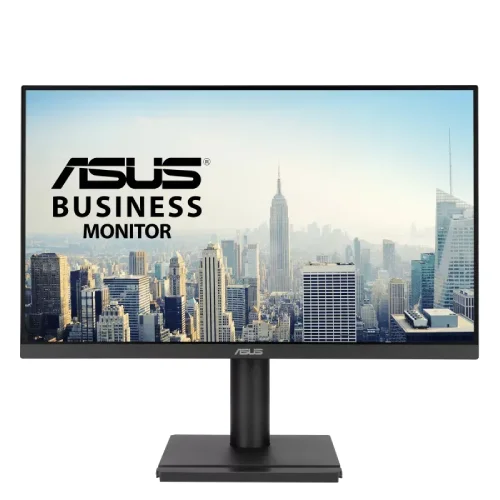
The ASUS VA279QGS is a 27-inch Full HD IPS business monitor with up to 120Hz, Adaptive-Sync, 350 cd/m² typical brightness, a four-axis ergonomic stand, four-port USB hub and two 2W speakers. ASUS lists 1ms MPRT, 99% sRGB, HDMI 1.4, DisplayPort 1.2 and VGA. The user manual supports 120Hz Full HD over HDMI and DP, and HDR is not listed. Review full USB, stand, power and regional warranty details below.
Designed for office work and clear viewing
The ASUS VA279QGS is a 27-inch 16:9 Full HD IPS monitor with a 1920 × 1080 native resolution. It combines a 120Hz maximum refresh rate with a stand designed for height and angle adjustment. For typical office tasks, the size provides a broad work area for documents, spreadsheets, browser tabs and video meetings. The IPS panel is rated for 178-degree horizontal and vertical viewing angles.
Full HD at 27 inches has larger pixels than QHD at the same size. That can be comfortable for users who prefer larger interface elements, but it provides less fine detail for small type and creative layouts. Think about your viewing distance, eyesight and the density of the work you do before choosing. Windows or application scaling can make text easier to read, but scaling cannot add pixels.
120Hz and Adaptive-Sync
ASUS specifies a maximum 120Hz refresh rate and Adaptive-Sync/VRR. A higher refresh rate can make pointer movement and scrolling appear smoother when the computer produces frames at an appropriate rate. Adaptive-Sync can coordinate refresh with compatible frame delivery to reduce tearing inside supported conditions. Driver, connection and display mode all affect availability.
The user manual lists 1920 × 1080 at 120Hz over HDMI and DisplayPort, with VGA supporting a lower analog range. Use a suitable cable and confirm the selected rate in the operating system. The label does not guarantee that every dock, adapter, laptop or legacy graphics card will output 120Hz. If a mode is unavailable, check the source output and cable first.
IPS, brightness and contrast
ASUS lists an IPS panel, 350 cd/m² typical brightness, 1500:1 typical contrast and 3000:1 maximum contrast. It also lists 99% sRGB and 16.7 million display colors. These manufacturer figures describe the model specification; they do not represent a calibration measurement of an individual retail unit or guarantee equal brightness at every point on the screen.
The anti-glare surface helps reduce reflections, but room lighting still matters. Set brightness for the room and avoid placing a bright window directly behind the viewer. Wide viewing-angle ratings help when the screen is shared, though brightness and color can still vary with angle. For color-critical design, use calibrated equipment and measurements rather than relying only on gamut coverage.
Understanding the 1ms MPRT claim
ASUS specifies 1ms MPRT. MPRT measures motion-picture response and is different from a GTG pixel transition. It is also not a measurement of input lag, which includes processing and source delay. The specification should not be read as a promise that every pixel transition finishes within one millisecond or that fast motion has no blur.
Motion clarity depends on refresh, content, selected settings and the panel response. If a blur-reduction feature is enabled, observe any change to brightness or flicker. Choose settings that look clear and comfortable rather than assuming the shortest advertised value is best for every use. This content does not claim an independent response-time test.
USB hub and workstation setup
The manual lists a USB 3.2 Gen 1 Type-B upstream connection and four downstream USB Type-A ports, each rated 5V/0.9A. Connect the upstream cable from the monitor to the computer to make the downstream hub available. This can keep a keyboard, mouse or other low-power peripherals near the display and reduce cable runs to the computer.
The USB hub is separate from the monitor’s video inputs and is not a USB-C docking station. It does not provide a listed USB-C video input or laptop charging. Confirm the Type-B cable is included for the local package and ensure the computer has an available USB port. Avoid treating the 0.9A per-port listing as a substitute for a high-power charging accessory.
HDMI, DisplayPort and VGA
ASUS lists DisplayPort 1.2, HDMI 1.4 and VGA. The manual identifies supported 120Hz Full HD timings for the digital inputs, while the VGA analog range tops out lower. A 3.5mm earphone output and sound input from HDMI/DisplayPort are also documented. This combination can support a modern computer and an older secondary source.
When selecting a cable, connect directly where possible and check the source’s output specification. Adapters, hubs and docks may restrict refresh rate, audio or variable-refresh support. VGA carries analog video and does not deliver digital audio. Choose the digital connection when available, and route sound through HDMI/DisplayPort or the computer’s audio output according to the setup.
Built-in audio and personal listening
The monitor includes two 2W speakers and an earphone output. Integrated speakers can handle calls, system alerts and casual video without adding desk equipment. Their small size limits bass and loudness, so they are not a substitute for dedicated speakers or a headset in a noisy space. The earphone jack provides a convenient option for private listening.
The manual notes that audio source and volume settings can be adjusted through the monitor and computer. If sound is missing, confirm the selected audio output device, input connection and OSD volume. HDMI and DisplayPort can carry digital sound; VGA cannot. Connecting an external headset may change which output is active depending on the computer configuration.
Ergonomic stand and VESA mounting
The stand supports 150mm of height adjustment, tilt from -5° to +35°, swivel +180°/-180° and pivot +90°/-90°. This range helps align the display with the viewer’s eye line, rotate to portrait and adapt the screen to shared desk positions. Change the angle while supporting the display and keep enough cable slack for swivel and pivot movement.
ASUS specifies a 100 × 100mm VESA wall-mount pattern and Kensington lock. Check the monitor-arm capacity and screw requirements before installation. Mounting hardware and safe stand-removal steps should follow the manual. Keep the panel supported and avoid pressure on the screen during setup. The USB cables and video leads should not be taut when moving the stand.
Eye Care+ and office comfort
ASUS lists Low Blue Light, Eye Care+, Flicker-Free, Eye-Q Check, rest-reminder tools and display software. The product guide also identifies TÜV Rheinland-certified Flicker-free and Low Blue Light. These are comfort and display functions, not medical treatments or guarantees that fatigue will not occur. Use readable text, sensible brightness, balanced room lighting and regular breaks.
QuickFit and DisplayWidget Center add software and overlay tools for selected workflows and settings. Availability can depend on compatible software and operating systems. The OSD remains useful for basic adjustments. Keep the screen at a comfortable distance and avoid strong reflections; if prolonged viewing remains uncomfortable, adjust the setup and seek appropriate professional advice.
Power, dimensions and included setup
The manual specifies 100–240V, 50/60Hz, maximum power-on consumption 16W, power-saving below 0.5W and off-mode below 0.3W. It notes the 16W measurement is at 200 nits without audio or USB/card-reader connection. Dimensions are 612 × 529 × 229mm with stand and 612 × 367 × 47mm without; net weight is 5.95kg and gross package weight 8.10kg.
The package may contain region-dependent cables and accessories; the local retailer lists HDMI cable, power cord, quick-start guide and USB Type-B to Type-A cable, varying by region. Check the box on delivery. Leave room for the broad stand footprint, power cord and USB connections. Use the supplied power cable and keep ventilation openings unobstructed.
Resolution and HDR expectations
The VA279QGS is an SDR Full HD display; ASUS does not list HDR support in its model specification. The 27-inch screen is suitable for common office content, while 99% sRGB and 350-nit typical brightness are useful reference specifications. No DisplayHDR certification is listed. If HDR playback is important, choose a model with a verified HDR specification and suitable brightness/contrast.
For detailed design, dense spreadsheets or small fonts, compare a QHD panel at 27 inches. For everyday office work, Full HD may suit users who prefer larger text and lower graphics load. The 120Hz refresh rate can smooth scrolling, but it does not change resolution or make a static image more detailed. Select the monitor based on the balance of readability, pixel density and motion.
Bangladesh price, stock and warranty
Ryans displayed the VA279QGS Out of Stock with no price; PC House listed ৳24,300 and In Stock during review. These seller snapshots can change and are not a BiponiBD price or availability promise. Check the exact SKU, final checkout price, delivery fee and current stock with the seller before payment.
Ryans advertises a three-year warranty and says the box is mandatory when claiming service. Confirm the local ASUS service provider, serial registration, invoice rules, panel/dead-pixel coverage and exclusions in writing. Warranty support can depend on the specific regional unit and sales channel, so verify the delivered serial rather than relying on a general page statement.
Model suffix and buying checklist
ASUS’s manual groups VA279QGS and VA279QGS-W and identifies black versus white color entries. Confirm the suffix and color on the product label, carton and invoice. Other similar names in ASUS’s VA279 family have different refresh rates, connectivity and panel features. Do not assume features from VA279HG, VA279QGS-W or another SKU transfer to this unit without checking the exact model.
Before ordering, verify that the computer supports 1920 × 1080 at 120Hz over the chosen HDMI or DisplayPort, connect the USB upstream cable if you want the four-port hub, and confirm the local warranty and required packaging. Review the stand movement, audio needs and image clarity in person where possible. No hands-on display measurement or guarantee of a particular retailer offer is claimed.
Key features
- 27-inch Full HD 1920 × 1080 IPS display with 16:9 aspect ratio, anti-glare surface and LED backlight.
- 120Hz maximum refresh and Adaptive-Sync for smoother compatible motion and variable frame delivery.
- ASUS specifies 1ms MPRT; this is not interchangeable with GTG transition time or total input lag.
- 350 cd/m² typical brightness, 1500:1 typical contrast and 3000:1 maximum contrast figures in ASUS specifications.
- 99% sRGB coverage, 16.7 million colors and 178° viewing angles.
- Inputs include DisplayPort 1.2, HDMI 1.4 and VGA; refresh capability depends on source and connection.
- Four USB 3.2 Gen 1 Type-A downstream ports are enabled through a USB Type-B upstream connection.
- Two built-in 2W speakers and an earphone jack support basic audio needs.
- Ergonomic stand supports 150mm height adjustment, tilt, swivel and portrait pivot.
- VESA 100 × 100mm mounting and Kensington lock support flexible office installations.
- Eye Care+ tools, Low Blue Light, Flicker-Free, Eye-Q Check/Rest Reminder, QuickFit and DisplayWidget Center.
- ASUS manual lists power-on maximum 16W and HDR is not listed as supported.
Pros
- The 150mm height range plus tilt, swivel and pivot gives broad ergonomic adjustment without immediately buying an arm.
- A 4-port USB hub can simplify connecting keyboard, mouse and other low-power peripherals when the upstream USB cable is connected.
- 120Hz, Adaptive-Sync and IPS viewing angles suit office work with smoother scrolling and occasional casual gaming.
- HDMI, DisplayPort and VGA cover a wide range of computers and legacy devices.
- Two speakers, an earphone jack and VESA mounting make it a flexible work monitor.
Cons and buying considerations
- At 27 inches, Full HD is less sharp than QHD for small text, detailed design and dense multiwindow workflows.
- The 1ms figure is MPRT, not a universal pixel response result; the monitor is an office display rather than a dedicated high-performance gaming model.
- USB-A ports require the separate USB Type-B upstream connection to the computer; the hub does not replace USB-C docking or video input.
- No HDR support is listed, and 2W speakers are intended for basic audio rather than rich sound.
- Retail stock, local warranty provider and serial eligibility need confirmation before ordering.
Full specifications
- Brand: ASUS
- Model: VA279QGS
- PanelSize: 27 inches
- Resolution: 1920 × 1080 (Full HD)
- AspectRatio: 16:9
- Panel: IPS, LED backlight
- RefreshRate: Up to 120Hz
- ResponseTime: 1ms MPRT
- AdaptiveSync: Adaptive-Sync; ASUS lists VRR
- Brightness: 350 cd/m² typical
- Contrast: 1500:1 typical; 3000:1 maximum
- ColorGamut: 99% sRGB
- DisplayArea: 597.89 × 336.31 mm
- PixelPitch: 0.311 mm
- Surface: Anti-glare
- DisplayColors: 16.7 million
- ViewingAngles: 178° horizontal / 178° vertical
- Ports: 1 × DisplayPort 1.2; 1 × HDMI 1.4; 1 × VGA
- USBHub: 1 × USB 3.2 Gen 1 Type-B upstream; 4 × USB 3.2 Gen 1 Type-A downstream, 5V/0.9A
- Audio: Earphone jack; sound input from HDMI/DisplayPort
- Speakers: 2 × 2W built-in
- Stand: Height 150 mm; tilt -5° to +35°; swivel +180°/-180°; pivot +90°/-90°
- VESA: 100 × 100 mm
- Security: Kensington lock
- Power: 100–240V, 50/60Hz, 1.5A; max on 16W; power saving <0.5W; off <0.3W
- Dimensions: 612 × 529 × 229 mm with stand; 612 × 367 × 47 mm without stand
- Weight: 5.95 kg net; 8.10 kg gross
- EyeCare: ASUS Eye Care+, Low Blue Light, Flicker-Free; Eye-Q/rest reminder tools
- OtherFeatures: Trace Free, SPLENDID, 4 color-temperature modes, GamePlus, QuickFit, Motion Sync, DisplayWidget Center, HDCP 1.4
- Certifications: TÜV Low Blue Light/Flicker-free, TCO Certified, EPEAT Gold, Energy Star and FSC MIX listed; exact regional configuration may vary
- LocalPriceObservation: Ryans and TechLand showed Out of Stock/price unavailable; PC House listed ৳24,300 In Stock at review time
- LocalWarrantyObservation: Ryans advertises 3 years and requires the box for a claim; verify local ASUS serial eligibility
Frequently asked questions
What are the resolution and refresh rate?
ASUS VA279QGS is a 27-inch Full HD 1920 × 1080 monitor with up to 120Hz refresh. Supported mode also depends on the source and connection.
Is the panel IPS?
Yes. ASUS identifies an IPS panel with 178° horizontal and vertical viewing angles.
What does 1ms MPRT mean?
ASUS lists 1ms MPRT. MPRT is a motion-picture response measure and differs from GTG pixel response and input lag; it does not guarantee every transition is blur-free.
Does it support Adaptive-Sync?
Yes. ASUS lists Adaptive-Sync/VRR. Compatibility depends on the source GPU, driver, selected port and refresh mode.
Which video ports are available?
The manual lists DisplayPort 1.2, HDMI 1.4 and VGA. It also documents 1920 × 1080 at 120Hz over HDMI and DisplayPort; analog VGA has a lower signal-frequency ceiling.
How does the USB hub connect?
Connect the monitor’s USB 3.2 Gen 1 Type-B upstream port to the computer. The monitor then provides four USB Type-A downstream ports, listed at 5V/0.9A.
Does it have built-in speakers?
Yes. ASUS lists two 2W speakers and an earphone output. They are suitable for basic audio, while external speakers/headphones provide stronger sound.
Can the stand rotate and adjust in height?
Yes. ASUS lists 150mm height adjustment, tilt from -5° to +35°, swivel +180°/-180° and pivot +90°/-90°.
Is it HDR capable?
ASUS specifications do not list HDR support for the VA279QGS. Treat it as an SDR display.
What eye-care features are included?
ASUS lists Low Blue Light, Eye Care+, Flicker-Free, Eye-Q Check/rest reminder tools and ASUS DisplayWidget features. These are display features, not medical treatment.
What is the Bangladesh price and warranty?
Ryans showed Out of Stock with price unavailable; PC House listed ৳24,300 In Stock during review. Ryans advertises three years and says the box is required for claims. Confirm current price, stock and ASUS serial eligibility.
Is this VA279QGS the same as VA279QGS-W?
ASUS manual lists both names and distinguishes black and white color entries. Confirm the suffix, color and local unit on the carton/invoice; the base model specifications are shared in the manual table.
Source note: ASUS model-specific specifications, manual and business guide provide technical details. Bangladesh seller price, stock and warranty are retailer observations and may change. Confirm local unit suffix, serial warranty and package contents. No BiponiBD offer, hands-on test or guaranteed inventory is claimed.