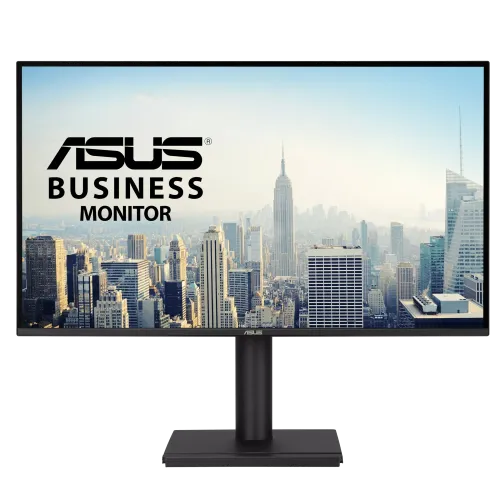
The ASUS VA27AQSE is a 27-inch QHD business monitor with a 2560 × 1440 IPS panel and 75Hz maximum refresh rate. ASUS lists 99% sRGB, 350 cd/m² typical brightness, HDR10, Adaptive-Sync, 1ms MPRT, stereo speakers and an adjustable ergonomic stand. Inputs include DisplayPort 1.2, HDMI 1.4 and VGA. It is intended for office productivity, general media and everyday use where a QHD workspace and flexible positioning are more important than very high gaming refresh rates.
QHD resolution and desktop workspace
The native 2560 × 1440 resolution places more pixels on the screen than Full HD, which can create extra room for documents, spreadsheets, browser tabs and multiple application windows. At 27 inches, QHD offers a useful balance between workspace and text size for many desk setups. Operating-system scaling and app behavior affect how much content fits. If your computer is connected through VGA, check its supported mode and image quality; digital DP or HDMI connections are generally more suitable for native QHD output.
IPS panel and anti-glare surface
ASUS specifies an IPS panel with 178-degree horizontal and vertical viewing angles and an anti-glare surface. These specifications help describe the display design but do not guarantee identical luminance or color across the whole screen. Desk lighting, reflections and viewing distance all influence comfort. The flat panel may suit office layouts and document work. Adjust the screen and chair to reduce reflections and keep the viewing position centered for consistent appearance.
Refresh rate and motion
The VA27AQSE supports up to 75Hz. ASUS lists a 48–75Hz vertical range for HDMI and DisplayPort and 48–75Hz for VGA. A 75Hz refresh rate can make ordinary desktop movement smoother than 60Hz when the source is configured correctly, but it is below esports-oriented gaming displays. Source output, connection, cable and operating-system settings must support the chosen mode. Verify the selected refresh rate after connecting a computer.
Response time and MPRT
ASUS lists 1ms MPRT. MPRT is a motion-picture response measure and should not be described as a universal 1ms gray-to-gray response or total input lag. Motion clarity depends on refresh, frame rate, response transitions and display settings. For office work, text rendering and stable brightness may matter more than the minimum response value. Use the monitor’s Trace Free settings only if the image looks comfortable and free from distracting artifacts.
Brightness, contrast and HDR10
Typical brightness is 350 cd/m². ASUS lists 1000:1 typical contrast and 3000:1 maximum contrast; typical and maximum figures should not be confused. HDR10 support allows HDR-format signaling, but it does not establish VESA DisplayHDR certification or a measured peak-brightness capability. For everyday business documents, SDR is often the relevant mode. If HDR work is important, confirm the application, operating system and content workflow and evaluate the display in person.
Color space and color modes
ASUS lists 99% sRGB and 16.7 million display colors. The product includes four color-temperature selections along with ASUS SPLENDID modes. Gamut coverage describes the range of colors the display can reproduce; it is not a substitute for measured accuracy, calibration or uniformity. For design or photo work, use a colorimeter when dependable color matching matters and keep the project color profile consistent. For office documents, choose a neutral preset that is comfortable under your room lighting.
Adaptive-Sync and variable refresh
ASUS lists Adaptive-Sync and Motion Sync, with the digital input frequency table showing a 48–75Hz vertical range. Variable refresh can help coordinate display refresh with compatible graphics output within that supported range. Actual behavior depends on the source, driver, cable and settings. ASUS does not name a specific FreeSync or G-Sync certification on the cited specification page. Confirm compatibility for the exact graphics device and port if this feature is important.
Inputs and device compatibility
The available inputs are one DisplayPort 1.2, one HDMI 1.4 and one VGA. DP and HDMI are digital connections; VGA is analog and can be useful with older computers. The monitor supports HDCP 1.4. Check the graphics output and adapter chain if you are connecting a laptop, dock or older workstation. The product does not list USB-C or a USB hub. Select the display as the active audio output when sending sound through HDMI or DisplayPort.
Speakers and headphone output
ASUS lists two built-in speakers rated at 2W each and an earphone jack. The speakers can provide basic sound for calls, notifications and video, while headphones or separate speakers may suit higher volume or fuller audio. Confirm the source sends audio through the chosen connection and select the display in the operating system’s sound settings. A VGA connection does not carry digital audio, so use a separate audio connection with an analog source.
Stand movement and VESA mounting
The stand adjusts from 0 to 150mm in height, tilts from -5° to +35°, swivels ±180° and pivots ±90° according to ASUS. These adjustments support landscape or portrait positioning and help align the screen to a workstation. The monitor also supports 100 × 100mm VESA mounting and includes a Kensington lock. Before installing an arm, confirm load rating, fastener length, cable slack and clearance around the panel.
Eye care and productivity utilities
ASUS lists TÜV Rheinland-certified Flicker-free and Low Blue Light technologies, Eye Care+, Trace Free, GamePlus, QuickFit, DisplayWidget Center and four color-temperature modes. These are tools and display options rather than guarantees against eye fatigue. Breaks, room lighting, text size and viewing distance remain important for long sessions. Use low-blue-light modes when they suit the task, and keep color settings appropriate for the type of work being viewed.
Dimensions and desk fit
ASUS gives estimated dimensions of 613.5 × 529.5 × 224mm with the stand and 613.5 × 358.5 × 46mm without the stand. Estimated net weight is 5.55kg with stand and 3.5kg without; gross packaged weight is approximately 7.9kg. Regional dimensions and accessories can vary. Measure desk depth and monitor-arm clearance before installation. Leave room for the broad stand and the full height, swivel and pivot movement.
Power and included accessories
ASUS lists 100–240V, 50/60Hz input, typical power under 17.7W, power-saving under 0.5W and off mode under 0.3W. Listed regional accessories include a warranty card, quick-start guide, power cord and HDMI cable; package contents vary by market. Check the carton and local seller details before purchase. Use a stable power outlet and route the cable so it is not pinched when adjusting the stand.
Bangladesh pricing and warranty
TechLand showed a ৳28,000 price and in-stock status during the checked listing snapshot. Kothaekom aggregated offers beginning at ৳25,800, while other sellers showed different prices and availability. These are time-sensitive retailer observations, not a BiponiBD offer. Retailers also describe warranty coverage differently, so request written details for the exact ASUS serial number, local service center, dead-pixel policy, claim documents and coverage duration. Keep the invoice and serial label for service.
Who may prefer the VA27AQSE
This model may suit office users who want QHD workspace, IPS viewing angles, an ergonomic stand, built-in speakers and mixed digital/analog connectivity. It may be less suitable for users seeking very high gaming refresh rates, USB-C docking, a USB hub or a professional HDR workflow. Consider whether your computer supports QHD at the desired refresh rate and whether the stand fits your desk. Match the purchase to daily applications instead of selecting from a single headline feature.
Setup and care
Use DisplayPort or HDMI for a digital QHD connection, select the native 2560 × 1440 resolution and confirm the operating system is set to the desired supported refresh rate. Position the monitor to avoid glare and adjust height and tilt before long work sessions. Use a soft dry cloth on the powered-off display and do not spray liquids directly onto the panel. For driver, OSD and warranty support, refer to ASUS documentation for VA27AQSE and retain the unit’s serial and purchase records.
Key features
- 27-inch 16:9 IPS display with QHD 2560 × 1440 native resolution.
- 75Hz maximum refresh rate across HDMI and DisplayPort; VGA supports up to 75Hz per ASUS frequency table.
- 99% sRGB color space, 350 cd/m² typical brightness and 1000:1 typical contrast.
- HDR10 input/display support and 1ms MPRT response specification.
- Adaptive-Sync and Motion Sync features; documented digital vertical range is 48–75Hz.
- One DisplayPort 1.2, one HDMI 1.4 and one VGA input.
- Built-in stereo speakers rated at 2W per channel plus an earphone jack.
- Height adjustment from 0 to 150mm, tilt, swivel and portrait pivot.
- 100 × 100mm VESA wall mount and Kensington security slot.
- ASUS GamePlus, QuickFit, SPLENDID, Trace Free and four color-temperature options.
- TÜV Rheinland-certified Flicker-free and Low Blue Light technologies.
- Estimated typical power below 17.7W; power-saving below 0.5W and off below 0.3W.
Pros
- QHD resolution at 27 inches provides more workspace and fine detail than Full HD at the same screen size.
- An adjustable stand supports height, tilt, swivel and portrait pivot for flexible office positioning.
- A broad selection of DP, HDMI and VGA inputs accommodates modern and older sources.
- Integrated speakers, earphone output and eye-care features suit basic shared-office use.
- ASUS lists Adaptive-Sync, HDR10 and 99% sRGB while maintaining a moderate 75Hz refresh profile.
Cons and limitations
- 75Hz is a business/productivity refresh rate, below high-refresh gaming displays.
- 1ms is MPRT and should not be mistaken for GtG response or total input latency.
- HDMI is version 1.4 and VGA is analog; confirm the exact input and resolution-refresh combination for each source.
- HDR10 support does not by itself establish high peak brightness or a certified HDR display tier.
- Bangladesh warranty descriptions vary between retailer pages and need seller/serial verification.
Frequently asked questions
What are the screen size and resolution?
The ASUS VA27AQSE has a 27-inch 16:9 IPS panel with native 2560 × 1440 QHD resolution.
What is the maximum refresh rate?
ASUS lists a maximum refresh rate of 75Hz. Its digital signal table lists 48–75Hz vertically for HDMI and DisplayPort, and 48–75Hz for VGA.
What does the 1ms response rating mean?
ASUS specifies 1ms MPRT. MPRT is a motion-picture response metric and is not the same as gray-to-gray pixel transition or complete system input latency.
Does it support HDR?
ASUS lists HDR10 support. This feature alone does not guarantee HDR certification, high peak brightness or strong HDR contrast; the typical brightness is 350 cd/m².
Does it support variable refresh rate?
ASUS lists Adaptive-Sync. The digital signal frequency table shows 48–75Hz vertical refresh. Compatibility depends on GPU, port, driver and configuration.
What ports are included?
The monitor has one DisplayPort 1.2, one HDMI 1.4, one VGA input and an earphone jack. Confirm output support on your computer or device.
Are there built-in speakers?
Yes. ASUS lists two 2W speakers and an earphone jack for headphones or external audio equipment.
How adjustable is the stand?
ASUS lists 0–150mm height adjustment, tilt from -5° to +35°, swivel of ±180° and pivot of ±90°.
Can it be mounted on a monitor arm?
Yes. ASUS lists 100 × 100mm VESA mounting. Check arm load rating, screw size, clearance and the display’s weight without stand.
How accurate is the color?
ASUS lists 99% sRGB coverage and 16.7 million display colors. These specifications do not independently prove calibration accuracy, panel uniformity or professional color validation.
What is the power consumption?
ASUS lists typical power below 17.7W, power-saving below 0.5W, off-mode below 0.3W and 100–240V, 50/60Hz input.
What is the Bangladesh price and warranty?
TechLand showed ৳28,000 in stock during its listing snapshot; other retailer offers differed. Warranty descriptions also vary. Confirm current price, serial eligibility, local service and coverage terms with the seller.
Source note: ASUS exact-model specifications and Bangladesh retailer pages were checked 2026-11-08T22:00:55.437Z. Local price and warranty are retailer observations and can change; no BiponiBD offer or serial-specific coverage is claimed. No independent hands-on test is claimed.