Pros
- 4K resolution provides detailed images and desktop workspace.
- VA panel lists 3000:1 contrast and broad viewing angles.
- Dual HDMI, DisplayPort and integrated speakers.
- Eye-care features include low blue light and flicker-free operation.

All categories
 New condition
Monitors
ASUS · VP327Q
31.5-inch 4K UHD VA monitor with 60Hz, HDR-10, Adaptive-Sync, dual HDMI, DisplayPort and built-in 2W speakers.
Price unavailable
Price range updating
No verified price is available yet. Store offers will appear when merchants publish them.
Compare store prices
No live offers for this variant
Offers will appear when merchants publish them.
Loading history…
Product story
The ASUS VP327Q is a 31.5-inch 4K UHD eye-care monitor with a VA panel, 3840 × 2160 resolution and 60Hz maximum refresh. ASUS lists 99% sRGB, 350cd/m² typical brightness, HDR-10 support, Adaptive-Sync, one DisplayPort 1.2, two HDMI 2.0 inputs and two 2W speakers. The monitor is intended for detailed desktop work and media rather than high-refresh gaming. Check the exact product code and local warranty before purchase.
The 31.5-inch screen displays 3840 × 2160 UHD pixels in a 16:9 aspect ratio. This provides four times the pixels of Full HD and supports detailed text, photos and 4K video. Applications may need scaling to keep text readable at a comfortable distance. ASUS lists a 697.31 × 392.23mm display area and 0.182mm pixel pitch. Select the native resolution in the computer settings for the sharpest output.
ASUS specifies a VA LCD panel with a typical 3000:1 contrast ratio and 178-degree horizontal and vertical viewing angles. VA technology can produce higher native contrast than many IPS panels, which may help dark scenes. Image appearance still varies with viewing angle, room light and panel settings. The anti-glare surface helps reduce reflections. These manufacturer ratings do not guarantee color uniformity or professional calibration on every individual monitor.
ASUS lists a maximum refresh rate of 60Hz for the VP327Q. This is suitable for general desktop use, 4K media and casual gaming but is not a high-refresh esports specification. The display and source must agree on a supported signal timing. Do not confuse this model with ASUS gaming monitors that advertise 144Hz, 165Hz or higher. At 4K, graphics hardware and source content determine smoothness and frame rate.
The official specification lists 4ms GtG response. This measurement describes pixel transitions under defined conditions and is different from input lag or refresh interval. Motion appearance also depends on content, panel response and overdrive settings. For fast competitive games, a high-refresh display may be more appropriate. For ordinary cursor movement, video and productivity, the 60Hz panel is designed for standard desktop use. Avoid interpreting 4ms as a guarantee that all motion appears blur-free.
ASUS lists Adaptive-Sync and Motion Sync support. Variable refresh can help synchronize display updates with compatible source frame output and reduce tearing in supported ranges. Operation depends on the GPU, driver, cable, port and source configuration. Enable the feature in the OSD and graphics settings, then verify behavior with compatible content. The feature does not increase the 60Hz maximum refresh rate or make unsupported devices output VRR.
ASUS lists HDR-10 support for compatible content. HDR playback requires an HDR-capable source, application, content and system output configuration. The technical specifications do not list VESA DisplayHDR certification or local dimming for this model. Typical brightness is 350cd/m², so do not promise high-end HDR performance based only on the HDR-10 label. Use HDR for suitable content and return to SDR when the source or workflow requires it.
ASUS specifies 99% sRGB color-space coverage and 16.7 million display colors. This can support general media, web content and everyday creative tasks. The percentage is a gamut specification, not proof of calibrated accuracy for a particular unit. For color-critical design or photo work, calibrate the monitor and verify output on the target device. Preset modes can change white balance, gamma and saturation, so choose the mode that suits the task.
The rear panel includes one DisplayPort 1.2 and two HDMI 2.0 inputs, supporting multiple computer or media sources. ASUS signal timing information lists up to 3840 × 2160 at 60Hz on both HDMI and DisplayPort. Use a cable rated for 4K at 60Hz and check the source output settings. The display does not list USB-C video or a USB hub. Select the intended input through the OSD when switching devices.
ASUS lists two integrated 2W speakers and an earphone jack. These speakers can provide basic sound for meetings, system alerts and video playback, though they are not equivalent to a dedicated audio system. HDMI or DisplayPort audio requires the source to route sound through the selected display. Use the headphone output for wired headphones or powered speakers. Check both the monitor volume and computer output if sound is missing.
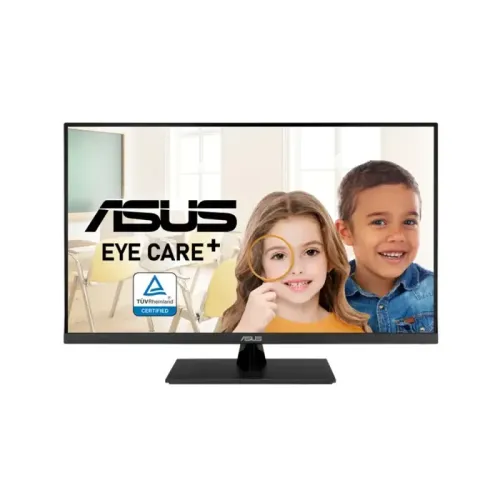
The VP327Q lists ASUS Eye Care+, low blue light and flicker-free features; ASUS also identifies TÜV Rheinland certifications for low blue light and flicker-free operation. These options can support comfortable viewing but do not replace suitable brightness, posture and breaks. Eye-care modes may change color temperature. For color-sensitive work, use a neutral calibrated mode; for longer reading sessions, adjust the screen to the room and personal preference.
ASUS lists tilt adjustment from about -5 to +8 degrees. Height adjustment, swivel and pivot are not listed for this model. Set the desk height or use a stable riser if the screen needs to be higher. The large 31.5-inch panel benefits from a comfortable viewing distance. Do not assume it has the ergonomic stand features of similarly named ASUS business or gaming monitors.
The monitor supports 100 × 100mm VESA mounting and has a Kensington lock slot. Check the mount’s load rating, screw length and clearance before installation. Support the frame while mounting and avoid applying pressure to the LCD. Keep the original stand hardware and allow space for the power cord and rear connectors. A correctly mounted screen should remain stable and unobstructed.
ASUS lists power consumption below 36W, power-saving mode below 0.5W and off mode below 0.3W, with 100–240V, 50/60Hz input. The power supply is internal. Approximate dimensions with stand are 714.6 × 485.8 × 201.8mm, with region-specific variation possible. Measure the desk and confirm the supplied power cord matches the local outlet before installing. Keep ventilation clear.
A computer with 4K output can use the display for detailed desktop work and compatible 4K media. Check whether the graphics output, cable and driver support 3840 × 2160 at 60Hz. HDMI and DP modes are listed at this timing by ASUS. Streaming quality also depends on the service, bandwidth and content. If text appears small, use operating-system scaling rather than lowering the display’s native resolution unnecessarily.
The dual HDMI inputs can connect a console and another HDMI source. The monitor supports 4K at up to 60Hz, but console HDR, VRR and game modes depend on the console generation and game. Configure the console to a supported resolution and refresh and check whether HDR10 is enabled. The 60Hz maximum is not a 120Hz console gaming specification. Use the monitor information menu to verify the active signal after connection.
The 4K panel can show detailed documents, spreadsheets, image previews and multiple application windows. Its 31.5-inch size provides workspace, while sRGB coverage supports general web and media content. The tilt-only stand may require desk adjustments for ergonomics. For print, photography or video color work, calibrate the actual monitor and validate color on target displays; the listed 99% sRGB alone does not establish full professional accuracy.
Clean the anti-glare display with a soft microfiber cloth and avoid harsh solvents or abrasive materials. Do not press on the LCD or spray fluid directly onto the panel. Disconnect power before cleaning the housing and keep connectors dry. When moving the monitor, support its frame and protect the large screen from impact. Retain packaging until the return period ends and record visible issues during delivery inspection.
The product record’s warranty wording and ASUS global coverage do not confirm a particular Bangladesh serial. Ask the seller to state the local warranty provider, coverage period, service location, dead-pixel policy and invoice requirements. Match the serial on the monitor and carton to the sales invoice. Confirm current price, stock, delivery terms and included cable/accessories with the live seller offer before payment.
The ASUS VP327Q suits buyers who need a large 31.5-inch 4K VA display for desktop productivity, media and casual gaming, with built-in speakers and eye-care features. Its maximum refresh is 60Hz, and the stand supports tilt only. It is less suitable for users who need high-refresh esports, USB-C docking or height adjustment. Verify source 4K/60Hz support, desk space, local warranty and included accessories before purchase.
Helpful answers
Product-specific answers maintained with the catalog information.
ASUS VP327Q is a 31.5-inch 4K UHD monitor with 3840 × 2160 resolution.
ASUS lists a maximum of 60Hz.
ASUS specifies a VA LCD panel.
ASUS lists HDR-10; the reviewed specifications do not list VESA DisplayHDR certification.
One DisplayPort 1.2 and two HDMI 2.0 ports are listed.
Yes, ASUS lists two 2W speakers and an earphone jack.
ASUS lists tilt adjustment; height adjustment is not listed.
Yes, ASUS lists Adaptive-Sync.
Confirm serial-specific local warranty and service terms with the seller.
Customer community
Become a merchant
Join BiponiBD, publish accurate offers and start free.