Pros
- Large 4K IPS panel for detailed office and media use.
- 100% sRGB and 10-bit signal support listed.
- Eye Care+ features and Adaptive-Sync support general comfort and casual gaming.
- Built-in speakers and VESA mounting add convenience.

All categories
 New condition
Monitors
ASUS · VP32UQ
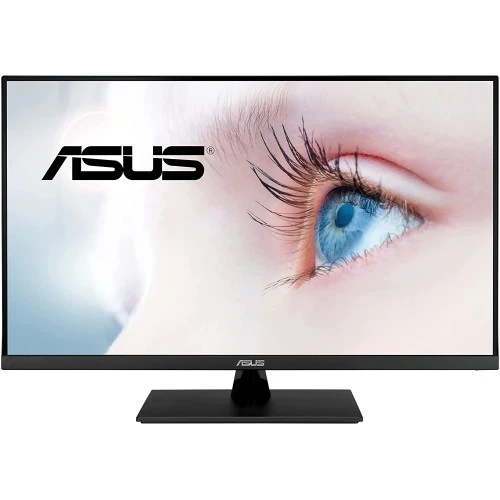
31.5-inch 4K UHD IPS monitor with HDR10, 100% sRGB, Adaptive-Sync and Eye Care+ features.
Price unavailable
Price range updating
No verified price is available yet. Store offers will appear when merchants publish them.
Compare store prices
No live offers for this variant
Offers will appear when merchants publish them.
Loading history…
Product story
ASUS VP32UQ is a 31.5-inch 16:9 4K UHD IPS monitor with HDR10 and Eye Care+ features. ASUS lists 3840 × 2160 resolution, 100% sRGB, 350 cd/m² typical brightness, 60Hz refresh, 4ms GTG response, Adaptive-Sync, two 2W speakers and HDMI 2.0 plus DisplayPort 1.2. It is a general-use eye-care monitor rather than a high-refresh gaming model. Refer to the official VP32UQ user guide and regional specifications for supported signal modes and setup. Results depend on source, cable and selected settings. Bangladesh price, availability, return terms, package and serial-specific warranty need seller confirmation.
Confirm that the label reads VP32UQ. ASUS has similar VP32 models with different panel type, refresh rate and ports. This version uses an IPS panel, 4K 60Hz output, one HDMI 2.0 and one DisplayPort 1.2. Check the serial, regional accessories and warranty for the actual local offer. Refer to the official VP32UQ user guide and regional specifications for supported signal modes and setup. Results depend on source, cable and selected settings. Bangladesh price, availability, return terms, package and serial-specific warranty need seller confirmation.
The 31.5-inch screen has native 3840 × 2160 UHD resolution and 16:9 aspect ratio, with 109 pixels per inch listed in product specifications. It provides fine detail for documents, images and 4K media. Interface scaling can improve readability at normal desk distance. Use native resolution for sharp output. Refer to the official VP32UQ user guide and regional specifications for supported signal modes and setup. Results depend on source, cable and selected settings. Bangladesh price, availability, return terms, package and serial-specific warranty need seller confirmation.
ASUS specifies an IPS panel with 178-degree horizontal and vertical viewing angles, 1000:1 typical contrast and anti-glare surface. IPS supports broad viewing angles, while perceived black level and uniformity depend on room lighting and the specific unit. The screen is flat; it is not a curved display. Refer to the official VP32UQ user guide and regional specifications for supported signal modes and setup. Results depend on source, cable and selected settings. Bangladesh price, availability, return terms, package and serial-specific warranty need seller confirmation.
The monitor lists 100% sRGB and 1.073 billion colors with 10-bit signal support. ASUS’s spec does not state factory calibration Delta E for this model, so do not assume ProArt-calibrated accuracy. Color-critical work should use a measured profile and color-managed software. Select color temperature and picture modes for the task. Refer to the official VP32UQ user guide and regional specifications for supported signal modes and setup. Results depend on source, cable and selected settings. Bangladesh price, availability, return terms, package and serial-specific warranty need seller confirmation.
HDR10 support is listed with 350 cd/m² typical brightness. HDR10 compatibility allows the monitor to receive compatible content but does not mean it has VESA DisplayHDR certification or local dimming. HDR impact depends on source, content and picture mode. Compare with SDR and set expectations for a standard-brightness display. Refer to the official VP32UQ user guide and regional specifications for supported signal modes and setup. Results depend on source, cable and selected settings. Bangladesh price, availability, return terms, package and serial-specific warranty need seller confirmation.
Maximum refresh is 60Hz and ASUS lists 4ms GTG response. This is appropriate for office work, media and casual gaming, but not fast competitive gaming. Select a supported mode in graphics settings. Motion clarity depends on frame rate, response behavior and the selected Trace Free setting. Refer to the official VP32UQ user guide and regional specifications for supported signal modes and setup. Results depend on source, cable and selected settings. Bangladesh price, availability, return terms, package and serial-specific warranty need seller confirmation.
Adaptive-Sync is listed to reduce tearing on compatible systems. Enable it in the monitor OSD and graphics driver where supported. The monitor remains capped at 60Hz, and frame rate is determined by the computer or console. Adaptive-Sync does not turn it into a high-refresh display. Refer to the official VP32UQ user guide and regional specifications for supported signal modes and setup. Results depend on source, cable and selected settings. Bangladesh price, availability, return terms, package and serial-specific warranty need seller confirmation.
The monitor includes one DisplayPort 1.2 input and one HDMI 2.0 input, plus a headphone jack. ASUS lists signal frequency up to 60Hz at 3840 × 2160 for these inputs. Use a compatible cable and confirm input selection. If the screen stays blank, check the source output and supported resolution. Refer to the official VP32UQ user guide and regional specifications for supported signal modes and setup. Results depend on source, cable and selected settings. Bangladesh price, availability, return terms, package and serial-specific warranty need seller confirmation.
Two built-in 2W speakers are listed, along with a headphone output. Speakers provide convenient basic audio for video and calls, while headphones or external speakers may produce clearer sound or more volume. Select the monitor as the audio output device when connected through HDMI or DisplayPort. Refer to the official VP32UQ user guide and regional specifications for supported signal modes and setup. Results depend on source, cable and selected settings. Bangladesh price, availability, return terms, package and serial-specific warranty need seller confirmation.
ASUS lists Low Blue Light, Eye Care+ technology, flicker-free operation, SPLENDID picture modes and QuickFit tools. These options can change brightness and color. Adjust brightness to ambient light and use regular breaks. Comfort features do not prevent all eye fatigue or replace healthy viewing habits. Refer to the official VP32UQ user guide and regional specifications for supported signal modes and setup. Results depend on source, cable and selected settings. Bangladesh price, availability, return terms, package and serial-specific warranty need seller confirmation.
The stand supports tilt from -5 to +8 degrees. Height adjustment is not listed. A 100 × 100mm VESA mounting pattern and Kensington lock are provided. If using an arm, check load rating and mounting screws; an external mount may be needed for height or swivel adjustment. Refer to the official VP32UQ user guide and regional specifications for supported signal modes and setup. Results depend on source, cable and selected settings. Bangladesh price, availability, return terms, package and serial-specific warranty need seller confirmation.
ASUS lists typical power below 32W, power-saving below 0.5W and off-mode below 0.3W, with 100–240V at 50/60Hz. Approximate dimensions are 714.6 × 485.7 × 201.8mm with stand and 714.6 × 423.7 × 50.4mm without stand; net weight is about 7.82kg. Regional figures may vary. Refer to the official VP32UQ user guide and regional specifications for supported signal modes and setup. Results depend on source, cable and selected settings. Bangladesh price, availability, return terms, package and serial-specific warranty need seller confirmation.
Connect a PC or console over HDMI 2.0 or DisplayPort 1.2, select 3840 × 2160 and 60Hz, then choose a picture preset. Adaptive-Sync requires compatible source support. Console output is limited by console and game settings; the monitor does not support 120Hz at 4K. Refer to the official VP32UQ user guide and regional specifications for supported signal modes and setup. Results depend on source, cable and selected settings. Bangladesh price, availability, return terms, package and serial-specific warranty need seller confirmation.
The large 4K panel and 100% sRGB can suit general desktop work, 4K media and casual photo editing. It has no USB-C input, limited ergonomic adjustment and 60Hz refresh. For color-critical production, validate calibration; for fast gaming, choose a higher-refresh monitor. Refer to the official VP32UQ user guide and regional specifications for supported signal modes and setup. Results depend on source, cable and selected settings. Bangladesh price, availability, return terms, package and serial-specific warranty need seller confirmation.
Benefits include 31.5-inch 4K IPS detail, 100% sRGB, HDR10 input, Adaptive-Sync, Eye Care+ tools, built-in speakers and VESA mounting. Trade-offs include 60Hz refresh, no height adjustment on the stand, only one HDMI and one DisplayPort input, and HDR10 without a VESA DisplayHDR tier. Refer to the official VP32UQ user guide and regional specifications for supported signal modes and setup. Results depend on source, cable and selected settings. Bangladesh price, availability, return terms, package and serial-specific warranty need seller confirmation.
The OSD offers color temperature modes, SPLENDID picture presets, Trace Free response adjustment and Eye Care features. QuickFit can help preview document or print layouts. These settings may change image appearance. Use a consistent profile for color work and reset settings when the display looks unexpectedly tinted. Refer to the official VP32UQ user guide and regional specifications for supported signal modes and setup. Results depend on source, cable and selected settings. Bangladesh price, availability, return terms, package and serial-specific warranty need seller confirmation.
Inspect the panel for cracks, pressure marks and defects under the seller’s return policy. Check stand, power cord, HDMI cable, serial label and invoice. Keep packaging through the return period. Clean the anti-glare surface with a soft cloth and avoid applying pressure or spraying liquid directly on the monitor. Refer to the official VP32UQ user guide and regional specifications for supported signal modes and setup. Results depend on source, cable and selected settings. Bangladesh price, availability, return terms, package and serial-specific warranty need seller confirmation.
Before buying in Bangladesh, confirm current price and stock, exact VP32UQ model code, new/open-box status, included HDMI/power cable, dead-pixel and return terms, delivery and serial-specific ASUS warranty provider and duration. Regional ASUS pages do not prove Bangladesh coverage; request local warranty in writing on the invoice. Refer to the official VP32UQ user guide and regional specifications for supported signal modes and setup. Results depend on source, cable and selected settings. Bangladesh price, availability, return terms, package and serial-specific warranty need seller confirmation.
ASUS VP32UQ is a 31.5-inch 4K UHD IPS monitor with 100% sRGB, HDR10, Adaptive-Sync and 2×2W speakers. It runs at 60Hz and offers tilt only on its stand. Confirm the exact VP32UQ model, included cable and serial-specific Bangladesh warranty before purchase. Refer to the official VP32UQ user guide and regional specifications for supported signal modes and setup. Results depend on source, cable and selected settings. Bangladesh price, availability, return terms, package and serial-specific warranty need seller confirmation.
Helpful answers
Product-specific answers maintained with the catalog information.
VP32UQ uses 3840 × 2160 4K UHD resolution at 31.5 inches.
ASUS lists a maximum refresh rate of 60Hz.
It supports HDR10, with 350 cd/m² typical brightness listed.
Yes, ASUS lists Adaptive-Sync for compatible sources.
ASUS lists 100% sRGB and 1.07 billion display colors.
Yes, two 2W speakers and a headphone jack are listed.
No height adjustment is listed; tilt adjustment is specified.
ASUS specifies a 100 × 100mm VESA pattern.
Confirm the serial-specific local ASUS provider, warranty term and service with seller in writing.
Customer community
Become a merchant
Join BiponiBD, publish accurate offers and start free.