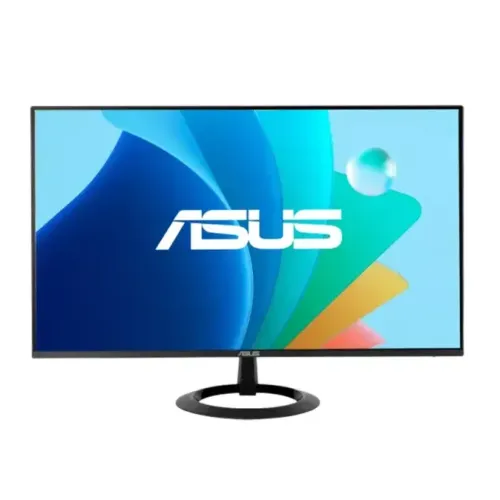
ASUS VZ279HG 27-inch Full HD IPS monitor
The ASUS VZ279HG is a 27-inch Full HD IPS monitor with a maximum refresh rate of 120Hz over HDMI. ASUS specifies 1920 × 1080 resolution, 250 cd/m² typical brightness, 1500:1 typical contrast, 99% sRGB colour space and 1ms MPRT. Connectivity includes HDMI 1.4, VGA and an earphone jack. The monitor has Adaptive-Sync, a tilt stand and a 75 × 75mm VESA mount. ASUS lists no built-in speakers and no height adjustment. These details come from the official ASUS technical specification page; current Bangladesh stock and seller pricing need live confirmation.
27-inch IPS panel and Full HD resolution
The display uses a 27-inch IPS panel with 1920 × 1080 pixels in a 16:9 aspect ratio. ASUS lists an active viewing area of 597.88 × 336.312mm and 0.311mm pixel pitch. The anti-glare surface helps reduce reflections in ordinary indoor lighting, though strong direct light can still affect visibility. The IPS panel is specified for 178-degree horizontal and vertical viewing angles.
Full HD is a lower pixel density at 27 inches than at 24 inches or than QHD at the same size. It can make interface elements and text appear physically larger, but small text, detailed images and dense spreadsheets will not be as sharp as on a higher-resolution screen. Consider the kind of work you do and your viewing distance before choosing. ASUS's listed 99% sRGB coverage describes gamut, not the calibration accuracy of the individual unit.
120Hz over HDMI and VGA refresh limits
ASUS lists a maximum refresh rate of 120Hz and a digital signal frequency over HDMI of 30–138kHz horizontal and 48–120Hz vertical. The analog VGA vertical range is 56–75Hz, so VGA is not the route for 120Hz. Use HDMI from a compatible graphics output, set the display to 1920 × 1080 and select 120Hz in the operating system or graphics settings.
If 120Hz is not available, check that the monitor is on the HDMI input, the source device and cable support the mode, the graphics driver is current and no dock or adapter is limiting the signal. The monitor cannot create additional game frames; smoothness depends on the computer's frame rate and the content. A higher refresh may make pointer movement, scrolling and supported games look smoother than 60Hz.
1ms MPRT and Adaptive-Sync
ASUS specifies 1ms MPRT. This is not the same as a 1ms grey-to-grey response guarantee. MPRT and GtG use different measurement methods, and perceived motion depends on the panel transition, refresh rate, frame rate, overdrive behaviour and selected mode. Do not compare an MPRT figure directly with GtG values from other displays.
The VZ279HG includes ASUS-listed Adaptive-Sync variable refresh technology. A compatible source can coordinate frame delivery and display refresh to help reduce tearing within a supported range. Actual operation depends on the graphics card, driver, HDMI connection, settings and game. ASUS's reviewed spec identifies Adaptive-Sync but does not establish formal G-Sync certification, so check compatibility with the exact GPU instead of assuming certification.
Brightness, contrast and colour
ASUS lists 250 cd/m² typical brightness, a 1500:1 typical contrast ratio and 99% sRGB colour space. Typical brightness and contrast values describe specified test conditions; actual results can vary between units and settings. A 250-nit display can work in a normal room, while bright ambient light or sunlight may require repositioning the screen or choosing a brighter monitor.
ASUS lists 16.7 million display colours and four colour-temperature selections. Gamut coverage indicates the range of colours the panel can show; it does not establish colour accuracy, factory calibration, white-point consistency or panel uniformity. The official technical page reviewed does not give a ΔE calibration target. For colour-critical photo, video or design work, request a calibration report or use a suitable colorimeter.
Eye-care, gaming and productivity controls
ASUS lists Flicker-free, Low Blue Light and Eye Care+ technologies, along with SPLENDID display modes, Trace Free response adjustment, Motion Sync, GamePlus and QuickFit. These features provide choices for display tuning, on-screen guides and productivity layouts. Their usefulness depends on the task and settings; eye-care labels cannot guarantee that long sessions will prevent fatigue. Set brightness to suit your room, choose readable text scaling and take breaks.
ASUS DisplayWidget Center can provide computer-based access to some display settings on supported systems. Software support can change by operating system and release, so download the current version for the VZ279HG from ASUS support. Adjusting colour modes may change the image appearance and should be checked for any work requiring a consistent colour profile.
HDMI, VGA, audio and speakers
The monitor provides one HDMI 1.4 input, one VGA input and an earphone jack. HDMI supports the listed 120Hz maximum, while VGA's listed vertical frequency range ends at 75Hz. Use HDMI for high refresh or digital video. VGA can connect legacy equipment when needed, but analog image quality and supported modes depend on the source and cable.
ASUS explicitly lists no speakers. The earphone jack is for audio output, not a microphone input. Connect headphones or powered external speakers and choose the correct sound device on your computer or console. If audio does not play through the monitor jack, check that the HDMI source is sending audio and that the operating system selected the correct output. The specification does not list a USB hub or DisplayPort.
Tilt stand, VESA mount and physical setup
The included stand tilts from -5° to +23°. ASUS lists no height adjustment. Swivel and pivot are not specified. A 75 × 75mm VESA mounting pattern is supported, allowing installation on a compatible arm or bracket. Check the arm's load rating, screw length and clearance around the input ports before mounting. Follow the manual and support the display during installation.
ASUS estimates physical dimensions at 610 × 421 × 210mm with the stand and 610 × 353 × 39.6mm without it; dimensions can vary by region. Net weight is listed at 3.18kg, or 2.67kg without the stand. Measure desk space and cable access before setup. The Kensington lock slot can be used with a compatible security cable, which is useful in shared or public environments.
Power consumption and package contents
ASUS lists 25W typical power consumption, less than 0.5W in power-saving mode and less than 0.3W in off mode. The listed input voltage is 100–240V AC at 50/60Hz. Use the power cable or adapter supplied for the regional unit and follow the electrical rating label. Do not replace a power component based only on connector fit.
ASUS lists a warranty card, quick-start guide, power cord and HDMI cable among accessories, with the note that included accessories vary by region. Confirm the Bangladesh package with the seller before ordering. Inspect the screen, stand, cable, serial label, carton and invoice when the unit arrives. Keep all purchase and warranty documents in case service is needed.
Who should consider the ASUS VZ279HG?
This monitor may suit users who want a 27-inch IPS screen, Full HD resolution, 120Hz HDMI refresh, Adaptive-Sync and basic eye-care features for office tasks, study, browsing and casual gaming. HDMI plus VGA supports a mix of current and older devices. VESA mounting can help users who want to place the display on a compatible arm.
Consider a QHD monitor if sharper text and more desktop space matter at 27 inches. Choose another model if you need built-in speakers, height adjustment, swivel, pivot or higher brightness for a bright room. Competitive gamers should compare independent measurements of motion clarity and input lag, since MPRT alone does not describe every display response.
ASUS Bangladesh warranty and purchase checks
ASUS Bangladesh's warranty page lists a 36-month period for LCD monitors. ASUS states that warranty timing begins from the dealer invoice date and serial number can be used to judge eligibility if the invoice is unavailable. Coverage depends on ASUS Bangladesh's current service terms and whether the product qualifies. Keep the authorised dealer invoice and verify the serial with ASUS or the seller before relying on the warranty.
Local reseller pages checked for this review did not provide a dependable current price snapshot for the exact VZ279HG, so this review does not publish a price range. Ask for a current quote, confirm the exact model name on the invoice, whether the item is in stock, delivery fees, return terms and the official warranty provider. Avoid confusing VZ279HG with similarly named ASUS VA279HG products.
Frequently asked questions
Key connection note: HDMI supports the listed 120Hz maximum; VGA is specified up to 75Hz. ASUS lists 1ms MPRT, Adaptive-Sync, no built-in speakers, tilt-only stand and 75 × 75mm VESA.