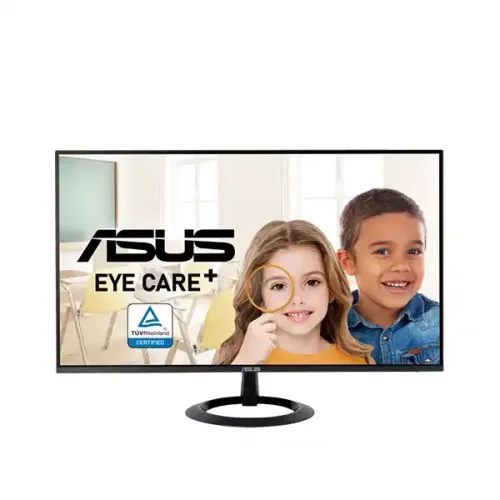
ASUS VZ27EHF 27-inch FHD IPS 100Hz Eye Care Monitor is a 27-inch Full HD IPS monitor built around a 100Hz refresh rate, Adaptive-Sync and ASUS Eye Care features. This guide explains its confirmed specifications, practical strengths, limitations, connections, setup and the checks to make before buying a Bangladesh unit.
A clear 27-inch Full HD workspace
The ASUS VZ27EHF is a 27-inch monitor for a desk setup that needs a larger screen for everyday work, study, web browsing and entertainment. Its IPS panel displays 1920 × 1080 pixels in a 16:9 layout. This resolution is familiar for Full HD video and games, and the broad screen gives room to arrange documents and browser windows side by side. Because those pixels cover a 27-inch diagonal, text and fine interface details are not as dense as on a 27-inch QHD monitor. Choose it for screen size and straightforward Full HD use; choose a higher-resolution panel if crisp small text or a very large desktop canvas is your priority.
IPS image characteristics
ASUS specifies an IPS panel with 178-degree horizontal and vertical viewing angles at a contrast-ratio criterion of 10:1. That wide viewing range helps the picture remain more consistent when you are not seated perfectly centered or when another person views the screen from the side. The panel has a typical 250 cd/m² brightness and a typical 1300:1 contrast ratio, with support for 16.7 million colors. These are standard SDR display specifications. They describe the panel's general capability, not a guarantee of calibrated color accuracy, professional color coverage or HDR performance; the official specifications do not establish those claims.
100Hz motion and Adaptive-Sync
The monitor supports a maximum refresh rate of 100Hz over its HDMI connection. A higher refresh rate can make cursor movement, scrolling, animation and compatible games feel smoother than a 60Hz mode. To use 100Hz, the graphics device, operating-system display settings, cable and selected resolution must support that mode. ASUS lists Adaptive-Sync variable-refresh-rate technology. With a compatible graphics card and a supported refresh range, VRR can coordinate display refresh with rendered frames and reduce tearing. The benefit depends on the specific computer and game; it does not raise frame rates by itself and is not a substitute for checking system compatibility.
Understanding 1ms MPRT
ASUS lists a 1ms Moving Picture Response Time (MPRT). MPRT describes perceived motion persistence and is not the same measurement as a 1ms gray-to-gray pixel transition. MPRT modes on monitors can use backlight strobing or other motion-clarity techniques and may change brightness or behavior. Do not interpret the figure as a guarantee that every pixel changes color in one millisecond or that all motion blur disappears. If motion clarity matters, compare the actual monitor mode, frame rate and brightness in your own setup and refer to the user guide for mode limitations.
Eye-care and image adjustment tools
The VZ27EHF includes ASUS Low Blue Light and Eye Care+ features, plus flicker-free technology. ASUS lists TÜV certifications for Low Blue Light and Flicker-free on the product specification page. These tools give users options for changing the screen presentation during long sessions; personal comfort still depends on room lighting, viewing distance, breaks and individual sensitivity. Four color-temperature presets let you select a preferred tone. ASUS also lists SPLENDID picture modes and Trace Free response tuning, so the on-screen controls provide practical ways to adjust the display without assuming that one setting is ideal for every task.
Useful built-in utilities
GamePlus provides monitor-side gaming overlays and tools, while QuickFit can help preview common document or layout sizes. Motion Sync and Adaptive-Sync are included in the ASUS feature list. Their usefulness depends on the connected system and the task: a layout overlay can aid alignment, while gaming features are most relevant when a computer is connected. These are display utilities, not additional video inputs or a replacement for software calibration. The official specification also lists HDCP 1.4 support for protected digital content.
Connections and audio
There is one HDMI 1.4 input. ASUS does not list DisplayPort, USB-C, a USB hub or built-in speakers for this model. A single HDMI connection is simple for one PC or console, but users who regularly switch among devices may need an external HDMI switch or should consider a monitor with more inputs. The product does not include a built-in speaker according to the manufacturer; use speakers or headphones connected to the computer or console. Check the source device's output resolution and refresh support, and confirm whether an HDMI cable is included in the local package before ordering.
Stand, mounting and physical setup
The included stand supports tilt from approximately -5 degrees to +23 degrees. It does not provide height adjustment, swivel or pivot according to ASUS's mechanical specification. If the screen needs to sit higher, a stable riser or compatible monitor arm may improve positioning. The rear mounting pattern is 75 × 75mm VESA, so a correctly rated wall or desk mount can be used after confirming screw requirements and clearance. ASUS lists Kensington lock support. Estimated dimensions with the stand are 612.3 × 433.5 × 209.8mm and estimated weight is 3.5kg; values can vary by region. Measure the desk and mount before installation.
Power, accessories and box contents
The manufacturer's specification lists power consumption below 21W, less than 0.5W in power-saving mode, and less than 0.3W when powered off. The input range is 100–240V at 50/60Hz. ASUS notes that accessories vary by region and lists items that may include a warranty card, quick-start guide, power cord, power adapter and HDMI cable. A local distributor can bundle a different cable or documentation, so check the actual seller listing and sealed box. Keep the invoice, serial label and packaging until the seller confirms the local warranty claim process.
Bangladesh availability and warranty checks
Availability and selling price change, and no confirmed BiponiBD offer was present during this review. A Bangladesh retailer page showed this exact model as out of stock; another retailer page also indicated stock unavailability and did not show a current price. A separate local listing has advertised a three-year warranty, but a listing alone does not establish that every VZ27EHF unit has the same coverage. Before payment, ask the seller for a fresh stock confirmation, final price, warranty provider, serial-number eligibility, invoice requirements and whether the box must be retained for a claim. The monitor's editorial specification here describes the model; it is not a live stock promise.
Who should consider this monitor?
The VZ27EHF may fit a home or office desk where a 27-inch screen, IPS viewing angles, familiar Full HD resolution and 100Hz motion are the main priorities. It can handle documents, lessons, video calls, streaming and casual gaming from a single HDMI source. It is a less suitable choice for a buyer who needs QHD detail at 27 inches, multiple native video inputs, USB-C docking, integrated speakers, height-adjustable ergonomics, very high competitive-gaming refresh rates or verified HDR performance. Matching the panel to your desk distance, graphics output and expected workload is more useful than relying on a gaming label alone.
Specifications at a glance
- Brand: ASUS
- Model: VZ27EHF
- Display Size: 27-inch
- Resolution: 1920 × 1080 (Full HD)
- Aspect Ratio: 16:9
- Panel Type: IPS
- Display Surface: Anti-glare
- Backlight: LED
- Refresh Rate: Up to 100Hz
- Response Time: 1ms MPRT (manufacturer listed)
- Brightness: 250 cd/m² typical
- Contrast Ratio: 1300:1 typical
- Display Colors: 16.7 million
- Viewing Angle: 178° horizontal / 178° vertical (CR ≥ 10)
- Pixel Pitch: 0.311mm (ASUS official specification)
- Variable Refresh Rate: Adaptive-Sync / VRR
- HDMI: 1 × HDMI 1.4
- Other Video Inputs: Not listed by ASUS
- Built-in Speakers: No
- Low Blue Light: Yes; ASUS Eye Care+
- Flicker-free: Yes
- Gaming and Utility Features: GamePlus, QuickFit, SPLENDID, Trace Free, Motion Sync
- Color Temperature Presets: 4 modes
- Tilt: Approximately -5° to +23°
- Height Adjustment: No
- VESA Mount: 75 × 75mm
- Kensington Lock: Yes
- Dimensions with Stand: 612.3 × 433.5 × 209.8mm (estimated; region may vary)
- Dimensions without Stand: 612.3 × 356.7 × 38.5mm (estimated; region may vary)
- Net Weight with Stand: 3.5kg (estimated; region may vary)
- Net Weight without Stand: 3.1kg (estimated; region may vary)
- Power Consumption: Less than 21W
- Power Saving: Less than 0.5W
- Power Off: Less than 0.3W
- Input Voltage: 100–240V, 50/60Hz
- Accessories: May include HDMI cable, power adapter, power cord, quick-start guide and warranty card; confirm regional bundle
- Warranty: Bangladesh seller pages advertise 3 years; verify unit eligibility, provider and claim requirements
Frequently asked questions
What is the screen size and resolution of the ASUS VZ27EHF?
It uses a 27-inch IPS panel with 1920×1080 Full HD resolution and a 16:9 aspect ratio. The large panel provides a broad everyday workspace, while QHD models show more detail at the same size.
Does the ASUS VZ27EHF support 100Hz?
Yes. ASUS specifies a maximum 100Hz refresh rate, and its signal-frequency table lists 48–100Hz vertical refresh over HDMI. The computer, cable and display settings must all support the selected mode.
What does the 1ms response-time claim mean?
ASUS lists 1ms MPRT, meaning Moving Picture Response Time. MPRT is a motion-clarity measurement/mode and is different from a 1ms GtG pixel response specification; consult the manual for the behavior and any brightness trade-offs.
Which video ports are available?
ASUS lists one HDMI 1.4 input. The official specification does not list DisplayPort, USB-C or a USB hub. Check the exact package and source-device compatibility before ordering.
Can it be wall mounted?
Yes. ASUS specifies a 75×75mm VESA mounting pattern. Confirm that the chosen mount supports the monitor weight, screw depth and installation requirements.
Does the stand adjust for height?
No. ASUS lists tilt adjustment from about -5° to +23° and no height adjustment. A compatible monitor arm or riser can help if you need the screen higher.
Does it have built-in speakers?
No. ASUS lists no built-in speaker. Plan to use headphones, external speakers or audio equipment connected to your computer; the monitor has no separate audio output listed in the official specification.
Is Adaptive-Sync the same as guaranteed G-SYNC or FreeSync certification?
ASUS specifies Adaptive-Sync/VRR support. Compatibility depends on the graphics card, driver, connection and operating range. The specification page does not identify a separate certified G-SYNC or FreeSync tier, so confirm compatibility with your exact setup.
What is the ASUS VZ27EHF price in Bangladesh and is it in stock?
Price and stock vary by seller and date. At review time, one retailer page showed the model as out of stock and did not publish a current price; another listed it but also withheld a price for unavailable stock. Contact a seller for a fresh quote. BiponiBD has no verified live offer for this item in this review.
What warranty applies to a Bangladesh unit?
Local retailer pages have advertised a three-year warranty, but eligibility depends on the exact imported unit, seller invoice, serial number and authorized service terms. Confirm the warranty provider and claim conditions with the seller before payment.
Is this monitor suitable for gaming?
It can suit casual gaming: it offers Full HD, up to 100Hz and Adaptive-Sync. It is not a high-refresh 144Hz-plus esports display, and the 27-inch Full HD pixel density may look less crisp at close range than a 24-inch Full HD screen.
What is in the box?
ASUS lists accessories that may vary by region, including a power cord, power adapter, HDMI cable, quick-start guide and warranty card. Confirm the exact box contents with the Bangladesh seller because bundles can differ.
Source note: Core specifications are cross-checked with ASUS. Local seller pages are used only for availability and warranty observations. Confirm regional package, stock, price and warranty with the seller before purchase.