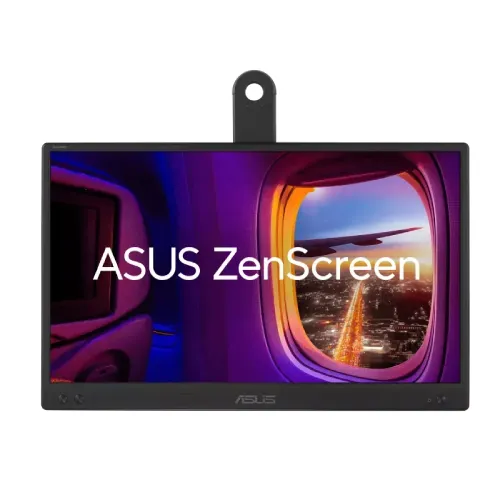
ASUS ZenScreen MB166CR 15.6-inch FHD IPS Portable USB-C Monitor is a lightweight portable monitor designed to add a 15.6-inch Full HD IPS screen to compatible USB-C devices. This guide explains DisplayPort Alt Mode compatibility, power, kickstand and tripod setup, image characteristics, limitations and Bangladesh seller checks.
A portable second screen for a laptop setup
The ASUS ZenScreen MB166CR is a portable 15.6-inch viewable IPS monitor with Full HD 1920 × 1080 resolution. ASUS positions it for adding screen space while working away from a permanent desk. It can hold reference material, chat, documents or a presentation while the laptop remains the main computer. The 16:9 image format is familiar, and the 60Hz refresh rate suits general productivity and video. The product is frequently marketed locally as “16-inch,” but ASUS identifies the panel as 15.6 inches. This is a compact external display, not a tablet or a high-refresh desktop gaming screen.
USB-C DisplayPort Alt Mode is essential
The MB166CR has one USB-C port with DisplayPort Alt Mode. This can make a simple one-cable connection possible when the host device sends video over USB-C and provides enough power for the monitor. However, not every USB-C port supports display output. Some ports handle charging and data only, and some phones do not support an external USB-C display. Before buying, check the specifications for the exact laptop, tablet or phone and confirm DisplayPort Alt Mode support. Use a compatible USB-C cable. The monitor does not list HDMI or a second video input, so it cannot be connected through any ordinary HDMI cable without a supported adapter path.
Full HD image and panel behavior
ASUS specifies a 15.6-inch IPS panel with 1920 × 1080 resolution, 16:9 aspect ratio, 250 cd/m² typical brightness and 178-degree horizontal and vertical viewing angles. The display surface is anti-glare, which can help reduce reflections under indoor lighting. Pixel pitch is 0.179mm. The panel is suited to documents, slides, web pages and video. It is not designed to replace a bright outdoor signage screen or a high-contrast professional display. Adjust brightness to the environment and avoid placing it directly in front of strong reflected light.
60Hz productivity, not high-refresh gaming
The official specification lists a maximum 60Hz vertical refresh over USB-C. That is suitable for normal desktop work, browser scrolling, presentations and video playback. It is not a 120Hz or 144Hz gaming portable display. Retailer pages list 5ms GTG response time; treat that value as a published measurement rather than a promise that all motion will look blur-free. If your main goal is competitive gaming, choose a monitor built around a higher refresh rate and a full set of gaming inputs. The MB166CR’s main advantage is portability and single-cable convenience on supported hardware.
Kickstand, sleeve and tripod setup
ASUS lists a 360-degree kickstand and a 1/4-inch tripod socket. The kickstand can help prop the screen for different viewing arrangements, while the tripod socket supports a compatible tripod or mount. ASUS also lists a ZenScreen sleeve among regional accessories. Check the exact local package because the sleeve design and included cable can vary. When using a tripod, ensure it is stable and rated for the panel. The monitor itself does not have a conventional height-adjustable stand, so set the screen position carefully to avoid neck strain during longer work sessions.
Eye-care and picture tools
The MB166CR includes Low Blue Light and flicker-free features, with TÜV certifications listed by ASUS. It also supports four color-temperature modes, SPLENDID, Trace Free, GamePlus and QuickFit photo/alignment grids. These are monitor-side viewing and utility options, not a substitute for color calibration or healthy workstation breaks. Choose a color temperature and brightness that suit the room. QuickFit can help with basic layout references, while DisplayWidget Center can provide supported configuration controls. The screen is not specified as a touch display, so use the connected host’s keyboard, trackpad or mouse for interaction.
Power and device compatibility
ASUS lists 5.24W power consumption, less than 0.5W power-saving use and less than 0.3W when powered off. A compatible laptop may supply the video and operating power through one USB-C connection. Actual behavior depends on the host’s USB-C power output and the cable. If the host cannot provide enough power, consult the ASUS user guide and use only a supported power arrangement. Avoid assuming that every smartphone can run the monitor or that any USB-C hub will preserve video output. Test the exact host and cable during the return period if compatibility is important.
Bangladesh price, stock and warranty
TechLand showed a ৳24,500 price but marked the product out of stock; its page also advertised a three-year warranty. Sumash Tech’s category page listed a price around ৳24,999, but availability for this exact SKU should be confirmed directly. These seller observations are not a BiponiBD offer and are not entered as a current market range because stock was not confirmed consistently. Ask for a fresh stock check, final price, included sleeve and cable, return terms, warranty provider and serial eligibility. Keep the invoice and package until you have verified the monitor works with your USB-C host.
Who should consider the MB166CR?
This ZenScreen can fit students, remote workers, presenters and travelers who need an extra laptop display that is light and easy to pack. It works best when the host device supports USB-C DisplayPort Alt Mode and can provide sufficient power. It may be a poor match for a phone without video output over USB-C, a desktop that needs HDMI connectivity, a user seeking integrated speakers, or anyone wanting a fast gaming refresh rate. Check the device compatibility, screen size, stand arrangement and local warranty before choosing it as a daily second display.
Specifications at a glance
- Brand: ASUS
- Series: ZenScreen
- Model: MB166CR
- Panel Size: 15.6-inch
- Viewable Area: 344.16 × 193.59mm
- Resolution: 1920 × 1080 Full HD
- Aspect Ratio: 16:9
- Panel Type: IPS
- Backlight: LED
- Display Surface: Anti-glare
- Pixel Pitch: 0.179mm
- Brightness: 250 cd/m² typical
- Contrast Ratio: 800:1 (local retailer listing; ASUS tech page does not expose this value in current extracted spec block)
- Viewing Angle: 178° horizontal / 178° vertical (CR ≥ 10)
- Display Colors: 262K
- Refresh Rate: 60Hz maximum
- Response Time: 5ms GTG (retailer listed)
- Color Temperature: 4 modes
- Flicker-free: Yes
- Low Blue Light: Yes; TÜV certification listed
- HDCP: Yes
- Input: 1 × USB-C with DisplayPort Alt Mode
- Audio: No built-in speaker; no audio output listed
- Tripod Socket: 1/4-inch
- Height Adjustment: No conventional height stand; 360° kickstand listed
- Power Consumption: 5.24W
- Power Saving: Less than 0.5W
- Power Off: Less than 0.3W
- Voltage: 100–240V, 50/60Hz (power adapter/input context varies; USB-C monitor power ratings in user guide)
- Dimensions without Stand: 360.1 × 225.6 × 11.8mm
- Weight without Stand: 0.78kg estimated
- Accessories: ZenScreen sleeve, USB-C cable, quick-start guide, warranty card and 360° kickstand may be included; confirm regional bundle
- Warranty: TechLand advertises 3 years; verify provider and serial eligibility
Frequently asked questions
What is the actual screen size?
ASUS lists a 15.6-inch panel size and 15.6-inch viewable class. Retailers often market it as a 16-inch portable monitor, but the official panel specification is 15.6 inches.
What resolution and refresh rate does it support?
The MB166CR uses 1920×1080 Full HD resolution and a 60Hz maximum vertical refresh over USB-C. It is designed as a portable work/second screen rather than a high-refresh gaming monitor.
Does any USB-C port work with this monitor?
No. The host USB-C port must support DisplayPort Alt Mode for video output. A connector that supports charging or data only may not send a display signal. Check the laptop/phone specifications and use a compatible cable.
Does the USB-C cable power the screen too?
ASUS specifies USB-C DisplayPort Alt Mode and power consumption around 5.24W. A supported host may power the display through the same connection, but behavior depends on the host’s power output and cable. If the host cannot supply sufficient power, follow the product guide for an approved power arrangement.
Can I connect it to a phone?
It may work with phones that support USB-C DisplayPort Alt Mode and compatible external-display output. Many phones do not support video over USB-C, so confirm the exact handset model before purchase.
Does it have speakers?
No. ASUS lists no built-in speaker. Use the phone or computer’s audio, headphones or external speakers; the monitor has only the documented USB-C input.
Can it be mounted on a tripod?
Yes. ASUS specifies a 1/4-inch tripod socket. Use a tripod or mount rated for the monitor and make sure the setup is stable, especially during travel or presentations.
What stand is included?
ASUS lists a 360° kickstand and a ZenScreen sleeve among regional accessories. The exact bundle can vary, so confirm the local package contents and how the sleeve/stand supports the screen before ordering.
Does it support touch input?
ASUS does not list a touch panel for MB166CR. Treat it as a non-touch external display unless the exact regional SKU documentation says otherwise.
What is the Bangladesh price and availability?
TechLand’s page showed ৳24,500 but marked the monitor out of stock; Sumash Tech lists a price around ৳24,999 in its current category snapshot, but product-level stock should be confirmed. These are seller observations, not a BiponiBD offer.
What warranty comes with the Bangladesh unit?
Local TechLand listing advertises three years, but the exact provider, serial eligibility and claim rules should be confirmed with the seller before purchase. Keep the invoice and serial number.
What should I check before buying?
Check that your host supports USB-C DisplayPort Alt Mode, confirm power behavior and cable compatibility, verify the local sleeve/kickstand/accessories, and request current stock, return policy and warranty terms.
Source note: Core technical details are from ASUS. Local price pages showed unavailable stock or category-level pricing; confirm exact SKU, live availability, USB-C compatibility and warranty before purchase.