Pros
- Adds Bluetooth to compatible desktop/laptop USB hosts
- Works with supported Bluetooth audio devices and peripherals
- Compact adapter with advertised up-to-20m open-condition range

All categories
 New condition
Computer Accessories
Baseus · BA04
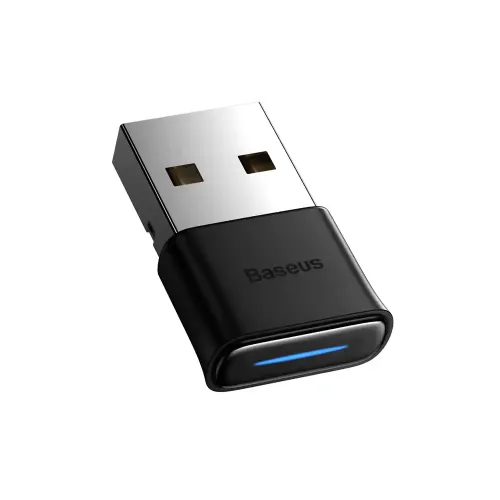
Baseus BA04 is a USB Bluetooth 5.0 adapter for compatible Windows computers, with an advertised range up to 20m.
Approximate Market Price
BDT 460
Informational market estimate only; this is not a current Store offer.
Compare store prices
No live offers for this variant
BDT 460
Approximate Market Price
Informational market estimate only; this is not a current Store offer.
Loading history…
Product story
Baseus BA04 is a compact USB Bluetooth adapter for adding wireless connectivity to a compatible laptop or desktop computer. Star Tech lists Bluetooth 5.0, a connection range up to 20 metres, plug-and-play installation, aluminium alloy/ABS construction and Windows 7 through 11 support. It can be used with compatible Bluetooth audio devices and peripherals when their profiles and the computer’s software support the connection. The listed range is an open-condition claim, not a guaranteed indoor distance.
The BA04 provides a Bluetooth radio link through a computer’s USB port. It can help a desktop without built-in Bluetooth connect to compatible wireless devices. The adapter does not itself play audio, contain a speaker, provide a headphone jack or turn every USB device into a Bluetooth host. The computer’s operating system and drivers manage pairing and device profiles. Confirm the intended computer and accessories support the needed Bluetooth function.
Local listings identify the BA04 as Bluetooth 5.0. A Bluetooth 5.0 host adapter can pair with compatible devices using earlier Bluetooth versions, but the link uses capabilities and profiles supported by both sides. Pairing and feature support are not guaranteed for every accessory. Put the peripheral in pairing mode, use the computer’s Bluetooth settings and consult the accessory manual if discovery or pairing fails.
Retailers advertise a range up to 20 metres. This figure assumes favorable conditions and should not be interpreted as a reliable distance through multiple walls. Building materials, radio interference, the USB port location, nearby cables and the connected device can all affect performance. For better reception, avoid placing the adapter behind a metal computer case or next to strong sources of interference; a USB extension can sometimes improve placement if suitable.
Plug the adapter into a compatible USB port and follow the computer’s Bluetooth setup or the instructions supplied with the product. Star Tech describes plug-and-play installation. Actual driver behavior can vary with operating-system version, updates and existing Bluetooth hardware. If the computer already has Bluetooth, check how the system selects or manages multiple radios before adding another adapter. Disconnect the adapter safely when it is not needed.
Star Tech lists Windows 7, Windows 8, Windows 8.1, Windows 10 and Windows 11. The checked retailer details do not establish support for macOS, Linux, ChromeOS, smart TVs, game consoles or every device with a USB port. Check the current product instructions and the operating system’s driver support for the exact computer before purchase. A physical USB connection alone does not guarantee the host can use the adapter.
Star Tech describes connections to wireless headphones and Bluetooth speakers. Audio playback depends on the computer, the connected device and the supported audio profile. Microphone input may require a headset that exposes a compatible hands-free profile and correct operating-system/app settings. Star Tech’s product Q and A says microphone use depends on the headset. Do not assume that every headset feature or high-quality stereo-plus-microphone mode works identically across devices.
The adapter may connect supported Bluetooth keyboards, mice and other peripherals when the operating system recognizes their profiles. Pairing behavior, latency and feature keys depend on the peripheral and software. A USB Bluetooth dongle is not the same as a proprietary wireless receiver supplied with some keyboards or gaming mice. Verify that the specific accessory supports standard Bluetooth and the required computer profile.
Star Tech lists an aluminium alloy and ABS construction. The adapter is small, so avoid bending it while it is in a USB port or striking it with a cable or object. Keep it away from liquids and excessive heat. The checked source does not provide complete dimensions, weight, chipset or a transfer-throughput rating, so those details are not claimed here.
The listed Windows support and standard Bluetooth pairing are not a guarantee for every device. If the adapter is not detected, try another USB port, check Device Manager/system settings and install only the driver or instructions supplied by Baseus or the seller. If devices pair but audio does not work, select the correct playback/input device and confirm profile support. If range is poor, move the adapter away from the metal chassis and test without nearby interference.
Star Tech’s checked listing states a three-month warranty for its own offer. Another seller may provide different coverage or none, so confirm the warranty provider, service location, duration and claim rules in writing. Current price and stock can change. BiponiBD’s live offer was not verified during this catalog update.
Choose the BA04 when a compatible Windows computer needs a USB Bluetooth adapter and the connected device supports the required profile. Verify USB port type, operating-system support, headset microphone needs, peripheral compatibility and realistic range expectations. For non-Windows hosts, consoles or TVs, request model-specific confirmation before purchase. Check package contents and local warranty terms with the seller.
It is a USB Bluetooth adapter that adds wireless Bluetooth connectivity to a compatible laptop or desktop computer. It is not a standalone Bluetooth speaker receiver with an audio output jack.
Star Tech and local Baseus listing snippets identify it as Bluetooth 5.0. The adapter can communicate with compatible earlier Bluetooth devices, but features depend on the device and Bluetooth profile.
Retail listings state up to 20 metres. Treat that as an open-space claim; walls, interference, computer placement and the connected device can reduce practical range.
It plugs into a computer USB port. The reviewed Star Tech listing presents it as a plug-and-play USB adapter; check your device has a compatible USB-A port or use an appropriate adapter if necessary.
Star Tech lists Windows 7, 8, 8.1, 10 and 11 compatibility. Confirm the exact driver and OS support for your computer before ordering; the listing does not provide a complete support matrix for every OS revision.
Star Tech describes use with wireless headphones and Bluetooth speakers. Audio quality and features depend on the computer, headset/speaker and supported Bluetooth audio profiles.
Star Tech says in its product Q and A that headset microphone use depends on the headset supporting it. The selected operating-system audio profile and application settings also affect microphone availability and quality.
Bluetooth peripherals may work when their profile is supported by the computer’s operating system and the specific device. Check the peripheral’s pairing and profile requirements; the listings do not guarantee every controller or accessory.
The advertised up-to-20m range is not a guaranteed indoor distance. Walls, USB port orientation, nearby radio devices and the other device’s antenna can shorten it. Keep the adapter in a clear position where practical.
Star Tech lists aluminium alloy and ABS for the adapter body.
Star Tech lists a three-month warranty for its offer. Warranty duration and provider can differ at other sellers; check the selected merchant’s written terms.
The checked listing is for adding Bluetooth to a laptop or desktop computer and names Windows versions. Compatibility with phones, TVs, consoles or other USB hosts is not confirmed; do not assume they can use it.
Helpful answers
Product-specific answers maintained with the catalog information.
It is a USB Bluetooth adapter that adds wireless Bluetooth connectivity to a compatible laptop or desktop computer. It is not a standalone Bluetooth speaker receiver with an audio output jack.
Star Tech and local Baseus listing snippets identify it as Bluetooth 5.0. The adapter can communicate with compatible earlier Bluetooth devices, but features depend on the device and Bluetooth profile.
Retail listings state up to 20 metres. Treat that as an open-space claim; walls, interference, computer placement and the connected device can reduce practical range.
It plugs into a computer USB port. The reviewed Star Tech listing presents it as a plug-and-play USB adapter; check your device has a compatible USB-A port or use an appropriate adapter if necessary.
Star Tech lists Windows 7, 8, 8.1, 10 and 11 compatibility. Confirm the exact driver and OS support for your computer before ordering; the listing does not provide a complete support matrix for every OS revision.
Star Tech describes use with wireless headphones and Bluetooth speakers. Audio quality and features depend on the computer, headset/speaker and supported Bluetooth audio profiles.
Star Tech says in its product Q and A that headset microphone use depends on the headset supporting it. The selected operating-system audio profile and application settings also affect microphone availability and quality.
Bluetooth peripherals may work when their profile is supported by the computer’s operating system and the specific device. Check the peripheral’s pairing and profile requirements; the listings do not guarantee every controller or accessory.
The advertised up-to-20m range is not a guaranteed indoor distance. Walls, USB port orientation, nearby radio devices and the other device’s antenna can shorten it. Keep the adapter in a clear position where practical.
Star Tech lists aluminium alloy and ABS for the adapter body.
Star Tech lists a three-month warranty for its offer. Warranty duration and provider can differ at other sellers; check the selected merchant’s written terms.
The checked listing is for adding Bluetooth to a laptop or desktop computer and names Windows versions. Compatibility with phones, TVs, consoles or other USB hosts is not confirmed; do not assume they can use it.
Customer community
Become a merchant
Join BiponiBD, publish accurate offers and start free.