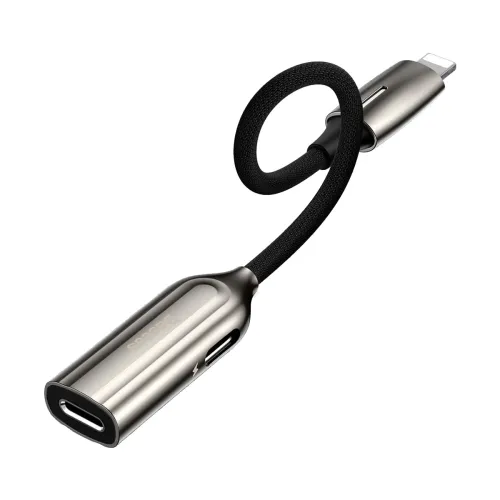
Baseus CALL55-0A dual Lightning converter
The Baseus CALL55-0A, also listed as the L55 adapter, connects a Lightning-equipped iPhone to two Lightning female sockets. Retailers describe its main use as charging while listening through compatible Lightning earphones. This can be useful when a phone has one Lightning port and the user wants to keep a wired audio accessory connected during charging.
Understand the connector arrangement
The adapter has one Lightning male plug for the host device and two Lightning female sockets for connected accessories. It does not provide a USB-C socket, a USB-A socket or a 3.5mm headphone jack. A USB-C earphone cannot plug directly into these Lightning sockets. Match the connector on the phone and accessories before buying, and follow any charging or headphone markings on the supplied adapter rather than assuming both sockets perform every function interchangeably.
Charging while listening
Star Tech and Ryans both describe charging while listening, and both list a charging indicator. Star Tech explains that a charger and earphones can be connected through the adapter at the same time. The reviewed evidence does not independently establish a supported charging-current limit, power rating or fast-charging protocol. Do not assume USB Power Delivery performance or a particular charging speed. The charger, cable, phone and current battery conditions also affect charging behaviour.
Music, calls and remote controls
Star Tech describes music, calls and earphone remote-control support; Ryans also answers that calls are supported. These are retailer claims rather than tests with every headset and iOS version. Confirm the exact Lightning earphones, microphone and remote-control functions with the supplying seller, particularly if call recording or a specific audio accessory is essential. Marketing wording about lossless decoding is not an independently verified guarantee of bit depth, sample rate, zero noise or unchanged sound quality.
Device and software compatibility
The documented connector is for Lightning-equipped iPhones. It is not a direct-fit adapter for a USB-C phone. A connector that fits does not by itself prove that every iOS release, microphone receiver or accessory will operate correctly. A current iOS compatibility question on the reviewed Ryans page was unanswered, and there was no complete manufacturer compatibility matrix in the reviewed sources. Check your exact device, software version and accessory combination before purchase.
Data transfer and peripheral limitations
Star Tech describes data synchronisation, while Techland lists USB 2.0 High Speed at up to 480Mbps. These statements do not establish the exact behaviour of each female socket or support for external SSDs, USB storage, cameras or all digital microphone receivers. Treat 480Mbps as a retailer-listed interface claim, not a measured transfer rate. Do not buy this adapter as a general-purpose USB hub or storage adapter without confirmation for the specific use case.
Construction and handling
Star Tech and Ryans list zinc-alloy construction and a gray-and-black finish. The product is a compact adapter, not an extension cable with a verified reach. Ryans’ zero-metre catalogue field should not be interpreted as a measured body dimension. Product weight, exact dimensions and shipping-package measurements were not verified in the reviewed evidence. Support connected cables so their weight does not strain the phone’s Lightning port, and check whether a thick phone case obstructs full insertion.
Warranty differences between sellers
Warranty terms are not consistent across the reviewed stores. Star Tech lists three months. Ryans lists six months and requires the original box and all accessories for a claim. Techland shows three months in the product overview but no warranty in its specification table and description. Confirm the terms for the particular offer before paying and retain the invoice, packaging and supplied accessories. A seller warranty does not independently establish Apple MFi certification or manufacturer-authorised status.
Before ordering and testing
Match the CALL55-0A product code and connector arrangement, then confirm charging, audio playback, microphone and remote controls with your exact setup. Charger, charging cable, earphones and phone should not be assumed to be included. After delivery, test the functions promised by the seller within the return period. Report accessory-not-supported messages, intermittent charging or missing microphone functionality promptly rather than relying on a generic compatibility claim.