Pros
- Compact adapter for connecting USB-C accessories to compatible USB-A hosts
- High maximum transfer rate listed for compatible USB 3.1 equipment
- No cable or software installation is required for basic adapter use

All categories
 New condition
Computer Accessories
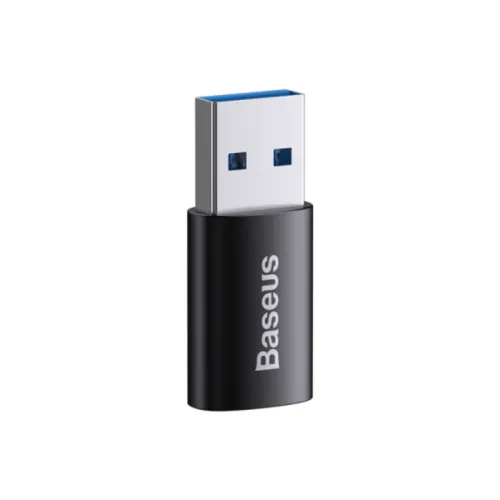
Baseus · Ingenuity Series Mini USB-A to USB-C OTG Adapter
Baseus Ingenuity Series Mini USB-A male to USB-C female OTG adapter with up to 10Gbps transfer and 20W power figures listed. Check device support.
Approximate Market Price
BDT 440
Informational market estimate only; this is not a current Store offer.
Compare store prices
No live offers for this variant
BDT 440
Approximate Market Price
Informational market estimate only; this is not a current Store offer.
Loading history…
Product story
The Baseus Ingenuity Series Mini is a compact USB-A male to USB-C female OTG adapter. Bangladesh listings describe it as USB 3.1, with up to 10Gbps data transfer and 20W power listed by Star Tech. It can connect a USB-A host to a compatible USB-C accessory or device, depending on operating-system and power support. It is an adapter, not a charging brick or a multiport hub. Check which end is on the host before purchase because a reverse-direction Type-C-to-USB-A adapter is a different configuration.
For this model, USB-A is the male input plug and USB Type-C is the female port. Insert the adapter into a host with a compatible USB-A port, then connect a USB-C cable or peripheral to its Type-C socket. Some online listings use “input” and “output” inconsistently, so rely on the connector genders and check product photos/packaging before ordering. This adapter does not convert a USB-C host port to USB-A.
Star Tech and several local product listings advertise USB 3.1 and a maximum transfer rate of 10Gbps. That is a rated interface ceiling under compatible conditions, not a promise of real-world copy speed. Both the host port and attached device must support the relevant high-speed mode; slower USB versions operate at their own rates. The adapter does not increase the capabilities of an older host, storage drive or cable.
OTG can let a compatible phone or tablet act as a USB host for a flash drive, keyboard, mouse or other supported accessory. Function depends on the device hardware, operating-system support, power available from the host and the peripheral. A connector that fits does not guarantee every phone supports OTG or every accessory is recognized. Check the device maker’s instructions and accessory power needs first.
Star Tech lists 20W power supply for this adapter. This is not a standalone charger and does not establish USB Power Delivery or a particular fast-charge protocol. Charging behavior depends on the host USB-A port, attached cable and device. Do not assume it can deliver 20W in every combination or use it as a replacement for the device manufacturer’s charger. Stop use if the adapter or connected equipment becomes unusually hot.
Baseus and retailer listings describe an aluminum-alloy housing, and retailers describe a compact mini form factor. The metal enclosure can protect the small adapter during ordinary handling but does not make it waterproof, crushproof or immune to wear. Hold the adapter body when inserting or removing it and avoid applying side force to the host port. Exact dimensions, finish and weight may vary by regional package; these were not consistently confirmed.
A USB-C female socket may accept many cable plugs, but compatibility still depends on signal, protocol, power and device direction. This adapter is not documented as a display output, Thunderbolt adapter, Ethernet adapter or multiport hub. Do not infer video output or high-power laptop charging from the USB-C socket. Match the adapter to the intended peripheral and verify any special feature with the device maker.
Its mini format is convenient for carrying with a laptop or phone accessory kit and for converting a USB-A port when needed. Because it is small, store it where it will not be lost and disconnect it before packing. Keep lint and debris out of the USB-C socket. Avoid inserting incompatible, damaged or wet plugs and do not force the connector if orientation or fit is wrong.
Connect the USB-A male plug fully to a suitable host, then attach the USB-C device or cable. If the device is not recognized, test the accessory directly on a known-compatible USB-C port, check the host’s OTG/data settings and try a lower-power peripheral. If transfer is slow, inspect each component’s USB version and use a compatible high-speed cable. Restart the host or update its driver if the manufacturer recommends it.
Retail listings describe a single compact adapter; do not assume a cable, charger or case is included unless the chosen package states so. Retail prices, stock and warranty differ by seller and do not verify BiponiBD’s current offer. Confirm the exact USB-A male to USB-C female orientation, model/MPN, package condition and warranty service terms before ordering. Keep the invoice and packaging in case of a claim.
The adapter provides a small USB-A male to USB-C female OTG connection, with 10Gbps maximum data and 20W power figures listed by retailers. Aluminum-alloy construction is also listed. It has only one port, depends on host and peripheral compatibility and is not documented for video, Thunderbolt or USB-PD charging. Confirm port direction and supported device functions before buying.
This is the Baseus Ingenuity Series Mini USB-A male to USB-C female OTG adapter. Local listings advertise USB 3.1, up to 10Gbps transfer, 20W power and an aluminum-alloy body. Actual performance depends on the host, attached cable and device; OTG support is device-dependent. It is not verified as a video, Thunderbolt or USB-PD adapter. Check exact orientation and seller warranty.
Helpful answers
Product-specific answers maintained with the catalog information.
It has a USB-A male plug and a USB-C female port.
Retailers list up to 10Gbps; actual speed depends on all connected devices and cables.
It is sold as an OTG adapter, but the host device must support OTG and the connected accessory.
A retailer lists 20W power, but charging behavior depends on the host and device; no specific fast-charge protocol is verified.
Local listings describe the adapter as USB 3.1 and advertise up to 10Gbps.
Video output is not established by the reviewed specifications.
Thunderbolt support is not verified.
Baseus and retailer listings describe aluminum alloy.
Package contents vary; confirm the selected seller’s box contents.
Confirm current coverage and service terms with the selected seller.
Customer community
Become a merchant
Join BiponiBD, publish accurate offers and start free.