Pros
- 2m length gives extra reach from a USB-A charger or computer
- USB-A-to-Lightning suits compatible Lightning devices
- 480Mbps data transfer is listed for sync use

All categories
 New condition
Computer Accessories
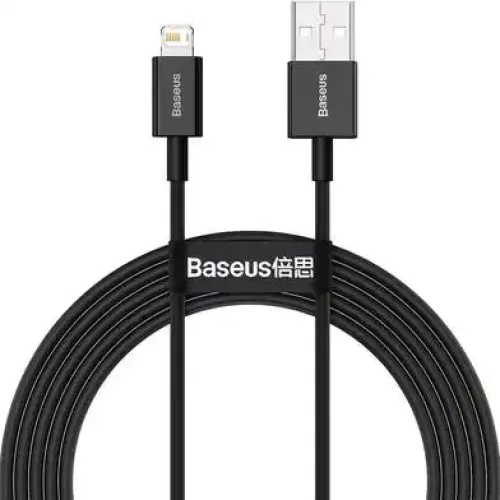
Baseus · Superior Series CALYS-C01 2M USB to Lightning
Baseus Superior Series CALYS-C01 2m USB-A-to-Lightning cable with 2.4A, 480Mbps and ABS+TPE listed. Verify exact length, MFi status and warranty.
Approximate Market Price
BDT 370
Informational market estimate only; this is not a current Store offer.
Compare store prices
No live offers for this variant
BDT 370
Approximate Market Price
Informational market estimate only; this is not a current Store offer.
Loading history…
Product story
This catalog item is the two-meter Baseus Superior Series USB-A-to-Lightning cable, model number CALYS-C01. Star Tech identifies the model and lists USB-to-Lightning connectors, 2.4A output current, up to 480Mbps data transfer, a 2m length and ABS+TPE materials. These specifications fit compatible Lightning-equipped Apple devices and USB-A chargers or computer ports. Baseus Superior Series includes multiple connector and length variants, so verify CALYS-C01 and the two-meter measurement on the package before ordering.
The CALYS-C01 has a standard USB-A plug at the power-source or host end and an Apple Lightning plug at the device end. It is not a USB-C-to-Lightning PD cable and does not connect directly to a USB-C-only charger. Some seller pages use “Superior Series” for both 1m and 2m cables; Techland’s page for the same MPN CALYS-C01 shows a 1m version, while Star Tech lists 2m. Confirm the exact length and package code for the selected product.
Star Tech lists a maximum current of 2.4A for the two-meter CALYS-C01. Current alone does not specify wattage; the voltage and charging negotiation determine power. The cable does not force an iPhone or iPad to draw 2.4A, and actual charging can be lower based on the charger, device, battery temperature and charge level. Do not describe this USB-A cable as a USB-C Power Delivery cable or promise a specific wattage without an exact supported voltage profile.
The Lightning connector can be used with compatible Apple products that have a Lightning port, subject to device and accessory support. It will not fit USB-C-equipped Apple devices such as newer models with USB-C. The reviewed exact model pages do not provide a verified MFi certification record. If certification is important, confirm it for the exact CALYS-C01 packaging or check an authoritative Apple accessory source. Do not infer MFi status from the Lightning plug, “for iPhone” wording or brand name alone.
Star Tech lists data transfer up to 480Mbps. That is a nominal maximum associated with USB 2.0; real file transfer speed may be much lower and depends on the computer, device, storage, cable, software and connection mode. To sync, connect the USB-A plug to a computer or supported USB host, unlock the Apple device and approve any trust prompt. A wall charger provides power but does not transfer files to a computer. Confirm that the selected cable supports data if sync matters.
The 2m cable length offers additional reach between a USB-A charger and a nearby device on a bed, desk or sofa. Measure the path and leave enough slack so the wire does not pull on the Lightning port. Avoid running it under doors, chair wheels or sharp furniture edges. A longer cable may be less convenient on a small desk and can become tangled; coil it loosely and do not sharply bend it near either connector.
Star Tech lists ABS+TPE as the cable material; its description presents the material as suitable for ordinary use. This does not establish a quantified bend-life rating, waterproofing or tear-proof construction. Avoid pulling the cable by its wire, crushing it beneath furniture, exposing it to heat or liquid, and twisting near the plug. Inspect the jacket and strain relief periodically. If it frays, loosens or charges intermittently, stop using it and replace it.
“Fast charging” is relative to the device and charger. This model uses a USB-A source connection and lists up to 2.4A; it should not be assumed to support USB-C PD or Apple’s maximum fast-charge modes. Use a power adapter recommended for the exact device, and check that the adapter’s output and cable are appropriate. Battery temperature, charge level, background activity and device settings can reduce charging speed even when the cable is working normally.
Inspect the USB-A and Lightning ends before use and connect them straight without force. If charging is slow, test a known-good USB-A adapter, inspect device ports and allow a warm device to cool. If sync fails, connect to a computer, unlock the device and accept any access prompt; try another USB port or data-capable cable. An accessory warning can indicate compatibility or damage. Do not scrape a Lightning port with metal or continue using a cable with bent contacts.
Disconnect by holding the connector body rather than pulling the cable. Keep it dry and away from sharp edges, heaters and heavy objects. Loosely coil the extra length for storage and avoid tight knots. Clean the outer jacket with a dry soft cloth; do not immerse the cable or use harsh chemicals. A damaged cable can cause unreliable charging and should be replaced. Keep the product label and purchase invoice in case the seller requests them for a claim.
Star Tech’s two-meter listing states no warranty, while SmartDeal’s CALYS-C01 page shows a one-year warranty; Techland lists a six-month warranty on its CALYS-C01 page but describes a one-meter variant. Warranty and length therefore differ among listings. Verify the selected offer’s exact length, warranty provider, coverage period, invoice requirement and return conditions. Prices and stock on other sites are not confirmation of the BiponiBD offer. Check model CALYS-C01 and the actual cable label at delivery.
The CALYS-C01 combines a two-meter USB-A-to-Lightning connection with 2.4A current and 480Mbps data transfer listed by Star Tech. ABS+TPE material is specified for the 2m listing. Its USB-A source end fits common older adapters but not USB-C-only chargers, and it is not a USB-C PD cable. MFi certification is unverified, while length and warranty differ across seller pages. Confirm the exact unit and device support before purchase.
CALYS-C01 is the Baseus Superior Series USB-A-to-Lightning model. Star Tech lists the 2m variant at 2.4A, up to 480Mbps and ABS+TPE. Another CALYS-C01 page lists 1m, so verify the selected variant. It is not USB-C PD, and MFi status was not verified. Warranty listings range from no warranty to six or twelve months. Actual charging and sync depend on the charger, device and host.
Helpful answers
Product-specific answers maintained with the catalog information.
The cable is Baseus Superior Series CALYS-C01.
It has USB-A at the source end and Lightning at the device end.
The catalog and Star Tech exact listing are for 2 meters; another seller page lists 1m for CALYS-C01, so verify the selected variant.
Star Tech lists up to 2.4A. Actual current depends on charger, device and charging negotiation.
Star Tech lists up to 480Mbps; real transfer speed depends on the host and device.
No. This model has a USB-A source connector and is not listed as a USB-C PD cable.
MFi certification was not verified in the reviewed exact-model sources.
Not directly; the cable’s source end is USB-A.
ABS+TPE is listed for the 2m variant by Star Tech.
Seller pages vary from no warranty to six or twelve months; confirm the selected offer in writing.
Customer community
Become a merchant
Join BiponiBD, publish accurate offers and start free.