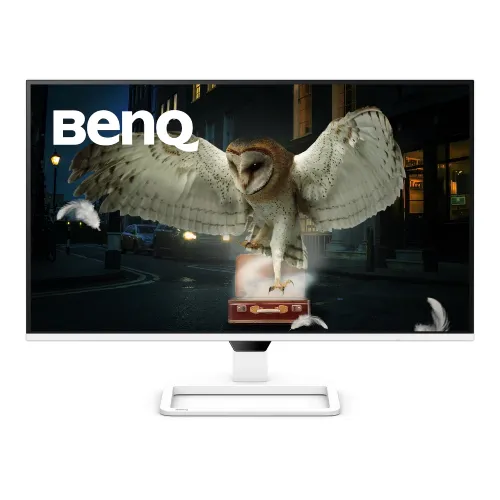
BenQ EW270Q overview
The BenQ EW270Q is a 27-inch QHD entertainment and gaming monitor with a 2560 × 1440 IPS panel, up to 200Hz refresh and 1ms GtG response. BenQ lists HDR10, 350-nit typical brightness, 90% P3 color, AMD FreeSync Premium, two built-in 5W speakers and USB-C with 65W Power Delivery. HDMI 2.0, DisplayPort 1.4 and USB-C provide video options. This update follows BenQ’s official specifications; Bangladesh price, stock and local warranty were not confirmed.
Exact model and screen size
This listing is for BenQ model EW270Q. The display measures 27 inches diagonally, with a 16:9 aspect ratio and 2560 × 1440 maximum resolution. Similar BenQ monitor names may represent different refresh rates, USB-C power and speaker configurations, so compare EW270Q on the unit label and carton. Existing slug, Active status, variant identifier and SKU are retained. Confirm color or regional package details with the seller before ordering.
QHD 2560 × 1440 resolution
The native QHD resolution provides 2560 × 1440 pixels in a 16:9 layout. It offers more workspace than Full HD while remaining less demanding than 4K for high frame rates. A 27-inch display is commonly used at a desk for games, video and multitasking. Applications may scale text and controls differently, so choose an operating-system scaling level that suits your viewing distance and eyesight. The monitor’s actual output is limited by the source and selected input mode.
IPS panel, matte surface and viewing angle
BenQ specifies an IPS panel with LED backlight, matte screen coating and 178° horizontal and vertical viewing angles. IPS technology is designed for broad viewing and consistent image appearance across typical desk positions. The matte finish can reduce some reflections, but room lighting can still affect contrast. Position the screen away from direct glare, and adjust brightness to your room. Viewing angle ratings do not mean the image is immune to changes in ambient light or off-axis color perception.
200Hz refresh and 1ms GtG
The official specification lists up to 200Hz refresh and 1ms gray-to-gray response. Higher refresh can make supported motion appear smoother when the computer supplies enough frames. Response time describes a pixel transition under the manufacturer’s method, not total system input latency. A compatible graphics card, driver, cable and DisplayPort or USB-C connection are important for 200Hz. Check the selected mode in the operating system and monitor information menu after setup.
Adaptive sync and variable refresh range
BenQ lists AMD FreeSync Premium. The user manual states a variable refresh range of 48–200Hz over DisplayPort and USB-C, while HDMI VRR is supported from 48–144Hz. The source GPU or console must also support VRR through the selected port. Enable FreeSync or VRR in the monitor menu and source settings, then check the game’s behavior. Adaptive sync can reduce tearing and stutter within its supported range but does not increase the computer’s frame rate.
Brightness, HDR10 and contrast
BenQ lists typical and HDR peak brightness of 350 nits, HDR10 support and a native contrast ratio of 1200:1. HDR performance depends on the content, source settings, display mode and room conditions. The 350-nit figure is a specified output rating, not a guarantee that every scene appears equally bright. HDR10 support means the monitor can accept compatible HDR signals; it does not make all content HDR or guarantee a particular HDR certification tier.
Color gamut and 1.07 billion colors
The official EW270Q page lists 90% P3 color gamut and 1.07 billion display colors. BenQ includes modes such as Rec.709, sRGB, HDR, Standard, User, Game, Cinema HDRi and Game HDRi. Color gamut describes the range of colors the display can reproduce, not factory calibration accuracy for every unit. Select an appropriate mode for the work or game, and use color-managed software for workflows where consistent color matters.
HDMI 2.0 and DisplayPort 1.4 inputs
The monitor includes one HDMI 2.0 input and one DisplayPort 1.4 input. The manual indicates support for 2560 × 1440 up to 200Hz through compatible signal paths, with chroma format and bit depth affecting available combinations. Use a cable capable of the required bandwidth and check GPU output support. Consoles may have different refresh and VRR limits than a PC, so verify the console’s supported mode before expecting 200Hz.
USB-C display, data and 65W charging
One USB-C port supports DisplayPort Alt Mode, data and up to 65W Power Delivery. A compatible laptop can carry video and charge over one full-featured USB-C cable. The laptop’s power requirement and cable determine whether charging keeps pace with use. BenQ also lists the USB-C signal cable among potential regional accessories. A charge-only cable will not carry display video; verify that the computer’s USB-C port supports DP Alt Mode.
Built-in speakers and audio modes
Two built-in speakers are rated at 5W each, and a headphone jack is listed. BenQ also provides audio modes for different listening scenarios. The integrated speakers can avoid separate desktop speakers for everyday audio, while headphones or external speakers may suit music and detailed listening. Select the monitor as the audio output device in the computer or console and confirm volume and mute controls if sound is absent.
HDRi, color and eye-care tools
BenQ highlights HDRi, which uses ambient-light awareness to adjust the viewing experience, along with Game Color, Light Tuner, Color Vibrance and Eye-Care features. The official specifications list flicker-free technology, Low Blue Light Plus, Color Weakness mode and Visual Optimizer. These settings can alter image appearance and are not a substitute for proper lighting or breaks. Review the on-screen menu to choose modes that suit the room and task.
Stand adjustment, dimensions and VESA
The stand supports tilt from -5° to +20° and swivel about 20° left or right. BenQ lists a 100 × 100mm VESA mount. Approximate landscape dimensions are 613.51 × 436.09 × 211.15mm with base and 613.506 × 371.819 × 59.6mm without base; weight is about 4.64kg with base. Verify desk capacity, arm load rating, screw fit and cable clearance before mounting.
Power, box contents and warranty
BenQ lists a built-in power supply, 100–240V input, typical consumption of 26W, maximum 150W and 0.5W sleep consumption. Box contents vary by region; listed accessories include quick-start and warranty documents, and may include HDMI or USB-C signal cables. Warranty duration and service location can differ by country. Ask the seller to confirm Bangladesh coverage, dead-pixel policy, return window and invoice details for the exact unit.
Frequently asked questions
What is the resolution? 2560 × 1440 QHD. What is the size and panel type? 27-inch IPS. What is the maximum refresh? 200Hz. What is the response rating? 1ms GtG. Does it support FreeSync? Yes; the manual specifies 48–200Hz over DP/USB-C and 48–144Hz over HDMI. Does USB-C charge a laptop? Up to 65W with compatible devices. Are speakers built in? Yes, two 5W speakers. What Bangladesh warranty applies? Confirm with the seller for the supplied unit.