Pros
- 4K UHD resolution offers detailed desktop and video playback.
- IPS panel supports broad shared viewing.
- USB-C 60W can simplify compatible laptop docking.
- HDRi modes and integrated treVolo speakers support entertainment use.

All categories
 New condition
Monitors
BenQ · EW2880U
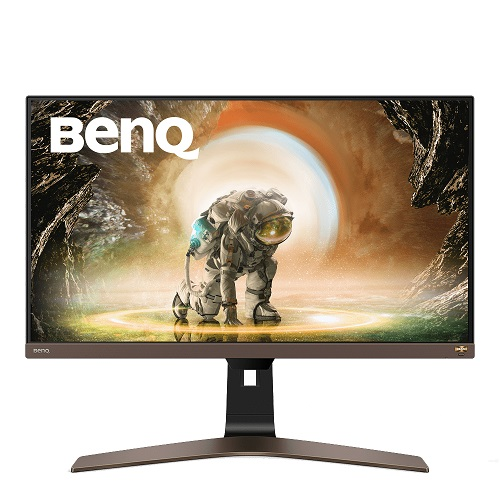
BenQ 28-inch 4K UHD IPS monitor with HDR10/HDRi, 90% P3, treVolo speakers and USB-C 60W charging.
Price unavailable
Price range updating
No verified price is available yet. Store offers will appear when merchants publish them.
Compare store prices
No live offers for this variant
Offers will appear when merchants publish them.
Loading history…
Product story
BenQ EW2880U is a 28-inch 4K UHD IPS monitor for home entertainment and desktop use. BenQ lists 3840 × 2160 resolution, 60Hz refresh, HDR10, 90% P3 gamut, HDRi, USB-C with 60W power delivery and integrated treVolo speakers. Confirm package contents and regional warranty before purchase. Follow the BenQ EW2880U specification page and user guide for exact setup details. Actual display modes depend on source hardware, cable and software. Current price, stock, included regional accessories and local warranty are separate and should be confirmed with the Bangladesh seller.
The model code is EW2880U, not EW2880U-JP, EW2780U or another BenQ entertainment display. Match the box and rear label to the invoice. The exact model-specific BenQ specification page is the reference for resolution, ports, brightness and color information. Follow the BenQ EW2880U specification page and user guide for exact setup details. Actual display modes depend on source hardware, cable and software. Current price, stock, included regional accessories and local warranty are separate and should be confirmed with the Bangladesh seller.
The display measures 28 inches diagonally and has a 3840 × 2160 UHD resolution in a 16:9 format. It provides fine text and image detail for desktop work, streaming and 4K video. Operating-system scaling can improve text comfort. The high pixel count also requires a compatible GPU and signal path. Follow the BenQ EW2880U specification page and user guide for exact setup details. Actual display modes depend on source hardware, cable and software. Current price, stock, included regional accessories and local warranty are separate and should be confirmed with the Bangladesh seller.
BenQ specifies an IPS panel and 178-degree horizontal and vertical viewing angles. IPS is suited to shared viewing and general desktop use, but unit-level uniformity and calibration are not guaranteed by panel type alone. Place the screen to reduce reflections and use a comfortable viewing distance. Follow the BenQ EW2880U specification page and user guide for exact setup details. Actual display modes depend on source hardware, cable and software. Current price, stock, included regional accessories and local warranty are separate and should be confirmed with the Bangladesh seller.
EW2880U supports HDR10 signal and BenQ HDRi picture modes. BenQ lists 300 nits typical brightness; this is a conventional HDR monitor rather than a high-brightness local-dimming display. HDR impression depends on source content, mode, room lighting and settings. HDR format support alone does not guarantee strong highlight impact. Follow the BenQ EW2880U specification page and user guide for exact setup details. Actual display modes depend on source hardware, cable and software. Current price, stock, included regional accessories and local warranty are separate and should be confirmed with the Bangladesh seller.
BenQ specifies 90% P3 color gamut. Gamut coverage describes a color range rather than calibration accuracy. The product specification lists 1.07 billion display colors, but no unit-specific calibration report was verified. For color-critical work, use a calibrated unit and a managed color workflow. Follow the BenQ EW2880U specification page and user guide for exact setup details. Actual display modes depend on source hardware, cable and software. Current price, stock, included regional accessories and local warranty are separate and should be confirmed with the Bangladesh seller.
The refresh rate is 60Hz and response time is listed at 5ms GTG. This display is designed for entertainment and everyday computing, not high-refresh competitive gaming. Response time does not equal input lag. Choose suitable system display settings and confirm 4K at 60Hz with the connected source. Follow the BenQ EW2880U specification page and user guide for exact setup details. Actual display modes depend on source hardware, cable and software. Current price, stock, included regional accessories and local warranty are separate and should be confirmed with the Bangladesh seller.
USB-C carries video and data and provides up to 60W power delivery according to BenQ product material. A compatible laptop may use one cable for display and charging, subject to its power requirements. Check the cable and host support. The 60W limit may not sustain every high-performance laptop under load. Follow the BenQ EW2880U specification page and user guide for exact setup details. Actual display modes depend on source hardware, cable and software. Current price, stock, included regional accessories and local warranty are separate and should be confirmed with the Bangladesh seller.
The product offers HDMI, DisplayPort and USB-C inputs. Check the BenQ manual for exact connector versions and supported 4K timings. Use a cable rated for 3840 × 2160 at 60Hz. Confirm HDR and HDCP support for protected streaming content on the selected input. Follow the BenQ EW2880U specification page and user guide for exact setup details. Actual display modes depend on source hardware, cable and software. Current price, stock, included regional accessories and local warranty are separate and should be confirmed with the Bangladesh seller.
BenQ includes treVolo audio with integrated speakers, listed as 3W × 2 in the catalog. Built-in sound is convenient for calls, films and everyday listening, but may not replace external speakers in a larger room. Audio output and volume depend on source routing and the chosen input. Follow the BenQ EW2880U specification page and user guide for exact setup details. Actual display modes depend on source hardware, cable and software. Current price, stock, included regional accessories and local warranty are separate and should be confirmed with the Bangladesh seller.
The EW2880U package may include a remote control, but contents can vary by market. A remote can make picture mode and volume changes easier from a sofa or shared space. Verify its inclusion and batteries with the local seller. Use on-screen controls if the remote is absent or unavailable. Follow the BenQ EW2880U specification page and user guide for exact setup details. Actual display modes depend on source hardware, cable and software. Current price, stock, included regional accessories and local warranty are separate and should be confirmed with the Bangladesh seller.
BenQ lists eye-care functions such as low blue light and flicker-free operation. These options may help adjust viewing for long sessions, but they do not remove the need for comfortable brightness, room lighting and breaks. Choose settings that remain readable and natural for the room. Follow the BenQ EW2880U specification page and user guide for exact setup details. Actual display modes depend on source hardware, cable and software. Current price, stock, included regional accessories and local warranty are separate and should be confirmed with the Bangladesh seller.
For a PC, connect through DisplayPort, HDMI or compatible USB-C and select 3840 × 2160 at 60Hz. Confirm the active signal in system display settings. For a laptop using USB-C, verify video Alt Mode and charging capability. Enable HDR only when the source, OS, content and display mode are correctly configured. Follow the BenQ EW2880U specification page and user guide for exact setup details. Actual display modes depend on source hardware, cable and software. Current price, stock, included regional accessories and local warranty are separate and should be confirmed with the Bangladesh seller.
For consoles, check the model’s supported 4K and HDR output and the monitor’s input timing. 60Hz is the display’s maximum refresh. Some games or older devices may output lower resolution or refresh. HDCP and cable compatibility can affect protected 4K streaming; verify the complete signal path. Follow the BenQ EW2880U specification page and user guide for exact setup details. Actual display modes depend on source hardware, cable and software. Current price, stock, included regional accessories and local warranty are separate and should be confirmed with the Bangladesh seller.
The 4K panel and treVolo audio suit films, streaming and general desktop tasks. The 16:9 ratio matches common video formats. For design work, check color mode and calibrate the monitor; 90% P3 does not establish proofing accuracy. It is not a substitute for a calibrated reference display in professional grading. Follow the BenQ EW2880U specification page and user guide for exact setup details. Actual display modes depend on source hardware, cable and software. Current price, stock, included regional accessories and local warranty are separate and should be confirmed with the Bangladesh seller.
Stand height adjustment and pivot/tilt values need confirmation from the exact regional manual; existing catalog attributes may be retailer-derived. Verify ergonomic movement and VESA pattern before selecting an arm. Allow space for rear ports and cable bends and ensure the stand rests on a stable desk. Follow the BenQ EW2880U specification page and user guide for exact setup details. Actual display modes depend on source hardware, cable and software. Current price, stock, included regional accessories and local warranty are separate and should be confirmed with the Bangladesh seller.
Strengths include 4K detail, HDR10/HDRi modes, IPS viewing, USB-C 60W charging and built-in treVolo audio. Trade-offs include 60Hz maximum refresh, moderate HDR brightness and limited gamut versus professional reference displays. Match the monitor to entertainment, laptop docking and everyday use. Follow the BenQ EW2880U specification page and user guide for exact setup details. Actual display modes depend on source hardware, cable and software. Current price, stock, included regional accessories and local warranty are separate and should be confirmed with the Bangladesh seller.
Inspect the panel, remote, stand, ports, speakers and included power/video/USB cables on delivery. Retain the serial label, invoice and packaging during the return period. Clean the screen with microfiber; do not spray liquid directly onto the surface. Keep vents clear and follow BenQ setup instructions. Follow the BenQ EW2880U specification page and user guide for exact setup details. Actual display modes depend on source hardware, cable and software. Current price, stock, included regional accessories and local warranty are separate and should be confirmed with the Bangladesh seller.
For Bangladesh purchases, confirm current price, stock, delivery, included remote and cables, return/dead-pixel terms and serial-specific warranty provider. The catalog’s three-year entry is not proof of local serial coverage. Ask for the exact EW2880U version and written service terms. Follow the BenQ EW2880U specification page and user guide for exact setup details. Actual display modes depend on source hardware, cable and software. Current price, stock, included regional accessories and local warranty are separate and should be confirmed with the Bangladesh seller.
BenQ specifies a 28-inch 3840 × 2160 IPS display, 60Hz refresh, 300-nit typical brightness, 90% P3, HDR10 and 5ms GTG. The monitor also has HDRi, treVolo audio and USB-C with 60W power delivery. Confirm local package, ports and warranty with seller. Follow the BenQ EW2880U specification page and user guide for exact setup details. Actual display modes depend on source hardware, cable and software. Current price, stock, included regional accessories and local warranty are separate and should be confirmed with the Bangladesh seller.
Helpful answers
Product-specific answers maintained with the catalog information.
BenQ lists 3840 × 2160 4K UHD resolution at 28 inches.
EW2880U is a 60Hz monitor designed for entertainment and desktop work.
BenQ specifies an IPS panel with 178-degree viewing angles.
It supports HDR10 input and BenQ HDRi picture modes.
BenQ lists USB-C power delivery up to 60W for compatible devices.
Yes, it includes BenQ treVolo speakers; verify package and regional configuration.
Use a compatible input, cable and source, then confirm 3840 × 2160 at 60Hz in settings.
Its maximum refresh is 60Hz, so it is not a high-refresh competitive gaming display.
Confirm the serial-specific provider, coverage term and service location with the seller.
Customer community
Become a merchant
Join BiponiBD, publish accurate offers and start free.