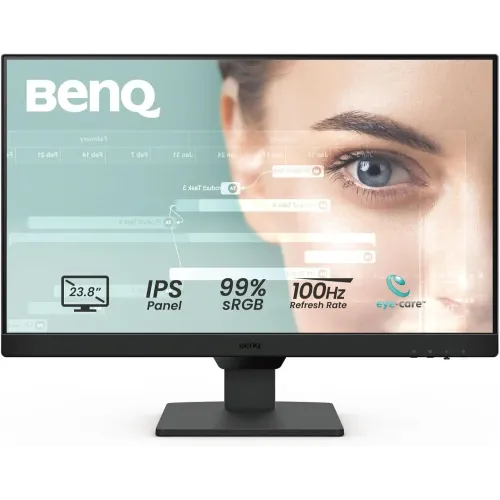
BenQ GW2490 23.8-inch Full HD 100Hz IPS Eye-Care Monitor
The BenQ GW2490 is a 23.8-inch Full HD IPS monitor for work, study, browsing, video and casual gaming. BenQ specifies a 1920 × 1080 panel, 16:9 aspect ratio, 250 nits typical brightness, 1300:1 native contrast, 99% sRGB gamut and 178° viewing angles. Its 100Hz maximum refresh rate can make scrolling and supported motion look smoother than 60Hz when the computer and selected connection deliver compatible frames. The panel does not increase the computer’s frame rate by itself.
Refresh rate, connections and source setup
The GW2490 provides two HDMI 1.4 inputs and one DisplayPort 1.2 input. Connect a compatible computer, console or media source, select the matching input and choose 1920 × 1080 at 100Hz in the operating system or source settings. If 100Hz is unavailable, check the cable, graphics output, driver, monitor input and display mode. The monitor’s published specs do not list VGA or USB-C. Keeping multiple HDMI sources connected can be convenient, while DisplayPort offers another digital input for a desktop computer.
The monitor supports BenQ’s eye-care and adaptive sync features, including MediaSync/variable refresh in supported configurations. Adaptive refresh requires compatible graphics hardware, drivers and settings; the supported range can vary by source and should be verified for your system. Refresh rate is the display’s update frequency, while frame rate is set by the computer or console.
IPS image and colour
The IPS panel’s 178° horizontal and vertical viewing-angle rating supports viewing from off-centre positions. BenQ lists 99% sRGB colour gamut, 250 nits brightness and 1300:1 contrast. Gamut coverage does not mean the screen is factory calibrated or suitable for colour-critical work without verification. Matte display coating helps reduce reflections, but strong light can still affect visibility. Full HD on a 23.8-inch monitor is a familiar desktop format; users who want more fine detail or workspace can compare a QHD monitor at a similar size.
Eye-care modes and Brightness Intelligence
BenQ lists Brightness Intelligence Gen2, Low Blue Light Plus and Flicker-Free technology. Brightness Intelligence adjusts the displayed image based on ambient lighting and content to help maintain a comfortable viewing level. Low Blue Light Plus and modes such as ePaper, Coding, Care and Cinema can be selected in the on-screen menu. These settings may change brightness, contrast and colour appearance; choose the mode that suits the task. They are display features, not medical guarantees.
5ms GtG response and AMA
BenQ specifies a 5ms grey-to-grey response time and AMA (Advanced Motion Acceleration) support. Response behaviour depends on the selected overdrive setting, refresh rate and content. A stronger setting may reduce some transitions but can also produce overshoot. Try the available AMA level with your normal games and applications and use the setting that looks cleanest. The GW2490 is a 100Hz everyday IPS monitor, not a high-refresh esports model.
Built-in speakers and audio connections
The monitor includes stereo speakers rated at 2W per channel and a headphone jack. These speakers can provide basic system audio for meetings, tutorials or casual video without a separate speaker immediately. For fuller sound, music or gaming, external speakers or a headset may be preferable. Check the selected HDMI or DisplayPort source’s audio settings if sound does not play through the monitor.
Stand, VESA mounting and desk fit
The included stand tilts approximately −5° to +20°. Height adjustment, swivel and pivot are not listed for the standard GW2490; the GW2490T is a different variant with a different stand, so do not assume its ergonomics apply here. A 100 × 100 mm VESA mount is supported. With the stand, the monitor is approximately 540 × 182 × 408 mm (width × depth × height) and weighs 3.93 kg; without the stand it is about 540 × 61 × 343 mm. Check desk depth, cable clearance, arm capacity and fastener details before mounting.
Power and package contents
BenQ lists a built-in power supply rated for 100–240V AC. Typical power use is about 20W, maximum 30W and standby below 0.5W. Package contents and regional power cables can vary; confirm the local box contents with the seller. Use the on-screen menu to choose the input, sound level, colour mode and AMA setting. Disconnect power before cleaning and use a soft cloth on the matte screen.
Bangladesh price, stock and warranty
Local retailer pages checked for this review displayed approximately ৳16,000–৳20,000, with current stock labels varying. TechLand displayed ৳16,000 and in stock; Rose Tech listed ৳16,700 in stock; CTG Computer showed ৳17,300; Tech Platoon listed ৳20,000. Prices and stock can change, and the values are retailer asking prices—not a live BiponiBD offer or a market-wide guarantee. Confirm current stock, final checkout price, delivery charge, return conditions and exact GW2490 model before paying. Some Bangladeshi sellers advertise a three-year warranty; ask for the authorized service provider, coverage, exclusions and claim procedure in writing.
Who may choose the GW2490?
The BenQ GW2490 may suit a home office or study setup that needs a 23.8-inch IPS display, 100Hz refresh, multiple digital inputs, built-in basic audio and eye-care settings. It may not suit users who need a height-adjustable stand, VGA, USB-C docking, a USB hub, QHD resolution or a dedicated high-refresh gaming panel. Compare those requirements and your preferred warranty channel before ordering.
BenQ GW2490 specifications
- Display: 23.8-inch IPS, LED backlight, matte coating
- Resolution: 1920 × 1080 Full HD; aspect ratio 16:9
- Refresh rate: 100Hz maximum
- Brightness/contrast: 250 nits typical; 1300:1 native
- Colour: 99% sRGB; 16.7 million colours
- Response time: 5ms GtG; AMA support
- Ports: 2 × HDMI 1.4, 1 × DisplayPort 1.2, headphone jack; no VGA/USB-C listed
- Audio: built-in speakers 2W × 2
- Eye-care: Brightness Intelligence Gen2, Low Blue Light Plus, Flicker-Free
- Stand: tilt −5° to +20°; no height/swivel/pivot adjustment listed
- Mount: VESA 100 × 100 mm
- Dimensions with stand: 540 × 182 × 408 mm; weight 3.93 kg
- Power: built-in 100–240V supply; 20W typical, 30W max, under 0.5W standby
- Warranty: some local retailers list three years; confirm written local coverage
Source and market notes
Technical specifications follow the BenQ GW2490 specification page and BenQ datasheet. Bangladesh seller prices and stock indicators are separate observations and should be confirmed at checkout.