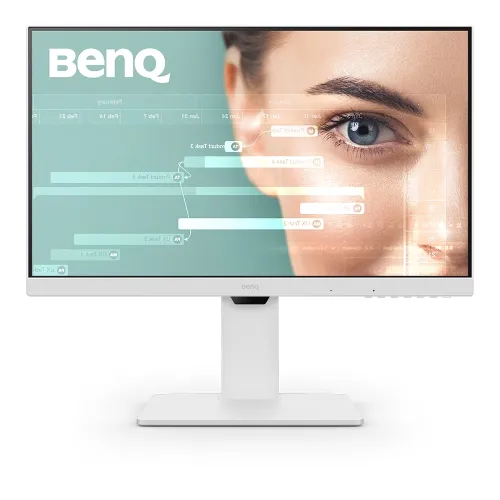
BenQ GW2786TC overview
BenQ GW2786TC is a 27-inch Full HD monitor built for home office, coding, study and multi-device desks. BenQ specifies a 1920 × 1080 IPS panel, 100Hz refresh, 250-nit typical brightness, 1300:1 native contrast and 99% sRGB color gamut. A USB-C connection supports DisplayPort Alt Mode, data and up to 65W power delivery. The monitor also has HDMI, DisplayPort input and output with MST, two USB-A ports, a height-adjustable stand, pivot, swivel and tilt, and BenQ Eye-Care options. This page describes the exact GW2786TC model; check your laptop USB-C functions and local package before relying on docking or charging.
Full HD resolution and 27-inch workspace
The 27-inch IPS display has a native 1920 × 1080 resolution, 16:9 aspect ratio and 82 pixels per inch. Full HD is widely supported by laptops and desktops and can be comfortable for everyday office applications. A 27-inch Full HD panel has lower pixel density than QHD at the same size, so text and fine graphics may appear less crisp at close viewing distances. Adjust system scaling, font size and monitor distance for your eyes. The matte screen coating reduces reflections, while the 178-degree left/right viewing angle helps the image remain viewable from an offset seat.
100Hz refresh and response behavior
BenQ lists a 100Hz refresh rate and 5ms GtG response time. A 100Hz mode can make cursor movement and scrolling look smoother than 60Hz when the computer supplies the matching signal. Response time is not the same as refresh rate; neither figure guarantees a particular gaming result. Select 1920 × 1080 at 100Hz in the operating system, and check the cable and output if this mode is missing. The GW2786TC is a productivity monitor with a higher-than-60Hz refresh, rather than a dedicated high-refresh gaming display. Actual results depend on the source, connection, driver and selected mode.
USB-C single-cable laptop setup
The USB-C port supports DisplayPort Alt Mode, data and up to 65W Power Delivery. With a compatible laptop and USB-C cable, it can carry video and data while charging the computer through one connection. The laptop port must support video output and charging; the USB-C plug alone does not guarantee these functions. Confirm the laptop’s power requirement, because a computer that needs more than 65W may still require its own power adapter under heavy load. BenQ lists a USB-C cable among signal cables, with package details varying by region. If the display or charge does not work, verify the host port capability and cable first.
USB hub and external devices
The monitor has two USB Type-A downstream ports using USB 3.2 Gen 1, rated at 5Gbps, with 4.5W charging per port as listed by BenQ. USB-C provides the upstream data link when connected to a compatible computer. Attach keyboard, mouse or low-power accessories to the downstream ports and keep in mind that power and data availability depend on the upstream connection. This is a monitor hub, not a replacement for a powered desktop dock when several high-power devices are involved. Check system permissions and device compatibility for storage or specialist peripherals.
DisplayPort MST daisy-chain
BenQ specifies DisplayPort out with Multi-Stream Transport (MST), which can extend a compatible computer’s desktop to another display through a supported daisy-chain. The host graphics output and operating system must support MST. BenQ notes that Mac devices support daisy-chain through Thunderbolt, so standard MST behavior should not be assumed on every Mac. Connect the first monitor to the host and the next display to the monitor’s DP out, then configure extended displays in system settings. Resolution, refresh and the number of displays depend on the host bandwidth and display combination. This feature can reduce cable clutter but does not mean the monitor includes a full docking station.
Coding and picture modes
BenQ includes a Coding picture mode alongside Standard, sRGB, ePaper, Low Blue Light Plus, Color Weakness, Movie, Game, ECO, M-book, Care and User modes. The Coding preset is intended to tune contrast for reading code, while ePaper presents a monochrome reading style. These are image presets, not substitutes for calibrating color-critical work. Choose a mode suited to the task and compare text clarity at your preferred brightness. Switching modes can change color temperature and contrast. The monitor can also work as a standard display without the user choosing a specialized mode.
Eye-Care features and brightness sensing
BenQ lists Flicker-Free technology, Brightness Intelligence Gen2, Low Blue Light Plus, Color Weakness and ePaper features. Brightness Intelligence uses the monitor’s sensor and picture processing to respond to content and ambient conditions, according to BenQ’s product overview. Eye-CareU software offers timer, lighting and distance reminders on compatible computers. These features can help customize viewing, but they do not guarantee prevention or treatment of eye strain. Set room lighting and brightness comfortably, take regular breaks and follow the software support requirements. Some modes alter image appearance, so select a neutral preset for work requiring consistent color.
Ergonomic stand and portrait mode
The included stand supports tilt from -5 to +20 degrees, swivel 45 degrees left and right, 90-degree pivot and 130mm height adjustment. Portrait orientation can suit long code files, documents and web pages. The height range is measured by BenQ’s specification and can help align the display with a seated desk position. Rotate the panel carefully and check that cables have enough slack. The complete stand dimensions are 407.0–535.4 × 612.3 × 234.9mm in height, width and depth; portrait dimensions are also listed. Ensure the desk has enough depth for the base and keyboard.
Microphone and video conferencing
BenQ’s product overview describes an integrated noise-cancellation microphone. The manufacturer notes that this microphone works with laptops and external PCs when connected through USB-C. It is not a webcam, and the overview does not claim built-in video capture. For calls, confirm that the computer selects the monitor microphone as the input device and check application permissions. Microphone behavior depends on USB-C data connection, operating-system input settings and conference software. Users who need a camera should connect a separate webcam.
Color, brightness and contrast
BenQ specifies 250 nits typical brightness, 1300:1 native contrast, 99% sRGB gamut and 16.7 million display colors. These are manufacturer specifications and do not serve as an individual-unit calibration report. For general productivity and web content, the sRGB mode can be a useful starting point. For photo, print or design work, use a suitable calibrated workflow and verify the screen’s measured color performance. The monitor is not a high-brightness HDR display according to the specification reviewed; the page lists standard SDR characteristics. Avoid inferring professional color accuracy from gamut coverage alone.
Ports and compatibility
The specification lists one HDMI 1.4 input, one DisplayPort 1.2 input, one USB-C port with 65W Power Delivery, DisplayPort Alt Mode and data, DisplayPort out with MST, and two USB-A 3.2 Gen 1 downstream ports. HDCP 1.4 is specified. BenQ lists signal cables as HDMI 1.4 and USB-C, but notes that the supplied cables may vary by region. Connect the intended source and check the system’s recognized resolution and refresh. If your laptop lacks USB-C video, use HDMI or DisplayPort for image and a separate USB connection for hub functions if supported by your configuration.
Power, dimensions, VESA and weight
BenQ lists built-in power supply, 17.3W normal consumption, 120W maximum consumption, less than 0.5W in sleep mode and a 65W USB-C power delivery rating. The difference between maximum power draw and USB-C laptop charging describes separate operating requirements. Net weight is listed as 7.9kg with stand and 4.9kg without base. VESA mounting is 100 × 100mm. Confirm that a monitor arm can support the assembled weight and the correct VESA plate. Leave ventilation clearance and use the supplied power cable appropriate to the local market.
Strengths and practical limitations
The GW2786TC combines 100Hz Full HD, an ergonomic stand, 65W USB-C charging and data, a USB hub, MST daisy-chain, a coding picture mode and several Eye-Care options. The integrated noise-cancellation microphone is an additional convenience when a compatible USB-C host is connected. Practical limitations include Full HD pixel density at 27 inches, 250-nit typical brightness and the need for host support for USB-C video, charging, MST and microphone data. It has a 5ms GtG response rating and is primarily suited to productivity rather than competitive gaming. Choose it when connectivity and adjustability are more important than QHD resolution.
Warranty and Bangladesh purchase details
This review did not confirm current BiponiBD price, stock, delivery fee or local serial-specific warranty. Ask the seller for warranty period, service provider, coverage exclusions, dead-pixel policy, start date and invoice requirements in writing. BenQ’s US specification page is used for technical product data; its online store terms do not establish Bangladesh support. Confirm the exact regional unit and box contents, especially the USB-C cable and power cord. Retain the serial number, invoice and packaging so support can verify the purchased unit.
Setup and troubleshooting
Connect the monitor to the computer using USB-C for video, data and up to 65W charging when the laptop supports all three, or use HDMI/DisplayPort for video. Connect the USB-C data link for USB hub and microphone features. Set Full HD resolution and 100Hz in system display settings. For daisy-chain, use DP out and configure MST on a compatible host. If the USB devices are missing, check that the monitor’s upstream USB connection is active. If a laptop is not charging, check its USB-C charging support and power requirements. Adjust height, tilt, swivel and pivot only after ensuring the cable path is free.
Buyer checklist and summary
Before buying, confirm that the model label is GW2786TC and that your laptop supports USB-C DisplayPort video and charging if you want one-cable use. Check 65W is adequate for the computer, and confirm whether the local package includes the USB-C cable. Verify that MST works with your operating system if you plan to daisy-chain displays. Consider whether 27-inch Full HD is sharp enough for your viewing distance, and obtain local warranty terms from the seller. BenQ GW2786TC is a 27-inch IPS productivity monitor with 100Hz, 99% sRGB, USB-C 65W, a two-port USB hub, DisplayPort MST, ergonomic adjustments and BenQ Eye-Care features.