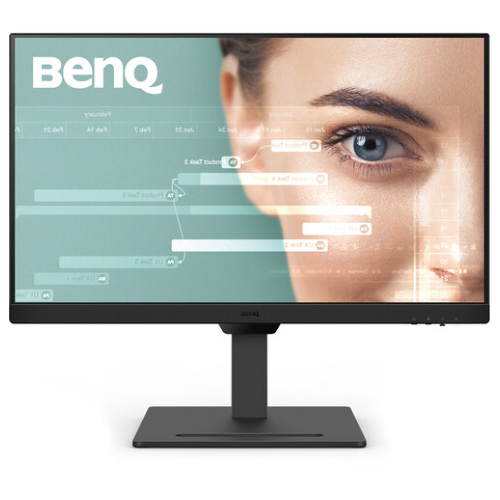
The BenQ GW2790T is a 27-inch Full HD IPS monitor with 100Hz, 99% sRGB, a fully adjustable stand, built-in 2W × 2 speakers and BenQ eye-care functions. The official specification lists dual HDMI 1.4 and DisplayPort 1.2, plus 100 × 100mm VESA mounting. Read the full specifications and Bangladesh purchase notes below.
Overview and intended use
The BenQ GW2790T is a 27-inch Full HD IPS monitor with a 100Hz refresh rate, 99% sRGB coverage, built-in 2W × 2 speakers and a height-adjustable stand. Its 1920 × 1080 resolution and everyday connection options suit home offices, study desks, video calls and general entertainment. BenQ’s official specification also lists eye-care modes such as Brightness Intelligence Gen2, Low Blue Light, Flicker-free, ePaper, Color Weakness and Eye Reminder.
This model prioritizes a comfortable, adjustable workstation and common desktop tasks. At 27 inches, Full HD offers a large screen but lower pixel density than a same-size QHD display. If you work with dense text, spreadsheets or fine image details at close range, compare QHD options. The 100Hz mode is smoother than 60Hz when the computer can output it, but the 5ms GtG response specification does not make this a dedicated high-speed esports monitor.
Screen, panel and resolution
BenQ specifies a 27-inch IPS screen with 16:9 aspect ratio, 1920 × 1080 resolution, LED backlight, matte coating and 82 pixels per inch. IPS viewing angles are listed as 178°/178° at a contrast threshold of at least 10:1. The anti-glare finish helps reduce reflections from ordinary indoor lighting, although no matte surface can eliminate bright reflections from a window or lamp placed directly in front of the display.
The 27-inch Full HD format gives room for larger application windows and readable content, but the same pixel count is spread across more area than a smaller FHD monitor. Small fonts and fine diagonal lines may appear less sharp from close seating. Scaling can make interface controls larger but does not add panel detail. Consider viewing distance and whether you value pixel density or a broad workspace more.
100Hz refresh and compatible setup
BenQ lists a maximum refresh rate of 100Hz. Compared with 60Hz, a 100Hz mode can make scrolling, pointer movement and supported video or games look smoother. The graphics device must output the mode, and the display connection, cable, adapter, dock and operating-system settings can all affect the available refresh rate. Confirm that the system reports 1920 × 1080 at 100Hz after connecting.
A 100Hz display does not force applications to render at 100 frames per second. Games may run below that depending on hardware and settings, while video content has its own frame cadence. This monitor is designed for everyday work and entertainment, with moderate gaming capability rather than competitive high-refresh performance. Use a direct HDMI or DisplayPort connection when diagnosing a missing mode and consult the source device’s output limits.
Brightness, contrast and color
BenQ lists 250 nits typical brightness, 1300:1 native contrast, 99% sRGB coverage and 16.7 million colors. These figures describe the model’s published specifications. They are not a unit-by-unit calibration report and do not establish color uniformity, factory accuracy or a specific delta-E value. The display includes several color modes, including Standard, User, Game, ePaper, Care, Coding, Cinema and M-book.
For everyday web and office use, sRGB coverage supports common online content. If you edit photos for print or need color-critical work, look for independent measurements and a calibrated workflow. The 250-nit typical brightness may be adequate for a controlled room but can be less comfortable in a bright environment. Set brightness based on ambient light and content, and avoid aiming the panel at direct sunlight.
Eye-care functions and software
BenQ lists Brightness Intelligence Gen2, Low Blue Light, Flicker-free, Color Weakness, ePaper and Eye Reminder features, together with Eye-CareU software. The official specifications also list EyeSafe 2.0, TÜV Eye Comfort 2.0, hardware low-blue-light and flicker-free certifications. These functions offer different display adjustments and reminders; choose modes based on your task and preference rather than assuming a single preset works best for every activity.
Eye-care labels are not medical treatments and cannot guarantee the absence of discomfort. Position the screen to reduce glare, adjust text size and brightness, keep a comfortable viewing distance and take breaks during long sessions. BenQ’s ePaper mode changes the display appearance for reading, while Coding and Care modes provide alternate presets. Check the current BenQ user guide and software compatibility for your operating system before depending on a specific function.
Connectivity, sound and peripherals
The official BenQ page lists two HDMI 1.4 inputs and one DisplayPort 1.2 input, plus a headphone jack. Some retailer summaries omit port versions or may use generic monitor specifications, so this product content follows BenQ’s specification page. USB-C, laptop charging and a USB hub are not listed. Check the video-output capabilities of your computer before purchase, especially if it relies on a USB-C adapter or dock.
The monitor includes two 2W speakers according to BenQ. They can provide basic sound for calls, tutorials and everyday video; listeners who want more bass or volume may prefer external speakers or a headset. A headphone jack is listed. To use audio through the monitor, select it as the output device when connecting over HDMI or DisplayPort and confirm the operating system sends sound through that connection.
Ergonomic stand and VESA mounting
BenQ lists 110mm height adjustment, -5° to +20° tilt, ±20° swivel and 90° pivot. These movements allow users to raise the panel, angle it, turn it left or right and rotate it to portrait orientation. The listed landscape dimensions are 612 × 241 × 424–534mm; portrait dimensions are 384 × 241 × 666mm. A 100 × 100mm VESA mount is available for compatible arms.
Check desk depth and stand footprint when planning a setup. For VESA mounting, confirm the arm’s load limit, screw length and clearance, and use the mounting instructions. Adjust the height so you do not need to hold your neck in an awkward position. Route cables with enough slack to accommodate pivot and lift. BenQ lists a 7.14kg net weight with stand and 4.2kg without the base; verify the manual for your exact regional unit.
Power, certifications and package
BenQ specifies a built-in power supply accepting 100–240V. Normal consumption is listed as 25W, maximum 35W and sleep-mode consumption below 0.5W. The page lists Energy Star 8.0, EPEAT Bronze and VESA MediaSync. Actual power draw depends on brightness, audio level, refresh mode and operating state. Use the supplied power connection and leave ventilation openings unobstructed.
The official accessories section lists a quick start guide, warranty card and safety instructions. BenQ notes that the HDMI signal cable may vary by region. A local seller may bundle a cable or other accessory, so check the box contents when ordering. Keep the carton and invoice until you are comfortable with the product and understand the local warranty and return conditions.
Bangladesh market and purchase checks
TechLand displayed ৳26,300 offer price, ৳30,000 regular price and In Stock when reviewed, and advertised a three-year warranty. Ryans showed Out of Stock and no current price and says it confirms final availability and price before processing. Tech Valley listed a separate snapshot near ৳26,000. Retail listings can change and do not establish a current BiponiBD offer, inventory or checkout total.
BenQ’s product family has regional model configurations; its official page notes specifications may vary by market. Before ordering, confirm the model code, HDMI/DisplayPort revisions, included cable, stand movements, final price, delivery charges and written serial warranty coverage. Ask which service provider handles a claim, which documents are needed and whether original packaging is mandatory. No hands-on unit inspection or BiponiBD offer is claimed in this description.
Key features
- 27-inch IPS display with Full HD 1920 × 1080 resolution, 16:9 aspect ratio and matte anti-glare surface.
- 100Hz refresh rate for smoother desktop movement and supported video compared with 60Hz; source hardware must support the mode.
- 99% sRGB coverage, 250-nit typical brightness and 1300:1 native contrast specified by BenQ.
- 5ms GtG response time; not represented as a 1ms gaming panel or an input-lag measurement.
- Two HDMI 1.4 inputs, one DisplayPort 1.2 input and a headphone jack.
- Two integrated 2W speakers provide built-in audio for calls, videos and basic desktop use.
- Ergonomic stand includes 110mm lift, -5°/+20° tilt, ±20° swivel and 90° pivot; 100 × 100mm VESA mount also listed.
- Brightness Intelligence Gen2, Low Blue Light, Flicker-free, Color Weakness, ePaper and Eye Reminder features are listed by BenQ.
- Eye-CareU software, TUV Eye Comfort 2.0, EyeSafe 2.0, hardware low-blue-light and flicker-free certification claims appear in BenQ specifications.
- Energy Star 8.0, EPEAT Bronze and VESA MediaSync are listed for the model specification.
Pros
- IPS viewing angles and 99% sRGB coverage suit general office, study and everyday web content.
- 100Hz refresh adds smoother scrolling and desktop motion than a standard 60Hz display when enabled by the source.
- A fully adjustable stand offers height, tilt, swivel and portrait pivot, with a 100 × 100mm VESA mounting option.
- Built-in 2 × 2W speakers, headphone jack and two HDMI inputs simplify a basic desktop setup.
- BenQ lists several eye-care modes and certifications, plus Energy Star and EPEAT Bronze information.
Cons and buying considerations
- Full HD on a 27-inch screen is less pixel-dense than QHD, which can be noticeable for small text and fine design details.
- 250-nit typical brightness may be modest in a bright room or near direct sunlight.
- HDMI 1.4 and DisplayPort 1.2 are the official listed port versions; do not assume the newer port revisions sometimes advertised on retailer listings.
- 5ms GtG and 100Hz are aimed at everyday productivity and moderate motion, not the fastest competitive gaming.
- Bangladesh price, stock and local warranty depend on seller; BiponiBD offer and serial coverage have not been verified.
Full specifications
- Brand: BenQ
- Model: GW2790T
- DisplaySize: 27 inches
- Panel: IPS
- Backlight: LED
- Resolution: 1920 × 1080 Full HD
- AspectRatio: 16:9
- RefreshRate: 100Hz
- Brightness: 250 nits typical
- ContrastRatio: 1300:1 native
- ViewingAngle: 178° horizontal / 178° vertical (CR ≥ 10)
- ResponseTime: 5ms GtG
- ColorGamut: 99% sRGB
- ColorSupport: 16.7 million colors
- PixelDensity: 82 PPI
- Surface: Matte / anti-glare
- ColorModes: M-book, Standard, User, Game, ePaper, Care, Coding and Cinema
- EyeCare: Brightness Intelligence Gen2; Low Blue Light; Flicker-free; Color Weakness; ePaper; Eye Reminder; Eye-CareU; TUV Eye Comfort 2.0, EyeSafe 2.0, Low Blue Light hardware and Flicker-free certifications listed by BenQ
- VideoPorts: 2 × HDMI 1.4; 1 × DisplayPort 1.2 (BenQ official specification)
- Audio: 2 × 2W integrated speakers; headphone jack
- Stand: Tilt -5° to +20°; swivel ±20°; pivot 90°; height adjustment 110mm
- VESA: 100 × 100mm
- Power: Built-in power supply; 100–240V; 25W normal, 35W maximum, <0.5W sleep
- Dimensions: Landscape with stand: 612 × 241 × 424–534mm (W×D×H); pivot: 384 × 241 × 666mm; without stand: 612 × 61 × 384mm
- Weight: 7.14kg with stand; 4.2kg without base (BenQ specification)
- Certification: Energy Star 8.0; EPEAT Bronze; VESA MediaSync
- Accessories: QSG, warranty card, safety instructions; HDMI cable may vary by region
- Warranty: Local sellers advertise 3 years; confirm Bangladesh serial eligibility and exact service terms.
- LocalMarketObservation: TechLand displayed ৳26,300 offer / ৳30,000 regular and In Stock; Ryans showed Out of Stock with no price. Retailer observations only.
- Sources: {"benq":"https://www.benq.com/en-me/monitor/home/gw2790t/spec.html","techland":"https://www.techlandbd.com/benq-gw2790t-27-inch-100hz-ips-monitor","ryans":"https://www.ryans.com/benq-gw2790t-eye-care-27-inch-fhd-display-professional-monitor","techvalley":"https://www.techvalley.bd/benq-gw2790t-27-inch-fhd-professional-monitor"}
- CheckedAt: 2026-11-08T20:16:01.390Z
Frequently asked questions
What are the display size and resolution?
BenQ specifies a 27-inch IPS panel with 1920 × 1080 Full HD resolution and 16:9 aspect ratio.
Does the GW2790T support 100Hz?
Yes. BenQ lists a 100Hz refresh rate. The computer, cable and selected display mode must support 1920 × 1080 at 100Hz; confirm the active signal in system display settings.
Which ports are included?
BenQ lists two HDMI 1.4 inputs, one DisplayPort 1.2 input and a headphone jack. Check the exact unit and manual; do not assume USB-C or a USB hub.
What color coverage and brightness are listed?
BenQ lists 99% sRGB coverage, 250 nits typical brightness and 1300:1 native contrast. These are model specifications, not calibration results for an individual panel.
Does it have built-in speakers?
Yes. BenQ lists 2W × 2 built-in speakers and a headphone jack for personal or external audio.
Can I rotate it to portrait orientation?
Yes. BenQ lists a 90-degree pivot, ±20-degree swivel, -5° to +20° tilt and 110mm height adjustment.
Can it be mounted to an arm?
BenQ lists 100 × 100mm VESA wall mounting. Verify arm capacity and the correct screws before installation.
What eye-care features does it have?
BenQ lists Brightness Intelligence Gen2, Low Blue Light, Flicker-free, Color Weakness, ePaper, Eye Reminder and Eye-CareU. It also lists EyeSafe 2.0 and TUV Eye Comfort/low-blue-light certifications. These features do not guarantee that eye fatigue will not occur.
Is it an HDR monitor?
BenQ’s specification page reviewed here does not list HDR support. Do not infer HDR capability from an unrelated model or seller title.
What is the response time?
BenQ lists 5ms GtG. That is distinct from input lag and from a 1ms MPRT specification.
What is the Bangladesh price and warranty?
TechLand displayed ৳26,300 offer price and In Stock when checked; Ryans showed Out of Stock and no price. Local sellers advertise three years, but confirm the current written terms and serial eligibility with your seller.
What is in the box?
BenQ lists quick start guide, warranty card and safety instructions; the signal cable may vary by region. Retailers may bundle additional items, so confirm the actual carton contents.
Source note: BenQ’s official specification page is the primary source for monitor features. Local price, availability and warranty are retailer observations and can change. No BiponiBD offer, live stock or hands-on test is claimed. Sources checked 2026-11-08T20:16:01.390Z.