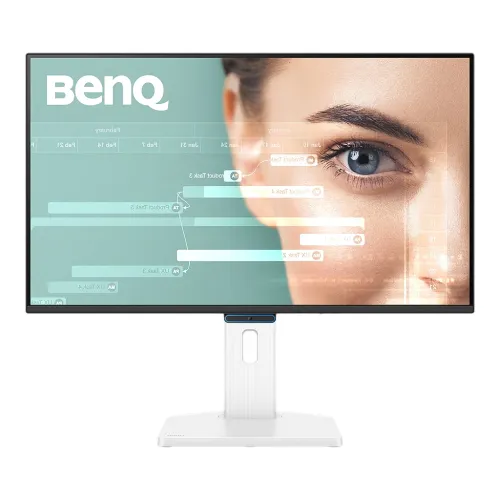
BenQ GW2790TC is a 27-inch Full HD IPS monitor designed for home-office and everyday use, with a manufacturer-listed 144Hz refresh rate, USB-C connectivity and an ergonomic stand. Its 1920 × 1080 panel, matte surface and eye-care options suit a mix of work, study, web browsing, video and casual gaming. It is important to distinguish this exact model from GW2790C, GW2790, GW2790TC-T and other similar products: ports, stand, refresh capability and regional contents can vary. Check that the carton and rear product label say GW2790TC before purchase.
Screen size and image resolution
The screen measures 27 inches diagonally and uses an IPS panel with 16:9 aspect ratio, LED backlight and 1920 × 1080 maximum resolution. BenQ lists a 597.89 × 336.31 mm display area, matte coating and approximately 82 pixels per inch. Full HD offers compatibility with many computers and leaves a lower rendering workload than QHD, but at 27 inches its pixel density is lower than QHD at the same size. This can be a reasonable choice for larger interface elements and typical desktop distance; users who prioritize fine text or dense creative work may prefer a higher resolution.
Refresh rate and response
BenQ specifies 144Hz refresh and 5ms GtG response time. A 144Hz refresh means the panel can update up to 144 times per second when the connected source, port, cable, resolution and selected mode support it. This can make pointer motion and compatible games appear smoother than a conventional 60Hz display. The 5ms GtG figure is the manufacturer’s stated response specification, not a promise that every pixel transition takes exactly that long. Confirm the available refresh rate in system display settings after connecting; source-device limits can reduce it.
USB-C connection and charging
The model includes one USB-C port supporting DisplayPort Alt Mode, data and up to 20W Power Delivery according to BenQ’s specification. A compatible laptop can send video and data while receiving up to the monitor’s stated 20W USB-C power, reducing cable clutter for light-duty setups. It is not a high-wattage laptop charger: a laptop that needs more power may continue discharging under load or require its original adapter. USB-C video requires a host port that supports DisplayPort Alt Mode or an equivalent compatible video mode; a charge-only USB-C port will not send a picture.
Video inputs and device compatibility
BenQ lists one HDMI 1.4 input, one DisplayPort 1.2 input and one USB-C input with DisplayPort Alt Mode. HDMI is suitable for compatible computers, consoles and media devices; DisplayPort and USB-C can connect supported PCs and laptops. The available official spec page lists HDCP 1.4. Check the graphics device, cable, adapter and output timing when planning 1920 × 1080 at 144Hz, particularly through a dock or converter. Package cable type may vary by region; the India specification lists HDMI 1.4 as a signal cable, so confirm Bangladesh package contents with the seller.
Color, brightness and contrast
The BenQ spec lists 300 nits typical brightness, 1500:1 native contrast, 99% sRGB, 16.7 million colors and 178°/178° viewing angles under its CR≥10 criterion. It offers Standard, Game, ePaper, Care and Cinema color modes and lists a gamma range of 1.8–2.6. These figures describe the manufacturer’s specification and do not imply calibration for every unit or color-critical production. For professional grading or print matching, verify calibration data and color profile independently. Room lighting, brightness selection and viewing distance influence comfort and perceived image quality.
Eye-care and viewing modes
BenQ lists Flicker-Free, Low Blue Light Plus, Color Weakness mode, ePaper mode and Visual Optimizer. The official product overview describes a built-in sensor that can adjust brightness and color temperature to ambient conditions, with a hotkey for user adjustment. Eye-care features are intended to offer display settings for different environments; they do not eliminate the need for sensible breaks, comfortable posture or appropriate lighting. Modes can change color and contrast, so choose a view that suits the task and adjust it when reading, watching video or editing images.
Stand, ergonomics and portrait use
The GW2790TC stand supports 150 mm height adjustment, tilt from -5° to 35°, swivel up to 45° left/right and 90° pivot according to the BenQ spec. These adjustments can help align the screen to desk height, share the display with another person or rotate it for portrait reading. The monitor also lists VESA 100 × 100 mm mounting. Pivoting changes the physical orientation; rotate the operating-system image as needed. Use the stand on a stable desk and check the vertical and depth clearance, especially when raising or rotating the screen.
Sound and headphone connection
The monitor has built-in 2W × 2 speakers and a headphone jack. Built-in speakers can handle basic system sounds, calls or casual video without an additional device, while headphones or dedicated speakers may provide more volume and richer audio. The available specification does not describe advanced surround processing or a subwoofer, so do not expect a full external speaker system from the integrated units. Confirm that audio is routed through the selected HDMI, DisplayPort or USB-C source and adjust the operating system’s output device if sound is absent.
Dimensions and weight
BenQ lists overall dimensions in H × W × D order as 547.3 × 611.9 × 241.6 mm, with height ranging from 397.3 to 547.3 mm in landscape when the stand is adjusted. In pivot orientation, listed dimensions are 675.5 × 355.5 × 241.6 mm. Without the base it measures 355.5 × 611.9 × 64.7 mm. Net weight is 6.7 kg with the stand and 4.2 kg without the base. Use the correct orientation when checking a desk, shelf or monitor arm; the panel’s rotation changes its overall height and width.
Power and energy
The monitor has a built-in power supply rated for 100–240V. BenQ lists normal power consumption at 12W, maximum consumption at 56W and sleep-mode consumption below 0.5W. Actual demand varies with brightness, USB-C power delivery, connected peripherals and usage. USB-C Power Delivery can supply up to 20W to a compatible host, while the monitor’s own maximum power figure accounts for operating conditions; these numbers describe separate parts of the setup and should not be confused with laptop charger requirements. Use a grounded outlet and the power cable appropriate to the delivered region.
Work, study and gaming fit
The 27-inch display gives room for documents, browser windows and video calls. IPS viewing angles and the adjustable stand can help in shared or flexible desk setups. The 144Hz refresh rate can make compatible games and everyday motion feel smoother, while Full HD is easier to drive than QHD for many computers. It is not positioned as a high-resolution or high-end esports panel, and its 5ms GtG response specification should be considered alongside the refresh rate. Select it for a balance of desktop productivity, eye-care controls, USB-C convenience and casual gaming rather than assuming a specialist gaming response profile.
Eye-care software and practical functions
BenQ lists Eye-CareU software, Visual Optimizer, ePaper and Color Weakness features, alongside color modes and AMA response adjustment. Feature names and availability can depend on region, software version and operating system. ePaper mode changes the image to a lower-contrast reading appearance; it is optional and not a separate e-ink display. Color Weakness mode changes color presentation for certain viewing needs but should not be treated as a medical device or a substitute for accessibility configuration in individual applications.
Exact-model verification and regional notes
BenQ’s GW2790TC specification lists 27-inch FHD IPS, 144Hz, USB-C with DisplayPort Alt Mode/data/20W Power Delivery, 1 HDMI 1.4, 1 DisplayPort 1.2, built-in speakers and an ergonomic height/swivel/pivot stand. Regional accessories and product pages can differ; cable contents may vary. BenQ’s regional website itself notes that users should choose the applicable region. The Bangladesh retailer listings advertise the model as a 144Hz display and one retailer advertises a three-year warranty, but those listings do not establish the warranty for a specific BiponiBD unit or prove current stock on this catalog.
Who should consider the GW2790TC
This monitor may suit someone who wants a 27-inch IPS Full HD screen, smoother 144Hz motion, a laptop-friendly USB-C video connection, up to 20W charging, integrated speakers and a stand with height, swivel and pivot adjustments. It may not suit users who need QHD or 4K detail, high-wattage laptop charging, multiple HDMI inputs, high-refresh QHD gaming or a verified local serial warranty before checkout. Compare the laptop’s USB-C capability, expected dock arrangement, desk measurements and resolution preference before deciding.
Setup checklist
Connect a compatible laptop through USB-C DisplayPort Alt Mode, or use HDMI/DisplayPort from a PC. Select 1920 × 1080 and choose 144Hz if offered by the source and chosen connection. If USB-C picture output fails, confirm that the host port carries video and that the cable supports it. Position the panel using the stand’s height, tilt, swivel or pivot range; turn on system portrait rotation when needed. Select an eye-care or color mode for the current task, route sound to the monitor when using its speakers, and confirm local accessories, display condition and written serial warranty at delivery.
Buying and warranty guidance
Local prices, stock, importer, included cable, service route and dead-pixel terms can change. Ask the seller to confirm that the unit is the exact GW2790TC, whether it is a Bangladesh-market or imported version, which cable is in the box, how the 144Hz mode is supported through the port you intend to use, and how USB-C power delivery is handled. Request the warranty duration, coverage exclusions, claim location and panel-pixel policy in writing for the serial number. The page does not promise a current BiponiBD price or local warranty until an actual BiponiBD offer is verified.
Summary
BenQ GW2790TC is a 27-inch 1920 × 1080 IPS monitor with manufacturer-listed 144Hz refresh, 5ms GtG, 300 nits typical brightness, 99% sRGB, USB-C with DisplayPort Alt Mode/data/up to 20W Power Delivery, HDMI 1.4, DisplayPort 1.2, 2W × 2 speakers and an adjustable stand. Its eye-care modes and portrait-capable stand support flexible everyday use. Confirm that the computer supports USB-C video or the intended input, and verify the exact region, live seller offer and serial-specific warranty before purchase.
Key features
- 27-inch Full HD 1920 × 1080 IPS display
- 144Hz manufacturer-rated refresh rate
- 5ms GtG response time
- USB-C with DisplayPort Alt Mode, data and up to 20W Power Delivery
- One HDMI 1.4 and one DisplayPort 1.2 input
- 2W × 2 built-in speakers and headphone jack
- 150 mm height-adjustable stand
- Tilt -5° to 35°, swivel ±45° and 90° pivot
- VESA 100 × 100 mm mounting
- 300 nits typical brightness, 1500:1 native contrast, 99% sRGB
- Flicker-Free, Low Blue Light Plus, ePaper and Visual Optimizer
- Eye-CareU software, Color Weakness mode and AMA
Advantages
- USB-C can carry video/data and provide up to 20W to a compatible laptop.
- The 144Hz refresh specification supports smoother motion than a typical 60Hz display.
- Ergonomic stand supports height, tilt, swivel and pivot adjustments.
- Built-in speakers and a headphone jack provide basic audio options.
- Eye-care modes, matte coating and IPS viewing angles fit mixed work and home use.
Limitations
- 1920 × 1080 on 27 inches has lower pixel density than QHD at the same size.
- USB-C Power Delivery is limited to 20W and cannot replace many laptop chargers.
- Only one HDMI and one DisplayPort input are listed.
- 5ms GtG is not a specialist ultra-low response claim.
- Local warranty and BiponiBD offer remain unverified.
Frequently asked questions
What is the native resolution?
BenQ lists 1920 × 1080 Full HD at a 16:9 aspect ratio.
What is the refresh rate?
BenQ specifies 144Hz. The source device and chosen port/cable must support the mode.
What response time is listed?
The manufacturer specification lists 5ms GtG.
Does the USB-C port carry video?
Yes. BenQ lists DisplayPort Alt Mode, data and up to 20W Power Delivery over USB-C. The host port must support video output.
Can USB-C charge a laptop?
It can provide up to 20W to a compatible host, which may be insufficient for laptops with higher power needs.
What other video inputs does it have?
One HDMI 1.4 and one DisplayPort 1.2 are listed.
Does it have built-in speakers?
Yes, BenQ lists 2W × 2 speakers and a headphone jack.
Can the stand pivot to portrait?
Yes. The specification lists 90° pivot, 150 mm height adjustment, ±45° swivel and -5° to 35° tilt.
What is its color coverage?
BenQ lists 99% sRGB, 16.7 million colors and 300 nits typical brightness.
Can I mount it on an arm?
Yes, it lists VESA 100 × 100 mm. Check the arm’s load rating and hardware.
Is this a gaming-only monitor?
BenQ positions the GW2790TC as an Eye-Care Home Office monitor, while its 144Hz refresh can also support compatible gaming.
What warranty is available in Bangladesh?
One Bangladesh retailer advertises three years; confirm the exact delivered serial’s importer, terms and dead-pixel coverage in writing.
Manufacturer sources: BenQ GW2790TC specifications and BenQ product overview. Local pricing and warranty are seller-specific and are not a BiponiBD offer. Reviewed 2026-11-08T22:24:19.182Z.