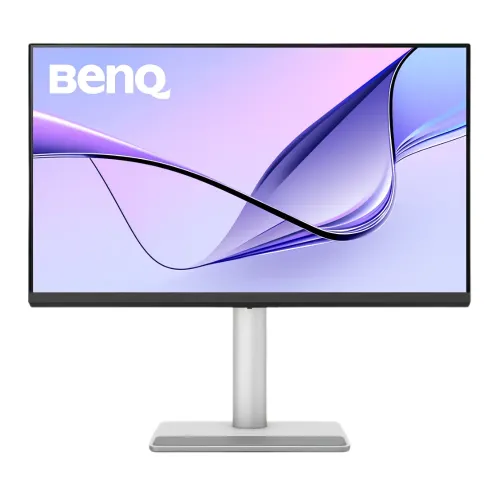
BenQ MA270UP overview
The BenQ MA270UP is a 27-inch 4K UHD IPS monitor designed for Mac-oriented work and general productivity. BenQ lists 3840 × 2160 resolution, 60Hz refresh, Nano Gloss screen coating, 99% sRGB and 95% P3 color coverage. Its USB-C port carries DisplayPort video and data with up to 90W power delivery, and the monitor includes 3W × 2 speakers and an ergonomic stand. The result depends on source device, cable, application color management and room lighting. Bangladesh stock, price, package and serial-specific warranty require seller confirmation.
Confirm the exact MA270UP model
Check the full MA270UP model code; it differs from MA270U, MA270S and larger MA-series monitors. The “UP” model has a Nano Gloss surface and USB-C power delivery rated up to 90W on BenQ’s specification page. Related models may have different coating, resolution, refresh or port configuration. Confirm the supplied unit label and regional package before purchase. The result depends on source device, cable, application color management and room lighting. Bangladesh stock, price, package and serial-specific warranty require seller confirmation.
27-inch 4K UHD image detail
The 16:9 IPS screen measures 27 inches and displays 3840 × 2160 pixels. 4K resolution provides fine text and image detail, though macOS or Windows scaling may be needed for comfortable interface size. IPS viewing angles help maintain color consistency across ordinary seating positions. Choose the native resolution for the clearest desktop and ensure the connected source supports 4K at 60Hz. The result depends on source device, cable, application color management and room lighting. Bangladesh stock, price, package and serial-specific warranty require seller confirmation.
Nano Gloss surface and room lighting
BenQ calls the panel coating Nano Gloss. A glossy finish can give images a clear, high-contrast appearance in controlled lighting, but it may reflect windows and lamps more visibly than matte displays. Place the monitor so bright sources do not reflect directly toward the viewer. Compare the surface type with your room lighting and working position before choosing it. The result depends on source device, cable, application color management and room lighting. Bangladesh stock, price, package and serial-specific warranty require seller confirmation.
Color coverage, modes and calibration
BenQ specifies 99% sRGB and 95% P3 coverage, plus Display P3, sRGB, HDR, M-Book, User, Game, ePaper and Cinema modes. The page lists factory calibration and ICCsync. Wide gamut and preset modes support color-aware workflows, but critical work still benefits from controlled lighting, color-managed applications and calibration checks appropriate to the output target. The result depends on source device, cable, application color management and room lighting. Bangladesh stock, price, package and serial-specific warranty require seller confirmation.
Brightness, contrast and HDR400
The official page lists 450 nits typical brightness, 400 nits HDR peak and a 1200:1 native contrast ratio. HDR modes include HDR10 and VESA DisplayHDR 400. The earlier catalog said HDR600; that is incorrect for this model. HDR400 support does not mean local dimming or premium HDR performance. Use HDR only when the source and content support it and evaluate the image in your workflow. The result depends on source device, cable, application color management and room lighting. Bangladesh stock, price, package and serial-specific warranty require seller confirmation.
Refresh rate and response behavior
The maximum refresh is 60Hz and the response time is listed as 5ms GTG. This is suitable for office, photo, video and general desktop work, not high-refresh competitive gaming. Motion clarity depends on transitions and settings. Select 3840 × 2160 at 60Hz in the operating system and avoid expecting the 120Hz or higher modes of other BenQ MA-series products. The result depends on source device, cable, application color management and room lighting. Bangladesh stock, price, package and serial-specific warranty require seller confirmation.
USB-C 90W laptop connection
USB-C supports DisplayPort Alt Mode, data and up to 90W power delivery. A compatible MacBook or laptop can send video and receive charging over one cable. Confirm the computer’s USB-C port supports display output; devices needing more than 90W may still require their own adapter under heavy load. BenQ lists 4K at 60Hz over the USB-C input. The result depends on source device, cable, application color management and room lighting. Bangladesh stock, price, package and serial-specific warranty require seller confirmation.
HDMI and downstream USB ports
The display includes two HDMI 2.0 inputs, one USB-C upstream input, two USB 3.2 Gen 1 Type-A downstream ports and one USB-C downstream port with up to 15W charging. The HDMI and USB-C cable bundle varies by region. Connect the correct upstream cable to access connected USB devices and confirm whether each port supplies the needed charging or data speed. The result depends on source device, cable, application color management and room lighting. Bangladesh stock, price, package and serial-specific warranty require seller confirmation.
MacBook-oriented setup and Display Pilot
BenQ positions the MA270UP for MacBook use and lists M-Book mode, Display Pilot 2 and ICCsync. M-Book mode is intended to align the monitor’s look with a MacBook display; actual appearance still depends on device, profile and lighting. Display Pilot features require supported software and connection. Check BenQ’s current software compatibility and operating-system requirements before relying on automation. The result depends on source device, cable, application color management and room lighting. Bangladesh stock, price, package and serial-specific warranty require seller confirmation.
Ergonomics, portrait pivot and stand
The stand supports 115mm height adjustment, tilt from -5 to +20 degrees, ±15-degree swivel and 90-degree pivot. VESA 100 × 100mm mounting is available. Auto Pivot is listed. Set the screen at a comfortable height and allow clearance when rotating to portrait. The stand footprint and cable path should be planned before installation on a small desk. The result depends on source device, cable, application color management and room lighting. Bangladesh stock, price, package and serial-specific warranty require seller confirmation.
Built-in speakers and audio output
BenQ lists built-in 3W × 2 speakers and a headphone jack. These speakers can handle calls and basic desktop audio, while external speakers or headphones may deliver fuller sound. The official specification does not list a built-in microphone; use the laptop or an external microphone for meetings. Select the monitor audio device after connecting HDMI, USB-C or another supported input. The result depends on source device, cable, application color management and room lighting. Bangladesh stock, price, package and serial-specific warranty require seller confirmation.
Windows and other device compatibility
Although marketed for MacBook, the monitor accepts standard HDMI and DisplayPort Alt Mode USB-C signals and can also work with compatible Windows PCs and other devices. Check the source output, cable and HDCP support for protected content. The USB-C hub and 90W charging work only when the host and cable support the relevant functions. The result depends on source device, cable, application color management and room lighting. Bangladesh stock, price, package and serial-specific warranty require seller confirmation.
Strengths and practical trade-offs
Advantages include sharp 4K IPS detail, Nano Gloss coating, broad sRGB/P3 coverage, multiple Mac-oriented color modes, 90W USB-C, USB hub, 3W speakers and a fully adjustable pivot stand. Trade-offs include 60Hz refresh, glossy reflections in bright rooms, DisplayHDR 400 rather than HDR600, and USB-C power limits for laptops requiring more than 90W. The result depends on source device, cable, application color management and room lighting. Bangladesh stock, price, package and serial-specific warranty require seller confirmation.
Setup and image configuration
Connect through USB-C for laptop video, data and charging, or use HDMI for desktop sources. Set 3840 × 2160 at 60Hz, select an appropriate color preset and adjust brightness to room lighting. For color work, use a consistent mode and color-managed application. If the computer detects only a lower resolution, check cable capability, port selection, driver and any dock bandwidth limit. The result depends on source device, cable, application color management and room lighting. Bangladesh stock, price, package and serial-specific warranty require seller confirmation.
Desk placement and care
Position the glossy screen away from direct reflections and keep the arm/stand clear for height and pivot adjustments. Clean the screen with a soft microfiber cloth and avoid pressure or spraying liquid directly onto the surface. At delivery, inspect panel condition, stand movements, USB ports, speakers, USB-C charging, model label and included cable set during the return period. The result depends on source device, cable, application color management and room lighting. Bangladesh stock, price, package and serial-specific warranty require seller confirmation.
Bangladesh purchase checklist
Before purchase in Bangladesh, confirm current stock and price, exact MA270UP model (not MA270U/MA270S), new condition, 90W USB-C operation, Nano Gloss panel, included stand, power adapter and cables, return/dead-pixel policy, delivery and the seller’s written serial-specific BenQ warranty provider and duration. Ask for the warranty term on the invoice and verify local service coverage. The result depends on source device, cable, application color management and room lighting. Bangladesh stock, price, package and serial-specific warranty require seller confirmation.
Frequently asked questions
The MA270UP is a 27-inch 3840 × 2160 IPS monitor with Nano Gloss coating, 60Hz refresh, 99% sRGB, 95% P3, HDR10/DisplayHDR 400 and USB-C with 90W power delivery. It has two HDMI 2.0 inputs, USB-A/C downstream ports, 3W × 2 speakers and an adjustable pivot stand. Confirm the exact model and local warranty before ordering. The result depends on source device, cable, application color management and room lighting. Bangladesh stock, price, package and serial-specific warranty require seller confirmation.
Who should consider this display
Consider the MA270UP if you want 4K detail, a glossy screen and one-cable USB-C charging for a compatible laptop. It suits office, creative and MacBook-centered desks where 60Hz is enough. Compare a matte panel for bright rooms, higher refresh for gaming, or a higher-power dock monitor if your computer needs more than 90W. The result depends on source device, cable, application color management and room lighting. Bangladesh stock, price, package and serial-specific warranty require seller confirmation.
Product summary
Match the display to your room, workflow and charging requirement. Nano Gloss can look clear in controlled light but may reflect bright surroundings. USB-C power is capped at 90W, refresh at 60Hz, and HDR is DisplayHDR 400. Check host compatibility, local offer and warranty with the seller before payment. The result depends on source device, cable, application color management and room lighting. Bangladesh stock, price, package and serial-specific warranty require seller confirmation.