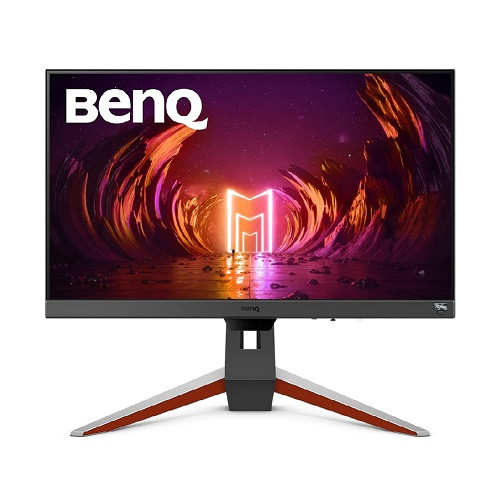
BenQ MOBIUZ EX240 is a 23.8-inch Full HD IPS gaming monitor with a manufacturer-listed 165Hz refresh rate. The exact EX240 specification lists 1ms MPRT and 2ms GtG response measurements, HDR10, FreeSync Premium, built-in speakers, an integrated USB hub and a stand with height, tilt and swivel adjustment. This page covers EX240. It is not the VA-panel EX240N or another MOBIUZ model, which can have different panel, response, ports and ergonomic details. Check the product label and exact suffix on the carton before purchase.
Screen size and resolution
The panel measures 23.8 inches diagonally and uses 1920 × 1080 Full HD at a 16:9 aspect ratio. BenQ lists a matte screen surface, 93 pixels per inch and 527 × 296.5 mm display area in its datasheet. This resolution is widely supported by computers and consoles, and it generally requires less graphics performance than QHD at high frame rates. At a typical desk distance, Full HD provides a clear gaming and desktop image; buyers who want more workspace or finer text may prefer a higher-resolution display.
Refresh rate and response measurements
BenQ specifies a 165Hz refresh rate, 1ms MPRT and 2ms GtG. MPRT and GtG describe different response measurement methods and should not be compared as if they were the same. MPRT modes can change backlight behavior and perceived brightness. A 165Hz mode requires a compatible graphics source, cable, port and selected timing. After connecting, choose 1920 × 1080 and the desired refresh rate in the operating system or GPU control panel, then confirm the value in the monitor information screen.
FreeSync Premium and motion
BenQ lists FreeSync Premium support, which can synchronize refresh behavior with a compatible AMD graphics device to reduce tearing under supported conditions. The exact experience depends on source hardware, driver, cable, selected input, frame rate and configuration. The spec also lists motion blur reduction, AMA and gaming controls such as FPS mode, Color Vibrance and Light Tuner. These options affect image behavior; review the manual if a setting reduces brightness or cannot be combined with adaptive sync at the chosen refresh mode.
HDR10 and HDRi modes
BenQ lists HDR10 and HDRi modes, including Game HDRi and Cinema HDRi. HDR10 is an input format; HDRi is BenQ image processing that adapts picture presentation. Neither label alone establishes a VESA DisplayHDR certification. The specification lists 350 nits typical brightness and 1000:1 native contrast, and it does not list a peak HDR luminance or local-dimming system. Treat HDR as a supported signal and mode feature rather than assuming high-end HDR brightness or certification.
Brightness, contrast and color
The exact-model specification lists 350 nits typical brightness, 1000:1 native contrast, 99% sRGB gamut, 16.7 million display colors and 178°/178° viewing angles at the stated contrast criterion. Color modes include sRGB, HDR, M-book, Cinema HDRi, Game HDRi, FPS, RPG, racing and ePaper. These specifications do not establish calibration, uniformity or color accuracy for every unit. For color-critical editing, verify measured calibration and an appropriate color profile rather than relying only on coverage and preset names.
Ports and USB hub
EX240 provides two HDMI 2.0 inputs, one DisplayPort 1.2 input, one USB Type-B upstream connection, two USB 3.0 downstream ports and a headphone jack. The two downstream USB ports function as a hub when the upstream connection is connected to a host; they do not make the monitor a USB-C dock. BenQ lists HDCP 2.2. Confirm HDMI/DisplayPort cable contents and port access for the local package; accessories can vary by region.
Built-in speakers and audio
The monitor includes two 2.5W speakers and a headphone jack. The speakers can provide basic game, video and system audio without separate speakers. Headphones or dedicated speakers may provide more volume or fuller bass. Select the display as the audio output device when using HDMI or DisplayPort, and adjust monitor volume if sound is missing. The technical specification does not describe a subwoofer or advanced multi-channel audio system.
Stand adjustment and mounting
The included stand supports 100 mm height adjustment, tilt from -5° to +15° and swivel up to 15° left/right. BenQ lists VESA 100 × 100 mm mounting. The specification does not list pivot, so portrait rotation should not be assumed from the stock stand. A compatible monitor arm can provide additional movement if its plate, fasteners and load rating match. Adjust the stand on a stable desk and check cable slack before swiveling or raising the panel.
Dimensions and weight
BenQ lists dimensions of 540 mm wide by 389.9–489.9 mm high by 252 mm deep with the base, with height depending on stand position. Without the base, the monitor is 540 × 344.9 × 76.7 mm. Net weight is 5.9 kg with the stand and 3.7 kg without the base. These dimensions help with desk, shelf and arm planning; leave room for the stand footprint, cable bends and ventilation. Package size and regional accessories may differ from the individual monitor dimensions.
Power and operating conditions
The power supply is built in and accepts 100–240V. BenQ lists normal consumption at 20W, maximum at 65W and sleep-mode consumption below 0.5W. Actual consumption changes with brightness, USB devices, speaker use and settings. Use the power cord supplied for the delivered region and a grounded outlet. The maximum figure is an electrical specification, not a prediction of constant use. If connecting USB peripherals, use the USB upstream cable and stay within the hub’s documented capability.
Eye-care and convenience features
BenQ lists Brightness Intelligence Plus, Flicker-Free, Low Blue Light, Color Weakness mode and ePaper mode. Brightness Intelligence Plus adjusts the viewing experience based on ambient light; the feature is intended for comfort and may change brightness or color temperature. Game and content presets are optional picture modes. Eye-care tools do not replace suitable room lighting, posture, breaks or professional advice. Choose settings for the current task and adjust them if the image looks too dim, warm or contrast-heavy.
Gaming, work and device compatibility
The 165Hz Full HD mode may suit PC players whose system can render high frame rates, while the IPS panel, speakers and USB hub can serve a mixed desk setup. BenQ lists PC, Mac, PS5, PS4, Xbox, mobile and notebook compatibility, subject to their video output and cable. Console output modes differ; do not assume every console supports 165Hz. For a PC, check that the source and chosen connection offer 1920 × 1080 at the intended refresh rate and enable FreeSync only when supported.
What is verified and what remains local
BenQ’s exact-model specification and EX240 datasheet support the screen, refresh, response, HDR, FreeSync, USB hub, speakers, stand, dimensions and power details in this page. A Bangladesh retailer lists a three-year warranty and a current price/stock snapshot, but that does not prove the warranty for a particular BiponiBD unit. Confirm the local importer, authorized purchase channel, serial eligibility, dead-pixel rules and service address in writing. No BiponiBD offer was verified during this review.
Who should consider EX240
Consider EX240 if you want a 23.8-inch Full HD IPS display with a 165Hz mode, adaptive sync, integrated speakers, USB-A hub, HDR10/HDRi modes and an adjustable stand. It may not suit users who need QHD resolution, USB-C video or laptop charging, pivot rotation, a verified HDR certification or a high-wattage docking setup. Match the graphics source and port to the desired refresh rate, and distinguish EX240 from the similar EX240N before buying.
Setup checklist
Connect through HDMI 2.0 or DisplayPort 1.2 and select 1920 × 1080 at 165Hz if offered. Enable FreeSync Premium through the monitor and compatible graphics settings. Connect the USB Type-B upstream cable if you plan to use the two downstream USB 3.0 ports. Select the display as an audio output device for the built-in speakers. Set height, tilt and swivel for a comfortable view; check the manual before combining motion-blur reduction and adaptive sync. Confirm serial, cables and warranty on delivery.
Purchase and warranty checklist
Before payment, confirm the label says EX240 rather than EX240N, verify the seller’s current stock and price, and ask which HDMI/DisplayPort and USB cables are included. Request the local warranty period, service provider, serial registration steps, dead-pixel policy, return window and panel coverage in writing. BenQ publishes authorized dealer/service information for Bangladesh; use the exact seller and invoice to verify the claim. Keep the carton and serial label until the return period has passed.
Summary
BenQ MOBIUZ EX240 is a 23.8-inch 1920 × 1080 IPS monitor with manufacturer-listed 165Hz refresh, 1ms MPRT / 2ms GtG, FreeSync Premium, HDR10/HDRi, 350 nits typical brightness, 99% sRGB, two HDMI 2.0 inputs, DisplayPort 1.2, a USB 3.0 hub and 2.5W × 2 speakers. Its stand adjusts height, tilt and swivel and supports VESA 100 × 100 mm mounting. It is distinct from EX240N. Confirm local offer and serial-specific warranty before purchase.
Key features
- 23.8-inch Full HD 1920 × 1080 IPS panel
- 165Hz refresh rate
- 1ms MPRT and 2ms GtG response ratings
- AMD FreeSync Premium support
- HDR10 input and BenQ HDRi modes
- 350 nits typical brightness and 1000:1 native contrast
- 99% sRGB color gamut and matte surface
- 2 × HDMI 2.0 and 1 × DisplayPort 1.2
- USB Type-B upstream and 2 × USB 3.0 downstream hub ports
- 2 × 2.5W built-in speakers and headphone jack
- 100 mm height, tilt -5° to +15°, swivel ±15°
- 100 × 100 mm VESA mounting
Advantages
- 165Hz Full HD refresh and FreeSync Premium are documented by BenQ.
- IPS panel and 99% sRGB cover common gaming and everyday tasks.
- Built-in dual speakers and a USB 3.0 hub add desk convenience.
- Height, tilt and swivel adjustments are listed on the stock stand.
- HDR10/HDRi modes and eye-care features provide several picture options.
Limitations
- Full HD provides less fine detail than QHD at similar screen sizes.
- No USB-C video or laptop charging is listed.
- The stock stand does not list pivot adjustment.
- HDR10/HDRi support does not establish VESA HDR certification.
- Local BiponiBD offer and serial-specific warranty remain unverified.
Frequently asked questions
What resolution does BenQ EX240 use?
The native resolution is 1920 × 1080 Full HD at a 16:9 aspect ratio.
What refresh rate does it support?
BenQ lists a maximum refresh rate of 165Hz. The source and chosen connection must support that timing.
What are the response ratings?
BenQ specifies 1ms MPRT and 2ms GtG; these use different measurement methods.
Does it support FreeSync?
Yes. BenQ lists AMD FreeSync Premium; compatibility depends on the graphics source and configuration.
Does it support HDR?
BenQ lists HDR10 and HDRi modes. The cited spec does not identify a VESA DisplayHDR certification.
Which video connections are available?
Two HDMI 2.0 inputs and one DisplayPort 1.2 input are listed.
Does it have a USB hub?
Yes. It has one USB Type-B upstream connection and two USB 3.0 downstream ports.
Are speakers built in?
Yes. BenQ lists two 2.5W speakers and a headphone jack.
Can the stand adjust in height?
Yes. It lists 100mm height adjustment, -5° to +15° tilt and up to 15° swivel per side.
Can it be mounted on an arm?
Yes. BenQ lists VESA 100 × 100 mm mounting; check the arm’s load rating and screws.
Is EX240 the same as EX240N?
No. EX240 is an IPS model and EX240N is a different model. Verify the full suffix because specifications can differ.
What warranty applies in Bangladesh?
A local retailer advertises three years, but confirm written serial-specific terms and authorized service for the exact unit.
Manufacturer sources: BenQ EX240 specifications, BenQ product overview and BenQ datasheet. Local pricing and warranty are seller-specific, not a BiponiBD offer. Reviewed 2026-11-08T22:39:29.797Z.