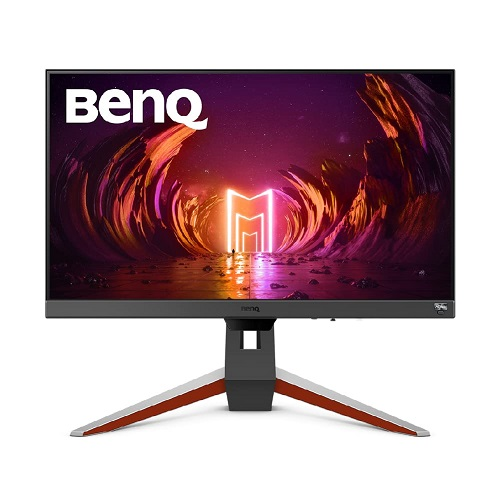
BenQ MOBIUZ EX240N: complete monitor guide
BenQ MOBIUZ EX240N overview
The BenQ MOBIUZ EX240N is a 23.8-inch Full HD gaming monitor with a VA panel, 165Hz refresh rate, HDR10 input support and built-in stereo speakers. It is designed for PC players who want smooth motion at 1920 x 1080 resolution, and it can also accept 1080p/120Hz console signals on supported PlayStation 5 and Xbox Series X|S setups. BenQ lists 250-nit typical brightness, a native 3000:1 contrast ratio, 178-degree horizontal and vertical viewing angles, and a matte screen coating. The model includes HDMI 2.0 and DisplayPort 1.2 inputs, a headphone jack, AMD FreeSync Premium, and monitor-side image and eye-care modes. Confirm the exact regional SKU, package contents, local stock, price and warranty card with the Bangladesh seller before ordering.
FHD resolution, pixel density and screen size
The EX240N uses a 23.8-inch diagonal VA LCD panel with LED backlighting and a maximum resolution of 1920 x 1080 pixels. The 16:9 aspect ratio is a familiar format for games, streaming video and everyday PC work. At this size and resolution the published pixel density is 93 pixels per inch, which balances desktop readability with a moderate graphics load. Full HD can be easier to drive at high frame rates than a higher-resolution gaming monitor, but the image has fewer pixels than QHD and 4K alternatives. The matte coating is intended to reduce reflections in ordinary indoor light; it does not remove every reflection or substitute for controlling bright windows and lamps. Choose the resolution and size based on desk distance, GPU capability and the applications you use.
VA panel, brightness and contrast
BenQ specifies a VA panel with a typical brightness of 250 nits and a native contrast ratio of 3000:1. VA technology can provide deeper dark tones than many conventional IPS panels, which may suit games and films viewed in a dim room. The stated 178-degree horizontal and vertical angles are measured at a contrast-ratio criterion; perceived contrast and color can still vary with viewing position. The 250-nit figure is typical SDR brightness, and HDR10 signal support should not be read as proof of high-end HDR brightness or local dimming. The published EX240N specification does not list VESA DisplayHDR certification or a local-dimming zone count. For accurate expectations, treat HDR10 as input compatibility and compare brightness, contrast, panel features and certification separately.
165Hz refresh rate and response settings
The monitor supports a maximum refresh rate of 165Hz at 1920 x 1080 according to BenQ's official specification. A higher refresh rate can show more frames per second than a 60Hz display when the computer or console provides those frames and the connection is configured correctly. BenQ lists 4ms gray-to-gray response time and 1ms MPRT; these are different measurement methods and should not be combined into a claim of 1ms GtG. MPRT mode may involve backlight behavior or trade-offs in brightness, so the experienced result depends on the selected settings. BenQ also includes AMA pixel overdrive controls. Use an appropriate DisplayPort or HDMI connection and confirm the host GPU output mode to enable the desired refresh rate.
Adaptive sync and HDR10 input
BenQ lists AMD FreeSync Premium support for variable refresh operation with compatible graphics hardware. Adaptive sync can reduce tearing when the frame rate varies within the supported range, but compatibility depends on the GPU, driver, display connection and game settings. HDR10 signal support allows compatible content to send HDR metadata to the monitor. EX240N's published 250-nit typical brightness and VA panel should be considered when setting expectations: HDR signal support alone does not establish a particular HDR certification, peak-brightness figure or reference HDR performance. BenQ's monitor modes include Game HDRi and Cinema HDRi, with selectable picture profiles. Try the standard SDR mode for desktop color and enable HDR only when the operating system, content and game support it.
Game modes and picture controls
BenQ lists several color and picture modes, including sRGB, HDR, M-book, Cinema HDRi, Game HDRi, FPS, RPG, racing game and ePaper. The monitor also includes controls such as Light Tuner, Color Vibrance and Black eQualizer, which adjust the presentation of shadows and color in supported game profiles. These options are intended to let users tune the image to different content; they do not change the source game's actual graphics or guarantee a competitive advantage. Brightness Intelligence Plus can adapt brightness and color temperature to ambient conditions. Picture settings are subjective, and some presets may alter color accuracy. For color-critical photography or print work, use a suitable calibrated display rather than treating gaming presets as a color-management system.
Eye-care features
BenQ lists Flicker-Free, Low Blue Light, ePaper and Color Weakness modes for the EX240N. Flicker-Free is designed to reduce visible screen flicker, while Low Blue Light and ePaper adjust the image for different viewing preferences. Color Weakness mode offers red and green filters intended to help some users distinguish color differences. Brightness Intelligence Plus adjusts brightness and color temperature based on the environment. These are comfort and accessibility features, not medical treatment, and individual results vary. Good lighting, readable text size, regular breaks and a comfortable viewing distance remain useful for long sessions. The display should be set to a brightness that fits the room rather than left at maximum for every task.
HDMI, DisplayPort and audio connections
The manufacturer specification identifies one HDMI 2.0 input, one DisplayPort 1.2 input and a headphone jack. This corrects the catalog's old HDMI field, which incorrectly stated two HDMI ports. The monitor also has a built-in power supply. BenQ's EX240N datasheet lists a 1.5-metre power cord and 1.5-metre HDMI cable among accessories, though package contents can vary by region and seller; confirm the Bangladesh package before relying on a cable being included. Connect a PC through DisplayPort or a suitable HDMI connection, then choose the desired resolution and refresh rate in the operating system or graphics settings. The headphone jack can route audio to wired headphones or external speakers.
Built-in stereo speakers
The EX240N includes two built-in speakers rated at 2.5 watts each. They can provide basic audio for system sounds, calls and casual viewing without adding desktop speakers. A monitor speaker system has limited enclosure volume and should not be assumed to match dedicated headphones or a separate speaker set for detailed music, competitive gaming cues or room-filling sound. The headphone output gives users an alternative when private listening or stronger audio is needed. Check the connected computer's audio output selection if sound does not play through the display. Speaker performance depends on source level, equalization, placement and the content being played.
Stand, tilt and VESA mounting
BenQ specifies a tilt range of -5 to +15 degrees and a 100 x 100mm VESA wall-mount pattern. The supplied stand is intended for basic tilt positioning; confirm any height adjustment or swivel features with the exact regional manual rather than assuming them from other MOBIUZ models. A compatible VESA arm can provide additional height or positioning flexibility, subject to the monitor's mounting requirements and the arm's load capacity. Keep the display stable and avoid over-tightening mounting hardware. The 16:9 panel is designed for landscape desktop use. Check desk depth, cable clearance and the final viewing height before installation.
Console and PC compatibility
BenQ's product page lists PC operation at 1080p up to 165Hz and console compatibility at 1080p/120Hz for PS5, Xbox Series X and Xbox Series S. Actual modes depend on the console, game, cable, input and display settings. A console does not automatically produce 120 frames per second in every title; supported games and performance modes are required. On PC, the graphics card must render the game at the chosen frame rate, and the display refresh rate must be selected in the operating system. This Full HD monitor can be a practical match for entry and mid-range gaming systems that prioritize frame rate over resolution. Buyers wanting 1440p, 4K, USB-C docking or a higher HDR tier should compare a different class of monitor.
Power, dimensions and desk setup
BenQ lists a 100-240V voltage rating and a built-in power supply. Its specification lists typical power consumption of 20W, maximum consumption of 40W and sleep-mode consumption below 0.5W. The EX240N's compact 23.8-inch size can fit smaller desks, but users should still allow room for the stand, connected cables and ventilation. The official listing and regional datasheet should be consulted for exact dimensions and weight for a particular package; measurements can differ from another EX240-series model. Place the screen so that the center is near a comfortable eye line and the panel does not face a strong reflection source. Disconnect power before moving or mounting the monitor.
Bangladesh price, warranty and purchase checks
The captured BiponiBD variant has no price, and this review did not verify a current exact-model Bangladesh checkout price from a seller. The variant price remains null rather than using an old or unrelated EX240 price. The catalog currently says three years warranty, but the official specifications page does not establish the coverage of this particular Bangladesh unit. Ask the retailer to confirm the local warranty card, service location, sealed-box status, exact model EX240N, package accessories, return conditions and stock. Check the carton label and invoice when the display arrives. Also confirm the serial number and whether warranty service is provided by the local authorized channel. Exact terms can vary by region and importer.
Who should consider the EX240N
The BenQ MOBIUZ EX240N can suit a gamer seeking a Full HD 165Hz VA monitor with adaptive sync, basic HDR10 input, built-in speakers and eye-care controls. Its combination of 23.8-inch size and 1080p resolution can make sense for compact desks and systems targeting higher frame rates. Its compromises are equally important: it is not a QHD or 4K screen, HDR10 input does not establish high-end HDR performance, and its speakers are modest in power. It also has just one HDMI input alongside one DisplayPort input, so users with multiple HDMI devices may need to switch cables or use a compatible switch. Compare the actual local price and warranty against other 24-inch gaming monitors before choosing.
Model identity and source notes
This record is specifically for BenQ MOBIUZ EX240N, the VA-panel model. It should not be confused with BenQ EX240, which is a separate model and may have different panel details, ports or connectivity. The official BenQ Asia Pacific EX240N specification page is the primary source for panel, resolution, refresh, response, brightness, contrast, color, features, audio, voltage and power figures. BenQ's official product page documents the gaming and console positioning. BenQ's EX240N datasheet supports the HDMI 2.0, DisplayPort 1.2, speaker and accessory details. Local price, exact warranty, regional contents and GTIN remain unverified in this catalog review. The product's brand association is corrected from “Others” to the existing active BenQ brand record.
Frequently asked questions
1. What is the native resolution of the BenQ EX240N?
The EX240N has a 1920 x 1080 Full HD resolution and a 16:9 aspect ratio.
2. What is the maximum refresh rate?
BenQ specifies up to 165Hz at 1920 x 1080 for compatible PC output.
3. Is the panel IPS or VA?
The EX240N uses a VA panel. It is distinct from other EX240-series models.
4. What response times does BenQ list?
BenQ lists 4ms gray-to-gray and 1ms MPRT; these are different measurements.
5. Does it support AMD FreeSync?
Yes. BenQ lists AMD FreeSync Premium support with compatible hardware and connections.
6. Does it support HDR?
It accepts HDR10 input and has HDRi picture modes; HDR10 support alone does not specify certification or peak brightness.
7. How many HDMI ports does it have?
BenQ specifies one HDMI 2.0 input and one DisplayPort 1.2 input. The previous catalog HDMI count was incorrect.
8. Does it include speakers?
Yes. It has two built-in speakers rated at 2.5 watts each.
9. Can PS5 or Xbox use 120Hz?
BenQ lists 1080p/120Hz console compatibility for PS5, Xbox Series X and Series S; the game must also support that mode.
10. Can I mount it on a monitor arm?
The official specification lists a 100 x 100mm VESA mounting pattern. Check the arm load rating and regional manual.
11. What is the price in Bangladesh?
A current exact-model Bangladesh checkout price was not verified; the variant price remains unset.
12. What warranty does this local unit have?
Confirm the Bangladesh warranty card, service provider and exact coverage with the seller before purchase.