Pros
- 240Hz refresh is suited to compatible high-frame-rate PC gaming.
- IPS panel, 99% sRGB and broad viewing angles.
- Integrated 2.1-channel speaker system and headphone output.
- Height, swivel and tilt adjustment plus VESA mounting.

All categories
 New condition
Monitors
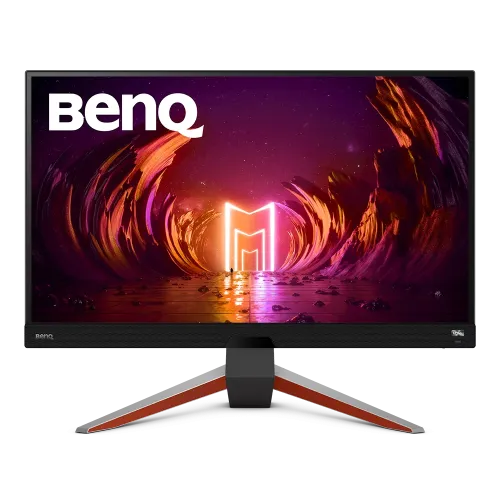
BenQ · MOBIUZ EX270M
27-inch Full HD IPS gaming monitor with 240Hz, HDR10, FreeSync Premium and 2.1-channel audio.
Price unavailable
Price range updating
No verified price is available yet. Store offers will appear when merchants publish them.
Compare store prices
No live offers for this variant
Offers will appear when merchants publish them.
Loading history…
Product story
The BenQ MOBIUZ EX270M combines a 27-inch 1920 × 1080 IPS panel with a 240Hz maximum refresh rate. BenQ's official specification also lists 1ms GtG and MPRT, 400-nit typical brightness, HDR10, FreeSync Premium, 99% sRGB and integrated 2.1-channel speakers. This is an FHD high-refresh monitor, not a QHD EX270QM. Check BenQ's EX270M-specific specification and guide for setup. Performance depends on the source device, selected mode, cable and content. Current Bangladesh pricing, inventory, warranty and return terms are seller details and must be confirmed before ordering.
Check the rear label for EX270M. Similar MOBIUZ model names can describe different resolutions, refresh rates and lighting/audio hardware. This page is based on BenQ's EX270M specification and user guide. Do not apply EX270QM or other model details to this product; confirm model code and included accessories on the regional unit. Check BenQ's EX270M-specific specification and guide for setup. Performance depends on the source device, selected mode, cable and content. Current Bangladesh pricing, inventory, warranty and return terms are seller details and must be confirmed before ordering.
The 27-inch screen has a native 1920 × 1080 resolution and 16:9 aspect ratio. Full HD is less demanding on a graphics card than QHD or 4K, which can help a PC target high frame rates in competitive games. At 27 inches, viewing distance and scaling preferences affect perceived sharpness; use native resolution for normal desktop clarity. Check BenQ's EX270M-specific specification and guide for setup. Performance depends on the source device, selected mode, cable and content. Current Bangladesh pricing, inventory, warranty and return terms are seller details and must be confirmed before ordering.
BenQ specifies an IPS panel with 178-degree horizontal and vertical viewing angles. IPS supports broad viewing angles and consistent color appearance from off-center positions, while the listed native contrast is 1000:1. Actual uniformity, glow and color perception vary between panels and room conditions; this specification does not promise professional calibration. Check BenQ's EX270M-specific specification and guide for setup. Performance depends on the source device, selected mode, cable and content. Current Bangladesh pricing, inventory, warranty and return terms are seller details and must be confirmed before ordering.
The EX270M supports up to 240Hz. BenQ advises selecting 240Hz in the computer display settings and checking monitor system information. The source GPU, output, cable, driver and game must all support the desired mode. A 240Hz panel does not make a game render 240 frames per second by itself. Check BenQ's EX270M-specific specification and guide for setup. Performance depends on the source device, selected mode, cable and content. Current Bangladesh pricing, inventory, warranty and return terms are seller details and must be confirmed before ordering.
BenQ lists 1ms GtG and 1ms MPRT. These are different measurement methods and should not be read as a guarantee that every pixel transition or full system input path is exactly one millisecond. BenQ includes motion blur reduction features; settings may affect brightness or compatibility with other display functions. Tune the OSD for the specific game. Check BenQ's EX270M-specific specification and guide for setup. Performance depends on the source device, selected mode, cable and content. Current Bangladesh pricing, inventory, warranty and return terms are seller details and must be confirmed before ordering.
The official specification lists HDR10 input support, HDRi modes and 400-nit peak HDR brightness. HDR appearance depends on source content, operating system, game, signal and selected mode. This monitor is not specified as an OLED or local-dimming display, so HDR10 compatibility should not be interpreted as a guarantee of high-end HDR contrast. Check BenQ's EX270M-specific specification and guide for setup. Performance depends on the source device, selected mode, cable and content. Current Bangladesh pricing, inventory, warranty and return terms are seller details and must be confirmed before ordering.
BenQ lists 99% sRGB and multiple picture modes including sRGB, HDR, M-book, Cinema HDRi, Game HDRi, FPS, RPG, racing and ePaper. These modes help adapt the image to content, but factory mode and unit variation affect color accuracy. For color-critical work, verify calibration with suitable tools rather than relying only on a gamut percentage. Check BenQ's EX270M-specific specification and guide for setup. Performance depends on the source device, selected mode, cable and content. Current Bangladesh pricing, inventory, warranty and return terms are seller details and must be confirmed before ordering.
FreeSync Premium is listed for compatible graphics hardware and signal paths. Enable the function in the monitor and GPU settings, then confirm the supported range for the exact input and configuration. Variable refresh can reduce tearing within supported conditions; it does not replace a sufficiently capable GPU or guarantee identical performance in every game. Check BenQ's EX270M-specific specification and guide for setup. Performance depends on the source device, selected mode, cable and content. Current Bangladesh pricing, inventory, warranty and return terms are seller details and must be confirmed before ordering.
The built-in audio is specified as 2.1 channel: two 2W speakers plus a 5W woofer, with a headphone jack. It offers convenient everyday sound without separate desktop speakers. Room placement, source audio and volume affect results; gaming headsets or dedicated speakers may suit users seeking stronger positioning or higher fidelity. Check BenQ's EX270M-specific specification and guide for setup. Performance depends on the source device, selected mode, cable and content. Current Bangladesh pricing, inventory, warranty and return terms are seller details and must be confirmed before ordering.
Connectivity includes two HDMI 2.0 ports, one DisplayPort 1.4, one USB upstream port and two USB 3.0 downstream ports. BenQ's official signal guide notes DisplayPort for 240Hz PC setup. The USB hub needs an upstream connection to the computer. Port availability alone does not prove a particular cable is included in every regional package. Check BenQ's EX270M-specific specification and guide for setup. Performance depends on the source device, selected mode, cable and content. Current Bangladesh pricing, inventory, warranty and return terms are seller details and must be confirmed before ordering.
The stand supports 100mm height adjustment, -5 to 15 degree tilt and 15-degree swivel in each direction per BenQ. Set the display at a comfortable eye level and keep its base on a stable desk. The stand's listed adjustment range assists positioning but should not be treated as a substitute for proper seating and break habits. Check BenQ's EX270M-specific specification and guide for setup. Performance depends on the source device, selected mode, cable and content. Current Bangladesh pricing, inventory, warranty and return terms are seller details and must be confirmed before ordering.
A 100 × 100mm VESA wall mount is specified. Check mount capacity, screw length and installation instructions before attaching an arm or wall bracket. Support the panel while fitting and route cables without sharply bending them. The stand can be removed when using a compatible mount. Check BenQ's EX270M-specific specification and guide for setup. Performance depends on the source device, selected mode, cable and content. Current Bangladesh pricing, inventory, warranty and return terms are seller details and must be confirmed before ordering.
For a PC, use a suitable DisplayPort connection for 1920 × 1080 at 240Hz, select the refresh rate in the OS, and verify it in the monitor's system information. Update graphics drivers and set game frame-rate options intentionally. Some games need reduced visual settings to maintain high frame output. Check BenQ's EX270M-specific specification and guide for setup. Performance depends on the source device, selected mode, cable and content. Current Bangladesh pricing, inventory, warranty and return terms are seller details and must be confirmed before ordering.
Console output is limited by each console generation and title. Many consoles target 60Hz or 120Hz rather than 240Hz, and support for Full HD, HDR and variable refresh varies. Check the console's HDMI output modes and the game settings; the monitor's maximum refresh does not expand a console's capabilities. Check BenQ's EX270M-specific specification and guide for setup. Performance depends on the source device, selected mode, cable and content. Current Bangladesh pricing, inventory, warranty and return terms are seller details and must be confirmed before ordering.
BenQ lists flicker-free, low blue light and Brightness Intelligence Plus features, plus color-weakness and ePaper modes. These tools offer viewing adjustments, but comfort depends on brightness, ambient lighting, distance and breaks. No display feature guarantees prevention of eye strain; choose settings that remain comfortable for the user. Check BenQ's EX270M-specific specification and guide for setup. Performance depends on the source device, selected mode, cable and content. Current Bangladesh pricing, inventory, warranty and return terms are seller details and must be confirmed before ordering.
Advantages include a 240Hz FHD IPS panel, 99% sRGB, FreeSync Premium, USB connectivity and built-in 2.1-channel audio. Trade-offs include Full HD resolution at 27 inches, GPU and cable requirements for 240Hz, and HDR10 support without a premium local-dimming claim. Evaluate resolution versus frame rate for your games and desk. Check BenQ's EX270M-specific specification and guide for setup. Performance depends on the source device, selected mode, cable and content. Current Bangladesh pricing, inventory, warranty and return terms are seller details and must be confirmed before ordering.
BenQ lists dimensions of 614 × 252mm footprint and 425–525mm height with stand, 6.4kg net weight and 100–240V power input. Typical power consumption is 22W and maximum 70W. Leave ventilation clearance and use a suitable mains supply. Packaging, adapter and cables can vary by region, so inspect the supplied box contents. Check BenQ's EX270M-specific specification and guide for setup. Performance depends on the source device, selected mode, cable and content. Current Bangladesh pricing, inventory, warranty and return terms are seller details and must be confirmed before ordering.
Before purchase in Bangladesh, confirm live price and stock, delivery, exact EX270M model, return/dead-pixel policy, included cables and serial-specific local warranty provider and duration. The manufacturer specification does not establish a local seller's warranty. Keep the invoice and serial label, and test for image, ports, speakers and refresh behavior promptly after delivery. Check BenQ's EX270M-specific specification and guide for setup. Performance depends on the source device, selected mode, cable and content. Current Bangladesh pricing, inventory, warranty and return terms are seller details and must be confirmed before ordering.
BenQ specifies 27-inch Full HD IPS, 240Hz, 1ms GtG/MPRT, HDR10, FreeSync Premium, 99% sRGB and 2.1-channel audio for EX270M. Verify that the unit is EX270M rather than EX270QM. For 240Hz, check compatible PC, DisplayPort connection and system settings. Confirm local stock, warranty, return conditions and accessories with the seller. Check BenQ's EX270M-specific specification and guide for setup. Performance depends on the source device, selected mode, cable and content. Current Bangladesh pricing, inventory, warranty and return terms are seller details and must be confirmed before ordering.
Helpful answers
Product-specific answers maintained with the catalog information.
BenQ specifies 1920 × 1080 Full HD and up to 240Hz.
It uses a 27-inch IPS panel with 178-degree viewing angles.
BenQ lists HDR10 input, HDRi modes and 400-nit peak HDR brightness.
BenQ lists 1ms GtG and 1ms MPRT; these use different measurement methods.
Yes, BenQ lists FreeSync Premium for compatible systems.
A 2.1-channel system with two 2W speakers and a 5W woofer is specified.
Two HDMI 2.0, one DisplayPort 1.4, USB upstream, two USB 3.0 downstream and headphone jack.
Console refresh depends on console and game; many operate below 240Hz.
Confirm serial-specific warranty coverage, local provider and duration with the seller.
Customer community
Become a merchant
Join BiponiBD, publish accurate offers and start free.