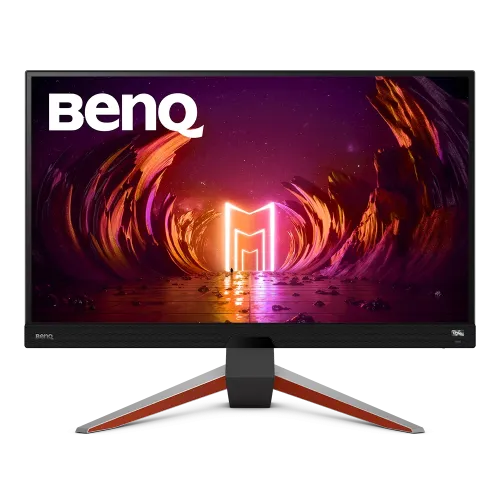
BenQ MOBIUZ EX270QM gaming monitor overview
The BenQ MOBIUZ EX270QM is a 27-inch QHD IPS gaming monitor designed for high-refresh PC play and immersive audio. It pairs 2560 × 1440 resolution with a 240Hz maximum refresh rate, 1ms GtG response, 98% P3 color gamut, HDR10 and VESA DisplayHDR 600 certification. FreeSync Premium Pro, HDRi image modes, local dimming, a remote control and built-in 2.1-channel treVolo speakers round out the feature set. The monitor targets gamers seeking fast QHD performance while retaining color-rich single-player and media viewing. Actual refresh, HDR and VRR behavior depend on source hardware, cable, game, selected mode and regional bundle; verify current seller stock and serial warranty before purchase.
Exact model and QHD resolution
The exact model identifier is EX270QM. It belongs to BenQ MOBIUZ and should not be confused with EX270M, which is a Full HD sibling, or EX2710Q and other similarly named models with different specifications. BenQ specifies 27 inches and 2560 × 1440 QHD; the phrase “2K” in some catalogs can be ambiguous, so the native pixel dimensions are more precise. Check the rear product label and regional carton before ordering accessories or installing firmware. Actual refresh, HDR and VRR behavior depend on source hardware, cable, game, selected mode and regional bundle; verify current seller stock and serial warranty before purchase.
27-inch IPS panel and pixel density
The flat IPS display has a 16:9 aspect ratio, 178-degree viewing angles and 109 pixels per inch at 2560 × 1440. QHD provides more desktop detail than Full HD while demanding less GPU rendering power than 4K at comparable settings. Matte coating helps reduce reflections in many rooms. A 27-inch screen works well at common desk distances, though Windows/macOS scaling and game UI settings affect readability. IPS viewing angles support shared viewing, while 1000:1 native contrast is not OLED-level black. Actual refresh, HDR and VRR behavior depend on source hardware, cable, game, selected mode and regional bundle; verify current seller stock and serial warranty before purchase.
240Hz refresh and response options
BenQ lists a maximum refresh rate of 240Hz and 1ms response for both GtG and MPRT. The computer, graphics card, cable, connection and game must all support the chosen 2560 × 1440 timing. Use DisplayPort 1.4 for the most direct PC route to 1440p 240Hz. Faster response modes and blur-reduction settings can affect brightness or produce artifacts, so compare them using actual gameplay rather than assuming every mode improves every scene. Actual refresh, HDR and VRR behavior depend on source hardware, cable, game, selected mode and regional bundle; verify current seller stock and serial warranty before purchase.
FreeSync Premium Pro and variable refresh
FreeSync Premium Pro is listed for variable refresh operation. It can synchronize the display refresh with compatible GPU frame output to reduce tearing and stutter within its supported range. Compatibility depends on the graphics card, driver, connection, frame rate and settings. The feature cannot increase game rendering speed or compensate for a system that cannot maintain a playable frame rate. Enable Adaptive-Sync/FreeSync in the monitor and GPU software according to the current BenQ and graphics-vendor instructions. Actual refresh, HDR and VRR behavior depend on source hardware, cable, game, selected mode and regional bundle; verify current seller stock and serial warranty before purchase.
HDR10, DisplayHDR 600 and local dimming
The monitor supports HDR10 and carries a VESA DisplayHDR 600 specification. BenQ lists 400 nits typical brightness and up to 600 nits peak HDR brightness. Local dimming is also specified. HDR performance depends on content, display mode and system configuration; certification and peak brightness do not guarantee identical results across games. Enable HDR in the operating system and game only when appropriate, and compare SDR/HDR with the actual content. The IPS panel still has 1000:1 native contrast outside local-dimming behavior. Actual refresh, HDR and VRR behavior depend on source hardware, cable, game, selected mode and regional bundle; verify current seller stock and serial warranty before purchase.
HDRi modes and ambient light features
BenQ HDRi modes use the monitor’s image processing and ambient light sensor to adapt HDR presentation. Cinema HDRi and Game HDRi are listed as color modes; Brightness Intelligence Plus can respond to room conditions. These features may change brightness, contrast and shadow appearance. For consistent work or competitive play, decide whether the adaptive processing helps and turn it off if it interferes with repeatable settings. Keep the ambient sensor unobstructed only when using its automatic behavior. Actual refresh, HDR and VRR behavior depend on source hardware, cable, game, selected mode and regional bundle; verify current seller stock and serial warranty before purchase.
98% P3 color and everyday accuracy
BenQ specifies 98% P3 color gamut and 1.07 billion display colors. This wide gamut helps saturated game worlds and video appear vivid, but it is not a factory promise for every unit’s measured color accuracy. Choose sRGB or another target mode when applications need standard-gamut output. The monitor includes multiple color temperature selections and a user-defined mode. Color work should use managed software and a measured profile; HDR gaming presets may prioritize immersion over neutral reference accuracy. Actual refresh, HDR and VRR behavior depend on source hardware, cable, game, selected mode and regional bundle; verify current seller stock and serial warranty before purchase.
Gaming modes, Light Tuner and Color Vibrance
Game modes include FPS, RPG and racing presets, with GameVisual, GamePlus, Color Vibrance, Dark/Light Tuner and AMA controls. These options let players tune visibility, color saturation and response behavior for specific games. Increasing saturation or brightening shadows can make details easier to see but may distort the intended image. Use the neutral setting for general content, and change one control at a time so the effects remain understandable and reversible. Actual refresh, HDR and VRR behavior depend on source hardware, cable, game, selected mode and regional bundle; verify current seller stock and serial warranty before purchase.
2.1-channel treVolo audio system
Built-in treVolo audio is specified as 2.1-channel: two 2W speakers plus a 5W woofer. BenQ lists several audio modes and a headphone jack. The integrated system is convenient for games, video and calls without separate desktop speakers, while headphones or an external system may provide more precise positioning and stronger output. Audio quality and bass depend on placement, content and volume. Select the EX270QM as the host’s audio output after connecting HDMI or DisplayPort. Actual refresh, HDR and VRR behavior depend on source hardware, cable, game, selected mode and regional bundle; verify current seller stock and serial warranty before purchase.
HDMI 2.1 and DisplayPort connections
The monitor provides two HDMI 2.1 inputs and one DisplayPort 1.4 input. BenQ’s product overview lists 1440p at 240Hz for PC, while its console compatibility section lists PS5 and Xbox Series X/S at up to 1440p 120Hz. Use a suitable certified cable and confirm the source’s output mode. HDMI 2.1 labeling does not make this a 4K panel; the native resolution remains 2560 × 1440. HDCP 2.2 support is listed for compatible protected content. Actual refresh, HDR and VRR behavior depend on source hardware, cable, game, selected mode and regional bundle; verify current seller stock and serial warranty before purchase.
USB hub, remote and OSD control
A USB hub includes one USB Type-B upstream port and two USB 3.0 downstream ports. Connect the upstream cable to the computer if you want host access to downstream USB devices. A remote control and IO cover are listed accessories, but bundle contents can vary by region. The remote can simplify OSD access from a seated position. The monitor does not provide USB-C video or laptop charging; USB-B upstream is for hub data, not a one-cable docking connection. Actual refresh, HDR and VRR behavior depend on source hardware, cable, game, selected mode and regional bundle; verify current seller stock and serial warranty before purchase.
Stand adjustment and VESA mounting
The stand supports 100mm height adjustment, tilt from -5 to +15 degrees and swivel 15 degrees left/right. BenQ lists a 100 × 100mm VESA mounting pattern. Adjust the screen to a comfortable eye level and leave cable slack for swivel and tilt. If using an arm, verify its load rating and VESA compatibility. Confirm the desktop footprint and power adapter placement before installation. The supplied adapter and regional power cord should match local electrical requirements. Actual refresh, HDR and VRR behavior depend on source hardware, cable, game, selected mode and regional bundle; verify current seller stock and serial warranty before purchase.
PC gaming performance and setup
For PC play, connect DisplayPort, select 2560 × 1440 and set the highest refresh rate available in the graphics control panel. Confirm 240Hz appears in the operating-system display settings, then enable FreeSync/Adaptive-Sync and tune the game frame cap as desired. HDR should be configured in both the OS and game. If the refresh list stops at 60Hz or 144Hz, check the connection, cable, GPU output, monitor OSD and whether the game is using the intended display mode. Actual refresh, HDR and VRR behavior depend on source hardware, cable, game, selected mode and regional bundle; verify current seller stock and serial warranty before purchase.
PlayStation and Xbox compatibility
BenQ lists console compatibility for PS5 and Xbox Series X/S at 1440p 120Hz. Console output is therefore below the monitor’s 240Hz PC maximum. Set the console resolution and refresh explicitly, enable supported VRR where available, and connect through HDMI 2.1. Game modes and HDR behavior can vary by console title. If 120Hz is unavailable, check the console video settings, game support, cable and selected HDMI input rather than assuming the monitor is defective. Actual refresh, HDR and VRR behavior depend on source hardware, cable, game, selected mode and regional bundle; verify current seller stock and serial warranty before purchase.
Work, media and console versatility
The EX270QM can switch between high-refresh PC gaming and 120Hz console gaming, with HDR modes, built-in audio and multiple inputs supporting mixed use. A 27-inch QHD panel offers a more compact desk footprint than a large 4K television while retaining sharp game detail. The remote, USB hub and headphone output add convenience. For work use, the IPS viewing angles and color gamut are useful, but the 16:9 1440p workspace and gaming presets may not replace a dedicated color-calibrated professional monitor. Actual refresh, HDR and VRR behavior depend on source hardware, cable, game, selected mode and regional bundle; verify current seller stock and serial warranty before purchase.
Limitations and buyer fit
This model is not 4K and does not include USB-C or laptop Power Delivery. HDR10 and DisplayHDR 600 support do not make it an OLED panel; native contrast is listed at 1000:1. A high-end PC is needed to approach 240 frames per second at QHD in demanding games. The 1ms MPRT blur-reduction mode can alter brightness and may not suit every player. Built-in speakers are convenient, but competitive players may prefer headphones for positional cues. Actual refresh, HDR and VRR behavior depend on source hardware, cable, game, selected mode and regional bundle; verify current seller stock and serial warranty before purchase.
Bangladesh stock, offer and warranty
Before buying in Bangladesh, confirm the exact EX270QM model, present stock, final seller offer, region and physical condition. Verify whether the remote, IO cover, adapter and supplied signal cables are included. Ask for the local BenQ service provider, warranty duration and serial-specific eligibility in writing. Manufacturer specifications establish the model capabilities, not a retailer’s current price, inventory, bundle or warranty. Confirm return terms for dead pixels and panel issues with the seller. Actual refresh, HDR and VRR behavior depend on source hardware, cable, game, selected mode and regional bundle; verify current seller stock and serial warranty before purchase.
Setup and troubleshooting checklist
Place the display securely, attach the stand or compatible VESA mount, and connect the power adapter and source. For PC, start with DisplayPort at native QHD and configure 240Hz, then enable Adaptive-Sync and test HDR separately. For a console, select QHD at 120Hz where supported. If speakers are silent, choose the monitor audio output and check volume/mute. If 240Hz is missing, inspect cable capability and GPU output. Use the OSD reset if settings produce unexpected color or motion behavior. Actual refresh, HDR and VRR behavior depend on source hardware, cable, game, selected mode and regional bundle; verify current seller stock and serial warranty before purchase.
Frequently asked questions
What is the EX270QM native resolution? 2560 × 1440 QHD. What refresh rate does it support? Up to 240Hz. What is the panel type? IPS. How bright is it? 400 nits typical and 600 nits peak HDR. Is it HDR certified? BenQ lists HDR10 and VESA DisplayHDR 600. Which VRR is included? FreeSync Premium Pro. Does it have speakers? Yes, a 2.1-channel system with two 2W speakers and a 5W woofer. Does it support consoles at 120Hz? BenQ lists PS5 and Xbox Series X/S at 1440p 120Hz. Does it have USB-C? No USB-C video/charging port is listed. What warranty applies in Bangladesh? Confirm local service and serial terms with the seller. Actual refresh, HDR and VRR behavior depend on source hardware, cable, game, selected mode and regional bundle; verify current seller stock and serial warranty before purchase.