Pros
- QHD resolution and high refresh in a 27-inch format.
- IPS viewing with wide published viewing angles.
- HDRi modes and DisplayHDR 400 certification listed by BenQ.
- Integrated 2.1-channel audio and adjustable stand.

All categories
 New condition
Monitors
BenQ · MOBIUZ EX2710Q
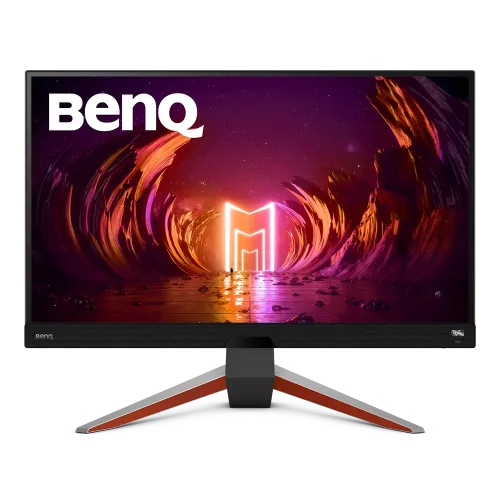
BenQ MOBIUZ 27-inch QHD IPS gaming monitor with up to 165Hz refresh, HDRi, FreeSync Premium and built-in treVolo audio.
Price unavailable
Price range updating
No verified price is available yet. Store offers will appear when merchants publish them.
Compare store prices
No live offers for this variant
Offers will appear when merchants publish them.
Loading history…
Product story
The BenQ MOBIUZ EX2710Q is a 27-inch gaming monitor built around QHD resolution and a high refresh rate. BenQ’s official product and specification pages identify a 2560 × 1440 IPS display with a maximum 165Hz refresh rate, HDRi modes and gaming-oriented features. The product also includes integrated treVolo speakers and AMD FreeSync Premium. This description refers to the exact EX2710Q; do not mix it with EX2710, EX2710S or newer EX271Q variants. This product’s official listing should be consulted for current regional details, while local price, stock and warranty must be confirmed with the seller. Configure the display only with compatible hardware, a suitable cable and the exact input/mode documented for the delivered unit.
Confirm the product label and carton say EX2710Q. BenQ has multiple MOBIUZ displays with similar names, and specifications such as resolution, refresh rate, panel and ports vary among them. This catalog item is the 27-inch QHD 165Hz EX2710Q. The official regional specification page is the reference for published product details; the delivered country revision, accessories and warranty should be checked with the local seller. This product’s official listing should be consulted for current regional details, while local price, stock and warranty must be confirmed with the seller. Configure the display only with compatible hardware, a suitable cable and the exact input/mode documented for the delivered unit.
The panel resolution is 2560 × 1440, commonly called QHD or 2K, in a 16:9 format. At 27 inches it offers more desktop detail than Full HD and works well for games, browser windows and media. Use native resolution for crisp text and imagery. Scaling preferences and viewing distance affect comfort, while game performance depends on the graphics system and in-game settings. This product’s official listing should be consulted for current regional details, while local price, stock and warranty must be confirmed with the seller. Configure the display only with compatible hardware, a suitable cable and the exact input/mode documented for the delivered unit.
BenQ specifies a refresh rate up to 165Hz. A high refresh can make supported PC games and desktop motion appear smoother when the source provides matching frames. Select 165Hz in the display settings after connecting through a supported input and cable. The available refresh can depend on GPU, port, cable, driver, resolution and any console or application limitation. This product’s official listing should be consulted for current regional details, while local price, stock and warranty must be confirmed with the seller. Configure the display only with compatible hardware, a suitable cable and the exact input/mode documented for the delivered unit.
The EX2710Q uses an IPS panel according to BenQ. IPS is intended to provide broad viewing angles and consistent viewing for a desktop screen, but actual contrast and uniformity vary by unit and room. BenQ lists 1000:1 contrast and 178-degree viewing angles in the published specification. These numbers do not guarantee a particular black level, calibration quality or absence of panel variation. This product’s official listing should be consulted for current regional details, while local price, stock and warranty must be confirmed with the seller. Configure the display only with compatible hardware, a suitable cable and the exact input/mode documented for the delivered unit.
BenQ describes HDRi picture modes and lists VESA DisplayHDR 400 for this model. HDR appearance depends on source content, operating system, input signal and selected monitor mode. DisplayHDR 400 is an entry HDR certification level, not a promise of OLED-like contrast or high local-dimming performance. Check whether HDR is useful in the intended room and compare SDR and HDR modes with actual content. This product’s official listing should be consulted for current regional details, while local price, stock and warranty must be confirmed with the seller. Configure the display only with compatible hardware, a suitable cable and the exact input/mode documented for the delivered unit.
BenQ lists 95% P3 color gamut coverage. Gamut coverage indicates a color range, not calibration accuracy. No unit-specific calibration report or Delta E result is included in this catalog review. For color-sensitive creative work, verify the regional specification, use an appropriate color profile and calibrate the actual monitor. Brightness, color temperature, room light and selected picture preset all change the result. This product’s official listing should be consulted for current regional details, while local price, stock and warranty must be confirmed with the seller. Configure the display only with compatible hardware, a suitable cable and the exact input/mode documented for the delivered unit.
The catalog lists 1ms MPRT, a motion-picture response metric. MPRT is not the same as gray-to-gray response or total input lag. The best motion setting may depend on refresh rate and can introduce artifacts, so review the available OSD options and choose a comfortable mode. A responsive display does not increase the frame rate produced by the PC or game console. This product’s official listing should be consulted for current regional details, while local price, stock and warranty must be confirmed with the seller. Configure the display only with compatible hardware, a suitable cable and the exact input/mode documented for the delivered unit.
Published catalog details list two HDMI 2.0 inputs, one DisplayPort 1.4, USB upstream and downstream ports, and a headphone connection. Confirm exact port count and high-refresh timing against BenQ’s manual for the supplied revision. Connect the source directly where practical, use a suitable cable and check that the selected input supports the desired QHD refresh and HDR signal. This product’s official listing should be consulted for current regional details, while local price, stock and warranty must be confirmed with the seller. Configure the display only with compatible hardware, a suitable cable and the exact input/mode documented for the delivered unit.
The display includes BenQ treVolo audio, described in the specification as a 2.1-channel configuration with two 2W speakers and a 5W woofer. Integrated audio can reduce desk clutter and is convenient for everyday viewing. It is not a substitute for a separate speaker system in every room. Volume, positioning, source audio format and listening distance influence sound quality. This product’s official listing should be consulted for current regional details, while local price, stock and warranty must be confirmed with the seller. Configure the display only with compatible hardware, a suitable cable and the exact input/mode documented for the delivered unit.
BenQ specifies AMD FreeSync Premium for variable refresh support. The feature coordinates monitor refresh with compatible graphics output within supported conditions to reduce tearing. It requires compatible source hardware, drivers, connection and settings. Confirm the compatible refresh range and whether the selected port and mode support the feature; a product label alone does not establish operation with every GPU or console. This product’s official listing should be consulted for current regional details, while local price, stock and warranty must be confirmed with the seller. Configure the display only with compatible hardware, a suitable cable and the exact input/mode documented for the delivered unit.
The catalog describes a stand with 100mm height adjustment, tilt from -5 to +15 degrees and swivel about 15 degrees each way. These details should be verified against the exact supplied model and regional packaging. Adjust the monitor so the viewing position is comfortable and reduce reflections with placement. Stand movement helps adapt the desk setup but does not change the display specifications. This product’s official listing should be consulted for current regional details, while local price, stock and warranty must be confirmed with the seller. Configure the display only with compatible hardware, a suitable cable and the exact input/mode documented for the delivered unit.
The catalog lists a 100 × 100mm VESA mounting pattern. Confirm the rear mounting pattern and screw depth before attaching an arm. Check the arm’s load rating and support the monitor while fitting it. Allow space behind the display for connectors and airflow. Do not rely on a generic wall-mount assumption if the supplied hardware or manual gives a different requirement. This product’s official listing should be consulted for current regional details, while local price, stock and warranty must be confirmed with the seller. Configure the display only with compatible hardware, a suitable cable and the exact input/mode documented for the delivered unit.
For PC gaming, connect through a supported DisplayPort or HDMI input and select 2560 × 1440 at up to 165Hz when the graphics card and cable permit. Enable FreeSync through the monitor OSD and GPU driver if desired, then verify the active signal in system settings. HDR support depends on the content and configuration. Lower game settings may be needed to sustain a high frame rate at QHD. This product’s official listing should be consulted for current regional details, while local price, stock and warranty must be confirmed with the seller. Configure the display only with compatible hardware, a suitable cable and the exact input/mode documented for the delivered unit.
Console output varies by console generation and game. A console may support QHD or HDR features differently from a PC and will not necessarily use 165Hz. Check the console’s resolution, refresh, VRR and HDR capabilities against the specific HDMI input. If console use is primary, confirm the desired signal works before purchase and do not assume the monitor’s PC maximum refresh is available. This product’s official listing should be consulted for current regional details, while local price, stock and warranty must be confirmed with the seller. Configure the display only with compatible hardware, a suitable cable and the exact input/mode documented for the delivered unit.
QHD resolution and the 27-inch size suit general desktop use, streaming and gaming. The integrated speakers provide convenient sound for calls and media. For long work sessions, set a comfortable brightness and use BenQ eye-care features as appropriate. Wide color gamut does not replace a calibrated color-managed workflow for professional imaging, print or video grading. This product’s official listing should be consulted for current regional details, while local price, stock and warranty must be confirmed with the seller. Configure the display only with compatible hardware, a suitable cable and the exact input/mode documented for the delivered unit.
Strengths include QHD detail, 165Hz refresh, IPS viewing, HDRi modes, FreeSync Premium and built-in 2.1-channel audio. Trade-offs include the GPU demand of QHD at high frame rates and the limits of an HDR 400 display compared with higher-contrast technologies. Integrated speakers are convenient but preferences vary. Match features to the games and work you actually use. This product’s official listing should be consulted for current regional details, while local price, stock and warranty must be confirmed with the seller. Configure the display only with compatible hardware, a suitable cable and the exact input/mode documented for the delivered unit.
Place the monitor on a stable surface and keep its vents unobstructed. Clean the screen with a soft microfiber cloth; avoid spraying fluid directly on the panel or using abrasives. Support the frame when moving or adjusting the stand. Retain packaging, serial number, invoice and accessories until the screen, ports, speakers, stand and dead-pixel condition have been checked during the applicable return period. This product’s official listing should be consulted for current regional details, while local price, stock and warranty must be confirmed with the seller. Configure the display only with compatible hardware, a suitable cable and the exact input/mode documented for the delivered unit.
For Bangladesh purchases, confirm current price and stock, delivery conditions, return and dead-pixel policy, included accessories and the serial-specific warranty provider. The catalog currently says three-year warranty, but local serial eligibility and service location were not independently verified. Ask for written confirmation and ensure the invoice records the exact EX2710Q model and serial. This product’s official listing should be consulted for current regional details, while local price, stock and warranty must be confirmed with the seller. Configure the display only with compatible hardware, a suitable cable and the exact input/mode documented for the delivered unit.
Official BenQ specifications describe the EX2710Q as 27-inch QHD, 165Hz, IPS, 95% P3 with HDRi and FreeSync Premium. Catalog values such as 2× HDMI 2.0, DisplayPort 1.4, 2.1 speakers and adjustable stand should be checked against the official manual and regional unit. This is not the EX271Q or EX2710S. Verify the model before ordering and retain the product documentation. This product’s official listing should be consulted for current regional details, while local price, stock and warranty must be confirmed with the seller. Configure the display only with compatible hardware, a suitable cable and the exact input/mode documented for the delivered unit.
Helpful answers
Product-specific answers maintained with the catalog information.
2560 × 1440 QHD at 16:9.
BenQ lists up to 165Hz; confirm the source, port and cable support the selected timing.
BenQ specifies an IPS panel.
BenQ lists HDRi and VESA DisplayHDR 400 for the model.
BenQ lists 95% P3 coverage.
Yes. BenQ describes integrated treVolo audio in a 2.1-channel configuration.
BenQ specifies AMD FreeSync Premium; confirm compatibility and range for your source.
The catalog lists 100×100mm VESA; verify the exact unit and screw requirements before mounting.
Confirm the serial-specific local provider, service location and term with the seller.
Customer community
Become a merchant
Join BiponiBD, publish accurate offers and start free.