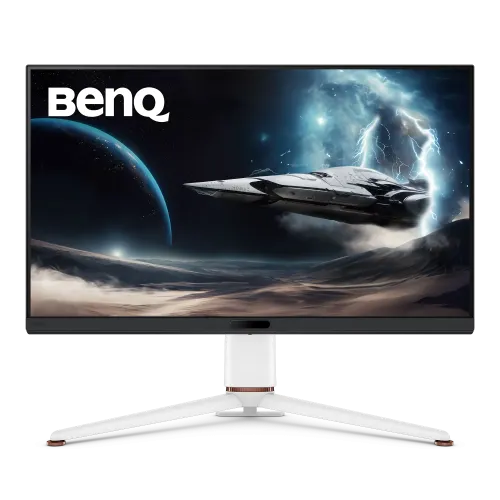
BenQ MOBIUZ EX321UX overview
The BenQ MOBIUZ EX321UX is a 31.5-inch 4K gaming monitor using an IPS panel with 1152-zone Mini LED backlighting. BenQ lists 3840 × 2160 resolution, 144Hz refresh, 1ms GTG response, 700-nit typical brightness and 1,000-nit HDR peak, with HDR10 and VESA DisplayHDR 1000. The model also includes USB-C with 65W Power Delivery, HDMI 2.1 inputs, DisplayPort 2.1, KVM, eARC HDMI and a 4-way adjustable stand.
Exact model identity
Confirm EX321UX on the rear label, carton, invoice and support documents. It differs from other MOBIUZ EX-series models such as EX3210U and newer EX321UZ; resolution, refresh, panel, local dimming and ports may differ. Regional suffix and bundled accessories also matter. This listing preserves its original product slug and variant/SKU identity.
31.5-inch 16:9 IPS display
BenQ specifies a 31.5-inch diagonal IPS panel with a 16:9 aspect ratio. IPS viewing angles are listed as 178 degrees horizontally and vertically. The flat display suits conventional desk use, design timelines and 4K gaming. Screen appearance depends on position, ambient light and selected mode. Use the model’s factory calibration report as reference, not as a substitute for unit-level validation.
4K UHD 3840 × 2160
The native resolution is 3840 × 2160, providing four times the pixel count of Full HD. This offers detailed desktop text and game visuals but demands more GPU performance than QHD, particularly at high refresh. Choose native resolution in the source settings and adjust scaling for readability. Dock, graphics output, cable and software all affect available display modes.
144Hz refresh and 1ms response
BenQ specifies up to 144Hz refresh and 1ms GTG response. The faster update can make motion smoother when the graphics system supplies appropriate frame rates. A refresh headline does not make the game render those frames. Select the supported mode in the OS and monitor menu, and check the signal details when connecting a console or computer.
1152-zone Mini LED local dimming
The EX321UX uses Mini LED backlighting with 1152 local dimming zones. Local zones can brighten and dim parts of the panel to improve contrast in HDR scenes compared with a basic edge-lit display. Zone size is much larger than individual pixels, so bright objects on dark backgrounds can still show halos. The effect depends on content and dimming settings.
HDR10 and DisplayHDR 1000
BenQ lists HDR10 and VESA DisplayHDR 1000 certification, with typical brightness of 700 nits and HDR peak brightness of 1,000 nits. HDR needs compatible content, source output, operating-system configuration and monitor mode. A certification tier and peak figure do not guarantee every scene or the whole panel stays at peak brightness. Adjust HDR settings for the application and room.
Color coverage and factory calibration
BenQ specifies 99% Adobe RGB, 99% P3 and 1.07 billion colors. Its specification lists factory calibration report support and uniformity technology. Gamut coverage does not guarantee exact color accuracy for an individual unit or all applications. Use color management and the included report where available; calibrate the delivered monitor if precise production or proofing is important.
USB-C video, data and 65W charging
The USB-C port supports DisplayPort Alt Mode, data and up to 65W Power Delivery. A compatible laptop can use one cable for display, USB data and charging, but 65W may not cover every laptop’s power needs. Check the computer’s requirements and use the correct cable. A separate USB-C upstream port is also present for data-only connections.
HDMI 2.1, eARC and DisplayPort 2.1
BenQ lists two standard HDMI 2.1 ports plus one HDMI 2.1 eARC port, and one DisplayPort 2.1 input. These allow connection of computers, consoles and audio equipment. Port bandwidth and timing depend on source capability and cable. eARC can pass supported audio to a compatible receiver or soundbar; confirm device settings and regional port layout.
USB hub and downstream charging
The monitor includes one USB-C upstream port, three USB-A downstream ports and one USB-C downstream port. BenQ specifies USB 3.2 Gen 1 data rates, with power charging ratings for the downstream connections. KVM lets compatible systems share peripherals when correctly wired. Consult the port diagram to distinguish the 65W video/charging input from the data upstream and downstream ports.
KVM and multi-device workflow
BenQ lists a built-in KVM switch for controlling compatible connected computers with one keyboard and mouse. Connect video and USB upstream paths for each source, then choose the KVM routing in the monitor menu. KVM switches peripheral control, not computer processing or application desktops. Check that the selected input and USB path match if devices do not follow source switching.
FreeSync Premium Pro and VRR
BenQ specifies AMD FreeSync Premium Pro for variable refresh. The feature can synchronize refresh with a compatible graphics source to reduce tearing. Support depends on GPU, driver, connection and supported range. Enable VRR on the monitor and in the source settings, then verify with a compatible game. HDR and VRR may have separate settings and cable requirements.
B.I.+ Gen2 and eye-care modes
The monitor lists Brightness Intelligence Plus Gen2, flicker-free technology and low blue light. B.I.+ can adjust picture behavior based on ambient light under supported conditions. Eye-care modes may change brightness or color temperature. Select settings suitable for the room, and take breaks during long sessions; automated features do not replace comfortable setup.
HDRi, AI contrast and gaming controls
BenQ offers HDRi presets, AI Contrast, Color Vibrance and Light Tuner for adjusting game scenes. These controls can improve visibility or alter contrast to personal preference but do not change the underlying source data. Compare presets with the game and HDR mode you use. Color Shuttle and BenQ utilities may require software installation and can vary by operating system.
Stand adjustment and VESA mounting
BenQ lists tilt from -5° to +15°, swivel ±15°, 100mm height adjustment and a 100 × 100mm VESA pattern. The monitor weighs about 9.7kg without shipping packaging and requires suitable desk or arm support. Check arm rating, mounting screws, clearance and cable bend radius before installation. Use the manual and support the display while fitting the stand.
Audio, remote and package contents
The product specifications list a headphone jack and remote control among accessories; the reviewed official page does not list integrated speakers. Plan for headphones or an external sound system. BenQ lists a calibration report and warranty card among regional accessories. Confirm the exact local box contents, power adapter, cables and remote with the seller before ordering.
PC and console setup
For PC use, verify the graphics card and cable support 3840 × 2160 at 144Hz through the chosen port. Console refresh is governed by console generation and game support; 144Hz is not a console guarantee. Configure HDR and FreeSync where supported and check the monitor’s signal information. For soundbar use, connect to eARC and enable matching audio settings on the source.
Bangladesh price, stock and warranty
This review does not verify current BiponiBD stock, price, delivery condition or warranty eligibility for a specific serial. Ask the seller to confirm the exact EX321UX model suffix, condition, local service route, warranty duration and included accessories. BenQ policies vary by market; retain the invoice, carton label and calibration report for support.
Frequently asked questions
What is the resolution? 3840 × 2160 4K UHD. What is refresh? Up to 144Hz. What backlight? 1152-zone Mini LED. What HDR certification? VESA DisplayHDR 1000 and HDR10. How bright? BenQ lists 700-nit typical and 1,000-nit HDR peak. Does USB-C charge a laptop? Up to 65W, subject to device requirements. Does it include KVM? Yes. Is there HDMI eARC? Yes, one port. What is the VESA pattern? 100 × 100mm. What Bangladesh warranty applies? Confirm the exact unit serial and local terms with the seller.