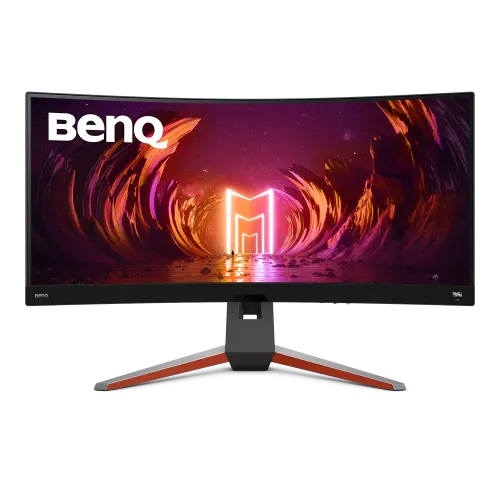
BenQ MOBIUZ EX3410R: complete 34-inch ultrawide monitor guide
Product overview
The BenQ MOBIUZ EX3410R is a 34-inch ultrawide gaming monitor with a 3440 x 1440 VA panel, 1000R curve and up to 144Hz refresh over DisplayPort. BenQ specifies 120Hz over HDMI, 350 nits typical brightness, 400 nits peak HDR brightness, HDR10 and VESA DisplayHDR 400. Its 2.1-channel audio system combines two 2W speakers with a 5W woofer, and an included remote control supports quick setting changes. The monitor also offers HDRi picture modes, FreeSync Premium Pro, PIP/PBP and a height-adjustable stand. Its 21:9 screen can provide a broad PC gaming and productivity canvas, while console output and supported refresh depend on each device and connection.
34-inch ultrawide resolution
The EX3410R uses a 34-inch 21:9 screen with a native 3440 x 1440 resolution and 110 pixels per inch. The expanded horizontal workspace can show more of a game scene or timeline than a conventional 16:9 screen when the software supports ultrawide output. Some games and video sources may use letterboxing, crop or different field-of-view behavior. BenQ lists a matte coating to reduce reflections. This is a 1440p-class ultrawide display, not a 4K panel. Check the graphics card's ultrawide resolution support and the desk width before buying; the stand footprint and 1000R curvature occupy more space than a typical 27-inch monitor.
1000R curved VA panel
The monitor uses a VA panel with a 1000R curve and 3000:1 native contrast. Its 178-degree horizontal and vertical viewing angles are specified at a contrast ratio of at least 10:1. The curve brings the edges of a wide screen toward the viewer and may feel more enveloping in games. VA contrast can make dark scenes appear deeper than many IPS displays, though the experience depends on room lighting and picture settings. The curve is personal preference: view the display at a normal desk distance and consider whether it suits spreadsheets, design work or shared viewing before choosing it.
Refresh rate and connection limits
BenQ specifies 144Hz via DisplayPort and up to 120Hz via HDMI for the EX3410R. The native PC mode is 3440 x 1440 at up to 144Hz through DisplayPort 1.4, while HDMI 2.0 supports up to the model's specified HDMI refresh. The source GPU, cable, driver and game must support the chosen resolution and rate. BenQ's product page lists 1440p at 120Hz compatibility for PS5 and Xbox Series X/S, but console handling of a 21:9 monitor can differ from PC ultrawide output. Confirm the displayed format and game support for the connected console.
HDR10, DisplayHDR 400 and HDRi
The EX3410R accepts HDR10 and carries VESA DisplayHDR 400 certification. BenQ distinguishes 350 nits typical brightness from 400 nits peak HDR brightness. HDRi is BenQ's picture optimization technology that adjusts image tone and clarity; Brightness Intelligence Plus can also respond to ambient light and color temperature. Available modes include Game HDRi and Cinema HDRi as well as DisplayHDR. These features affect image presentation, but DisplayHDR 400 does not mean OLED-level blacks or high-zone local dimming. HDR results depend on the source, content, selected mode and room. Select a mode that suits the game or video rather than assuming every HDR preset is identical.
Color coverage and color modes
BenQ lists 90% P3 color gamut and support for 16.7 million display colors. Color modes include sRGB, HDR, M-book, Custom, Cinema HDRi, Game HDRi, FPS, RPG, Racing game, ePaper and DisplayHDR. This range supports entertainment and gaming adjustments, but the monitor is not specified as a factory-calibrated professional reference display. For color-critical design, use the correct profile and verify the individual unit with a calibration workflow. The color temperature options include Bluish, Normal, Reddish and User Define, and gamma settings range from 1.8 to 2.6. Adjustments may change brightness and perceived contrast.
Gaming features and adaptive sync
The EX3410R supports AMD FreeSync Premium and FreeSync Premium Pro, with VRR features intended to reduce tearing when the source graphics card and game support them. BenQ also lists Motion Blur Reduction, Color Vibrance, Light Tuner and FPS mode. Its product page notes G-Sync use via VESA Adaptive Sync but does not guarantee every graphics-card configuration; users should check NVIDIA Control Panel and compatibility. Some features may be unavailable simultaneously, and the selected picture mode can change how the image looks. Enable adaptive sync on both the monitor and source device, then test the actual game.
2.1-channel sound system
Unlike many displays, the EX3410R includes a 2.1-channel sound system: two 2W speakers and a 5W woofer. BenQ offers sound modes such as FPS, RCG, SPG, Pop/Live and Cinema to tune emphasis for positional cues, voice, music or dialogue. Built-in audio can reduce the need for desk speakers for casual play and video. It is not a replacement for every dedicated audio system or headset, especially where microphone communication and precise competitive positional audio matter. A headphone jack is also provided for private listening or another audio setup.
Remote control and on-screen settings
The BenQ specification lists a remote control in the package. The monitor's settings include picture modes, HDRi options, audio profiles, game controls, input selection and PIP/PBP. BenQ describes Quick OSD and scenario mapping through its monitor management software. A remote can make common adjustments easier when the display is used for both PC gaming and console media. Confirm that the remote and IO cover are present in the local package, because used or incomplete stock may differ. Keep the on-screen display settings consistent when comparing HDR and SDR sources.
Ports and USB hub
The EX3410R provides two HDMI 2.0 inputs, one DisplayPort 1.4 input, one USB Type-B upstream port and two USB 3.0 downstream ports. It also includes a headphone jack. Connect the USB-B upstream cable to the computer to use the downstream USB ports as a hub; the USB ports do not function as a video input. The monitor's refresh rate differs by video connection: BenQ lists 144Hz via DisplayPort and 120Hz via HDMI. Choose the port based on the source and desired mode, and check the graphics output and cable specifications before planning an ultrawide high-refresh setup.
Ergonomics and installation
The stand offers 100mm height adjustment, tilt from -5 to +15 degrees and swivel 15 degrees left and right. VESA mounting is 100 x 100mm. With the base, BenQ lists dimensions of 795.7mm wide, 269.7mm deep and height from 430.8 to 530.8mm. Without the base, dimensions are 795.7 x 150.2 x 380.4mm. The unit weighs 9.9kg with its base and 6.9kg without it. Allow adequate desk depth for the curved screen, base and cable bends. If using an arm, verify its load rating and VESA fit before mounting.
Power, eye care and everyday use
BenQ specifies a 100-240V supply, 30W normal power consumption, 88W maximum and below 0.5W in sleep mode. The specification identifies an external power adapter. Flicker-Free and Low Blue Light features are included, as are Brightness Intelligence Plus, ePaper mode and Color Weakness adjustments. These tools offer display choices for different environments and preferences; they are not medical guarantees. Brightness Intelligence Plus can adapt brightness and color temperature to surrounding light, which may be useful in changing room conditions. For color-sensitive tasks, disable automatic adjustments and use a consistent lighting setup.
Bangladesh price and warranty verification
A current exact-model Bangladesh checkout price was not verified during this review, so the variant price remains unset. The catalog previously listed a three-year warranty, but BenQ's global specifications do not confirm the local warranty card, distributor or service terms for a particular Bangladesh unit. Ask the seller to verify stock, exact model and serial label, sealed or open-box condition, invoice, return terms and authorized service coverage. BenQ's listed package includes a quick start guide, warranty card, remote control and IO cover; the included cable set can vary by region. Confirm actual box contents before payment.
Who should consider EX3410R
The EX3410R may fit gamers and home entertainment users who want a curved 34-inch 21:9 screen, 3440 x 1440 resolution, high PC refresh over DisplayPort and built-in 2.1 audio. It can also be useful for wide desktop layouts when applications support ultrawide workspaces. Trade-offs include the large desk footprint, VA viewing behavior, 144Hz DisplayPort versus 120Hz HDMI limits, and local price and warranty uncertainty. It is not the same model as the EX3415R, which has a different curve and color gamut. Check the PC or console output, available desk space, speakers and current warranty before deciding.
Model identity and source notes
This product is the BenQ MOBIUZ EX3410R, a 34-inch 1000R curved ultrawide monitor. BenQ's exact-model page confirms VA technology, 3440 x 1440, 144Hz DisplayPort / 120Hz HDMI, 90% P3, 3000:1 contrast, 2ms GtG and 1ms MPRT. It also specifies HDR10, DisplayHDR 400, 2.1-channel speakers, the USB hub, FreeSync Premium Pro, stand dimensions and adapter power. The product should not be confused with EX3415R or other MOBIUZ variants. The catalog's brand has been corrected to BenQ. Bangladesh price, local unit warranty and GTIN remain unverified rather than inferred.
Frequently asked questions
1. What resolution and aspect ratio does EX3410R have?
It is a 34-inch 21:9 monitor with a native 3440 x 1440 resolution and 110ppi.
2. What refresh rate can it use?
BenQ specifies up to 144Hz over DisplayPort and up to 120Hz over HDMI.
3. Is the screen curved?
Yes. The VA panel uses a 1000R curve.
4. What is the brightness and contrast?
Typical brightness is 350 nits, peak HDR brightness is 400 nits, and native contrast is 3000:1.
5. Does it support HDR?
Yes. It supports HDR10 and VESA DisplayHDR 400, along with BenQ HDRi picture modes.
6. Does EX3410R have built-in speakers?
Yes. It has a 2.1-channel system with two 2W speakers and a 5W woofer.
7. Which ports are provided?
Two HDMI 2.0, one DisplayPort 1.4, one USB-B upstream, two USB 3.0 downstream and a headphone jack.
8. Can PS5 and Xbox Series X use 1440p at 120Hz?
BenQ lists PS5, Xbox Series X and Series S compatibility at 1440p/120Hz. Game and device settings can affect output.
9. Does it support FreeSync?
Yes. BenQ lists AMD FreeSync Premium and FreeSync Premium Pro.
10. What stand adjustments are included?
Height adjustment is 100mm, tilt is -5° to +15°, and swivel is 15° to either side. VESA mounting is 100 x 100mm.
11. What is included in the package?
BenQ lists a quick start guide, warranty card, remote control and IO cover; cable contents vary by region. Confirm the local package.
12. What is the Bangladesh price and warranty?
A current local checkout price and the unit-specific warranty card were not verified; confirm both with the seller.