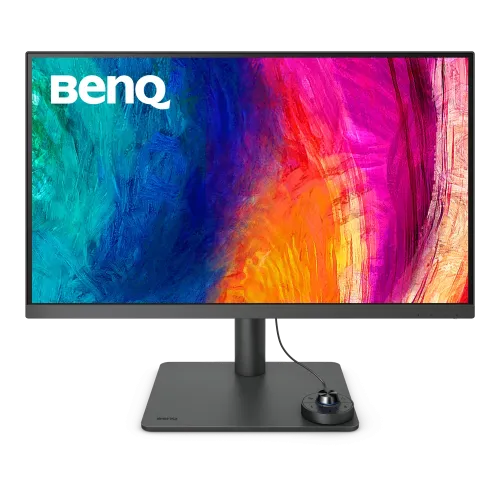
BenQ PD2705U overview
BenQ PD2705U is a 27-inch 16:9 4K UHD IPS monitor for creative and design work. BenQ lists 3840 × 2160, 99% sRGB and 99% Rec.709, HDR10, USB-C with 65W Power Delivery, KVM, factory calibration report, Hotkey Puck G2 and a height-adjustable conventional stand. This is the PD2705U model, distinct from PD2705UA with the Ergo clamp arm. Follow BenQ’s PD2705U manual and regional specification for exact configuration and setup. Results depend on the host, cable, software and color mode. Local price, stock, accessories, return conditions and serial-specific warranty require confirmation from the Bangladesh seller.
Exact PD2705U model identity
Check the product label and invoice for PD2705U without the UA suffix. BenQ describes PD2705UA as the Ergo Arm version with a new clamp design; PD2705U is supplied with the standard ergonomic monitor stand. This affects the desk installation and included mounting hardware. Confirm the exact version and accessories before purchase. Follow BenQ’s PD2705U manual and regional specification for exact configuration and setup. Results depend on the host, cable, software and color mode. Local price, stock, accessories, return conditions and serial-specific warranty require confirmation from the Bangladesh seller.
27-inch 4K UHD resolution
The 27-inch display has a native 3840 × 2160 UHD resolution, 16:9 aspect ratio and 163 pixels per inch. The high pixel density supports detailed images, fine text and 4K timelines. Interface scaling can make controls comfortable at a normal desk distance. For sharp output, use native resolution and a graphics output capable of 4K at 60Hz. Follow BenQ’s PD2705U manual and regional specification for exact configuration and setup. Results depend on the host, cable, software and color mode. Local price, stock, accessories, return conditions and serial-specific warranty require confirmation from the Bangladesh seller.
IPS panel and color reproduction
BenQ specifies an IPS panel with native 1200:1 contrast, 250 nits typical brightness, 178-degree viewing angles and matte coating. Its 99% sRGB and Rec.709 coverage is intended for common web and SDR video workflows. Color appearance still depends on the unit, room lighting, selected mode and graphics pipeline. Follow BenQ’s PD2705U manual and regional specification for exact configuration and setup. Results depend on the host, cable, software and color mode. Local price, stock, accessories, return conditions and serial-specific warranty require confirmation from the Bangladesh seller.
Factory calibration and validation
BenQ lists factory calibration and an included calibration report with average Delta E at or below 3. Calman Verified and Pantone Validated/Pantone SkinTone validation are listed for the model. These help establish an intended color workflow but do not replace calibration of the specific unit over time. Keep the report and use color-managed software. Follow BenQ’s PD2705U manual and regional specification for exact configuration and setup. Results depend on the host, cable, software and color mode. Local price, stock, accessories, return conditions and serial-specific warranty require confirmation from the Bangladesh seller.
HDR10 and brightness limits
The monitor supports HDR10 with listed brightness of 250 nits typical and 350 nits peak HDR. This is a professional SDR-focused display with HDR compatibility, not a high-brightness HDR mastering reference. HDR results vary with source, OS and picture mode. Use a suitable reference display when mastering HDR delivery. Follow BenQ’s PD2705U manual and regional specification for exact configuration and setup. Results depend on the host, cable, software and color mode. Local price, stock, accessories, return conditions and serial-specific warranty require confirmation from the Bangladesh seller.
Color modes for creator workflows
Available modes include Rec.709, sRGB, HDR, M-Book, DICOM, CAD/CAM, Animation, Darkroom, Low Blue Light and User. M-Book aims to simulate MacBook Pro color characteristics. DICOM mode does not make this a certified diagnostic display. Select a mode for the actual deliverable and keep color management consistent. Follow BenQ’s PD2705U manual and regional specification for exact configuration and setup. Results depend on the host, cable, software and color mode. Local price, stock, accessories, return conditions and serial-specific warranty require confirmation from the Bangladesh seller.
USB-C 65W connection
USB-C carries DisplayPort Alt Mode video and data and provides up to 65W Power Delivery. A compatible laptop can connect to the monitor and receive power through one cable. Confirm the host USB-C port supports display output and that 65W meets its workload; some high-performance laptops may require their own adapter. Follow BenQ’s PD2705U manual and regional specification for exact configuration and setup. Results depend on the host, cable, software and color mode. Local price, stock, accessories, return conditions and serial-specific warranty require confirmation from the Bangladesh seller.
Ports, USB hub and KVM
Connectivity includes HDMI 2.0, DisplayPort 1.4, one USB-C input, one USB-C downstream, two USB Type-B upstream ports and three USB 3.2 downstream ports. The KVM switch can share a keyboard and mouse across connected computers when their USB upstream links are connected. BenQ also lists one all-in-one USB-C connection path. Follow BenQ’s PD2705U manual and regional specification for exact configuration and setup. Results depend on the host, cable, software and color mode. Local price, stock, accessories, return conditions and serial-specific warranty require confirmation from the Bangladesh seller.
Stand ergonomics and adjustment
The PD2705U conventional stand offers height adjustment up to 110mm, tilt -5 to +20 degrees, swivel 15 degrees each way and 90-degree pivot. A 100 × 100mm VESA mount is supported. Unlike PD2705UA, this is not the desk-edge clamp arm version. Check the base footprint, desk clearance and mounting screws for the selected setup. Follow BenQ’s PD2705U manual and regional specification for exact configuration and setup. Results depend on the host, cable, software and color mode. Local price, stock, accessories, return conditions and serial-specific warranty require confirmation from the Bangladesh seller.
Hotkey Puck G2 and BenQ software
Hotkey Puck G2 provides shortcut controls and a dial to access color modes and monitor settings. BenQ lists Display Pilot 2, Palette Master Ultimate/AQCOLOR Pilot and Display ColorTalk software. Utility support can depend on OS and device; download the latest supported version from BenQ. Use a compatible calibrator for advanced calibration workflows. Follow BenQ’s PD2705U manual and regional specification for exact configuration and setup. Results depend on the host, cable, software and color mode. Local price, stock, accessories, return conditions and serial-specific warranty require confirmation from the Bangladesh seller.
Speakers and audio output
Two 2.5W speakers and a headphone jack are listed. They can serve basic desktop audio and calls. For detailed monitoring, stronger bass or a predictable edit mix, use headphones or external reference speakers. Audio depends on the selected input and computer settings. Follow BenQ’s PD2705U manual and regional specification for exact configuration and setup. Results depend on the host, cable, software and color mode. Local price, stock, accessories, return conditions and serial-specific warranty require confirmation from the Bangladesh seller.
PIP/PBP and DualView
PIP/PBP and DualView let users compare sources or display multiple input layouts, depending on selected modes. KVM can switch USB peripherals with the active computer when upstream links are configured. Check the manual for supported combinations, image layouts and resolution limitations before planning a multi-source workflow. Follow BenQ’s PD2705U manual and regional specification for exact configuration and setup. Results depend on the host, cable, software and color mode. Local price, stock, accessories, return conditions and serial-specific warranty require confirmation from the Bangladesh seller.
Power, mounting and dimensions
BenQ lists a built-in power supply, 100–240V input, typical 27.5W consumption and under 0.5W sleep consumption. The display weighs about 9.3kg with stand and 6kg without stand. It uses 100 × 100mm VESA mounting. For installation, confirm exact dimensions and leave room for height, swivel and pivot movement. Follow BenQ’s PD2705U manual and regional specification for exact configuration and setup. Results depend on the host, cable, software and color mode. Local price, stock, accessories, return conditions and serial-specific warranty require confirmation from the Bangladesh seller.
Computer setup and signal
Connect via USB-C for video, data and 65W charging if the computer supports USB-C display output, or use HDMI/DisplayPort plus USB-B upstream for KVM and USB hub. Set 3840 × 2160 at 60Hz, select the intended color mode and use the factory report as a starting point. For calibration, use BenQ-supported software and equipment. Follow BenQ’s PD2705U manual and regional specification for exact configuration and setup. Results depend on the host, cable, software and color mode. Local price, stock, accessories, return conditions and serial-specific warranty require confirmation from the Bangladesh seller.
Who this monitor suits
PD2705U fits designers, photographers and video editors who need 4K detail, sRGB/Rec.709 coverage, a calibration report, KVM and USB-C laptop connectivity. Its 60Hz refresh and modest HDR brightness make it less suited to high-refresh gaming or HDR mastering. The standard stand is more conventional than the UA clamp-arm setup. Follow BenQ’s PD2705U manual and regional specification for exact configuration and setup. Results depend on the host, cable, software and color mode. Local price, stock, accessories, return conditions and serial-specific warranty require confirmation from the Bangladesh seller.
Strengths and trade-offs
Strengths include 4K IPS, 99% sRGB/Rec.709, calibration report, KVM, USB-C 65W, Hotkey Puck G2, speakers and an adjustable stand. Trade-offs include 60Hz refresh, limited HDR brightness, USB-C power that may not suit every laptop and the need for ongoing color management in critical work. Follow BenQ’s PD2705U manual and regional specification for exact configuration and setup. Results depend on the host, cable, software and color mode. Local price, stock, accessories, return conditions and serial-specific warranty require confirmation from the Bangladesh seller.
Delivery inspection and care
Check the panel, stand, Hotkey Puck, power cable, display/USB cables, calibration report and serial label on delivery. Keep the invoice and packaging through the return period. Assemble the standard base on a stable surface and verify the stand locks before lifting. Clean the matte screen with a soft cloth without pressing on it. Follow BenQ’s PD2705U manual and regional specification for exact configuration and setup. Results depend on the host, cable, software and color mode. Local price, stock, accessories, return conditions and serial-specific warranty require confirmation from the Bangladesh seller.
Bangladesh purchase checklist
Before purchase in Bangladesh, confirm live price and stock, exact PD2705U (not PD2705UA) model, new/open-box condition, included Hotkey Puck G2 and calibration report, cables, dead-pixel/return terms, delivery and serial-specific BenQ warranty provider and duration. Ask the seller to confirm local service in writing on the invoice. Follow BenQ’s PD2705U manual and regional specification for exact configuration and setup. Results depend on the host, cable, software and color mode. Local price, stock, accessories, return conditions and serial-specific warranty require confirmation from the Bangladesh seller.
Frequently asked questions
BenQ PD2705U is a 27-inch 4K IPS designer monitor with 99% sRGB/Rec.709, factory calibration report, USB-C 65W, KVM and standard adjustable stand. It runs at 60Hz and supports HDR10. Confirm the model suffix, included calibration report and Bangladesh serial warranty before purchase. Follow BenQ’s PD2705U manual and regional specification for exact configuration and setup. Results depend on the host, cable, software and color mode. Local price, stock, accessories, return conditions and serial-specific warranty require confirmation from the Bangladesh seller.