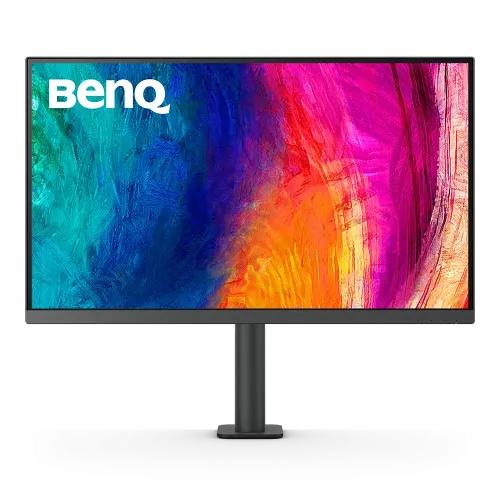
BenQ PD2705UA overview
The BenQ PD2705UA is a 27-inch 16:9 4K UHD designer monitor with an IPS panel and a clamp-mounted Ergo arm. BenQ specifies 3840 × 2160 resolution, 99% sRGB and Rec.709 coverage, HDR10, USB-C with 65W Power Delivery, KVM, factory calibration report, Hotkey Puck G2 and built-in speakers. The model is designed for color-focused creative work and flexible desktop positioning. Refer to the PD2705UA manual and regional BenQ specification for exact setup and dimensions. Performance depends on host, cable, software and selected color mode. Current Bangladesh stock, price, package contents, return terms and serial-specific warranty require seller confirmation.
Exact PD2705UA model and Ergo arm
Confirm the exact model is PD2705UA. BenQ’s model suffix UA distinguishes the Ergo Arm version with a new clamp design from the PD2705U stand version. The arm attaches to a suitable desk edge and may require different clearance and installation than a standard monitor base. Check the box, display label and invoice for the exact suffix. Refer to the PD2705UA manual and regional BenQ specification for exact setup and dimensions. Performance depends on host, cable, software and selected color mode. Current Bangladesh stock, price, package contents, return terms and serial-specific warranty require seller confirmation.
27-inch 4K UHD resolution
The 27-inch display uses native 3840 × 2160 UHD resolution, 16:9 aspect ratio and 163 pixels per inch. This high pixel density supports detailed artwork, fine text and 4K timelines. Operating system scaling may be useful for comfortable interface size. Use the native mode for best sharpness and ensure the graphics output supports 4K at 60Hz. Refer to the PD2705UA manual and regional BenQ specification for exact setup and dimensions. Performance depends on host, cable, software and selected color mode. Current Bangladesh stock, price, package contents, return terms and serial-specific warranty require seller confirmation.
IPS panel and color accuracy
BenQ lists an IPS panel, 1200:1 native contrast, 250 nits typical brightness and 178-degree viewing angles. The matte coating helps limit reflections. BenQ specifies 99% sRGB and 99% Rec.709, making the monitor suited to SDR web and video workflows when configured correctly. Color perception can still vary by unit and viewing conditions. Refer to the PD2705UA manual and regional BenQ specification for exact setup and dimensions. Performance depends on host, cable, software and selected color mode. Current Bangladesh stock, price, package contents, return terms and serial-specific warranty require seller confirmation.
Factory calibration and validation
BenQ lists a factory calibration report with average Delta E at or below 3 and Calman Verified and Pantone Validated certifications, including Pantone SkinTone validation. These provide useful quality references but do not replace a current calibration of the individual display. Keep the report and use a color-managed workflow for professional delivery. Refer to the PD2705UA manual and regional BenQ specification for exact setup and dimensions. Performance depends on host, cable, software and selected color mode. Current Bangladesh stock, price, package contents, return terms and serial-specific warranty require seller confirmation.
HDR10 and brightness
The monitor supports HDR10, with typical brightness listed at 250 nits and peak HDR brightness at 350 nits. HDR playback depends on source, software and system settings. This is not a high-brightness HDR mastering display; use the mode for compatible content with realistic expectations and rely on an appropriately calibrated reference display for final HDR mastering. Refer to the PD2705UA manual and regional BenQ specification for exact setup and dimensions. Performance depends on host, cable, software and selected color mode. Current Bangladesh stock, price, package contents, return terms and serial-specific warranty require seller confirmation.
Color modes and creative workflow
BenQ provides Rec.709, sRGB, HDR, M-Book, DICOM, CAD/CAM, Animation, Darkroom, Low Blue Light and user color modes. M-Book is intended to simulate MacBook Pro color characteristics. DICOM mode is not a substitute for a certified medical diagnostic display. Select modes for the workflow and use color management consistently. Refer to the PD2705UA manual and regional BenQ specification for exact setup and dimensions. Performance depends on host, cable, software and selected color mode. Current Bangladesh stock, price, package contents, return terms and serial-specific warranty require seller confirmation.
USB-C 65W and single-cable setup
USB-C supports DisplayPort Alt Mode, data and up to 65W Power Delivery. A compatible laptop can send video, connect to the USB hub and receive charging over one cable. Confirm the computer’s USB-C port supports video and that 65W meets its power needs. Higher-power workstations may need their own charger under load. Refer to the PD2705UA manual and regional BenQ specification for exact setup and dimensions. Performance depends on host, cable, software and selected color mode. Current Bangladesh stock, price, package contents, return terms and serial-specific warranty require seller confirmation.
Ports, USB hub and KVM
Inputs include one HDMI 2.0, one DisplayPort 1.4 and one USB-C with video, data and 65W PD. BenQ lists three USB 3.2 downstream ports and two USB Type-B upstream ports. KVM lets a connected keyboard and mouse switch between computers when USB upstream connections are properly wired. Connect host USB cables to enable hub and KVM features. Refer to the PD2705UA manual and regional BenQ specification for exact setup and dimensions. Performance depends on host, cable, software and selected color mode. Current Bangladesh stock, price, package contents, return terms and serial-specific warranty require seller confirmation.
Ergo arm adjustments
The UA version uses a clamp-style Ergo arm with broad movement. BenQ specifies up to 150mm height adjustment, 90-degree pivot, large swivel movement and tilt adjustment in the product specifications. The clamp needs a compatible desk thickness, edge shape and load capacity. Check desk clearance and follow the installation instructions to secure the arm safely. Refer to the PD2705UA manual and regional BenQ specification for exact setup and dimensions. Performance depends on host, cable, software and selected color mode. Current Bangladesh stock, price, package contents, return terms and serial-specific warranty require seller confirmation.
Hotkey Puck G2 and software
The included Hotkey Puck G2 provides shortcut buttons and a dial for frequently used monitor settings. Display Pilot 2, Palette Master Ultimate and Display ColorTalk are among BenQ software tools listed for this model family. Compatibility depends on operating system and connected computer; download supported utilities from BenQ and consult current release notes. Refer to the PD2705UA manual and regional BenQ specification for exact setup and dimensions. Performance depends on host, cable, software and selected color mode. Current Bangladesh stock, price, package contents, return terms and serial-specific warranty require seller confirmation.
Audio and built-in speakers
BenQ lists two 2.5W built-in speakers and a headphone jack. These can provide basic desktop audio for calls or review, but external speakers or headphones may be better for detailed editing and stronger sound. Audio output also depends on the selected computer or HDMI/DisplayPort source. Refer to the PD2705UA manual and regional BenQ specification for exact setup and dimensions. Performance depends on host, cable, software and selected color mode. Current Bangladesh stock, price, package contents, return terms and serial-specific warranty require seller confirmation.
PIP/PBP and DualView
PIP/PBP and DualView support can help compare inputs or view separate sources, subject to supported resolutions and layout modes. KVM is useful for sharing one keyboard and mouse across connected computers. Check the manual for exact configurations and connect required upstream USB links before expecting device switching. Refer to the PD2705UA manual and regional BenQ specification for exact setup and dimensions. Performance depends on host, cable, software and selected color mode. Current Bangladesh stock, price, package contents, return terms and serial-specific warranty require seller confirmation.
Dimensions and power
BenQ specifies 100 × 100mm VESA wall mounting, net weight around 10kg, 100–240V input, 65W USB-C PD and typical power use of 27.5W. Stand height range and clamp arm add desk depth requirements. Confirm the exact dimensions for the arm and desk layout, especially where a wall or shelf is behind the display. Refer to the PD2705UA manual and regional BenQ specification for exact setup and dimensions. Performance depends on host, cable, software and selected color mode. Current Bangladesh stock, price, package contents, return terms and serial-specific warranty require seller confirmation.
Computer setup and compatibility
Connect a computer through USB-C for video, data and 65W charging where supported, or use HDMI/DisplayPort plus USB upstream for KVM and the hub. Set native 3840 × 2160 at 60Hz, choose the appropriate color mode and use the calibration report as a starting point. Update compatible BenQ utilities only from the official support page. Refer to the PD2705UA manual and regional BenQ specification for exact setup and dimensions. Performance depends on host, cable, software and selected color mode. Current Bangladesh stock, price, package contents, return terms and serial-specific warranty require seller confirmation.
Professional workflow fit
PD2705UA is suited to designers, photographers and video editors working in sRGB or Rec.709 and needing a flexible arm, KVM or laptop USB-C connection. Its 60Hz refresh and moderate brightness make it less suitable for high-refresh gaming or demanding HDR mastering. Match the monitor to the color space and delivery specification of the work. Refer to the PD2705UA manual and regional BenQ specification for exact setup and dimensions. Performance depends on host, cable, software and selected color mode. Current Bangladesh stock, price, package contents, return terms and serial-specific warranty require seller confirmation.
Strengths and trade-offs
Strengths include 4K IPS detail, factory calibration report, 99% sRGB/Rec.709, USB-C 65W, KVM, Hotkey Puck G2, speakers and the Ergo arm. Trade-offs include 60Hz refresh, limited HDR brightness, clamp installation constraints and the need to calibrate for color-critical work. The arm and model suffix should be confirmed in the supplied package. Refer to the PD2705UA manual and regional BenQ specification for exact setup and dimensions. Performance depends on host, cable, software and selected color mode. Current Bangladesh stock, price, package contents, return terms and serial-specific warranty require seller confirmation.
Delivery inspection and care
Inspect the panel, clamp, arm joints, Hotkey Puck, adapter/cables and serial label on delivery. Retain the calibration report, invoice and packaging through the return period. Install the clamp on a suitable desk and check that all joints remain stable. Clean the matte panel with a soft cloth and avoid pressure or liquid directly on the screen. Refer to the PD2705UA manual and regional BenQ specification for exact setup and dimensions. Performance depends on host, cable, software and selected color mode. Current Bangladesh stock, price, package contents, return terms and serial-specific warranty require seller confirmation.
Bangladesh purchase and warranty checklist
Before buying in Bangladesh, confirm live stock and price, exact PD2705UA Ergo Arm model, new or open-box condition, Hotkey Puck and calibration report inclusion, USB-C and DP cables, return/dead-pixel terms, delivery and serial-specific BenQ warranty provider and term. Confirm the desk clamp is included and ask the seller to document local warranty on the invoice. Refer to the PD2705UA manual and regional BenQ specification for exact setup and dimensions. Performance depends on host, cable, software and selected color mode. Current Bangladesh stock, price, package contents, return terms and serial-specific warranty require seller confirmation.
Frequently asked questions
BenQ PD2705UA is a 27-inch 4K IPS designer monitor with 99% sRGB/Rec.709, factory calibration, USB-C 65W, KVM, Hotkey Puck G2 and Ergo arm. It runs at 60Hz and supports HDR10. Confirm the UA arm bundle, accessories and Bangladesh serial warranty before purchase. Refer to the PD2705UA manual and regional BenQ specification for exact setup and dimensions. Performance depends on host, cable, software and selected color mode. Current Bangladesh stock, price, package contents, return terms and serial-specific warranty require seller confirmation.