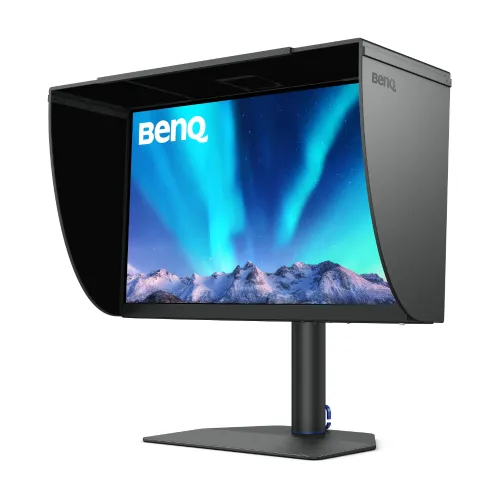
BenQ PhotoVue SW272QN overview
The BenQ PhotoVue SW272QN is a 27-inch QHD IPS monitor aimed at photography, video and color-managed creative work. Its 2560 × 1440 panel combines 99% Adobe RGB, 99% P3, full sRGB and Rec.709 coverage, a factory calibration report, hardware calibration, a 16-bit 3D-LUT and a typical 300-nit brightness rating. USB-C carries DisplayPort video, data and up to 90W power, while an SD card reader, KVM, shading hood and Hotkey Puck G3 support a dedicated editing desk. It is a 60Hz monitor, not a high-refresh gaming display. Confirm host compatibility, firmware, regional accessories and applicable serial warranty before purchase; results depend on the selected input, mode, software, cable and viewing environment.
Exact model identity and regional bundle
The product model is SW272QN, part of BenQ PhotoVue. BenQ specifies a 27-inch screen and QHD resolution; the QN suffix distinguishes this configuration from the SW272U 4K model and SW272Q sibling. Confirm the exact model printed on the carton, stand, and system information before buying replacement parts or downloading firmware. Regional packages and supplied signal cables may differ, so verify the local box contents rather than assuming every image or accessory shown online is included. Confirm host compatibility, firmware, regional accessories and applicable serial warranty before purchase; results depend on the selected input, mode, software, cable and viewing environment.
27-inch QHD IPS image detail
The IPS panel has a native 2560 × 1440 resolution, 16:9 aspect ratio, 109 pixels per inch, 178-degree horizontal and vertical viewing angles, and a 1000:1 native contrast ratio. QHD gives a 27-inch workspace with more pixels than Full HD while keeping interface scaling manageable on many systems. It does not provide the pixel density of a 4K 27-inch monitor. BenQ lists 5ms GtG response and a 60Hz refresh rate, which suit editing and desktop work rather than motion-first competition. Confirm host compatibility, firmware, regional accessories and applicable serial warranty before purchase; results depend on the selected input, mode, software, cable and viewing environment.
Adobe RGB, P3, sRGB and Rec.709 color
BenQ lists 100% sRGB, 100% Rec.709, 99% Adobe RGB and 99% P3 color coverage. These broad gamuts can support print photography, web delivery and video workflows when the right profile and color mode are selected. Coverage figures describe the model specification, not a measurement of the individual delivered unit. Use color-managed applications, choose an output profile suited to the destination and check that the computer, operating system and export settings preserve the intended color space. Confirm host compatibility, firmware, regional accessories and applicable serial warranty before purchase; results depend on the selected input, mode, software, cable and viewing environment.
Factory calibration and Delta E accuracy
The specification lists a factory calibration report, Calman Verified, Pantone Validated and Pantone SkinTone Validated status, with average Delta E of 1.5 or less. These are useful starting points for color-sensitive work, but they do not remove the need to manage ambient light, display brightness, application profiles and printer calibration. Results can vary over time and between units. Keep the delivered report and, when a project requires measured tolerances, validate the actual monitor with a supported calibration instrument. Confirm host compatibility, firmware, regional accessories and applicable serial warranty before purchase; results depend on the selected input, mode, software, cable and viewing environment.
HDR10, brightness and contrast limits
HDR10 input is supported and the typical brightness specification is 300 nits. BenQ does not list a VESA DisplayHDR tier on this specification page. HDR10 compatibility alone does not mean the display has the peak luminance or local-dimming performance of a mastering monitor. The native contrast is 1000:1, so dark-room black levels remain limited compared with OLED or local-dimming panels. Treat HDR mode as a supported signal and evaluate it using the intended content and workflow. Confirm host compatibility, firmware, regional accessories and applicable serial warranty before purchase; results depend on the selected input, mode, software, cable and viewing environment.
Nano Matte Black coating and glare control
BenQ names the screen finish Nano Matte Black and lists a shading hood as an accessory. The matte surface and hood can help reduce reflections and stray room light around a photograph-editing session, but neither makes the screen immune to bright windows or direct lamps. Position the display away from glare, keep the hood clean and use consistent room lighting when judging color. Confirm whether the hood is included with the Bangladesh region package and whether it is the landscape configuration described by BenQ. Confirm host compatibility, firmware, regional accessories and applicable serial warranty before purchase; results depend on the selected input, mode, software, cable and viewing environment.
Paper Color Sync and print workflow
Paper Color Sync is listed as supported software. It is intended to help preview how images may appear in a print workflow by combining display settings, paper choice and printer profile. A reliable soft proof still depends on an accurate ICC profile for the specific printer and paper, a managed application and suitable viewing light. The monitor cannot guarantee that a print will match without controlling those other parts of the workflow. Check BenQ’s current compatibility and download instructions for the computer operating system. Confirm host compatibility, firmware, regional accessories and applicable serial warranty before purchase; results depend on the selected input, mode, software, cable and viewing environment.
Hardware calibration and 3D-LUT
Hardware calibration and a 16-bit 3D-LUT are listed, along with LightSpace Ready support. These features are intended for maintaining or adjusting the monitor’s internal color response using compatible calibration tools. Required instruments and software may be separate purchases; check the supported device list before building a calibration workflow. Save calibration targets and profiles with the project. If you only use a software profile, verify that the graphics pipeline and applications load it correctly after startup and when switching users. Confirm host compatibility, firmware, regional accessories and applicable serial warranty before purchase; results depend on the selected input, mode, software, cable and viewing environment.
GamutDuo and picture comparison
GamutDuo can display two color spaces side by side, helping compare an image in different delivery targets. BenQ also lists multiple calibration memories and modes such as Adobe RGB, DCI-P3, Display P3, Rec.709, sRGB, HDR, M-Book, B+W, Paper Color Sync and custom settings. The selected preset affects what you see, so use the mode that matches the current task and record it when reviewing work with others. A split-view comparison is a viewing aid, not a substitute for exporting and checking final files. Confirm host compatibility, firmware, regional accessories and applicable serial warranty before purchase; results depend on the selected input, mode, software, cable and viewing environment.
USB-C 90W single-cable connection
The USB-C input supports DisplayPort Alt Mode, data and up to 90W Power Delivery. A compatible laptop may send QHD video, connect through the monitor’s USB hub and receive power using one cable. The host USB-C port must support video output, and the cable must support the needed signal and charging. Some performance laptops may require additional power. Confirm the port’s role and host compatibility before troubleshooting a blank screen or slow charging. Confirm host compatibility, firmware, regional accessories and applicable serial warranty before purchase; results depend on the selected input, mode, software, cable and viewing environment.
HDMI, DisplayPort and card reader
BenQ lists two HDMI 2.0 inputs and one DisplayPort 1.4 input, plus one USB-C video input. The monitor includes an SD/SDHC/SDXC/MMC card reader, a USB Type-B upstream connection, two USB downstream ports and a headphone jack. The spec describes the supplied signal cables as potentially region dependent. Check which cable is included and use a suitable certified cable for the selected input. Card reader performance and file transfer depend on the card, reader mode, host connection and file system. Confirm host compatibility, firmware, regional accessories and applicable serial warranty before purchase; results depend on the selected input, mode, software, cable and viewing environment.
KVM switch and USB hub
The integrated KVM switch can share compatible peripherals between connected computers. Connect the appropriate upstream USB path and configure the input-to-USB mapping in the on-screen menu; video input switching alone does not guarantee that a keyboard, mouse or card reader will follow the active host. The USB hub offers a convenient place for desk accessories, but it is not a substitute for a powered dock when multiple high-draw devices are attached. Check the manual for connection combinations and bandwidth behavior. Confirm host compatibility, firmware, regional accessories and applicable serial warranty before purchase; results depend on the selected input, mode, software, cable and viewing environment.
Hotkey Puck G3 and control options
Hotkey Puck G3 is listed as a supported accessory and provides a tactile way to access monitor controls and assignable functions. It can make switching color modes and navigating the OSD easier during a focused editing session. Confirm the Puck is present in the local package and connect it using the designated control port. The monitor’s software and menu features may vary by firmware; consult the latest official documentation for setup and supported host systems. Confirm host compatibility, firmware, regional accessories and applicable serial warranty before purchase; results depend on the selected input, mode, software, cable and viewing environment.
Shading hood, stand and ergonomics
The stand supports 140mm height adjustment, tilt from -5 to +20 degrees, swivel 30 degrees left and right, and 90-degree pivot. BenQ lists a 100 × 100mm VESA mounting pattern. Ergonomic adjustment helps align the screen to eye level and rotate it for portrait-oriented images or documents. Leave room behind the display for stand movement and cable routing. A third-party arm must support the monitor’s weight and VESA pattern; mount installation should be performed securely. Confirm host compatibility, firmware, regional accessories and applicable serial warranty before purchase; results depend on the selected input, mode, software, cable and viewing environment.
Portrait orientation and VESA mounting
Portrait pivot can help review vertical photos, page layouts and long documents, although panel rotation does not automatically rotate every application. Set orientation in the operating system and check cable clearance before turning the screen. The published net weight is 8.3kg with its stand and 4.92kg without base; with the hood BenQ lists 9.4kg. Use the correct weight for a wall mount or monitor arm and follow the mounting hardware load limits. Confirm host compatibility, firmware, regional accessories and applicable serial warranty before purchase; results depend on the selected input, mode, software, cable and viewing environment.
Photo, video and design suitability
Photographers can use the Adobe RGB and sRGB modes, calibration report, hardware calibration, shading hood and SD reader as parts of a controlled editing setup. Video editors can select P3 or Rec.709 modes according to the delivery target and use GamutDuo for visual comparisons. Designers can use the QHD workspace and broad viewing angles for layouts and review. The monitor supports these tasks best when paired with color-managed software and known profiles rather than relying on an uncalibrated default picture mode. Confirm host compatibility, firmware, regional accessories and applicable serial warranty before purchase; results depend on the selected input, mode, software, cable and viewing environment.
Gaming and general-use limitations
The 60Hz maximum refresh rate and 5ms GtG response are modest compared with gaming monitors. Casual gaming and everyday browsing are possible, but fast motion will not appear as fluid as on a 120Hz-or-higher display. The 27-inch QHD resolution is also less pixel-dense than 4K at the same size. HDR10 support does not make it a high-brightness HDR entertainment screen. Buyers choosing it primarily for gaming or HDR impact should compare those needs against its color-work strengths. Confirm host compatibility, firmware, regional accessories and applicable serial warranty before purchase; results depend on the selected input, mode, software, cable and viewing environment.
Bangladesh warranty and package checklist
Before ordering in Bangladesh, confirm the seller’s live stock, exact SW272QN model, final package contents, and current price directly on the product offer. Ask whether the shading hood, Hotkey Puck G3, calibration report, IO cover and region-appropriate cables are included. Confirm the local service provider, warranty duration and serial-number eligibility in writing. BenQ’s global specifications establish model capabilities; they do not establish a particular seller’s offer, regional warranty or current inventory. Confirm host compatibility, firmware, regional accessories and applicable serial warranty before purchase; results depend on the selected input, mode, software, cable and viewing environment.
Frequently asked questions
What resolution does the BenQ SW272QN have? It is a QHD 2560 × 1440 monitor. What are its color gamut figures? BenQ lists 100% sRGB and Rec.709 and 99% Adobe RGB and P3. Does USB-C charge a laptop? It supports up to 90W Power Delivery when the host and cable are compatible. Is a shading hood listed? Yes, BenQ lists a landscape shading hood among accessories; confirm the regional package. Does it have an SD reader? Yes, the specification lists SD, SDHC, SDXC and MMC. Is it 4K? No, SW272QN is QHD; SW272U is the 4K sibling. What refresh rate is specified? 60Hz. Does it support calibration? BenQ lists hardware calibration and a factory report; compatible calibration hardware/software may be needed. Is the warranty in Bangladesh established by the manufacturer page? No, confirm seller and serial-specific local terms. Confirm host compatibility, firmware, regional accessories and applicable serial warranty before purchase; results depend on the selected input, mode, software, cable and viewing environment.