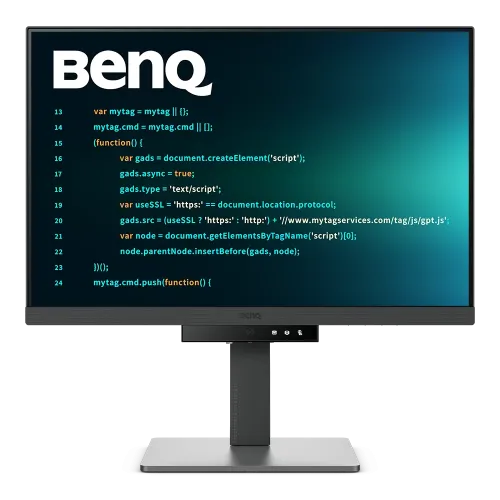
BenQ RD280U monitor overview
BenQ RD280U is a 28.2-inch 4K+ programming monitor built around an IPS panel with a tall 3:2 aspect ratio. Its 3840 × 2560 resolution provides more vertical workspace than a conventional 16:9 screen, which can reduce scrolling through code, documents and long web pages. BenQ also specifies a Nano Matte coating, coding picture modes, MoonHalo backlight, a 90W USB-C input and an integrated KVM switch. Real results depend on host graphics, cable, application, selected picture mode and room conditions. Verify the precise model and local seller terms; published specifications do not prove Bangladesh inventory, price, supplied accessories or serial warranty.
RD280U and related model differences
Check the exact RD280U model code. RD280UA is a related Ergo Arm version with pivot support, while RD280UG is a newer high-refresh model with different specifications. The standard RD280U refresh is 60Hz and does not pivot. Do not transfer the RD280UG’s 120Hz feature or the RD280UA’s arm/pivot details to this product. Confirm suffix and label on the delivered unit. Real results depend on host graphics, cable, application, selected picture mode and room conditions. Verify the precise model and local seller terms; published specifications do not prove Bangladesh inventory, price, supplied accessories or serial warranty.
28.2-inch 3:2 screen for code
The 28.2-inch panel uses a 3:2 shape, taller than the 16:9 format common on entertainment monitors. The extra vertical canvas is useful when keeping more lines of code, a document page, or a browser viewport visible at once. It can also require more desk height and a slightly different window arrangement. The shape is designed around productivity and reading rather than widescreen movie presentation. Real results depend on host graphics, cable, application, selected picture mode and room conditions. Verify the precise model and local seller terms; published specifications do not prove Bangladesh inventory, price, supplied accessories or serial warranty.
3840 × 2560 4K+ resolution
Native resolution is 3840 × 2560, marketed by BenQ as 4K+. At the reported 164 pixels per inch, text and interface edges appear detailed. High pixel density can make interface elements small at 100% scaling, so choose operating-system scaling that preserves readability. Applications should be tested at the chosen scale, especially when moving windows between displays of different density. Real results depend on host graphics, cable, application, selected picture mode and room conditions. Verify the precise model and local seller terms; published specifications do not prove Bangladesh inventory, price, supplied accessories or serial warranty.
IPS panel, color and brightness
The IPS LCD panel is rated at 350 nits typical brightness and 400 nits HDR peak, with 1200:1 native contrast, 178-degree viewing angles and 95% P3 coverage. BenQ lists 1.07 billion display colors. These are manufacturer specifications, not a substitute for calibration. HDR10 and VESA DisplayHDR 400 are listed; the 400-nit peak does not imply high-end local dimming. Real results depend on host graphics, cable, application, selected picture mode and room conditions. Verify the precise model and local seller terms; published specifications do not prove Bangladesh inventory, price, supplied accessories or serial warranty.
Nano Matte coating and reflections
BenQ specifies a Nano Matte coating and markets the monitor as Reflection Free for coding environments. A matte finish can reduce the visibility of reflections, though it cannot eliminate bright light sources or room glare in every placement. Position the display to avoid direct reflections from windows and lamps. The 3:2 format, font rendering and coating together are intended for long text-heavy work. Real results depend on host graphics, cable, application, selected picture mode and room conditions. Verify the precise model and local seller terms; published specifications do not prove Bangladesh inventory, price, supplied accessories or serial warranty.
Coding modes and Function Bar
Color modes include sRGB, HDR, M-book, User, ePaper, Cinema, Coding Dark Theme and Coding Light Theme. Coding modes change how text and background are presented for different ambient conditions. The Function Bar provides quick access to coding controls; the coding hotkey can switch modes quickly after setup. Confirm the selected mode after changing operating-system HDR or a connected computer. Real results depend on host graphics, cable, application, selected picture mode and room conditions. Verify the precise model and local seller terms; published specifications do not prove Bangladesh inventory, price, supplied accessories or serial warranty.
MoonHalo backlight and B.I. Gen2
MoonHalo is the rear ambient light designed to illuminate the wall behind the monitor. BenQ says its brightness and color temperature can be customized, and B.I. Gen2 can adjust brightness based on the surrounding environment. Ambient lighting is optional and should suit the room; it does not change the actual pixels or replace comfortable room lighting. Display Pilot 2 provides software controls for supported functions. Real results depend on host graphics, cable, application, selected picture mode and room conditions. Verify the precise model and local seller terms; published specifications do not prove Bangladesh inventory, price, supplied accessories or serial warranty.
USB-C 90W single-cable setup
The USB-C upstream port supports DisplayPort Alt Mode, data and up to 90W power delivery. A compatible notebook can send video, data and receive power over one cable, reducing desk clutter. Confirm the laptop USB-C port supports video and that 90W meets its charging needs under load. The monitor’s one-cable convenience does not guarantee full performance through every dock, cable or computer configuration. Real results depend on host graphics, cable, application, selected picture mode and room conditions. Verify the precise model and local seller terms; published specifications do not prove Bangladesh inventory, price, supplied accessories or serial warranty.
KVM and multi-computer workflow
An integrated KVM switch lets a keyboard and mouse connected to the monitor be shared across two computers. Connect each computer’s video and the required USB upstream path, then assign or switch the active source in the monitor controls. KVM simplifies switching between a work laptop and desktop but does not merge their storage or applications. Peripheral behavior depends on the selected USB routing. Real results depend on host graphics, cable, application, selected picture mode and room conditions. Verify the precise model and local seller terms; published specifications do not prove Bangladesh inventory, price, supplied accessories or serial warranty.
DisplayPort, HDMI and USB hub
Video inputs include one HDMI 2.0, one DisplayPort 1.4 and one USB-C input. USB connectivity includes one USB-B upstream port, three USB-A downstream ports and one USB-C downstream port, with data and charging limits by port. The downstream USB-A ports are listed for 5Gbps and 4.5W charging; downstream USB-C is 5Gbps and 7.5W charging. A headphone jack is also provided. Real results depend on host graphics, cable, application, selected picture mode and room conditions. Verify the precise model and local seller terms; published specifications do not prove Bangladesh inventory, price, supplied accessories or serial warranty.
MST daisy chaining limits
USB-C out supports Multi-Stream Transport daisy chaining for compatible multi-display workflows. BenQ notes that supported resolution varies by connection and device; Mac devices require Thunderbolt for daisy chaining, and M1/M2 Mac systems support only one external display in the specified scenarios. HDMI or ordinary USB ports do not provide MST daisy chaining. Consult the manual for source-specific resolutions before planning a multi-monitor chain. Real results depend on host graphics, cable, application, selected picture mode and room conditions. Verify the precise model and local seller terms; published specifications do not prove Bangladesh inventory, price, supplied accessories or serial warranty.
Stand adjustments and mounting
The standard stand provides 110mm height adjustment, -5 to +20 degree tilt and 15-degree swivel left/right. BenQ explicitly says RD280U does not support pivot rotation; consider RD280UA if pivot is required. The monitor supports 100 × 100mm VESA mounting. Allow for its large 610.4mm-wide, 3:2 panel and base footprint when checking desk space and arm load capacity. Real results depend on host graphics, cable, application, selected picture mode and room conditions. Verify the precise model and local seller terms; published specifications do not prove Bangladesh inventory, price, supplied accessories or serial warranty.
Refresh rate and response
The refresh rate is 60Hz over DisplayPort and USB-C, with a 5ms GtG response time. This is suited to coding, documents and general desktop work rather than high-refresh competitive gaming. Confirm that the computer can output 3840 × 2560 at 60Hz through its selected connection. Older docks may limit resolution, color depth or refresh, so test the direct connection first. Real results depend on host graphics, cable, application, selected picture mode and room conditions. Verify the precise model and local seller terms; published specifications do not prove Bangladesh inventory, price, supplied accessories or serial warranty.
Eye-care features for long sessions
BenQ lists Flicker-Free, hardware Low Blue Light, Low Blue Light Plus, Brightness Intelligence Gen2, ePaper, Eye Reminder and Night Hours Protection. These tools let users adjust viewing comfort but do not replace breaks, room lighting or an appropriate viewing distance. Eye-care settings may alter color appearance, so select a neutral or calibrated mode when accurate color matters. Real results depend on host graphics, cable, application, selected picture mode and room conditions. Verify the precise model and local seller terms; published specifications do not prove Bangladesh inventory, price, supplied accessories or serial warranty.
Programming, reading and office use
The taller screen can keep more code, spreadsheets, logs or document text visible at once. Coding Dark and Light modes offer distinct presentation, while KVM and the USB hub support multi-computer desks. For video editing or gaming, the 3:2 shape and 60Hz rate may be less suitable than a widescreen high-refresh display. Workflows should match the intended applications and desk layout. Real results depend on host graphics, cable, application, selected picture mode and room conditions. Verify the precise model and local seller terms; published specifications do not prove Bangladesh inventory, price, supplied accessories or serial warranty.
Advantages and practical limitations
Strengths include high pixel density, extra vertical workspace, a matte screen, 90W USB-C, KVM, an integrated hub, coding modes and ergonomic height/tilt/swivel adjustment. Trade-offs include a 60Hz refresh rate, no pivot on the RD280U, the large 3:2 footprint and HDR400-level peak capability without advertised local dimming. Check if the specific connection and host can drive full resolution. Real results depend on host graphics, cable, application, selected picture mode and room conditions. Verify the precise model and local seller terms; published specifications do not prove Bangladesh inventory, price, supplied accessories or serial warranty.
Bangladesh buying checklist
For Bangladesh purchases, verify the RD280U label and suffix, current stock, delivered price, included power cable and region-compatible warranty. Ask the seller to confirm serial eligibility, service provider and warranty duration in writing. The BenQ published regional spec is useful for model features, but it does not establish local stock, the exact supplied bundle or serial-specific service entitlement. Real results depend on host graphics, cable, application, selected picture mode and room conditions. Verify the precise model and local seller terms; published specifications do not prove Bangladesh inventory, price, supplied accessories or serial warranty.
Frequently asked questions
What is the resolution? 3840 × 2560. What aspect ratio? 3:2. What refresh rate? 60Hz over DP and USB-C. Does USB-C charge a laptop? Yes, up to 90W, provided the host supports USB-C display output. Can it pivot? No, standard RD280U does not pivot. What stand movement is listed? 110mm height, tilt and 15-degree swivel each way. What is the panel? IPS LCD. Does it support KVM? Yes. Is it suitable for gaming? General gaming is possible, but it is a 60Hz productivity-focused model. Real results depend on host graphics, cable, application, selected picture mode and room conditions. Verify the precise model and local seller terms; published specifications do not prove Bangladesh inventory, price, supplied accessories or serial warranty.
Who should choose the RD280U
Choose the BenQ RD280U if a tall, detailed screen for coding, reading and office work matters more than high refresh or pivot rotation. Its 90W USB-C, KVM, USB hub and MoonHalo can simplify a multi-computer desk. Confirm laptop compatibility, actual local warranty and seller offer before ordering. If pivot is essential, compare the RD280UA; if high refresh is needed, compare RD280UG separately. Real results depend on host graphics, cable, application, selected picture mode and room conditions. Verify the precise model and local seller terms; published specifications do not prove Bangladesh inventory, price, supplied accessories or serial warranty.