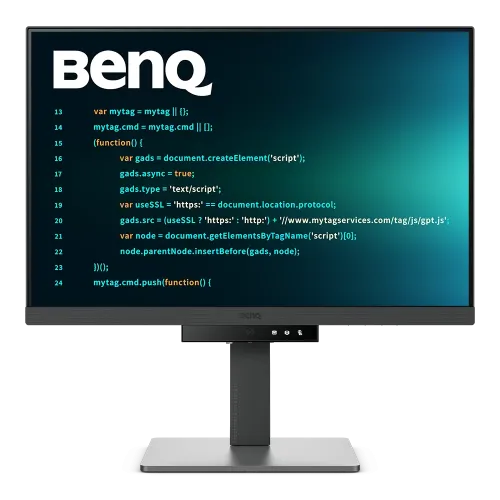
BenQ RD280UA overview
The BenQ RD280UA is a 28.2-inch 4K+ programming monitor with a 3:2 IPS display and a flexible Ergo Arm. Its 3840 × 2560 resolution provides a tall workspace for code, documents and browser windows. BenQ specifies 60Hz, 95% P3, Nano Matte coating, HDR10/DisplayHDR 400, USB-C with 90W power delivery, KVM, MoonHalo and coding-oriented picture modes. Actual results depend on host graphics, cable, operating system, room light and selected mode. Confirm exact local model, arm, package and serial warranty with the seller; specifications alone do not establish current Bangladesh availability.
RD280UA and RD280U differences
RD280UA is the Ergo Arm variant of the RD280U. Both share the 28.2-inch 3:2 IPS panel and 4K+ resolution, but the RD280UA supports pivot and uses the specialized arm; the standard RD280U has a conventional stand and does not pivot. RD280UG is a newer 120Hz model with separate specifications. Confirm the complete RD280UA code to avoid mixing features among these models. Actual results depend on host graphics, cable, operating system, room light and selected mode. Confirm exact local model, arm, package and serial warranty with the seller; specifications alone do not establish current Bangladesh availability.
28.2-inch 3:2 screen workspace
The 28.2-inch display uses a 3:2 aspect ratio, taller than common 16:9 monitors. The vertical space can show more source code, document lines and web content before scrolling. The landscape width also supports side-by-side windows, while portrait orientation can suit long code or documents. The tall 3:2 panel requires checking desk clearance, especially when raised or pivoted. Actual results depend on host graphics, cable, operating system, room light and selected mode. Confirm exact local model, arm, package and serial warranty with the seller; specifications alone do not establish current Bangladesh availability.
3840 × 2560 4K+ detail
Native resolution is 3840 × 2560, marketed as 4K+. With about 164 pixels per inch, text and fine interface elements can appear detailed. Operating-system scaling may be needed for comfortable reading; choose a scale that preserves application usability while taking advantage of the dense panel. Verify the host graphics output and cable can drive the full resolution at 60Hz. Actual results depend on host graphics, cable, operating system, room light and selected mode. Confirm exact local model, arm, package and serial warranty with the seller; specifications alone do not establish current Bangladesh availability.
IPS panel and color modes
BenQ specifies an IPS LCD panel, 95% P3 color gamut and 1.07 billion display colors. Color modes include sRGB, HDR, M-book, User, ePaper, Cinema, Coding Dark Theme and Coding Light Theme. These modes provide different looks for code, reading and media, but gamut figures alone do not guarantee calibrated accuracy. Select the correct profile for the application. Actual results depend on host graphics, cable, operating system, room light and selected mode. Confirm exact local model, arm, package and serial warranty with the seller; specifications alone do not establish current Bangladesh availability.
Nano Matte coating and brightness
The display has a Nano Matte surface, 350 nits typical brightness and 400 nits HDR peak brightness. Matte treatment can reduce visible reflections in offices, though it cannot eliminate every glare source. Arrange windows and lamps to avoid direct reflections. The peak brightness figure is limited to HDR conditions and does not mean sustained 400-nit full-screen output. Actual results depend on host graphics, cable, operating system, room light and selected mode. Confirm exact local model, arm, package and serial warranty with the seller; specifications alone do not establish current Bangladesh availability.
Ergo Arm height, swivel and pivot
The RD280UA’s flexible Ergo Arm supports 130mm height adjustment, tilt from -5 to +30 degrees, swivel up to 275 degrees each direction and 90-degree pivot. The pivot lets users turn the screen between landscape and portrait. Its size and weight change the arm’s balance and desk clearance; follow BenQ’s installation guide and use the arm supplied for this model. Actual results depend on host graphics, cable, operating system, room light and selected mode. Confirm exact local model, arm, package and serial warranty with the seller; specifications alone do not establish current Bangladesh availability.
USB-C 90W one-cable setup
USB-C supports DisplayPort Alt Mode, data and up to 90W Power Delivery. A compatible laptop can carry video, USB data and receive power through one cable. Check that the laptop USB-C port supports video and that its power requirements fit within 90W. A higher-power workstation may still need its own adapter, and cable or host limits can affect resolution or charging. Actual results depend on host graphics, cable, operating system, room light and selected mode. Confirm exact local model, arm, package and serial warranty with the seller; specifications alone do not establish current Bangladesh availability.
KVM and dual-computer sharing
KVM lets users share a keyboard and mouse across two connected computers through the display’s USB hub. Connect video for each computer and the required USB upstream paths, then assign the active KVM source in the OSD. A typical setup uses USB-C for one notebook and USB-B upstream plus DisplayPort/HDMI for another desktop. KVM switches peripherals; it does not transfer files or combine operating systems. Actual results depend on host graphics, cable, operating system, room light and selected mode. Confirm exact local model, arm, package and serial warranty with the seller; specifications alone do not establish current Bangladesh availability.
Ports, hub and MST daisy chain
Inputs include one HDMI 2.0, one DisplayPort 1.4 and one USB-C upstream connection. USB hub connections include one USB-B upstream, three USB-A downstream ports and one USB-C downstream port. The USB-C output supports MST daisy chaining for compatible monitors. BenQ notes that device capability and connection type can limit supported resolutions, especially on Mac systems. Actual results depend on host graphics, cable, operating system, room light and selected mode. Confirm exact local model, arm, package and serial warranty with the seller; specifications alone do not establish current Bangladesh availability.
Coding modes and Function Bar
Coding Dark and Light modes help tune text and background appearance. BenQ’s Function Bar and coding hotkey provide quick access to modes and other controls. Display Pilot 2 software can manage supported display functions and desktop organization. These tools are intended to reduce repetitive OSD navigation; verify the software version and host operating system before depending on a shortcut workflow. Actual results depend on host graphics, cable, operating system, room light and selected mode. Confirm exact local model, arm, package and serial warranty with the seller; specifications alone do not establish current Bangladesh availability.
MoonHalo and ambient lighting
MoonHalo is the rear ambient light for illuminating the wall behind the display. BenQ describes adjustable color temperature, brightness and modes, with auto-dimming via Brightness Intelligence Gen2. It can add soft bias lighting to a workspace, but does not change the panel’s picture. Adjust or switch it off to suit room lighting and personal preference. Actual results depend on host graphics, cable, operating system, room light and selected mode. Confirm exact local model, arm, package and serial warranty with the seller; specifications alone do not establish current Bangladesh availability.
HDR and image expectations
BenQ lists HDR10 and VESA DisplayHDR 400. The panel is rated at 400 nits peak HDR and 350 nits typical brightness, without a listed local-dimming system. Expect basic HDR input compatibility rather than OLED-like blacks or high-zone HDR. For everyday coding and desktop work, SDR or a coding preset may provide more predictable brightness and color. Actual results depend on host graphics, cable, operating system, room light and selected mode. Confirm exact local model, arm, package and serial warranty with the seller; specifications alone do not establish current Bangladesh availability.
Eye-care tools for long coding sessions
Eye-care functions include Flicker-Free, Low Blue Light Plus, Brightness Intelligence Gen2, ePaper, Eye Reminder and Night Hours Protection. These settings let users tailor the image to room lighting and reading needs. Eye-care modes can alter color temperature and gamut; disable them when color fidelity matters. Comfortable breaks, posture and screen distance remain important for extended work. Actual results depend on host graphics, cable, operating system, room light and selected mode. Confirm exact local model, arm, package and serial warranty with the seller; specifications alone do not establish current Bangladesh availability.
Setup for laptops and desktops
For a laptop, connect with a USB-C cable that supports DisplayPort Alt Mode and 90W PD. For a desktop, use DisplayPort or HDMI for video and USB-B upstream for hub/KVM features. Choose 3840 × 2560 at 60Hz in the operating system and check that the active signal is correct. Docks, adapters and older GPU outputs may restrict bandwidth. Actual results depend on host graphics, cable, operating system, room light and selected mode. Confirm exact local model, arm, package and serial warranty with the seller; specifications alone do not establish current Bangladesh availability.
Multi-monitor use and limits
MST can extend the desktop through USB-C to another compatible display. Supported resolution and device behavior vary. BenQ notes that Mac daisy-chaining requires Thunderbolt, not HDMI or ordinary USB, and M1/M2 Mac systems have external display limits. Plan the chain using the host’s documentation and monitor manual, and test each display directly before troubleshooting the chain. Actual results depend on host graphics, cable, operating system, room light and selected mode. Confirm exact local model, arm, package and serial warranty with the seller; specifications alone do not establish current Bangladesh availability.
Strengths and trade-offs
Advantages include a dense 3:2 workspace, portrait pivot, flexible arm, 90W USB-C, KVM, coding modes, MoonHalo and a USB hub. Trade-offs include 60Hz refresh, large desk footprint, HDR400-level peak output and the need for host compatibility with USB-C/MST. The dedicated arm is specialized for RD280UA and should not be assumed compatible with other BenQ displays. Actual results depend on host graphics, cable, operating system, room light and selected mode. Confirm exact local model, arm, package and serial warranty with the seller; specifications alone do not establish current Bangladesh availability.
Bangladesh purchase checklist
Before ordering in Bangladesh, confirm RD280UA on the monitor label, exact Ergo Arm inclusion, local stock, delivered price, included cables and serial-specific warranty. Ask the seller to document the warranty provider and duration. Verify the arm’s condition and box contents because this model’s arm is a central ergonomic feature. Manufacturer specifications do not prove local stock or support. Actual results depend on host graphics, cable, operating system, room light and selected mode. Confirm exact local model, arm, package and serial warranty with the seller; specifications alone do not establish current Bangladesh availability.
Frequently asked questions
What is the native resolution? 3840 × 2560 4K+. What aspect ratio? 3:2. Does it pivot? Yes, the RD280UA supports 90-degree pivot on its Ergo Arm. How much USB-C power? Up to 90W. Is it 120Hz? No, it is 60Hz; RD280UG is the separate 120Hz model. Does it have KVM? Yes. What HDR? HDR10 and VESA DisplayHDR 400. Is the Ergo Arm universal? BenQ says it is specialized for this model. Actual results depend on host graphics, cable, operating system, room light and selected mode. Confirm exact local model, arm, package and serial warranty with the seller; specifications alone do not establish current Bangladesh availability.
Best-fit user summary
Choose the BenQ RD280UA if a high-density tall display and true portrait pivot are important for programming, reading or document workflows. Its 90W USB-C and KVM can simplify a laptop-plus-desktop desk. It is not the 120Hz RD280UG, and its large arm footprint needs planning. Confirm the local seller offer and serial warranty before purchase. Actual results depend on host graphics, cable, operating system, room light and selected mode. Confirm exact local model, arm, package and serial warranty with the seller; specifications alone do not establish current Bangladesh availability.