Pros
- 240Hz and DyAc 2 target competitive motion clarity.
- S-Switch supports quick access to saved game profiles.
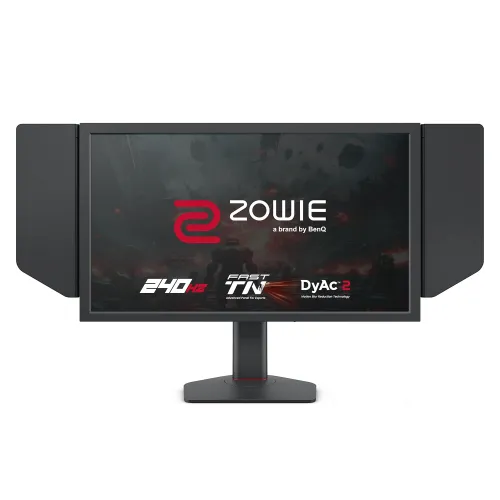
- Side shields and adjustable stand suit focused esports setups.
- Three HDMI inputs plus DisplayPort support multiple devices.

All categories
 New condition
Monitors
BenQ ZOWIE · XL2546X
24.5-inch 240Hz Full HD Fast TN esports monitor with DyAc 2, S-Switch and adjustable stand.
Price unavailable
Price range updating
No verified price is available yet. Store offers will appear when merchants publish them.
Compare store prices
No live offers for this variant
Offers will appear when merchants publish them.
Loading history…
Product story
The BenQ ZOWIE XL2546X is a 24.5-inch Full HD esports monitor built around a Fast TN panel, 240Hz refresh and DyAc 2 motion technology. ZOWIE lists 1920 × 1080 up to 240Hz on PC, three HDMI 2.0 inputs, one DisplayPort, an S-Switch, side shields and a height-adjustable stand. It is designed for competitive PC play where clear motion and repeatable settings matter. Use the XL2546X manual and regional ZOWIE product page for supported modes and setup. Results depend on graphics source, connection, game and OSD choices. Bangladesh price, stock, package, return conditions and serial-specific warranty require confirmation from the seller.
Confirm the exact model XL2546X. Similar names such as XL2546, XL2546K, XL2546X+ and XL2540X have different panels, refresh and DyAc versions. XL2546X is 240Hz with DyAc 2 and Fast TN; the later XL2546X+ is a separate 280Hz model. Check the chassis label and box before buying. Use the XL2546X manual and regional ZOWIE product page for supported modes and setup. Results depend on graphics source, connection, game and OSD choices. Bangladesh price, stock, package, return conditions and serial-specific warranty require confirmation from the seller.
The 24.5-inch 16:9 display has native 1920 × 1080 Full HD resolution. This is a common esports resolution that allows many PCs to reach high frame rates. It offers less desktop detail than QHD or 4K monitors, but helps focus gameplay and reduces GPU load. Set native resolution and choose a supported 240Hz refresh. Use the XL2546X manual and regional ZOWIE product page for supported modes and setup. Results depend on graphics source, connection, game and OSD choices. Bangladesh price, stock, package, return conditions and serial-specific warranty require confirmation from the seller.
ZOWIE specifies a Fast TN LCD panel with 1000:1 native contrast and typical 320-nit brightness. TN technology prioritizes rapid transitions and motion performance; color and viewing angles may look less consistent from off-center positions than IPS. Position the screen directly in front and adjust its height for a clear view. Use the XL2546X manual and regional ZOWIE product page for supported modes and setup. Results depend on graphics source, connection, game and OSD choices. Bangladesh price, stock, package, return conditions and serial-specific warranty require confirmation from the seller.
The maximum refresh rate is 240Hz. A high refresh can display more frames when the graphics system produces them, improving perceived motion smoothness and reducing display latency compared with 60Hz. It does not make a game render at 240fps by itself. Use a capable GPU and configure 1920 × 1080 at 240Hz in the driver. Use the XL2546X manual and regional ZOWIE product page for supported modes and setup. Results depend on graphics source, connection, game and OSD choices. Bangladesh price, stock, package, return conditions and serial-specific warranty require confirmation from the seller.
DyAc 2 uses backlight strobing and dual backlight design to improve perceived motion clarity in supported configurations. Strobing can reduce brightness and may interact with variable refresh. BenQ specifies that flicker-free operation and VRR are available with DyAc 2 off. Compare modes and use the one that suits each game and sensitivity. Use the XL2546X manual and regional ZOWIE product page for supported modes and setup. Results depend on graphics source, connection, game and OSD choices. Bangladesh price, stock, package, return conditions and serial-specific warranty require confirmation from the seller.
ZOWIE features include Black eQualizer, Color Vibrance, Color Mode, Brightness Intelligence and game-specific OSD controls. These can adjust dark-area visibility and color appearance, but the best setting is personal and may alter image fidelity. Use a consistent profile for tournament play and save game settings with the S-Switch or software. Use the XL2546X manual and regional ZOWIE product page for supported modes and setup. Results depend on graphics source, connection, game and OSD choices. Bangladesh price, stock, package, return conditions and serial-specific warranty require confirmation from the seller.
The monitor provides three HDMI 2.0 inputs and one DisplayPort 1.2 input. ZOWIE lists 1920 × 1080 at 240Hz over HDMI 2.0 and DisplayPort 1.2 for PC/laptop. Check GPU output, cable and OSD input selection when 240Hz is missing. High refresh requires the source to support the mode. Use the XL2546X manual and regional ZOWIE product page for supported modes and setup. Results depend on graphics source, connection, game and OSD choices. Bangladesh price, stock, package, return conditions and serial-specific warranty require confirmation from the seller.
For PS5 and Xbox Series X/S, ZOWIE lists 1920 × 1080 at up to 120Hz over HDMI 2.0. Console output depends on game and system settings; consoles do not use the 240Hz PC maximum. Check the detected signal after connecting and select 120Hz mode in the game or console where available. Use the XL2546X manual and regional ZOWIE product page for supported modes and setup. Results depend on graphics source, connection, game and OSD choices. Bangladesh price, stock, package, return conditions and serial-specific warranty require confirmation from the seller.
The included S-Switch lets users navigate OSD settings and switch saved modes with dedicated controls. XL Setting to Share software supports importing or sharing display presets, with auto game mode listed. Software and game recognition behavior depends on the connected PC and supported version; download the utility from ZOWIE support. Use the XL2546X manual and regional ZOWIE product page for supported modes and setup. Results depend on graphics source, connection, game and OSD choices. Bangladesh price, stock, package, return conditions and serial-specific warranty require confirmation from the seller.
The package includes side shields and a height-adjustable stand designed for esports setups. The stand has up to 155mm height adjustment, -5 to +35 degree tilt and 45 degree swivel each way. A handle supports carrying. The shields reduce side distractions but do not improve panel brightness or image quality. Use the XL2546X manual and regional ZOWIE product page for supported modes and setup. Results depend on graphics source, connection, game and OSD choices. Bangladesh price, stock, package, return conditions and serial-specific warranty require confirmation from the seller.
The monitor supports 100 × 100mm VESA mounting and includes a Kensington lock. Built-in power accepts 100–240V and maximum consumption is below 45W. Net weight is listed at about 6.1kg. Dimensions vary with stand height; confirm desk space and arm load rating before installing a third-party mount. Use the XL2546X manual and regional ZOWIE product page for supported modes and setup. Results depend on graphics source, connection, game and OSD choices. Bangladesh price, stock, package, return conditions and serial-specific warranty require confirmation from the seller.
ZOWIE provides several picture modes and settings for brightness, contrast, color vibrance, sharpness and overdrive. DyAc 2, adaptive sync, refresh mode and response settings may not all be available together. Consult the manual and test settings in the games used, avoiding the assumption that one preset is best for every title. Use the XL2546X manual and regional ZOWIE product page for supported modes and setup. Results depend on graphics source, connection, game and OSD choices. Bangladesh price, stock, package, return conditions and serial-specific warranty require confirmation from the seller.
XL2546X is most suitable for competitive FPS and esports players who prioritize high frame rate, motion clarity and familiar Full HD resolution. It is less suited to color-critical creation, high-resolution media or USB-C laptop docking. The Fast TN panel, 240Hz and DyAc 2 target a focused gaming workflow rather than an all-purpose creator setup. Use the XL2546X manual and regional ZOWIE product page for supported modes and setup. Results depend on graphics source, connection, game and OSD choices. Bangladesh price, stock, package, return conditions and serial-specific warranty require confirmation from the seller.
Strengths include 240Hz, DyAc 2, S-Switch, side shields, game-specific controls, three HDMI inputs and adjustable stand. Trade-offs include Full HD resolution on a 24.5-inch screen, TN viewing characteristics, no USB-C, no built-in speakers listed, and reduced brightness or VRR limitations when using strobing modes. Use the XL2546X manual and regional ZOWIE product page for supported modes and setup. Results depend on graphics source, connection, game and OSD choices. Bangladesh price, stock, package, return conditions and serial-specific warranty require confirmation from the seller.
DyAc 2 and VRR are separate motion options; ZOWIE notes VRR and flicker-free operation with DyAc 2 off. Some users may notice flicker or discomfort with strobing. Test the options at the intended refresh and brightness and turn them off if they cause discomfort. Choose stable settings before competitive play. Use the XL2546X manual and regional ZOWIE product page for supported modes and setup. Results depend on graphics source, connection, game and OSD choices. Bangladesh price, stock, package, return conditions and serial-specific warranty require confirmation from the seller.
Inspect the panel for cracks, dead pixels under seller policy, side shields, stand, S-Switch, power cable, DP/HDMI cables and serial label. Retain the invoice and packaging during the return period. Clean with a soft cloth and avoid pressing on the screen. Check the shields and stand are secured before moving the monitor. Use the XL2546X manual and regional ZOWIE product page for supported modes and setup. Results depend on graphics source, connection, game and OSD choices. Bangladesh price, stock, package, return conditions and serial-specific warranty require confirmation from the seller.
Before purchase in Bangladesh, confirm current stock and price, exact XL2546X (not XL2546X+ or XL2546K), new/open-box condition, included S-Switch and shields, cable bundle, dead-pixel and return terms, delivery and serial-specific BenQ/ZOWIE warranty provider and duration. Request local warranty in writing on the invoice. Use the XL2546X manual and regional ZOWIE product page for supported modes and setup. Results depend on graphics source, connection, game and OSD choices. Bangladesh price, stock, package, return conditions and serial-specific warranty require confirmation from the seller.
BenQ ZOWIE XL2546X is a 24.5-inch 1920 × 1080 Fast TN esports display with 240Hz and DyAc 2. PC supports 240Hz; compatible PS5/Xbox modes are listed up to 1080p 120Hz. It includes S-Switch and shields. Confirm the exact model and Bangladesh warranty before buying. Use the XL2546X manual and regional ZOWIE product page for supported modes and setup. Results depend on graphics source, connection, game and OSD choices. Bangladesh price, stock, package, return conditions and serial-specific warranty require confirmation from the seller.
For PC esports, connect a compatible source, choose 1080p at 240Hz and tune DyAc 2, VRR and game presets to your preference. Console users should expect up to 1080p 120Hz when supported. The display prioritizes competitive motion over high resolution or creator color features. Use the XL2546X manual and regional ZOWIE product page for supported modes and setup. Results depend on graphics source, connection, game and OSD choices. Bangladesh price, stock, package, return conditions and serial-specific warranty require confirmation from the seller.
Helpful answers
Product-specific answers maintained with the catalog information.
XL2546X uses 1920 × 1080 Full HD at 24.5 inches.
ZOWIE lists 240Hz for compatible PC and laptop sources.
It is ZOWIE backlight strobing technology designed to improve motion clarity.
Yes, it has three HDMI 2.0 inputs and one DisplayPort 1.2 input.
ZOWIE lists 1080p 120Hz for PS5 and Xbox Series X/S over HDMI.
VRR is listed with DyAc 2 turned off.
It is an included control for navigating OSD and switching saved settings.
Yes, side shields are listed as included accessories.
Confirm the serial-specific local BenQ/ZOWIE provider, term and service in writing.
Customer community
Become a merchant
Join BiponiBD, publish accurate offers and start free.