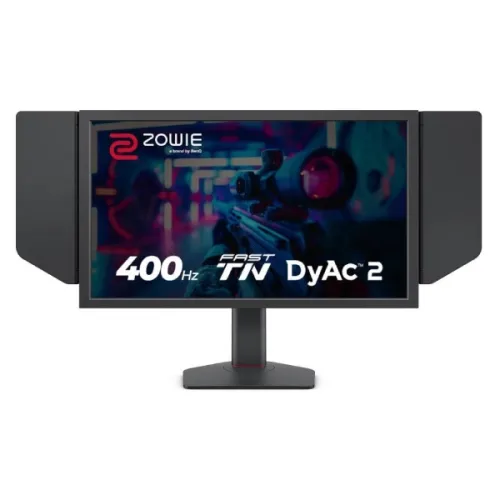
BenQ ZOWIE XL2566X+ monitor overview
The BenQ ZOWIE XL2566X+ is a 24.1-inch esports monitor designed around a Fast TN panel, native Full HD resolution and a maximum 400Hz refresh rate over DisplayPort. Its signature motion feature is DyAc 2, paired with a height-adjustable stand, S Switch controller and detachable shielding hoods. The display focuses on competitive first-person shooters where motion tracking and stable, high frame rates matter. It is not a high-resolution productivity or HDR monitor; its purpose is a responsive 1920 × 1080 competitive gaming setup. Actual results vary with GPU performance, game frame rate, selected monitor mode, cable and viewing conditions. Use BenQ ZOWIE support documentation for the current signal and feature behavior.
Exact XL2566X+ model identification
Confirm the model suffix “+”: XL2566X+ is the 400Hz Fast TN monitor with DyAc 2. It is different from XL2566K and XL2566X, which have different specifications and motion features. The plus-marked model supports 1920 × 1080 at up to 400Hz from a compatible PC through DisplayPort 1.4. Its three HDMI 2.0 ports are useful for other sources, but BenQ lists PS5 and Xbox Series X/S at 1920 × 1080 up to 120Hz through HDMI. Do not mistake the 400Hz PC rate for a console mode. Actual results vary with GPU performance, game frame rate, selected monitor mode, cable and viewing conditions. Use BenQ ZOWIE support documentation for the current signal and feature behavior.
24.1-inch Full HD Fast TN panel
The panel measures 24.1 inches diagonally, uses a 16:9 aspect ratio and has a native 1920 × 1080 resolution. BenQ lists a 535.68 × 298.08mm display area, 0.279mm pixel pitch and 1000:1 native contrast. Full HD is less detailed than QHD or 4K, but it reduces rendering load and is a common resolution for competitive PC titles. At typical desktop distance, text and objects remain legible; users who prioritize desktop workspace or high-resolution media should compare a larger QHD display. Actual results vary with GPU performance, game frame rate, selected monitor mode, cable and viewing conditions. Use BenQ ZOWIE support documentation for the current signal and feature behavior.
400Hz refresh rate and supported signal
BenQ specifies up to 400Hz at 1920 × 1080 on a suitable PC connected through DisplayPort 1.4. This refresh ceiling requires a graphics output, cable, driver, operating system and game configuration that all support the selected signal. HDMI console modes are separately specified up to 120Hz for current PlayStation and Xbox models. A 400Hz panel does not force the computer to generate 400 frames per second; the benefit depends on frame output and game behavior. Use the bundled DP 1.4 cable and confirm the active signal in Windows display settings. Actual results vary with GPU performance, game frame rate, selected monitor mode, cable and viewing conditions. Use BenQ ZOWIE support documentation for the current signal and feature behavior.
DyAc 2 motion clarity and trade-offs
DyAc 2 is BenQ ZOWIE’s backlight-based motion clarity feature. BenQ describes a dual-backlight design intended to reduce perceived motion blur and make fast movement easier to track. Motion clarity settings can change brightness and visual character, and individual users may prefer different levels. DyAc 2 is not a frame-rate multiplier and will not compensate for low or unstable frame output. For best results, begin with a stable high frame rate, a supported refresh mode and a suitable in-game sensitivity before adjusting the monitor feature. Actual results vary with GPU performance, game frame rate, selected monitor mode, cable and viewing conditions. Use BenQ ZOWIE support documentation for the current signal and feature behavior.
Adaptive-Sync and DyAc 2 mode conflict
A critical setup detail: BenQ states that DyAc, DyAc+ and DyAc 2 cannot operate simultaneously with FreeSync Premium or Adaptive-Sync. Turning one feature on disables the other. Choose DyAc 2 when backlight strobing and motion clarity are the priority, or choose Adaptive-Sync when variable refresh is more important. Flicker-free operation is listed with DyAc 2 off. This is a product behavior rather than a fault. Switch modes in the monitor menu and re-check the driver setting when a feature appears unavailable. Actual results vary with GPU performance, game frame rate, selected monitor mode, cable and viewing conditions. Use BenQ ZOWIE support documentation for the current signal and feature behavior.
FPS presets and XL Setting to Share
The monitor includes Black eQualizer, Color Vibrance, game presets and XL Setting to Share. BenQ states that XL Setting to Share can automatically select a color mode for a supported game; XL-X series FPS1 is tuned for Counter-Strike 2, FPS2 for VALORANT and FPS3 for Apex Legends according to its support guidance. These are starting points rather than guaranteed competitive advantages. Customize brightness, contrast and color for personal comfort and the game environment. Saved settings can help maintain a consistent profile between supported titles. Actual results vary with GPU performance, game frame rate, selected monitor mode, cable and viewing conditions. Use BenQ ZOWIE support documentation for the current signal and feature behavior.
Connectivity: DisplayPort and three HDMI ports
Physical inputs include one DisplayPort 1.4, three HDMI 2.0 ports and a headphone jack. The DisplayPort input is the required path for the maximum 1920 × 1080 at 400Hz PC mode. HDMI is useful for consoles and additional computers, with signal rates depending on the connected device. Use a quality cable, connect directly when troubleshooting, and avoid untested adapters or switches at very high refresh. The monitor does not list USB-C, USB hub or built-in speakers, so plan peripherals and audio separately. Actual results vary with GPU performance, game frame rate, selected monitor mode, cable and viewing conditions. Use BenQ ZOWIE support documentation for the current signal and feature behavior.
Console modes and PC signal setup
For a PS5 or Xbox Series X/S, BenQ lists Full HD at up to 120Hz using HDMI 2.0. Console games decide the actual output and many titles operate below the console’s maximum. For a PC, use DisplayPort 1.4 and select 1920 × 1080 at 400Hz in the operating system, then select the same mode in the game if needed. If the mode is missing, check GPU support, cable, driver, monitor input and Windows advanced display menu. BenQ recommends an RTX 30-series or better or Radeon RX 6000-series or better for its 360/400Hz models, while advising users to confirm GPU capability with its manufacturer. Actual results vary with GPU performance, game frame rate, selected monitor mode, cable and viewing conditions. Use BenQ ZOWIE support documentation for the current signal and feature behavior.
Ergonomics, height adjustment and stand
The stand provides 155mm height adjustment, -5 to +35 degrees of tilt and 45 degrees of swivel to either side. BenQ lists a 100 × 100mm VESA pattern, a 5.8kg net weight and dimensions around 576.15 × 517.3mm at maximum height or 362.3mm at minimum height, with 171.65mm depth. The ergonomic range supports posture adjustments for a seated desk. Measure monitor-arm clearance and desk depth before installation; use the correct VESA hardware and follow the mounting instructions. Actual results vary with GPU performance, game frame rate, selected monitor mode, cable and viewing conditions. Use BenQ ZOWIE support documentation for the current signal and feature behavior.
S Switch, shields and in-box accessories
The S Switch is a wired external controller for navigating menus and changing saved display profiles. The two detachable shielding hoods help reduce side glare and can be useful in bright tournament or practice environments. BenQ lists an S Switch and shields as included accessories, alongside a 1.8m DisplayPort cable, 1.8m HDMI cable and power cable; package contents may vary by region. Check the delivered box rather than assuming every Bangladesh distributor bundle is identical. Shielding hoods do not eliminate overhead reflections or replace sensible room lighting. Actual results vary with GPU performance, game frame rate, selected monitor mode, cable and viewing conditions. Use BenQ ZOWIE support documentation for the current signal and feature behavior.
Brightness, contrast and eye-care features
The official specification lists 320 nits typical brightness and a 1000:1 native contrast ratio. Low Blue Light and flicker-free technology are listed, with flicker-free specifically associated with DyAc 2 being off. The product does not claim HDR certification. TN panels can show color and contrast shifts when viewed from an angle compared with IPS or OLED, so align the screen to eye level. For tournament play, the adjustable stand and direct viewing position help make the intended image appearance consistent. Actual results vary with GPU performance, game frame rate, selected monitor mode, cable and viewing conditions. Use BenQ ZOWIE support documentation for the current signal and feature behavior.
Gaming fit and image characteristics
The XL2566X+ is aimed at competitive FPS players who already have a PC able to render high frame rates and who value motion clarity over pixel density. DyAc 2, 400Hz refresh, game presets, an S Switch and a compact stand base can support focused practice. Fast TN has also been revised for improved color performance relative to older TN generations, according to ZOWIE. These are manufacturer descriptions; image preference remains subjective and depends on room, game, settings and individual perception. Actual results vary with GPU performance, game frame rate, selected monitor mode, cable and viewing conditions. Use BenQ ZOWIE support documentation for the current signal and feature behavior.
Audio, power and desk requirements
The native resolution is only Full HD, so it offers less desktop detail than QHD and 4K competitors. Typical brightness is 320 nits, built-in speakers are absent, and the panel type is TN rather than IPS or OLED. The 400Hz mode requires a strong PC and DisplayPort; consoles are limited to the separately listed 120Hz mode. DyAc 2 and Adaptive-Sync cannot be used at the same time. If you mostly play story games, edit photos or work with broad-color workflows, another display class may fit better. Actual results vary with GPU performance, game frame rate, selected monitor mode, cable and viewing conditions. Use BenQ ZOWIE support documentation for the current signal and feature behavior.
Advantages for competitive FPS players
Before buying in Bangladesh, confirm the exact XL2566X+ variant, local stock, full delivered price, box contents, dead-pixel/return policy and serial-specific BenQ warranty. The source specifications establish product features but do not establish a live local offer or warranty duration for this particular unit. Ask the seller to identify the authorized service provider, coverage duration, claim process and whether the included S Switch, shields and cables are present. Obtain warranty terms in writing before payment, especially for imported stock. Actual results vary with GPU performance, game frame rate, selected monitor mode, cable and viewing conditions. Use BenQ ZOWIE support documentation for the current signal and feature behavior.
Limitations and comparison points
What is the native resolution? 1920 × 1080 Full HD. What is the highest refresh rate? Up to 400Hz on PC through DisplayPort 1.4. Which panel? Fast TN. What is DyAc 2? A backlight-based motion clarity feature. Can DyAc 2 and Adaptive-Sync run together? No; BenQ says they are incompatible and one disables the other. How many HDMI ports? Three HDMI 2.0. What is the console maximum listed? 1080p at 120Hz for PS5 and Xbox Series X/S. Does it have speakers? No built-in speaker is listed by BenQ support. What stand adjustments? 155mm height, tilt and swivel. Actual results vary with GPU performance, game frame rate, selected monitor mode, cable and viewing conditions. Use BenQ ZOWIE support documentation for the current signal and feature behavior.
Bangladesh purchase and warranty checks
If 400Hz is missing, first connect the GPU directly using the supplied DisplayPort 1.4 cable. Update the graphics driver, verify that the GPU supports the target timing, select the monitor’s DisplayPort input, then open the operating system’s advanced display settings and choose 1920 × 1080 at 400Hz. Install the official monitor driver if required. Close or restart a game after changing refresh or VRR settings. Avoid custom overclocked modes outside the published range, and use BenQ’s official support channel if the documented signal still cannot be selected. Actual results vary with GPU performance, game frame rate, selected monitor mode, cable and viewing conditions. Use BenQ ZOWIE support documentation for the current signal and feature behavior.
Frequently asked questions
Choose the XL2566X+ if competitive FPS gaming is the main use, your PC can sustain high frame rates, and you prefer DyAc 2 motion handling on a 24.1-inch Full HD Fast TN display. It is less suitable if you need QHD/4K detail, USB-C docking, speakers, HDR, or simultaneous DyAc 2 and VRR. A player who mainly uses a console should weigh the 1080p/120Hz console ceiling against less specialized alternatives. Verify stock and service terms locally before ordering. Actual results vary with GPU performance, game frame rate, selected monitor mode, cable and viewing conditions. Use BenQ ZOWIE support documentation for the current signal and feature behavior.
Setup troubleshooting for 400Hz
undefined Actual results vary with GPU performance, game frame rate, selected monitor mode, cable and viewing conditions. Use BenQ ZOWIE support documentation for the current signal and feature behavior.
Who should choose the XL2566X+
undefined Actual results vary with GPU performance, game frame rate, selected monitor mode, cable and viewing conditions. Use BenQ ZOWIE support documentation for the current signal and feature behavior.