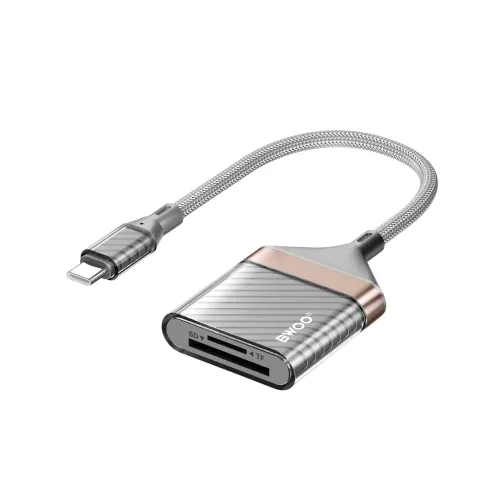
BWOO BO-BZ64 USB-C SD and TF card reader
The BWOO BO-BZ64 is a 2-in-1 memory card reader that connects through USB Type-C and provides SD and TF (microSD) card interfaces. BWOO lists dual-card simultaneous reading, plug-and-play use without a driver or app, and a transmission rate of up to 480 Mbps. Star Tech lists the cable at 20 cm, weight at 27 g, grey color and a one-year warranty. The manufacturer part number shown by Star Tech is 693365481754.
Card slots and device connection
The reader provides separate SD and TF card slots through a USB-C host connection. It can be used to move files from compatible memory cards to a phone, tablet or computer with USB Type-C, subject to the host device supporting USB host/OTG functionality and the card format. Check your device manual and card compatibility before purchase; the product listing does not enumerate supported SD capacities, card speed classes or operating systems.
BWOO describes simultaneous access to both card slots. This can make copying files from two cards more convenient, but it does not mean that the reader merges the cards or copies data automatically. Use your device's file manager or compatible application to browse and transfer files. Safely eject removable media before disconnecting it, especially during a write operation.
Transfer rate and practical expectations
The listed maximum transmission rate is 480 Mbps. This is a stated interface rate, not a promise that every card will read or write at that speed. Real transfer performance depends on the card's own speed, the host USB controller, file sizes, the device's workload and the software in use. A slower card or older host may be the limiting component. The exact card-reader listing does not specify a USB 3.x interface or UHS card mode, so those features are not claimed here.
Build, cable and portability
The published material description is ABS, transparent PC, aluminum alloy and braided wire. Star Tech lists a cable length of 20 cm, weight of 27 g and grey color. This short attached cable helps position the reader near a USB-C port; keep it from being sharply bent, pulled or trapped. Store the reader and cards dry and protect exposed connectors from dust and impact.
The manufacturer page notes CE, FCC and RoHS certificates. Certification names are reported as listed; check product packaging or documentation if a specific compliance document is required for your use. The sources reviewed do not establish waterproofing, encryption, write protection, a status light or a particular card capacity.
Compatibility and use
The Type-C plug must fit the host port, and the host must support external USB storage. Some phones require USB OTG or an appropriate setting before removable storage appears. The exact-model sources mention USB-C smartphones, tablets and laptops but do not publish an operating-system compatibility matrix. Confirm support for your model and for the exact SD or TF card before relying on it for a trip or a time-critical transfer.
Insert a card in the marked orientation and do not force it. If the card does not mount, check orientation, host compatibility, card condition and file system support before formatting. Formatting may erase data; make a separate backup first. The reader is an adapter and does not include SD or TF storage cards unless the seller explicitly states otherwise.
Price and warranty
On 10 November 2026, Star Tech and Astrix each listed the BO-BZ64 at ৳700 and showed it in stock; Tech Land also listed ৳700 in stock. These are retailer observations and can change. Check delivery costs, package contents and the seller's current stock at checkout.
Star Tech and Tech Land list a one-year warranty, and the manufacturer product page identifies the model and specifications. Confirm the written warranty, claim route and required packaging with the seller before purchase. Back up important card data before handing the reader or card to a service center.
Before you buy
- Confirm that your device has USB-C and supports USB host/OTG storage.
- Check whether your card is SD or TF/microSD and whether its capacity and format work with your host; the listing does not state maximum card capacity.
- Expect up to 480 Mbps as the stated interface rate, not a guaranteed card transfer speed.
- Use a file manager to copy files and safely eject cards before unplugging.
- Remember that storage cards are not listed as included, and verify warranty terms with the seller.
Specifications above are restricted to manufacturer and exact-model retailer details. Unlisted card capacities, interface generations, UHS modes, encryption and operating-system guarantees are not assumed. Verify compatibility with the particular host and card before relying on the reader.