Pros
- Non-conductive formulation per manufacturer description
- Small 3g tube suitable for servicing a compatible cooler interface
- Manufacturer provides an application guide

All categories
 New condition
Computer Components
Corsair · TM30 Performance Thermal Paste
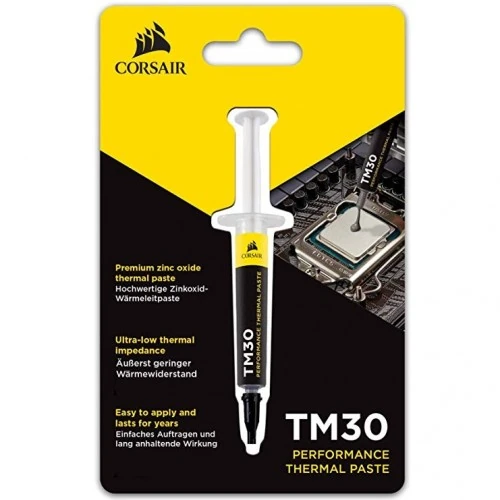
Corsair TM30 is a 3g zinc-oxide thermal compound for CPU and GPU coolers; Corsair describes it as non-conductive and low viscosity.
Approximate Market Price
BDT 650
Informational market estimate only; this is not a current Store offer.
Compare store prices
No live offers for this variant
BDT 650
Approximate Market Price
Informational market estimate only; this is not a current Store offer.
Loading history…
Product story
Corsair TM30 is a gray, zinc-oxide-based thermal compound for improving heat transfer between a processor and a cooler contact plate. Corsair lists a net weight of 3g and describes the compound as low viscosity, non-conductive and free of volatile compounds. It is intended for compatible CPU and GPU cooling installations. Thermal paste is applied as a thin interface layer between clean mating surfaces; it is not a substitute for a heatsink, fan or liquid-cooling system.
A processor heat spreader and cooler base can have microscopic surface irregularities. A small amount of thermal compound fills those gaps and helps reduce trapped air at the interface. TM30 supports heat transfer from the chip to a properly installed cooler, while the cooler itself moves heat away. Results depend on the processor, cooler, mounting pressure, airflow, application technique and ambient temperature. No single temperature reduction can be promised across different computers.
Corsair identifies TM30 as a zinc-oxide-based compound and states that it is non-conductive. That property reduces the electrical-conduction risk from accidental contact compared with conductive compounds, but care is still needed: avoid spreading paste onto sockets, contacts or connectors and follow the device service instructions. Keep the tube closed when not in use. “Non-conductive” does not mean the compound is suitable for every component or application.
The manufacturer lists a 3g net quantity. The practical number of applications depends on the processor size, application method and how much compound is used each time. Use only a small, appropriate amount for the cooler installation and follow Corsair’s application guide and the cooler/processor maker’s instructions. The package should contain one TM30 tube according to the manufacturer listing; verify package seals and contents with the seller.
Corsair describes TM30 as a low-viscosity compound that can flow into small surface irregularities and as a high-stability liquid compound designed to resist drying, cracking or consistency changes over time. These are manufacturer product claims; real service life depends on operating temperatures, installation and system conditions. Routine reapplication is not automatically needed just because time has passed—inspect or replace paste when servicing the cooler or if cooling performance indicates a problem.
Local retailer specification tables list thermal conductivity of 3.8 W/m·K, specific gravity of 2.5g/cm³, viscosity of 2300K cPs and thermal impedance around 0.01°C·in²/W. Corsair’s current product page does not include those figures in its short technical-spec table, so these numeric values are identified as retailer-published and may use particular measurement methods. Do not compare conductivity figures from different brands without checking testing conditions.
The compound can be used at a compatible CPU or GPU cooler interface when installing a heatsink or cooler. Confirm whether the cooler already has factory-applied paste; do not add a second layer on top unless the manufacturer directs it. Check cooler compatibility, mounting hardware and service instructions first. The paste does not improve cooling if the heatsink is poorly mounted, the fan is not working or airflow is blocked.
Power down and disconnect the system before cooler service. Remove the cooler and clean old compound from both contact surfaces with an appropriate lint-free material and electronics-safe cleaner, following hardware guidance. Apply TM30 according to Corsair’s application guide, mount the cooler evenly and avoid excess paste. Do not scrape surfaces with metal tools. If you are unsure about disassembly or warranty implications, use a qualified technician.
Keep the tube sealed and store it according to the package directions, away from children and contamination. Avoid contact with eyes and wash hands after handling. Do not ingest the compound. Do not use it as adhesive, sealant or thermal pad replacement. Check the tube and packaging for lot/date information and signs of leakage or drying. Dispose of used materials according to local guidance and keep residue away from sockets and electrical contacts.
The exact product is Corsair TM30, part number CT-9010001-WW, gray, 3g. Corsair’s package listing includes one tube. Local retailer pages differ on warranty: Ryans and Skyland state no warranty, while another merchant uses a brand-warranty claim. Confirm authenticity, sealed 3g quantity, seller warranty/return terms, current stock and delivery before purchase. Store offer price and included support belong to the selected seller, not the manufacturer specification.
It is a thermal compound used between compatible CPU or GPU heat spreaders and cooler contact plates to improve heat transfer.
Corsair lists a net weight of 3g and one tube in the package.
Corsair describes it as a zinc-oxide-based thermal compound.
Corsair states that TM30 is non-conductive. Avoid sockets, contacts and connectors during application.
Corsair lists the compound color as gray.
Bangladesh retailer tables list 3.8 W/m·K; Corsair’s current short tech-spec table does not state that value.
Follow Corsair’s application guide and your cooler/processor instructions; clean old compound and apply a small amount before mounting the cooler.
That depends on chip size and application amount; the manufacturer does not promise a fixed number of applications.
Corsair describes long-term stability, but replace it when cooler service or system condition calls for it; follow hardware guidance.
Retailer warranty terms differ. Confirm the selected BiponiBD seller’s written warranty and return policy.
Source basis: Corsair product and application pages plus Ryans, Skyland and Star Tech. Thermal conductivity, density, viscosity and impedance figures are retailer-published; warranty terms differ by seller.
Helpful answers
Product-specific answers maintained with the catalog information.
It is a thermal compound used between compatible CPU or GPU heat spreaders and cooler contact plates to improve heat transfer.
Corsair lists a net weight of 3g and one tube in the package.
Corsair describes it as a zinc-oxide-based thermal compound.
Corsair states that TM30 is non-conductive. Avoid sockets, contacts and connectors during application.
Corsair lists the compound color as gray.
Bangladesh retailer tables list 3.8 W/m·K; Corsair’s current short tech-spec table does not state that value.
Follow Corsair’s application guide and your cooler/processor instructions; clean old compound and apply a small amount before mounting the cooler.
That depends on chip size and application amount; the manufacturer does not promise a fixed number of applications.
Corsair describes long-term stability, but replace it when cooler service or system condition calls for it; follow hardware guidance.
Retailer warranty terms differ. Confirm the selected BiponiBD seller’s written warranty and return policy.
Customer community
Become a merchant
Join BiponiBD, publish accurate offers and start free.