Pros
- QHD at 165Hz combines image detail with high refresh for compatible PCs.
- IPS viewing angles and broad listed sRGB/DCI-P3 gamut.
- FreeSync and G-SYNC compatibility listed.
- USB hub and height/swivel/tilt stand add desk flexibility.

All categories
 New condition
Monitors
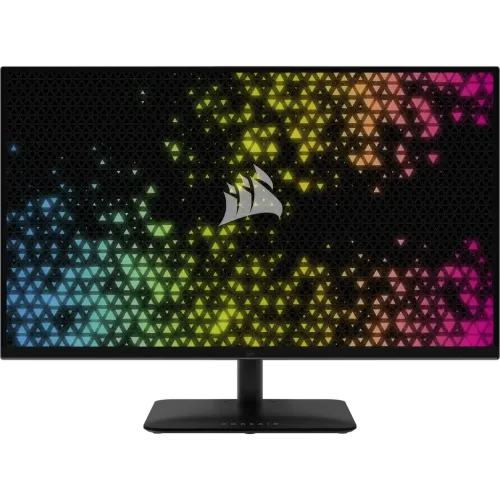
Corsair · XENEON 315QHD165
31.5-inch QHD IPS gaming monitor with 165Hz, FreeSync/G-SYNC compatibility, USB hub, HDR Ready and ergonomic stand.
Price unavailable
Price range updating
No verified price is available yet. Store offers will appear when merchants publish them.
Compare store prices
No live offers for this variant
Offers will appear when merchants publish them.
Loading history…
Product story
The CORSAIR XENEON 315QHD165 is a 31.5-inch QHD IPS gaming monitor with native 2560 × 1440 at up to 165Hz. CORSAIR lists 1ms MPRT, 4ms GtG, FreeSync certification, NVIDIA G-SYNC compatibility, an integrated USB hub and an adjustable stand. Its combination of high refresh, broad color coverage and multiple inputs suits gaming and general desktop use. Confirm local warranty, package contents and seller offer before purchase. Compare the exact model code on the carton and product label because similarly named monitors may use different panel, port or stand configurations. Product-specific compatibility details should be checked against the connected system before configuring a gaming setup.
The 16:9 panel displays 2560 × 1440 pixels over a 31.5-inch diagonal with 93 pixels per inch. QHD provides more detail and workspace than Full HD while remaining less demanding than 4K at high frame rates. Set the PC to the native resolution for crisp output, then adjust operating-system scaling for readable text. The monitor’s maximum refresh is reached only when the source and connection provide a supported timing.
CORSAIR specifies IPS panel technology and 178-degree horizontal and vertical viewing angles. The published color gamut is 99% sRGB and 90% DCI-P3 (CIE 1976); display color is 1.07 billion using 8-bit RGB plus FRC. These figures describe gamut and color depth, not individual factory calibration accuracy. For color-critical work, calibrate the actual monitor and confirm the workflow against its intended output device.
The native QHD mode supports 165Hz over DisplayPort 1.4 according to CORSAIR’s supported display modes. The high refresh can display motion more frequently when a compatible PC renders enough frames. The source graphics output, cable, driver, selected resolution and monitor mode all affect availability. Confirm 2560 × 1440 at 165Hz in the operating system after setup; a lower refresh can result from settings or source limitations.
CORSAIR rates response at 1ms MPRT and 4ms GtG. These are different measurement methods and should not be conflated with system input lag or treated as a guarantee of blur-free motion in every scene. Response settings and MPRT controls can change motion appearance. Use the on-screen display to tune response behavior and check feature compatibility; the experience also depends on refresh rate, content and graphics frame rate.
The monitor is AMD FreeSync certified and listed as NVIDIA G-SYNC compatible. Variable refresh can synchronize display updates with supported graphics output to help reduce tearing. CORSAIR describes FreeSync Premium in the monitor OSD documentation. Connect through a compatible input, use current drivers, and enable the feature in both the display and graphics controls. Compatibility can vary by source; VRR does not increase the 165Hz maximum.
The technical specifications list 300 nits peak SDR brightness, 1200:1 static contrast and HDR Ready status. HDR Ready is not a stated VESA DisplayHDR certification. HDR appearance depends on source, content, system configuration and panel capability; avoid promising premium HDR performance from the label alone. The non-glare surface helps control reflections, but placement and room lighting still matter for comfortable viewing.
CORSAIR lists 99% sRGB and 90% DCI-P3 color gamut, with 1.07 billion colors through 8-bit RGB plus FRC. This can support broad general-purpose gaming, media and creative previews. Gamut coverage does not prove accurate calibration or uniformity on a particular unit. Choose the correct color profile for the task and calibrate for color-managed work. Presets may change white balance, gamma or saturation.
Inputs include two HDMI 2.0 ports, one DisplayPort 1.4, a USB-B upstream port and two 5Gbps USB-A downstream ports rated 5V/0.9A each. Connect the USB-B upstream lead to the PC for the hub ports to function. CORSAIR lists native QHD 165Hz through DisplayPort; check supported timing for HDMI and the connected device. The monitor does not provide USB-C video or laptop charging in the published connectivity list.
The XENEON has a 3.5mm audio passthrough jack for sound routed from the video input; it is not listed with built-in speakers. Select the monitor or source as the audio output device, then connect headphones or external speakers to the jack. Audio routing depends on the source and input. If sound is missing, check system playback selection, mute and volume settings, and the cable carrying the video signal.
The stand provides tilt from -5° to +20°, swivel from -30° to +30° and 68mm height adjustment. These adjustments help position the large screen around a desk and chair. Gently support the display while changing height or angle and leave slack in attached cables. The official specification does not list pivot adjustment. Measure desk width and depth before installation because the stand footprint is substantial.
A 100 × 100mm VESA mounting pattern is specified. Verify the arm’s weight capacity, screw size and clearance before mounting, and follow CORSAIR’s instructions. The monitor weighs about 8kg and measures approximately 716 × 550 × 270mm with its stand. Keep the panel supported during installation, avoid pressure on the LCD and route cables so swivel or height adjustment does not strain connectors.
For PC setup, connect DisplayPort 1.4 when targeting native QHD at 165Hz, using a suitable cable and graphics output. Set resolution and refresh in the operating system, then verify the signal through the monitor OSD. Install current GPU drivers and enable FreeSync/G-SYNC compatible operation as supported. If the maximum mode is unavailable, check cable, port, GPU limits and settings before changing hardware. USB hub needs its upstream cable connected.
The 165Hz QHD IPS panel and variable refresh features are designed for fluid PC gaming when the graphics system can sustain appropriate frame rates. MPRT and response options can affect motion clarity and brightness; evaluate their tradeoffs in the games played. The 31.5-inch screen provides a large view, while the stand supports height and swivel positioning. Actual game performance depends on PC hardware, software and display configuration.
The HDMI 2.0 inputs can connect compatible consoles and media devices. CORSAIR’s timing table lists supported modes by connection; confirm the exact console resolution and refresh behavior rather than assuming 165Hz console output. HDR behavior is described as HDR Ready, not certified premium HDR. The audio passthrough can feed headphones or speakers when the source routes sound over the video connection.
QHD resolution and broad listed color coverage can serve documents, media, photo review and multiple desktop windows in addition to gaming. Use scaling to keep text comfortable, and adjust the stand to a suitable eye line. The 90% DCI-P3 and 99% sRGB figures are gamut values; they do not verify calibration. For professional graphics, calibrate the unit and check the result on the intended display or print workflow.
The monitor lists flicker-free operation and an Eye Saver mode in its on-screen controls. Eye Saver reduces blue-light emission when enabled but changes the display’s color appearance. Adjust brightness for room conditions and use a comfortable viewing distance. These settings complement good workstation setup and breaks; they do not replace them. For color-sensitive tasks, switch to a suitable neutral mode and validate the output.
CORSAIR lists 35W on-mode consumption, below 0.5W in sleep and below 0.3W when off, with a 65W AC adapter. Approximate dimensions are 716 × 550 × 270mm and listed weight is 8.0kg. The product specification identifies USB-A charging current and USB hub details. Included cables and accessories can vary by region or seller, so inspect the package contents at delivery and confirm local contents before ordering.
Set the monitor on a stable surface and avoid blocking ventilation. Clean the panel with a soft microfiber cloth; do not spray liquid directly onto the display or use abrasive cleaners. Support the frame when moving or changing stand position. Keep cables from hanging under tension, preserve packaging until return checks are complete, and record the serial number and visible condition for support.
The catalog’s existing three-year warranty wording does not verify coverage for a specific Bangladesh serial. Confirm local warranty provider, duration, service location, dead-pixel policy, invoice requirements and serial eligibility with the seller. Match serials on the monitor and box to the invoice. Verify current offer price, stock, delivery, return terms and included regional accessories before payment; manufacturer data does not validate retailer-specific claims.
Helpful answers
Product-specific answers maintained with the catalog information.
CORSAIR lists 2560 × 1440 QHD at up to 165Hz.
The XENEON 315QHD165 uses an IPS panel.
It is AMD FreeSync certified and listed as NVIDIA G-SYNC compatible.
Two HDMI 2.0, one DisplayPort 1.4, USB-B upstream, two USB-A hub ports and a 3.5mm audio jack are listed.
No integrated speakers are listed; it has a 3.5mm audio passthrough jack.
It supports 68mm height adjustment, -5°/+20° tilt and -30°/+30° swivel.
CORSAIR lists HDR Ready; the source does not list VESA DisplayHDR certification.
The listed VESA pattern is 100 × 100mm.
Confirm serial-specific local coverage and service terms with the seller.
Customer community
Become a merchant
Join BiponiBD, publish accurate offers and start free.