Pros
- 165Hz QHD gaming with Fast IPS and variable refresh support.
- Quantum Dot gamut coverage supports vivid gaming and media.
- Large 32-inch panel and 100×100mm VESA flexibility.
- Integrated USB hub and RapidRoute cable management.

All categories
 New condition
Monitors
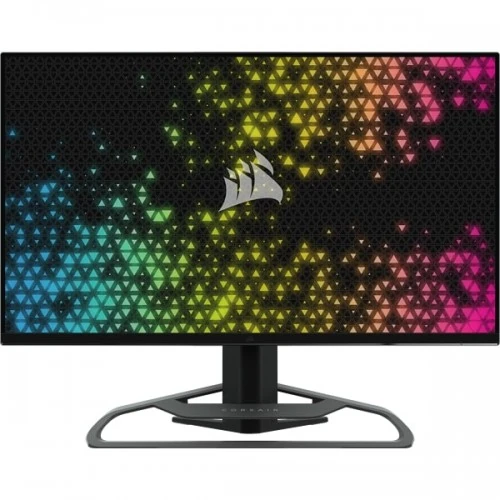
Corsair · XENEON 32QHD165
32-inch QHD Quantum Dot Fast IPS monitor with 165Hz, DisplayHDR 400, FreeSync Premium and USB-C DP Alt Mode.
Price unavailable
Price range updating
No verified price is available yet. Store offers will appear when merchants publish them.
Compare store prices
No live offers for this variant
Offers will appear when merchants publish them.
Loading history…
Product story
The CORSAIR XENEON 32QHD165 is a 32-inch QHD gaming monitor using a Quantum Dot Fast IPS panel. It combines 2560 × 1440 resolution, up to 165Hz refresh, 1ms MPRT, under-3ms GtG response, AMD FreeSync Premium and VESA DisplayHDR 400. The large 16:9 screen targets PC gaming and media, while its wide color gamut and IPS viewing angles also support general content work. Actual results depend on GPU output, cable, input, game and display settings. Confirm local stock, accessories and serial-specific warranty with the seller; manufacturer specifications do not establish a current Bangladesh offer.
Confirm the exact product name XENEON 32QHD165 and part number family CM-9020001. Do not confuse it with XENEON 32QHD240, 32UHD144 or the smaller 315QHD165; these are separate models with different refresh, resolution or screen size. This product is a 32-inch IPS QHD monitor, not a 4K display or an OLED panel. Actual results depend on GPU output, cable, input, game and display settings. Confirm local stock, accessories and serial-specific warranty with the seller; manufacturer specifications do not establish a current Bangladesh offer.
The display measures 32 inches diagonally and has a native 2560 × 1440 resolution with a 16:9 aspect ratio. Its pixel density is about 91.8 PPI, so the large screen can provide a generous workspace, though text is less dense than on a 27-inch QHD display. Choose a comfortable viewing distance and operating-system scaling for documents and desktop use. Actual results depend on GPU output, cable, input, game and display settings. Confirm local stock, accessories and serial-specific warranty with the seller; manufacturer specifications do not establish a current Bangladesh offer.
Corsair specifies Quantum Dot technology with a Fast IPS panel, 100% sRGB, 100% Adobe RGB and 98% DCI-P3 gamut coverage. It supports 16.7 million colors in 8-bit RGB. The broad gamut can present vivid games and media, but gamut coverage alone does not establish factory accuracy. Use an appropriate color mode and calibration if work requires consistent color reproduction. Actual results depend on GPU output, cable, input, game and display settings. Confirm local stock, accessories and serial-specific warranty with the seller; manufacturer specifications do not establish a current Bangladesh offer.
The maximum refresh rate is 165Hz. Corsair lists 1ms MPRT in the Fastest response mode and less than 3ms GtG. These measurements use different methods, and the MPRT mode may affect brightness or have setting trade-offs. The GPU and game must deliver enough frames to benefit from high refresh; select 2560 × 1440 at 165Hz in display settings. Actual results depend on GPU output, cable, input, game and display settings. Confirm local stock, accessories and serial-specific warranty with the seller; manufacturer specifications do not establish a current Bangladesh offer.
The monitor supports AMD FreeSync Premium and is NVIDIA G-SYNC Compatible. Adaptive refresh can align the panel with supported GPU frame output to reduce tearing and judder. Enable the feature in the monitor OSD and graphics driver, then verify the selected input and game. VRR does not create frames; it helps synchronize the display when frame rate varies. Actual results depend on GPU output, cable, input, game and display settings. Confirm local stock, accessories and serial-specific warranty with the seller; manufacturer specifications do not establish a current Bangladesh offer.
VESA DisplayHDR 400 certification is listed. Corsair specifies 400 nits SDR peak and 440 nits HDR peak. These are peak values, not a promise of sustained full-screen brightness or local-dimming contrast. HDR quality depends on source content, game settings and room lighting. Compare the HDR preset with SDR for your particular setup. Actual results depend on GPU output, cable, input, game and display settings. Confirm local stock, accessories and serial-specific warranty with the seller; manufacturer specifications do not establish a current Bangladesh offer.
Inputs include two HDMI 2.0 ports, one DisplayPort 1.4 and one USB-C input supporting DisplayPort Alt Mode. DisplayPort is the appropriate connection for the 165Hz maximum. Use a suitable certified cable and check the active signal in the operating system. The Type-C port provides video capability, but should not be treated as a high-power laptop charging port. Actual results depend on GPU output, cable, input, game and display settings. Confirm local stock, accessories and serial-specific warranty with the seller; manufacturer specifications do not establish a current Bangladesh offer.
The monitor integrates two USB-A 5Gbps downstream ports and a USB-C upstream path, with 15W power delivery on the Type-C connection. This output can support low-power devices but does not provide full charging for most laptops. Connect the USB upstream path to the computer to use hub functions. Audio can pass through to the 3.5mm headphone output from a video input. Actual results depend on GPU output, cable, input, game and display settings. Confirm local stock, accessories and serial-specific warranty with the seller; manufacturer specifications do not establish a current Bangladesh offer.
The stand supports up to 110mm height adjustment and tilt from -5 to +20 degrees. Corsair lists 100 × 100mm VESA compatibility. Swivel and pivot are not listed for this stand. Its die-cast aluminum build includes a cable channel and adjustable tie-downs. Measure desk clearance and check arm capacity if using VESA mounting. Actual results depend on GPU output, cable, input, game and display settings. Confirm local stock, accessories and serial-specific warranty with the seller; manufacturer specifications do not establish a current Bangladesh offer.
For QHD 165Hz PC gaming, connect the graphics card using DisplayPort 1.4, select 2560 × 1440 at 165Hz and enable FreeSync or G-SYNC Compatible as appropriate. If 165Hz is missing, check the active input, cable, GPU output, driver and system advanced display settings. HDMI 2.0 can support lower modes, but use DisplayPort for the maximum refresh. Actual results depend on GPU output, cable, input, game and display settings. Confirm local stock, accessories and serial-specific warranty with the seller; manufacturer specifications do not establish a current Bangladesh offer.
Consoles may output QHD or lower refresh modes depending on the console generation and game. The monitor’s 165Hz maximum does not mean a console game will render at that rate. Verify the detected signal in console settings. A laptop can send video over USB-C only if its port supports DisplayPort Alt Mode; 15W USB-C power is not full laptop charging. Actual results depend on GPU output, cable, input, game and display settings. Confirm local stock, accessories and serial-specific warranty with the seller; manufacturer specifications do not establish a current Bangladesh offer.
Quantum Dot coverage and IPS viewing angles make the panel suitable for vivid games, photos and video. The listed gamut percentages are coverage figures, not a guarantee of calibrated precision or uniformity. Use an appropriate color preset, disable dynamic enhancements if they interfere with the task, and calibrate when the workflow requires color accuracy. Actual results depend on GPU output, cable, input, game and display settings. Confirm local stock, accessories and serial-specific warranty with the seller; manufacturer specifications do not establish a current Bangladesh offer.
Corsair iCUE can control monitor settings when the USB connection is attached. A physical 5-way joystick behind the screen provides direct OSD access. The monitor can also integrate with compatible iCUE Nexus or Stream Deck controls for input switching. Software control is optional; users can manage core settings with the on-screen menu. Actual results depend on GPU output, cable, input, game and display settings. Confirm local stock, accessories and serial-specific warranty with the seller; manufacturer specifications do not establish a current Bangladesh offer.
The die-cast aluminum stand includes an integrated multi-mount point for compatible camera, microphone or lighting arms; those accessories are sold separately. RapidRoute cable management uses snap-in tie-downs to organize connections. Package contents listed by Corsair include stand/base, power adapter, DisplayPort, HDMI and USB Type-C cables, but local regional bundle should still be checked. Actual results depend on GPU output, cable, input, game and display settings. Confirm local stock, accessories and serial-specific warranty with the seller; manufacturer specifications do not establish a current Bangladesh offer.
Advantages include a large QHD canvas, 165Hz refresh, Fast IPS viewing angles, Quantum Dot color coverage, VRR support, DisplayHDR 400, USB hub and a sturdy adjustable stand. It can suit gaming and everyday productivity. QHD is easier to drive than 4K, though the 32-inch size has lower pixel density than smaller QHD alternatives. Actual results depend on GPU output, cable, input, game and display settings. Confirm local stock, accessories and serial-specific warranty with the seller; manufacturer specifications do not establish a current Bangladesh offer.
Trade-offs include HDMI 2.0 rather than HDMI 2.1, modest 15W USB-C power, no listed built-in speakers and a stand without swivel or pivot. HDR400 is entry-level HDR certification. The 32-inch QHD panel’s 91.8 PPI may look less sharp at close range. Buyers needing a single-cable laptop dock or 4K resolution should compare other models. Actual results depend on GPU output, cable, input, game and display settings. Confirm local stock, accessories and serial-specific warranty with the seller; manufacturer specifications do not establish a current Bangladesh offer.
Before buying in Bangladesh, confirm exact XENEON 32QHD165 model/part number, local stock, delivered price, package contents, dead-pixel policy and serial-specific warranty. Corsair advertises a three-year global warranty and zero-dead-pixel policy, but local eligibility and claim handling need seller confirmation in writing. Verify the included power adapter and cables for the regional unit. Actual results depend on GPU output, cable, input, game and display settings. Confirm local stock, accessories and serial-specific warranty with the seller; manufacturer specifications do not establish a current Bangladesh offer.
What is the native resolution? 2560 × 1440 QHD. What is the maximum refresh? 165Hz over DisplayPort 1.4. What response modes are listed? 1ms MPRT and under 3ms GtG. Does USB-C charge a laptop? It provides only 15W, so it is not full laptop charging for most systems. What HDR standard? VESA DisplayHDR 400. Are speakers built in? No; it provides a 3.5mm audio output. What VESA pattern? 100 × 100mm. Actual results depend on GPU output, cable, input, game and display settings. Confirm local stock, accessories and serial-specific warranty with the seller; manufacturer specifications do not establish a current Bangladesh offer.
Choose the XENEON 32QHD165 if a large 32-inch QHD screen, 165Hz gaming, wide Quantum Dot color and Adaptive-Sync match your needs. Use DisplayPort for the highest refresh. It is less suitable if you need 4K, high-wattage USB-C charging, built-in speakers or stand pivot. Confirm local offer, bundle and warranty before ordering. Actual results depend on GPU output, cable, input, game and display settings. Confirm local stock, accessories and serial-specific warranty with the seller; manufacturer specifications do not establish a current Bangladesh offer.
Helpful answers
Product-specific answers maintained with the catalog information.
It has a native QHD resolution of 2560 × 1440 at 32 inches.
Connect through DisplayPort 1.4 and select 165Hz in the operating system.
Corsair lists 1ms MPRT in Fastest mode and less than 3ms GtG.
It supports AMD FreeSync Premium and is NVIDIA G-SYNC Compatible.
It is VESA DisplayHDR 400 certified, with 440-nit HDR peak brightness specified.
USB-C provides 15W, which is insufficient for full charging on most laptops.
No built-in speakers are listed; a 3.5mm headphone output is provided.
Two HDMI 2.0, one DisplayPort 1.4, USB-C DP Alt Mode and a USB hub are listed.
The stand supports 110mm height adjustment and -5° to +20° tilt.
Confirm local Corsair service provider, duration and serial-specific eligibility with the seller.
Customer community
Become a merchant
Join BiponiBD, publish accurate offers and start free.