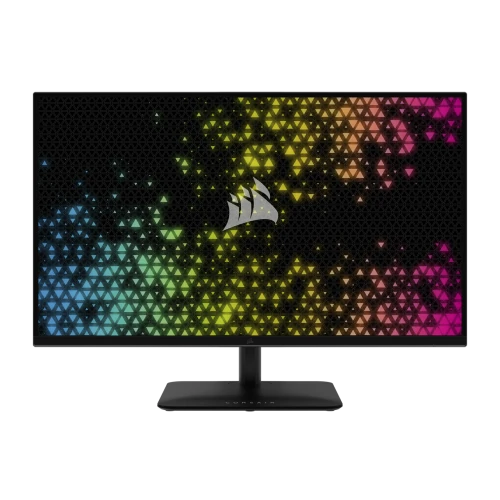
CORSAIR XENEON 32UHD144-A overview
The CORSAIR XENEON 32UHD144-A is a 32-inch 4K UHD gaming display using a Quantum Dot IPS panel with a maximum refresh rate of 144Hz. It lists VESA DisplayHDR 600, HDMI 2.1, DisplayPort 1.4 and USB-C DisplayPort Alt Mode with 15W Power Delivery. The monitor also includes a USB hub and variable-refresh support. It is designed for detailed PC and console gaming, while its 4K resolution supports high-resolution video and general work. Specifications in current Corsair product copy and the earlier quick-start guide differ on a few figures, so check the revision and exact regional unit. Actual behavior depends on source hardware, cable, firmware, regional part number and selected display mode. Refer to the supplied manual when its revision differs from current Corsair product-page specifications.
Confirm the exact 32UHD144-A model
The model suffix is XENEON 32UHD144-A, part number family CM-9020006. Do not confuse it with the XENEON 32UHD144 without the “-A”, or other XENEON displays with different refresh rates and ports. Corsair’s current listing identifies a stand-equipped monitor, whereas older manuals may describe earlier packaging or a different part number. Verify the product label and included stand before purchase. The item’s former catalog label “32 inch” is reasonable shorthand; the manufacturer identifies a 32-inch diagonal display. Actual behavior depends on source hardware, cable, firmware, regional part number and selected display mode. Refer to the supplied manual when its revision differs from current Corsair product-page specifications.
32-inch 4K UHD IPS and Quantum Dot panel
The panel has a native 3840 × 2160 resolution, 16:9 aspect ratio and IPS technology with Quantum Dot color. Corsair lists 178-degree viewing angles, 1000:1 static contrast and about 138 pixels per inch. At 32 inches, 4K provides fine text and detailed image presentation, while operating-system scaling can keep menus and text comfortable. IPS viewing angles support shared viewing, although black levels and dark-room contrast remain typical of an LCD rather than an OLED panel. Actual behavior depends on source hardware, cable, firmware, regional part number and selected display mode. Refer to the supplied manual when its revision differs from current Corsair product-page specifications.
144Hz refresh and response specifications
The maximum refresh rate is 144Hz at 4K. Corsair lists 1ms MPRT and less than 12ms GtG response figures; these use different measurement methods and should not be treated as equivalent. A capable GPU and suitable connection are required to select 3840 × 2160 at 144Hz. The monitor does not generate frames, and a game’s actual frame rate depends on hardware, quality settings and software. If 144Hz is unavailable, verify the active input, cable, GPU output, driver and operating-system display settings. Actual behavior depends on source hardware, cable, firmware, regional part number and selected display mode. Refer to the supplied manual when its revision differs from current Corsair product-page specifications.
HDR600, brightness and source differences
The product is certified VESA DisplayHDR 600. Corsair’s current product page lists 400 nits SDR and 600 nits HDR peak, while the older quick-start guide lists 350 nits SDR and 600 nits HDR. Treat the SDR figure as revision/source-dependent and check the exact unit documentation. HDR image quality also depends on content, tone mapping, panel behavior and room conditions; certification does not establish OLED-level black performance. Compare HDR and SDR using the games and video you actually watch. Actual behavior depends on source hardware, cable, firmware, regional part number and selected display mode. Refer to the supplied manual when its revision differs from current Corsair product-page specifications.
Quantum Dot color and color depth
Corsair lists 98% DCI-P3, 100% Adobe RGB and 100% sRGB gamut coverage. Color depth is also described differently: the current product listing says 1.07B colors with 8-bit RGB plus FRC, while the older guide labels 10-bit RGB. Preserve that difference as a specification-source discrepancy rather than promising native 10-bit panel processing. Wide gamut is useful for vivid media but does not itself prove factory calibration or color accuracy. Use a calibrated profile for color-critical work. Actual behavior depends on source hardware, cable, firmware, regional part number and selected display mode. Refer to the supplied manual when its revision differs from current Corsair product-page specifications.
Adaptive-Sync and GPU compatibility
The monitor supports AMD FreeSync Premium and is NVIDIA G-SYNC Compatible. Adaptive-Sync can coordinate display refresh with compatible GPU output and reduce tearing when frame rate fluctuates. Enable it in both the monitor menu and graphics driver, then verify the supported input and timing. It does not guarantee a specific frame rate or remove all stutter. GPU, driver, firmware and cable capability affect results, particularly at high-resolution, high-refresh settings. Actual behavior depends on source hardware, cable, firmware, regional part number and selected display mode. Refer to the supplied manual when its revision differs from current Corsair product-page specifications.
HDMI 2.1, DisplayPort and USB-C inputs
Inputs include two HDMI 2.1 ports, one DisplayPort 1.4 and one USB-C input supporting DisplayPort 1.4 Alt Mode. Corsair lists a separate USB-C upstream path for the monitor’s USB hub, two USB-A downstream ports and a 3.5mm audio output that passes audio from the video source. This provides several ways to connect a PC, console and laptop. It is not a high-power laptop dock; USB-C power delivery is only 15W. Actual behavior depends on source hardware, cable, firmware, regional part number and selected display mode. Refer to the supplied manual when its revision differs from current Corsair product-page specifications.
USB-C power delivery and USB hub limits
The USB-C video port provides up to 15W Power Delivery and USB data, while a separate USB-C upstream connection supports the hub. Fifteen watts can power small accessories or provide limited charging, but it is not sufficient as full laptop charging for most systems. Connect the appropriate USB upstream cable to use the USB-A ports with a computer. Check the host’s DP Alt Mode support before expecting video over USB-C. Use the laptop’s regular power adapter when it requires more power. Actual behavior depends on source hardware, cable, firmware, regional part number and selected display mode. Refer to the supplied manual when its revision differs from current Corsair product-page specifications.
Ergonomic stand and specification revision
Corsair’s current product listing specifies a 110mm height-adjustment range, tilt from -5 to +20 degrees, swivel ±30 degrees and 100 × 100mm VESA compatibility. The quick-start guide for the product family lists a 68mm height range, creating a revision/specification discrepancy. Because both are manufacturer sources, confirm the stand shipped with the exact unit before relying on one height figure. Weight and dimensions can also vary by bundle. Keep the heavy 32-inch panel centered and verify arm capacity if mounting it on a desk arm. Actual behavior depends on source hardware, cable, firmware, regional part number and selected display mode. Refer to the supplied manual when its revision differs from current Corsair product-page specifications.
Console and PC connection setup
For 4K 144Hz PC use, connect the graphics card directly through a suitable DisplayPort 1.4 or HDMI 2.1 cable, select 3840 × 2160, then choose 144Hz in the operating system. For a console, HDMI 2.1 can support high-resolution modes subject to console generation and game output. A console’s maximum is not the same as the monitor’s 144Hz PC maximum. If the image drops or the refresh menu omits 144Hz, test a certified cable, update GPU drivers and inspect the monitor’s active signal information. Actual behavior depends on source hardware, cable, firmware, regional part number and selected display mode. Refer to the supplied manual when its revision differs from current Corsair product-page specifications.
iCUE software and audio output
Corsair iCUE can integrate monitor controls with compatible Corsair devices and provide software access to supported settings. The monitor has a physical on-screen display for settings when software control is not used. Audio passes through to the headphone jack from the selected video input; built-in speakers are not listed. Connect headphones or external speakers for sound. Verify the USB upstream link if iCUE does not detect the monitor or the USB hub does not respond. Actual behavior depends on source hardware, cable, firmware, regional part number and selected display mode. Refer to the supplied manual when its revision differs from current Corsair product-page specifications.
Desk use, pixel density and viewing distance
A 32-inch 4K screen offers a large, detailed work area, but desk depth and viewing distance influence comfort. At about 138 PPI, text can appear small at native scaling, so choose operating-system scaling based on eyesight and application behavior. The stand footprint and panel width need space, and HDR or high-refresh gaming can increase graphics load. A suitable graphics card is important for 4K gaming, while office tasks and video playback are less demanding. Actual behavior depends on source hardware, cable, firmware, regional part number and selected display mode. Refer to the supplied manual when its revision differs from current Corsair product-page specifications.
Gaming, media and creative-work fit
The XENEON 32UHD144-A can suit 4K PC gaming, console play, detailed streaming media and general creative work that benefits from a wide gamut. Its 144Hz refresh makes motion smoother than a standard 60Hz monitor when the source can supply frames. HDR600 certification supports HDR input and higher highlight brightness, though actual impact depends on content and display behavior. It is less suitable when high-wattage USB-C charging, built-in speakers or OLED contrast are essential. Actual behavior depends on source hardware, cable, firmware, regional part number and selected display mode. Refer to the supplied manual when its revision differs from current Corsair product-page specifications.
Package contents and regional variation
Corsair lists a DisplayPort cable, HDMI cable, USB-C cable, stand/base, screws, AC adapter and power cord in its current package contents. Regional kits and product revisions can differ, so compare the delivered box with the exact part number. The older quick-start guide may reference a 150W adapter and different stand dimensions. Verify the supplied cables are suitable for the intended 4K high-refresh connection and retain the documentation for warranty service. Actual behavior depends on source hardware, cable, firmware, regional part number and selected display mode. Refer to the supplied manual when its revision differs from current Corsair product-page specifications.
Advantages and buyer fit
Key strengths include 4K detail, 144Hz refresh, Quantum Dot IPS color, DisplayHDR 600, HDMI 2.1, adaptive refresh and useful USB connectivity. It can serve a gaming PC and modern console while also providing a large desktop workspace. The 100 × 100mm VESA pattern offers mounting flexibility. These benefits are most useful with an appropriate GPU, correct cable and a viewing setup that makes the 32-inch image comfortable. Actual behavior depends on source hardware, cable, firmware, regional part number and selected display mode. Refer to the supplied manual when its revision differs from current Corsair product-page specifications.
Trade-offs and limitations
The monitor’s 15W USB-C power delivery is limited and will not replace a laptop charger. No built-in speakers are listed, and the 32-inch panel requires desk space. Corsair sources differ on SDR brightness, color-depth description and height adjustment, so a buyer should confirm the exact revision. HDR600 certification alone does not describe every aspect of contrast or local dimming. A 4K 144Hz signal also needs capable hardware and appropriate bandwidth. Actual behavior depends on source hardware, cable, firmware, regional part number and selected display mode. Refer to the supplied manual when its revision differs from current Corsair product-page specifications.
Bangladesh stock, warranty and version checks
Before purchase in Bangladesh, confirm the exact CM-9020006 regional part number, stock condition, delivered price, box contents, dead-pixel/return policy and serial-specific Corsair warranty. Corsair’s current product page lists a three-year warranty, but local claim handling depends on the seller and service arrangement. Ask which revision and stand are supplied because manufacturer documents disagree on some specifications. Obtain written confirmation of warranty duration and service location before payment. Actual behavior depends on source hardware, cable, firmware, regional part number and selected display mode. Refer to the supplied manual when its revision differs from current Corsair product-page specifications.
Frequently asked questions
What is the native resolution? 3840 × 2160 4K UHD. What refresh rate? Up to 144Hz. Which panel? Quantum Dot IPS. What HDR certification? VESA DisplayHDR 600. What USB-C charging power? 15W maximum. Which inputs? Two HDMI 2.1, one DisplayPort 1.4 and one USB-C DP Alt Mode. Are there speakers? Corsair does not list built-in speakers. Why do brightness/stand specs vary? The current product page and earlier quick-start guide report different SDR brightness and height-adjustment figures; confirm the delivered revision. Actual behavior depends on source hardware, cable, firmware, regional part number and selected display mode. Refer to the supplied manual when its revision differs from current Corsair product-page specifications.
Final buying recommendation
Choose the CORSAIR XENEON 32UHD144-A if you want a large 4K 144Hz IPS gaming monitor with HDMI 2.1, wide-gamut color and HDR600. It is less suitable if you require high-wattage USB-C laptop charging, built-in speakers or a guaranteed stand height specification without checking the regional revision. Confirm the exact model code, stand, cables, current stock and local warranty before ordering. Actual behavior depends on source hardware, cable, firmware, regional part number and selected display mode. Refer to the supplied manual when its revision differs from current Corsair product-page specifications.