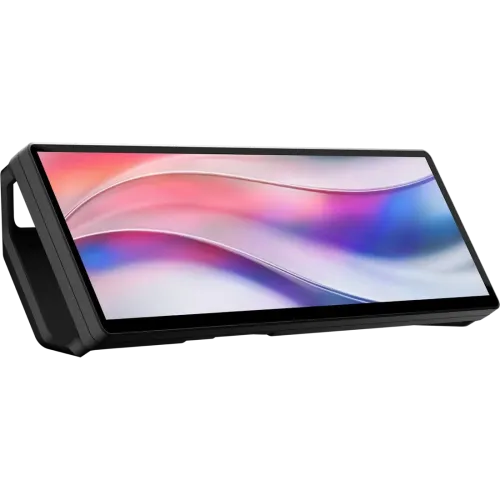
CORSAIR XENEON EDGE is a compact 14.5-inch LCD touchscreen designed as an auxiliary display for a PC, laptop or compatible device. Its extra-wide 32:9, 2560 × 720 screen can keep system telemetry, stream chat, controls, reference material or dashboards visible beside a main monitor. It is an external display, not a standalone tablet or computer: it requires a video source and does not run its own operating system. This catalog entry is for the black CC-9011306-WW model code shown on the Bangladesh retailer listing; confirm the exact color and part number on the delivered carton.
Display size, shape and resolution
The display measures 14.5 inches diagonally and has a native 2560 × 720 resolution with a 32:9 aspect ratio. The wide layout is intended to place multiple narrow panels side by side, such as chat, temperatures, playback controls or a monitoring dashboard. It is not a conventional 16:9 portable monitor and the 720-pixel vertical resolution gives less height for documents or full-screen video than a standard desktop screen. Use the native resolution for correct proportions; wallpaper and application layouts designed for 2560 × 720 can avoid unused space or stretching.
Panel, brightness and refresh
CORSAIR identifies the panel as AHVA and lists 350 cd/m² brightness, 16.7 million 8-bit RGB colors, and 60Hz at 2560 × 720. It is an SDR auxiliary display; the manufacturer page says there is no HDR certification and no adaptive sync. The official technical details do not provide a supported pixel response-time figure, so no response-time number is claimed here. This panel is suited to readable interface elements and controls; it should not be purchased as a high-refresh primary gaming display or HDR monitor.
Five-point touch
The XENEON EDGE has a five-point capacitive touchscreen. On supported Windows systems, touch can operate compatible apps, widget layouts and virtual Stream Deck controls without a mouse. Touch handling depends on how the display is connected: when USB-C DP Alt Mode carries video, the same connection can power the display and carry touch/data functions; with HDMI video, a separate USB connection is needed for touch. The screen’s 5-point capability is not a claim of pressure-sensitive pen input, palm rejection or drawing-tablet support.
Video connection choices
The supported video inputs are HDMI 2.0 and USB-C with DisplayPort Alt Mode. A compatible host USB-C connection can send video and power through one cable. If the host does not support DP Alt Mode, use HDMI for the picture and a separate USB connection for touch functionality and power as required by the setup. Check the graphics output, adapter, cable and available USB power before installation. The model is an extended display for a PC or laptop, and CORSAIR says it has no built-in operating system for standalone use.
Magnetic mounting and desk stand
CORSAIR lists 14 built-in magnets for attachment to a compatible steel surface, such as a suitable case panel or PSU shroud. A detachable magnetic angled desktop stand is included for flat-surface use. The screen supports vertical and horizontal orientation. Magnets will not hold the display to non-metal surfaces; use the stand or a compatible mounting solution instead. Check panel thickness, surface material, stability and clearance before mounting inside a PC case. Avoid obstructing ventilation or placing magnets where they could interfere with sensitive components.
AV arm and accessory mounting
The display has two ¼-20-inch mounting points for an Elgato Multi-Mount or a compatible standard AV arm. This is distinct from a standard monitor VESA 100 × 100 pattern: CORSAIR’s technical specification does not list ordinary VESA compatibility. Select an arm and fasteners that match the ¼-20 mounting points and the display’s load requirements. Use the included magnetic stand only on a suitable flat desk surface. Confirm mounting screws and accessory compatibility instead of assuming a television or monitor VESA bracket will fit.
Orientation and workspace
The EDGE can be placed in landscape or portrait orientation. Windows can be configured to rotate the desktop when the screen is turned vertically, which may be useful for chat, status lists, or narrow dashboards. The 32:9 landscape format is better suited to a row of compact widgets than to reading long documents; portrait orientation changes the amount of vertical and horizontal workspace. Application behavior, touch coordinates and widget layout may require adjustment after rotation. Place the display where it remains reachable without blocking the main monitor or airflow.
iCUE, widgets and Stream Deck
CORSAIR describes iCUE support for custom widget layouts and system monitoring. The display can also work as an extended Windows screen without iCUE for apps such as chat or monitoring tools. The manufacturer product page describes Virtual Stream Deck integration through Elgato software, allowing on-screen virtual keys and controls. Software features depend on supported Windows versions and current app releases; the monitor itself does not include a separate CPU or storage for running these tools. Verify the relevant software’s compatibility and install it from the official source.
Use cases
This auxiliary screen may suit PC builders who want temperatures, fan status or system statistics visible; streamers who want chat and controls beside the main canvas; sim-racing users who want telemetry; or office users who keep reference material and meeting details nearby. Its wide 2560 × 720 workspace can reduce window switching, but it remains a secondary screen with 60Hz refresh. It is not a substitute for a large primary monitor, a laptop touchscreen, a tablet, or a high-resolution color-critical display. Choose it for fixed utility panels and touch controls.
Power and portability
CORSAIR says USB-C DP Alt Mode can power the display and transmit video through a single compatible cable. A system without that feature can use HDMI for video and needs a separate USB path for touch and power. The official page lists a weight of about 1.67 kg in product overview text; region or variant details may affect package weight. It can be repositioned more easily than a full-size monitor, but requires a compatible host and cable connections, so portability does not mean standalone battery-powered operation.
What is included
CORSAIR lists the display, detachable magnetic desk stand, a 6-foot HDMI-to-DisplayPort cable, a 6-foot 20Gbps USB-C cable and quick-start documentation in the package contents. The Bangladesh seller’s package and warranty may differ by region, so compare the received box with its invoice and the seller’s written accessory list. Keep packaging and serial details in case of a warranty claim. Do not assume a local retail bundle contains every cable shown on an overseas product page without confirmation.
Model identity, warranty and market evidence
CORSAIR’s exact model page supports the 14.5-inch screen, 2560 × 720 at 60Hz, touch, magnetic stand, 14 magnets, HDMI 2.0, USB-C DP Alt Mode and ¼-20-inch mounts. The page also lists 350 cd/m² peak brightness, 16.7M colors, no HDR and no adaptive sync. Bangladesh listings show variable price and warranty claims: Star Tech has published a three-year claim, while TechLand has published two years. These seller statements conflict and do not prove a BiponiBD offer or the warranty eligibility of a specific serial. Obtain written local terms before purchase.
Who should consider it
Consider the XENEON EDGE if you need a compact touch-enabled secondary display for widgets, stream controls, system monitoring or a narrow dashboard, and your PC can supply HDMI or USB-C DP Alt Mode. It may not suit someone looking for a standalone tablet, a battery-powered portable monitor, high refresh, HDR, a standard VESA mount, or a main screen for detailed documents and full-screen media. Confirm the mounting surface and connection path before ordering so touch input, video and power all work as intended.
Setup checklist
Check the model number and accessories, then choose USB-C DP Alt Mode for a one-cable video/power/touch setup when supported. Otherwise connect HDMI for video and add USB for touch and power. Set the operating system output to 2560 × 720 at 60Hz and choose landscape or portrait orientation. Mount the unit on its magnetic stand, a suitable steel surface or a compatible ¼-20-inch AV arm. Install iCUE or supported Elgato software only if widget or virtual-key features are needed. Verify touch works on the intended OS and connection.
Purchase and warranty guidance
Price, stock, local importer, dead-pixel terms, warranty duration and box accessories can change independently of the manufacturer specification. Ask the seller to confirm the exact CC-9011306-WW part number and color, whether HDMI video needs a separate USB touch connection in your setup, included cables, dead-pixel coverage, claim location and warranty duration in writing. Preserve the invoice and serial number. This catalog page deliberately avoids presenting seller price or warranty as a BiponiBD offer or guaranteed entitlement.
Summary
CORSAIR XENEON EDGE is a 14.5-inch, 32:9 auxiliary touchscreen with 2560 × 720 resolution, 60Hz refresh, 350 cd/m² brightness, five-point touch, USB-C DP Alt Mode and HDMI 2.0. It includes magnetic mounting options, a desktop stand, two ¼-20-inch AV mount points, and supports landscape or portrait use. It has no HDR or adaptive sync and is not a standalone device. Match the connection to your PC, confirm the mount and exact market bundle, and obtain written Bangladesh serial-warranty terms before purchase.
Key features
- 14.5-inch 32:9 LCD touchscreen
- 2560 × 720 native resolution at 60Hz
- Five-point capacitive touch
- AHVA panel with 350 cd/m² brightness
- USB-C DisplayPort Alt Mode and HDMI 2.0 video
- 14 built-in magnets for compatible steel surfaces
- Detachable magnetic angled desktop stand
- Two ¼-20-inch AV-arm mounting points
- Landscape and portrait orientation
- iCUE widget layouts and Windows extended-display use
- 16.7 million 8-bit RGB colors; SDR, no HDR
- Package-listed USB-C and HDMI/DisplayPort cable accessories
Advantages
- Wide auxiliary layout can keep status, chat or controls visible next to a main display.
- Five-point touch supports interactive widgets on compatible systems.
- USB-C DP Alt Mode can carry video and power through one supported cable.
- Magnetic stand, 14 built-in magnets and AV-arm points provide placement options.
- Official package list includes both USB-C and HDMI/DisplayPort cable options.
Limitations
- 60Hz refresh and 2560 × 720 format are aimed at secondary-display tasks, not high-refresh gaming.
- Touch needs a compatible data connection; HDMI-only video requires a separate USB touch path.
- No built-in OS or battery; a compatible host and power are required.
- No HDR, adaptive sync or standard VESA pattern is listed.
- Bangladesh seller warranty listings conflict and no BiponiBD offer is verified.
Frequently asked questions
Is the XENEON EDGE a standalone tablet?
No. CORSAIR describes it as an external display that needs a video source from a PC, laptop or compatible device.
What is the resolution and refresh rate?
The native display mode is 2560 × 720 at 60Hz.
How large is the touchscreen?
The diagonal screen size is 14.5 inches with a 32:9 aspect ratio.
How many touch points does it support?
CORSAIR specifies five-point capacitive touch.
Does USB-C carry video?
Yes, through DisplayPort Alt Mode on a compatible host; CORSAIR says that path can also power the display.
Can I use HDMI?
Yes, HDMI 2.0 is supported. If HDMI provides video, a separate USB connection is needed for touch functionality.
Can it attach inside a PC case?
It has 14 built-in magnets for compatible steel surfaces. Check the case surface and clearance before mounting.
Does it include a desk stand?
Yes, the manufacturer package list includes a detachable magnetic desk stand.
Does it support a monitor arm?
It has two ¼-20-inch mounting points for compatible AV arms. The technical specification does not list standard VESA compatibility.
Can it be used vertically?
Yes. CORSAIR lists both vertical and horizontal orientation; configure display rotation in the operating system.
Does it support HDR or adaptive sync?
No. The manufacturer technical listing says no HDR certification and no adaptive sync.
What warranty applies in Bangladesh?
Seller pages show conflicting two- and three-year claims. Confirm written coverage, importer and dead-pixel terms for the exact serial.
Manufacturer source: CORSAIR XENEON EDGE product page. Bangladesh commercial terms are seller-specific, conflict on warranty duration and are not a BiponiBD offer. Reviewed 2026-11-08T22:27:09.011Z.