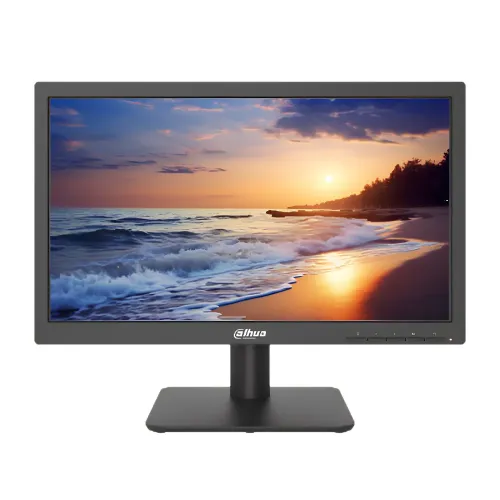
The Dahua DHI-LM19-L200N is a 19.5-inch monitor designed for everyday desktop work and display tasks where a compact screen and modest power use are priorities. Its native HD+ resolution is 1600 × 900 pixels in a 16:9 widescreen layout. That resolution provides more vertical pixels than standard 1366 × 768 HD while remaining straightforward for older office computers and basic graphics hardware to drive. The monitor uses TN LCD technology with an ELED backlight and is specified for a 75Hz refresh rate and 5ms response time. Dahua positions this Light Series screen for continuous operation, so it can suit reception desks, office stations and monitoring setups that need a simple display running for long periods.
A compact 19.5-inch HD+ monitor
The Dahua DHI-LM19-L200N is a 19.5-inch monitor designed for everyday desktop work and display tasks where a compact screen and modest power use are priorities. Its native HD+ resolution is 1600 × 900 pixels in a 16:9 widescreen layout. That resolution provides more vertical pixels than standard 1366 × 768 HD while remaining straightforward for older office computers and basic graphics hardware to drive. The monitor uses TN LCD technology with an ELED backlight and is specified for a 75Hz refresh rate and 5ms response time. Dahua positions this Light Series screen for continuous operation, so it can suit reception desks, office stations and monitoring setups that need a simple display running for long periods.
The 19.5-inch format can fit tighter desks and shared work areas more easily than a large widescreen gaming monitor. It works for documents, spreadsheets, web applications, point-of-sale interfaces, basic CCTV viewing and everyday media. It is not a high-resolution workstation display, and its panel is TN rather than IPS. Users who need wide off-axis color consistency, a large multitasking canvas, high-resolution design work or competitive high-refresh gaming should compare other options first. At 94.14 pixels per inch, text size and clarity depend on viewing distance and operating-system scaling. The 16:9 shape is common for current video and software, and the flat screen is practical for normal desktop placement. Confirm the model code DHI-LM19-L200N on the rear label and invoice, since Dahua has other similar L200-series displays in different sizes.
HD+ resolution, panel and viewing position
The 1600 × 900 native resolution has 1.44 million pixels and supports a useful balance for basic office tasks and older systems. Set the computer output to 1600 × 900 for a sharp one-to-one image; using a non-native mode can make text look softer. The monitor is not specified as a touchscreen. Its TN panel generally performs best when viewed from directly in front, and retailer technical tables list 90-degree horizontal and 65-degree vertical viewing angles. These viewing measurements are narrower than those of many IPS screens. Position the display so the primary user sits centered and can adjust the tilt to the text and work surface. For a workstation viewed by several people at once, the TN viewing behavior may be a limitation.
The manufacturer lists ELED backlighting and continuous 24/7 suitability. Local technical tables report 250 cd/m² maximum brightness, 600:1 contrast and 8-bit color support, with 72% NTSC typical color gamut. These details describe basic display performance; they do not promise professional color calibration or high-end image contrast. If the screen is used in a bright room, position it away from direct glare. For CCTV or monitoring interfaces, consider whether the smaller HD+ pixel grid can show the detail needed from the camera feed. The final visible detail also depends on the source resolution, compression and application layout. The screen’s 16:9 aspect ratio is convenient for standard video and typical business applications, but detailed content may require zoom or panning.
75Hz refresh and 5ms response
Dahua’s L200N series specification lists 75Hz refresh and a 5ms response time. A 75Hz display can update more often than a standard 60Hz screen when the connected system selects the correct mode, which can make ordinary pointer movement and scrolling look slightly smoother. It is intended for general desktop use rather than high-end esports performance. The 5ms rating is a manufacturer specification and should not be interpreted as a promise that all motion blur disappears. Actual image transitions vary with content, source, display settings and measurement conditions. This product’s TN panel and HD+ resolution are chosen for simple practical use, not for demanding competitive gaming or HDR media.
The HDMI 1.4 input supports a 1600 × 900 signal at up to 75Hz, according to local detailed specification tables. The VGA input is listed for 1600 × 900 at 60Hz. To use HDMI at 75Hz, connect a compatible PC or device, choose 1600 × 900 and select 75Hz in the operating system’s advanced display settings. VGA may be useful for older PCs, DVRs or equipment that lacks HDMI, but the listed mode is lower. The monitor only displays the frames sent by its source. Older hardware, docks, converters and cable limitations may cause the system to offer a reduced refresh rate or resolution. Check the source output and chosen connection before installation.
Ports, audio and device compatibility
This model includes one HDMI 1.4 input and one VGA (D-Sub) input. Having both digital and analog video connections allows a newer office PC to use HDMI and a legacy desktop or compatible DVR to use VGA. The manufacturer’s product positioning highlights multiple HDMI/VGA interfaces and high-fidelity digital processing. Match the selected cable to the resolution and refresh mode supported by the source. VGA is analog and may require fine adjustment for a stable image on some devices. Do not confuse this model with adjacent monitors whose specs include DisplayPort or additional connectors; those are not listed for the LM19-L200N. The local specification tables show the HDMI input at 1600 × 900/75Hz and VGA at 1600 × 900/60Hz.
Built-in speakers are not listed by Dahua or the checked seller specification tables. Plan to use the computer’s audio output or external speakers if sound is required. The product details do not establish that an audio output jack is available on the display, so verify the exact connector layout if monitor-based audio is part of the installation. Dahua’s package list shown on seller pages includes an external power adapter, base, HDMI cable, user documentation and regulatory information, but package contents can vary by region and seller. Confirm the contents with the shop and check the unit before disposing of packaging. For a multi-device desk, make sure the HDMI/VGA inputs match the computers, DVRs or other sources that will be connected.
Desk fit, tilt and VESA mounting
The listed dimensions are 464.8 × 283.5 × 48.3mm, and Star Tech lists 2.1kg net weight with 3.1kg gross package weight. These dimensions help estimate clearance, but the measurement may not include the base or every attached cable. Allow enough space for the stand, power adapter and cable bends. Dahua’s listed tilt range is approximately -5 degrees with a tolerance of two degrees to +22 degrees with a tolerance of two degrees. Tilt can aim the screen toward the viewer, but height adjustment, swivel and pivot are not specified. If height adjustment is needed, consider a separate VESA arm.
The monitor lists a 100 × 100mm VESA pattern. Check a wall bracket or monitor arm for the same pattern, a suitable weight capacity, correct screw length and safe clearance. Install the mount according to its instructions and avoid twisting the panel while tightening the bracket. The casing color is listed as black. Keep ventilation and adapter areas unobstructed and place the screen on a stable, level surface. For office deployments across several workstations, measure the desk depth and viewing distance, and ensure the stand does not interfere with keyboards, documents or other equipment. The compact panel is light enough for many small work areas, but the mounting surface still needs to be secure.
Energy use and continuous operation
Dahua markets the L200N series as suitable for continuous 24/7 operation and emphasizes low power consumption. Retailer specification tables report 11.5W basic consumption, 15.5W typical and 16W maximum, using an external 12V DC, 2A adapter. Standby use is listed below 0.5W. These values are not a power-use guarantee for every brightness or signal condition, and actual consumption can vary. Use the supplied adapter where possible. If a replacement is needed, verify voltage, polarity, connector and current rating against the manufacturer label. Do not cover the adapter or place it where heat cannot dissipate. The manufacturer lists 30,000 hours lifespan and continuous operation suitability; these are technical ratings, not warranty periods.
Use the monitor within normal indoor conditions and protect it from water, condensation, heat and impact. Do not press on the LCD surface or spray cleaner directly on the screen. Follow Dahua cleaning instructions and use a soft cloth. If the device is used for security monitoring, check that the installation environment keeps power and connections stable, and ensure that the source system can recover correctly after power interruptions. Continuous operation capability does not replace a suitable ventilation arrangement or reliable upstream equipment. Keep the product serial number, purchase invoice and warranty card available. If the monitor develops a fault, contact the seller or authorized service provider instead of opening the display or adapter.
Bangladesh price, stock and warranty
Three exact-model Bangladesh offers were in stock during the browser check. PQS showed ৳7,800 cash price. Pickaboo showed ৳8,175, a regular price of ৳9,810 and three-year official warranty, with Excel Technologies Ltd. listed as seller. Star Tech showed ৳8,200, a regular price of ৳8,680, in-stock status and a three-year warranty. The observed active retail range is ৳7,800–৳8,200. Retail prices and stock can change, and these seller prices are not the manufacturer’s MSRP. The catalog variant MSRP remains unset. Confirm the final checkout price, delivery charge, exact condition, warranty provider and any box or invoice requirements before ordering.
This model is a practical choice for basic office tasks, school or reception desktops, CCTV/DVR display and setups where a compact 19.5-inch HD+ monitor is sufficient. It is less suitable for color-critical design work, broad shared viewing angles, modern high-resolution gaming or users who need DisplayPort, speakers or a larger screen. Before buying, verify that 1600 × 900 meets the application’s requirements, check that the computer has HDMI or VGA output, and decide whether the TN viewing angle works for the desk arrangement. Confirm included HDMI cable and adapter with the seller. Keep the invoice and packaging for service claims, and compare current prices and availability when placing the order.
Advantages and points to consider
The main advantages are its compact footprint, common HDMI and VGA inputs, straightforward HD+ resolution and manufacturer-listed continuous operation suitability. The 75Hz refresh and 5ms response are adequate for everyday desktop tasks and casual viewing, and the modest published power use may suit workstations that run for extended periods. The 100 × 100mm VESA mount gives an option for an arm or wall bracket, and the tilt stand allows basic angle adjustment. For organizations replacing older monitors, the analog VGA port can help retain compatibility with equipment that has not yet been upgraded.
There are also clear trade-offs. TN technology has narrower viewing angles than many IPS panels, and 1600 × 900 offers less workspace than Full HD 1920 × 1080. It is not positioned for high-refresh gaming, and speakers or DisplayPort are not specified. Buyers should not assume that 24/7 operation means the monitor is appropriate for every industrial environment; use the published operating conditions and official guidance. The 5ms rating and 75Hz refresh are practical general-use specifications, not premium motion performance. Review the intended work, desk setup and connected devices to decide if this compact monitor matches the use case.
Key features
- 19.5-inch TN LCD with ELED backlight
- HD+ 1600 × 900 resolution, 16:9
- 75Hz refresh rate and 5ms response rating
- One HDMI 1.4 input and one VGA input
- HDMI supports 1600 × 900 at 75Hz; VGA at 60Hz
- 250 cd/m² maximum brightness and 600:1 contrast per retailer specs
- 72% NTSC typical gamut and 8-bit color per retailer specs
- Manufacturer says suitable for continuous 24/7 operation
- 100 × 100mm VESA mount and tilt stand
- External 12V/2A adapter; typical power listed at 15.5W
Advantages
- Compact 19.5-inch form factor for smaller desks
- HD+ resolution works with many basic desktop systems
- HDMI and VGA support digital and legacy connections
- Manufacturer lists suitability for continuous 24/7 operation
- Three local exact-model listings showed in-stock offers
Points to consider
- TN panel offers narrower viewing angles than many IPS panels
- 1600 × 900 provides less workspace than Full HD
- No DisplayPort or built-in speakers are specified
- 75Hz and 5ms are general-use rather than esports specifications
- Brightness and contrast details are from retailer tables, not the official page overview
Frequently asked questions
What is the native resolution?
It is HD+ 1600 × 900 pixels with a 16:9 aspect ratio.
How large is the display?
The Dahua LM19-L200N has a 19.5-inch TN LCD with ELED backlight.
What refresh rate does it support?
The listed refresh rate is 75Hz. HDMI supports HD+ at 75Hz; VGA is listed at 60Hz.
What is the response time?
Dahua specifications list a 5ms response rating for this monitor.
Can it run continuously?
Dahua states that the L200N series is suitable for continuous 24/7 operation.
Which video inputs are available?
The monitor has one HDMI 1.4 input and one VGA (D-Sub) input.
Does it include DisplayPort?
DisplayPort is not listed for this model; the specified video inputs are HDMI and VGA.
Does it have built-in speakers?
Built-in speakers are not specified. Use computer audio or external speakers if needed.
Can it be VESA mounted?
Yes. The listed VESA mount pattern is 100 × 100mm; confirm bracket compatibility.
What is the power requirement?
Seller specifications list an external 12V DC, 2A adapter and maximum consumption of 16W.
What warranty do Bangladesh sellers show?
The checked PQS, Pickaboo and Star Tech listings show three-year warranty terms.
What prices were observed in Bangladesh?
PQS showed ৳7,800, Pickaboo ৳8,175 and Star Tech ৳8,200, all in stock when checked.
Manufacturer product documentation is the reference for model positioning and continuous-operation suitability. Local prices and stock can change; confirm current terms and model code DHI-LM19-L200N with the seller.