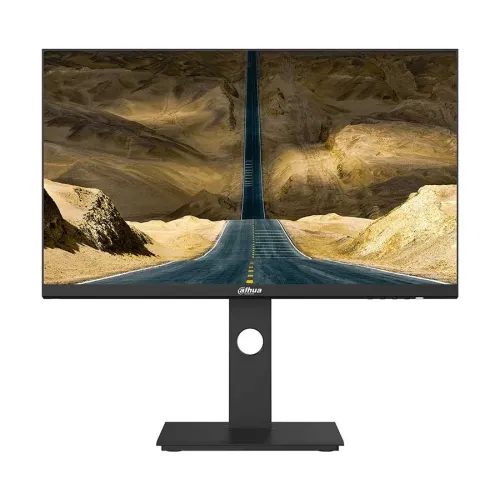
Exact model overview
Dahua DHI-LM24-P301A is a 23.8-inch QHD commercial monitor documented in Dahua’s exact-model datasheet. The manufacturer lists 2560 × 1440 resolution, IPS, a 75Hz refresh rate, 6ms response with OD enabled, 320-nit typical brightness, 1000:1 contrast, DisplayPort 1.4, HDMI 2.1, USB-C with 65W reverse charging and an audio output. Its stand offers height adjustment, tilt, swivel and pivot, and the monitor supports PIP/PBP. The catalog previously showed several inconsistent values including 100Hz, OD 5ms and 300 cd/m²; these have been corrected to the cited manufacturer data. Confirm the full model and revision on the delivered carton.
Screen size, resolution and pixel density
The Dahua datasheet specifies a 23.8-inch screen with a 16:9 aspect ratio and 2560 × 1440 QHD resolution. At this diagonal, QHD provides fine pixel density for text, detailed graphics and multi-window work, while requiring more GPU output capability than Full HD. Dahua lists a 0.2058 × 0.2058 mm pixel pitch. Select the native 2560 × 1440 resolution in the source device for a sharp image. Operating-system scaling can help make small text comfortable. The product name’s “24-inch” shorthand refers to the marketed 23.8-inch class; the official data sheet gives 23.8 inches.
Panel and image characteristics
Dahua identifies the panel as IPS with an E-LED backlight and a 178° horizontal and vertical viewing angle. The specification lists 320 nits typical brightness and 1000:1 contrast. Color information is 99% sRGB, 120% NTSC, 98% DCI-P3 and 93% Adobe RGB as stated in the manufacturer sheet. A gamut percentage alone does not prove calibration, uniformity or color accuracy on an individual sample. For color-sensitive production, calibrate the actual panel and use a measured profile. Brightness should be adjusted for the room; typical brightness is a specification, not an instruction to use maximum output constantly.
Refresh rate and response time
The manufacturer lists a 75Hz refresh rate and response time of 6ms with OD enabled. This exact model is not a 100Hz monitor as the old catalog specification said. A 75Hz signal can display more updates per second than a 60Hz signal when the source provides it, while the response figure uses Dahua’s overdrive condition. Response time and refresh rate measure different behaviors. Overdrive changes pixel transitions and may affect overshoot; compare settings with moving content. Confirm the output timing with your computer and chosen connection, especially when using a USB-C adapter or dock.
HDMI, DisplayPort and USB-C
Dahua’s datasheet specifies one DisplayPort 1.4 input, one HDMI 2.1 input, one USB Type-C connection rated for 65W reverse charging and one audio output. USB-C can carry display signal and provide up to the stated power to a compatible connected device, subject to device and cable requirements. The datasheet does not state that all USB-C cables or sources support every function. Check whether the laptop’s USB-C port supports video output, use a suitable cable and confirm its power needs; 65W may not be enough for every laptop under heavy load. The included accessory list specifies a 1.5m HDMI cable and power cable.
USB-C charging and laptop setup
A key feature of this exact model is USB-C 65W reverse charging, as listed by Dahua. When connected to a compatible laptop, one cable may carry video and provide power, reducing desk cable clutter. The usable charging rate depends on the laptop’s USB-C power delivery support, cable, workload and monitor configuration. A laptop requiring more than 65W may charge slowly or continue draining during intensive work. Verify video-over-USB-C support and power requirements before treating the monitor as a docking station. The available manufacturer specification does not describe an integrated Ethernet port or a multiport USB hub.
PIP and PBP viewing modes
The manufacturer lists PIP and PBP support for viewing signals from two devices at the same time. Picture-in-Picture places a smaller source window over the main picture; Picture-by-Picture divides the display between sources. The exact layout and available input combinations are controlled by the monitor menu and input timing. When split, each source receives only part of the screen area, so text and video may appear smaller. Consult the manual/menu for supported combinations and aspect handling. These modes can be useful for comparing two computers or monitoring one source while working on another.
Stand movement and mounting
The Dahua datasheet specifies tilt from approximately -5° to +20°, swivel from approximately -45° to +45°, pivot from 0° to 90°, and 125 ±5 mm height adjustment. VESA mounting is 75 × 75 mm. The stand supports a range of viewing positions, including portrait pivot, though cable slack and desk clearance should be checked while rotating. If using a monitor arm, confirm its VESA plate and load rating match the 75 × 75 mm pattern and 5.7 kg net monitor weight. Use appropriate fasteners and follow the installation manual rather than forcing a screw into the chassis.
Color gamut and professional use
The manufacturer lists 99% sRGB, 120% NTSC, 98% DCI-P3 and 93% Adobe RGB. These are manufacturer-stated gamut values; the sheet does not establish factory calibration or a color-accuracy delta-E result. A wide gamut can be useful for color-rich content, but unmanaged applications may show oversaturated colors. For a controlled workflow, calibrate the monitor, select the correct color profile and check that the application manages color. Ask whether the delivered unit includes a calibration report if that is required. Do not infer a specific HDR standard or certification from gamut coverage; the exact datasheet referenced here does not specify one.
Audio output
Dahua lists one audio output interface. The manufacturer data sheet does not list built-in speakers, so plan for external speakers or headphones if audio playback is required. The audio output behavior may depend on the active input and source routing. Select the monitor as the playback device when using a connection that carries audio and check the operating-system audio settings. Confirm connector size and cable requirements from the product manual or seller if the output will be connected to specialized audio equipment.
Power and dimensions
Dahua specifies a built-in power supply, 100–240V AC at 50/60Hz, typical consumption of 35W, maximum 130W and standby consumption of 0.5W or less. Net weight is 5.7kg and gross package weight is 8.2kg. The listed body dimensions without the stand are 539.6 × 324.46 × 53.25 mm; package dimensions are 779 × 397 × 127 mm. Maximum consumption is not expected to be constant usage. Keep airflow clear and use the supplied power cable appropriate to the local outlet. Allow extra desk depth for the stand and cable bends.
Compatibility
The monitor’s inputs are DisplayPort 1.4, HDMI 2.1 and USB-C. For a desktop PC, connect through the port supported by the graphics card and choose QHD at up to the monitor’s listed 75Hz. For a laptop, verify USB-C video output and power delivery before relying on a single cable. HDMI compatibility depends on the device’s output modes and cable. An adapter can impose its own bandwidth or refresh limits. PIP/PBP uses two source devices but does not remove their individual signal limits. Check the graphics hardware, cable and operating-system display settings if QHD is missing.
Eye comfort and usage
This Dahua datasheet does not provide an eye-care feature checklist, so this product copy does not claim flicker-free or low-blue-light modes based solely on the previous catalog. Use comfortable room lighting, appropriate brightness, readable scaling and regular breaks. Position the screen to reduce reflections and adjust height and tilt to maintain a comfortable posture. If a retailer advertises additional eye-care modes, ask for the exact manual or on-screen menu for the supplied revision before relying on those features.
What comes in the box
Dahua lists a 1.5m HDMI cable, power cable and height-adjustable stand (HAS) as standard accessories. Check the sealed package because regional bundles can change. The listed standard accessories do not explicitly include a USB-C cable, DisplayPort cable, audio cable or wall-mount hardware. If USB-C 65W operation is part of your setup, confirm a suitable cable is supplied or purchase one that supports video and the needed power delivery. Keep packaging, accessories and serial information during the return period.
Advantages and trade-offs
This model combines QHD on a 23.8-inch IPS panel, a 75Hz refresh rating, 65W USB-C reverse charging, DP 1.4, HDMI 2.1, PIP/PBP and an adjustable pivot stand. It may suit office and productivity users who value sharp workspace and laptop connectivity. Its 75Hz rating is below high-refresh gaming models, and 65W may not meet every laptop’s charging demand. Dahua’s datasheet does not specify built-in speakers or HDR certification. Compare those details with your daily workflow before choosing it.
Bangladesh stock and warranty
A Bangladesh retailer page is available for the exact model, but this review did not establish a current BiponiBD offer or serial-specific warranty eligibility. The earlier catalog states three years; the manufacturer datasheet reviewed here does not confirm the local warranty term. Ask BiponiBD which authorized service provider covers the product, how serial registration works, what panel/dead-pixel exclusions apply and which documents are required. Obtain the coverage in writing on the invoice. Price and stock change, so verify the final amount, delivery charge, return window and sealed-package condition before payment.
Buyer checklist
Confirm the label reads DHI-LM24-P301A and check whether the unit or package carries a revision suffix such as A5. Verify native resolution is 2560 × 1440 and maximum refresh is 75Hz. Ask which cable is included for USB-C video and whether the connected laptop supports video output and 65W charging. Confirm the HDMI/DP/USB-C connections, audio output, PIP/PBP, stand motions, VESA pattern, included accessories and local warranty. On delivery inspect the panel, connect at native resolution, verify 75Hz and test USB-C charging with the actual laptop. Keep serial and invoice records.
Summary
Dahua DHI-LM24-P301A is a 23.8-inch 2560 × 1440 QHD IPS commercial monitor with 75Hz refresh, 6ms response with OD enabled, 320-nit typical brightness, 1000:1 contrast, 65W USB-C, one DP 1.4, one HDMI 2.1, audio output, PIP/PBP and a height/tilt/swivel/pivot stand. It supports 75 × 75 mm VESA mounting. The exact Dahua datasheet corrects the old catalog values of 100Hz, OD 5ms and 300 cd/m². Confirm revision, current BiponiBD offer and serial-specific local warranty before ordering.