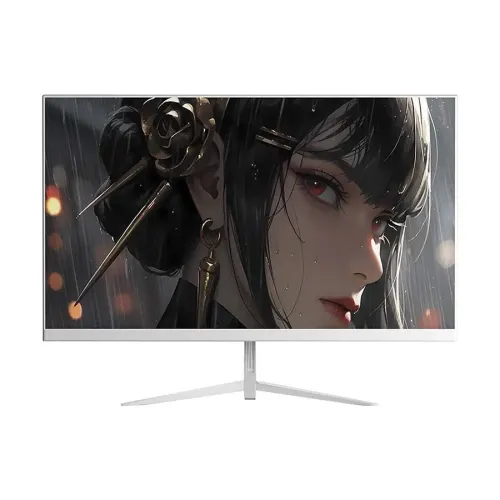
The Dahua DHI-LM27-A221YW is listed by local sellers as a 27-inch Full HD IPS gaming monitor. It uses a 1920 × 1080 resolution in a 16:9 layout, with a flat panel rather than a curved one. The larger screen is useful for games, video, browsing and everyday computer work, while Full HD keeps the pixel workload familiar to many desktop computers. Dahua’s official product documentation identifies the related DHI-LM27-A221Y model and specifies 27-inch IPS technology with ELED backlighting. Local A221YW pages add a white color variant and 144Hz product positioning. Check the model label and suffix on the carton and invoice, because regional SKU suffixes can identify different finish or bundle variants.
A 27-inch Full HD IPS display
The Dahua DHI-LM27-A221YW is listed by local sellers as a 27-inch Full HD IPS gaming monitor. It uses a 1920 × 1080 resolution in a 16:9 layout, with a flat panel rather than a curved one. The larger screen is useful for games, video, browsing and everyday computer work, while Full HD keeps the pixel workload familiar to many desktop computers. Dahua’s official product documentation identifies the related DHI-LM27-A221Y model and specifies 27-inch IPS technology with ELED backlighting. Local A221YW pages add a white color variant and 144Hz product positioning. Check the model label and suffix on the carton and invoice, because regional SKU suffixes can identify different finish or bundle variants.
IPS technology is intended to provide broad viewing angles; Dahua lists 178 degrees horizontally and vertically. That measurement does not mean the screen looks perfectly identical from every side, but it can help when a viewer shifts slightly from a centered position. The monitor is flat, which many people prefer for spreadsheets, documents, games and straight-line layout work. Its viewing area is specified as approximately 597.9 × 336.3mm, with a screen-to-body ratio of at least 85%. At 27 inches, Full HD text and interface elements may appear larger than on a smaller FHD monitor. Users who value fine pixel detail may prefer QHD at the same size; choose based on your viewing distance, eyesight and the type of applications you use.
144Hz mode and motion response
Local product listings describe this display as a 144Hz monitor. Dahua’s current official specification clarifies that the panel runs at 120Hz native and can be overclocked to 144Hz. That distinction matters when setting expectations: 144Hz is an overclocked mode, not the native refresh entry. The connected source, cable and selected operating mode must support the chosen signal. Dahua lists one HDMI 1.4 input capable of Full HD at 144Hz and one VGA input at Full HD 75Hz. The VGA connection is intended for compatible older devices and should not be treated as a route to 144Hz. For a modern PC, use HDMI and verify the selected resolution and refresh rate in the display settings after connection.
The manufacturer lists OD response at 5ms and MPRT at 1ms. These are separate measurement methods. MPRT describes motion picture response behavior under test conditions, while OD refers to overdrive response. They are not a guarantee that all blur or ghosting disappears in every game. Perceived motion depends on source frame rate, game content, refresh setting and individual sensitivity. A higher refresh mode can make compatible motion appear smoother than a standard 60Hz mode when the computer delivers enough frames. The monitor cannot create frames that the computer does not render. Check your graphics hardware, game settings and connection before expecting a consistent 144 frames per second. For ordinary browsing or office use, users may still benefit from smoother cursor movement and scrolling, though the effect varies by person.
Brightness, contrast and color specifications
Dahua lists typical brightness of 250 cd/m² and a 1200:1 contrast ratio. Local seller pages show the same 250 cd/m² brightness but may list contrast as 1500:1; the product content uses the manufacturer’s 1200:1 value and records the seller discrepancy. Brightness should be adjusted to the room rather than left at maximum by default. The manufacturer specifies 6-bit + FRC color and 72% NTSC typical gamut. Retailer copy sometimes describes the screen as 8-bit, but 6-bit plus frame-rate control is the manufacturer’s stated panel specification. These figures describe general display capability and should not be presented as professional color calibration.
This display is intended for gaming and everyday viewing, not for color-critical production without independent measurement. Designers or photographers who need predictable color should use a suitable calibrated monitor and confirm coverage for the exact color space in their work. Dahua lists Haze 25%, 3H surface treatment and flicker-free technology. The official page also describes an anti-blue-light design for eye protection. Local listings call this Low Blue Light. These features may support comfortable use, but screen comfort also depends on breaks, ambient lighting, posture and brightness. Avoid placing the monitor opposite a bright window, and keep the screen clean using a soft cloth and manufacturer-recommended method. Do not apply liquid directly to the panel.
Connectivity, audio and computer compatibility
The main video connection for high refresh use is one HDMI 1.4 port, specified for 1920 × 1080 at up to 144Hz. One VGA port is listed for 1920 × 1080 at 75Hz. Dahua’s current official specification does not list a DisplayPort input for this model, even though the catalog previously contained only HDMI and VGA and several nearby Dahua products have DisplayPort. Verify that the actual A221YW unit has the ports shown in the official datasheet before selecting an adapter or cable. Product descriptions for similar monitors must not be copied across models. The system, cable and settings should all support the intended timing. Older computers may fall back to a lower refresh rate, particularly over VGA.
Local sellers show an audio jack, while the official specification table does not clearly list audio out in the input/output row visible on the regional page. The product content therefore describes audio output as a seller-listed feature and advises verifying it on the unit. Built-in speakers are not specified; plan on using computer audio, headphones or external speakers if sound is required. The included accessory list on Dahua’s official page includes an HDMI cable, power adapter, base, QR-code manual, quick-start guide and regulatory information, but the seller should confirm regional box contents. Before purchasing, check the computer’s HDMI output, cable quality, operating system display settings and whether any dock or adapter limits the refresh mode.
Flat design, fit and ergonomics
The product is a flat 27-inch panel. Dahua lists tilt adjustment from -5 to +20 degrees and a 100 × 100mm VESA mount pattern. Height adjustment, swivel and pivot are not specified on the manufacturer page, so do not assume the supplied stand has those movements. If a height-adjustable position is needed, consider a compatible VESA arm with a sufficient weight rating. Confirm screw length and mounting instructions before installation. The published product dimensions are 615.1 × 364.1 × 49.1mm without the wall-mount bracket; the package dimensions are 678 × 450 × 118mm. Measure the desk and viewing distance with the stand attached, since the without-bracket measurement does not represent the full base footprint.
The manufacturer lists 3.4kg net weight and 4.7kg gross package weight. Its official regional page lists a black casing, but the Bangladesh A221YW seller listings identify the product as white. This likely reflects a variant or regional finish difference, but the two records do not prove the exact casing of every unit. The catalog currently identifies the YW product as white, supported by Star Tech and Pickaboo listing data. Confirm the actual color in writing with the seller before ordering if the finish matters. Keep enough clearance around the panel and adapter, and route cables so tilt adjustments do not pull on the ports. Place the display on a stable, level surface and avoid pressure on the LCD.
Power, operating limits and durability
Dahua specifies a 12V DC, 3A external power adapter. Published consumption is 20W basic, 27.1W typical and 28W maximum, with standby below 0.5W. Actual power draw varies with brightness and operating conditions. Use the supplied adapter where possible; replacement supplies must match the correct voltage, polarity, connector and current rating. Keep the power adapter ventilated and do not cover it. The operating range is 0 to +40 degrees Celsius and 10% to 85% relative humidity. Storage range is -20 to +60 degrees Celsius and 5% to 90% relative humidity. Storage limits are not operating limits. Protect the monitor from moisture, condensation, excessive heat and impact.
The manufacturer lists a 30,000-hour lifespan and operation hours of 7 × 16 hours. These are technical ratings, not a promise of a particular warranty duration or exact component life. Dahua lists CE EMC, CE LVD and CE ERP certifications. Local retailers show a three-year warranty, and Pickaboo labels its offer as three years official warranty. Confirm the written warranty terms, service provider, required documents and packaging requirements on the invoice. Retain the invoice and warranty card. If the product arrives damaged, document the condition and contact the seller promptly. Do not open the panel or adapter; use the seller’s service process or an authorized technician.
Price, stock and buyer checklist in Bangladesh
During the browser check, Star Tech showed ৳16,500 cash price and ৳17,690 regular price, marked In Stock and listed a three-year warranty. Pickaboo showed ৳16,895 current price, ৳20,274 regular price, an In Stock sticky bar, three years official warranty and Excel Technologies Ltd. as the seller. The observed two-seller current price span is ৳16,500–৳16,895. Prices, stock and payment offers can change. These are live retail offers, not the manufacturer’s MSRP. The variant MSRP remains unset in the catalog. Both local pages describe the A221YW finish as white, while Dahua’s regional A221Y page lists black. Buyers should confirm exact finish and model suffix before placing an order.
This model suits a buyer who wants a flat 27-inch IPS Full HD screen and a 144Hz overclocked mode for games and general desktop use. It may be less suitable for someone who needs a native 144Hz specification without overclocking, higher resolution, DisplayPort, built-in speakers or professional color accuracy. Confirm the PC can provide Full HD at 144Hz over HDMI, and understand that VGA is specified at 75Hz. Ask the seller to verify the unit’s white finish, audio jack, included cable and written warranty. Compare the final cash or EMI cost and delivery availability at checkout. Checking these details reduces confusion between similar Dahua model names and helps ensure the delivered monitor matches the A221YW listing.
Key features
- 27-inch flat IPS Full HD display
- ELED backlight and 16:9 aspect ratio
- 120Hz native refresh, overclocked to 144Hz
- 1ms MPRT and 5ms OD manufacturer ratings
- 250 cd/m² typical brightness, 1200:1 contrast
- 6-bit + FRC, 72% NTSC typical color gamut
- HDMI 1.4 at FHD 144Hz and VGA at FHD 75Hz
- Flicker-free technology and anti-blue-light design
- Tilt adjustment and 100 × 100mm VESA mount
- 12V DC, 3A adapter with <0.5W standby
Advantages
- Large 27-inch IPS panel with broad specified viewing angles
- Overclocked 144Hz mode for compatible gaming systems
- HDMI 1.4 and VGA inputs support newer and older devices
- VESA mounting and tilt adjustment are listed
- Two current local in-stock prices were observed
Points to consider
- 144Hz is overclocked; native refresh is 120Hz
- Full HD is less pixel-dense than QHD at 27 inches
- Manufacturer specs list 1200:1 contrast and 6-bit + FRC, differing from some seller claims
- No DisplayPort or built-in speakers are specified by Dahua
- White YW finish differs from black casing on the related official A221Y page; confirm unit color
Frequently asked questions
What is the native resolution?
Dahua lists native Full HD 1920 × 1080 resolution with a 16:9 aspect ratio.
Is 144Hz the native refresh rate?
Dahua lists 120Hz native and an overclocked mode up to 144Hz. Local sellers market the model as 144Hz.
What panel type is used?
The official specification identifies a 27-inch IPS LCD panel with ELED backlighting.
What is the official contrast ratio?
Dahua specifies 1200:1. Some local listings show 1500:1, so the manufacturer figure is used here.
What color depth does Dahua list?
The official page lists 6-bit + FRC and 72% NTSC typical, which differs from some retailer 8-bit claims.
Which video ports are included?
Dahua specifies one HDMI 1.4 input up to FHD 144Hz and one VGA input up to FHD 75Hz.
Does it include DisplayPort?
DisplayPort is not listed in Dahua’s official specification for this model. Verify the unit before buying.
Can it be mounted on a monitor arm?
Yes, the manufacturer lists a 100 × 100mm VESA pattern. Confirm the arm rating and screw compatibility.
Does it have built-in speakers?
Built-in speakers are not specified. Local sellers list an audio jack; verify audio output with the seller.
What is the warranty in Bangladesh?
Star Tech lists three years and Pickaboo shows three years official warranty. Confirm written terms on the invoice.
What are the observed seller prices?
Star Tech showed ৳16,500 and Pickaboo ৳16,895, both in stock during checking. Prices may change.
Is the A221YW white or black?
Bangladesh sellers list white, while Dahua’s related A221Y regional page says black. Confirm the actual variant color.
Manufacturer specifications describe the related A221Y model; local sellers identify the YW finish and offers. Confirm the product suffix, casing color, current stock, ports and warranty on the exact unit before purchase.