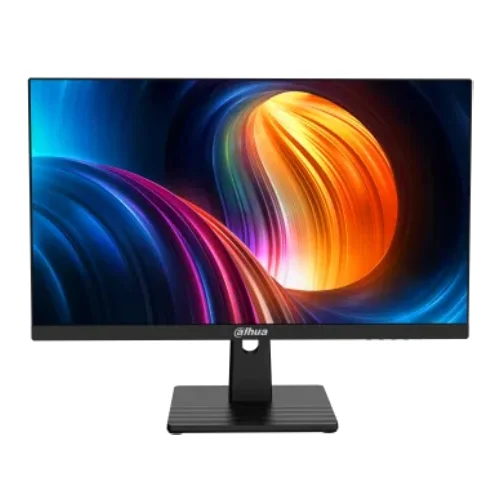
Dahua DHI-LM27-B211B 27-inch 120Hz Full HD IPS Monitor
The Dahua DHI-LM27-B211B is a 27-inch Full HD commercial monitor with an IPS panel and a 120Hz refresh rate. Its Dahua-branded datasheet lists 1920 × 1080 at 120Hz through both HDMI 2.0 and DisplayPort 1.4. It also specifies 300 cd/m² typical brightness, 1300:1 contrast, 85% NTSC typical colour gamut, one audio-out port and VESA 100 × 100mm mounting. This page corrects older retailer-derived data that listed a lower contrast ratio, different tilt range and less specific input standards.
The source document is Dahua DHI-LM27-B211B Datasheet Rev 002.000, bearing Dahua’s 2024 copyright and manufacturer site reference; it is hosted on a document mirror, not Dahua’s own domain. Use the exact model code on the product label to distinguish it from similar B201/B221 models. Bangladesh stock, warranty, price and box contents depend on the seller and regional import batch.
27-inch Full HD IPS display
The flat 16:9 screen measures 27 inches diagonally and has a native resolution of 1920 × 1080. At 81.6 pixels per inch, Full HD on a 27-inch panel presents larger interface elements than higher-resolution screens of the same size and can be comfortable for common desktop tasks. Buyers who want finer text or more workspace may prefer a QHD model. The resolution is widely supported by computers and consoles, and a lower pixel count can be easier for a modest graphics card to drive at high frame rates.
Dahua specifies an IPS panel, ELED backlight and viewing angles of 178 degrees horizontally and vertically. The stated viewing size is 597.888 × 336.312mm, with a screen-to-body ratio of at least 90%. IPS technology can help maintain a useful image when viewed from off-centre, though brightness, contrast and colour may vary by angle, room lighting and individual unit. The screen treatment is listed as haze 25%, 3H, which can reduce some reflections but does not make the panel scratch-proof.
120Hz operation on HDMI and DisplayPort
The manufacturer datasheet specifies 120Hz at 1920 × 1080 on both one HDMI 2.0 input and one DisplayPort 1.4 input. To use the maximum refresh rate, the computer’s graphics output, cable, driver and selected display timing must support it. After connecting, verify the active refresh rate in your operating system’s advanced display settings. If 120Hz is not available, check the source port and cable, update the graphics driver and confirm the display is set to its native resolution.
A 120Hz refresh rate can make desktop motion and compatible games look smoother than 60Hz when the source supplies a matching frame rate. It does not cause a PC or console to render more frames by itself. Actual gaming performance depends on the processor, GPU, game engine and chosen graphics settings. The manufacturer datasheet does not list FreeSync or G-SYNC, so do not assume variable-refresh support based on a retailer title or the fact that the display runs at 120Hz.
Response time and motion clarity
Dahua quotes 1ms MPRT. MPRT (motion picture response time) is a motion-persistence measurement and is not equivalent to a guaranteed 1ms grey-to-grey response for every pixel transition. The datasheet does not specify a GtG value or document a complete overdrive response table. Real motion clarity also depends on frame rate, response tuning, image content and viewing conditions. Treat the headline response number as one specification, not a guarantee that all blur or trails will disappear.
Brightness, contrast and colour
The datasheet lists 300 cd/m² typical brightness and a 1300:1 contrast ratio. These values describe the published specification; they do not guarantee identical brightness or black uniformity across all units. The screen is intended for typical indoor use. Direct sunlight and bright reflections may still reduce legibility, so position it away from windows when possible.
Dahua reports 85% NTSC typical gamut and 16.7 million colours. A gamut percentage does not establish factory calibration, uniformity, colour accuracy or suitability for print proofing. For design, photography or video work where colour matters, use a calibrated monitor and confirm measured coverage in your desired colour space. This monitor’s Full HD resolution and specified gamut are better understood as general-purpose display characteristics than as a professional colour guarantee.
Connections and audio
Available inputs are one HDMI 2.0 and one DP 1.4, with Dahua specifying 1920 × 1080 at 120Hz over each. The monitor also has one audio-out port. The datasheet does not specify built-in speakers, a USB hub or a microphone, so plan for external audio equipment and USB connectivity through your computer. The box is listed to include an HDMI cable, but the included cable’s version and regional package contents should be confirmed with the seller.
Stand, VESA mounting and placement
The listed tilt range is -5° ±2° to +20° ±2°. Height adjustment, swivel and pivot are not documented in the datasheet; treat the included stand as tilt-only unless the actual product or seller confirms additional movement. VESA mounting is 100 × 100mm, and wall mounting is listed as an optional accessory. Before purchasing a monitor arm, verify screw length, load rating and clearance and support the screen safely during installation.
The monitor measures 614.3 × 366.8 × 57.2mm without a wall-mount bracket. The package measures 695 × 460 × 150mm. Dahua lists a net weight of 3.7kg and gross weight of 4.95kg. The casing is black with upper/left/right/lower frame widths reported as 3.1/3.1/3.1/20.9mm. Allow additional desk space for the stand and cables and keep ventilation clear.
Power, controls and environmental conditions
The monitor uses an external 12V DC, 2.5A power adapter. Dahua lists 21W basic consumption, 25W typical, 35W maximum and less than 0.5W standby. The datasheet lists operating temperatures from 0°C to +40°C and operating humidity of 10%–85% relative humidity, non-condensing. Five-button control and a status indicator are specified. Keep the adapter ventilated and use the power supply provided for the exact unit.
Low Blue Light and daily comfort
Dahua describes Low Blue Light technology as a feature intended to support a comfortable viewing experience. Its effect depends on the chosen picture settings, content and user. Set brightness to match the room, keep a comfortable viewing distance and take breaks during long sessions. These features should not be treated as medical or vision-care claims.
Who should consider the DHI-LM27-B211B?
This model may suit a user who wants a 27-inch IPS screen with a 120Hz Full HD mode and standard HDMI/DisplayPort inputs for work, entertainment or casual gaming. It can be a practical option if a computer can drive 1080p at 120Hz and the user prefers larger interface elements. Consider a QHD monitor for sharper text at 27 inches, a height-adjustable model for stronger ergonomic flexibility, or a monitor with built-in speakers if an all-in-one desk setup is important.
Bangladesh price, stock and warranty
Retailer pages checked during this review showed prices around ৳18,890–৳19,500. Skyland listed ৳18,890, Techland listed ৳19,000 but showed out-of-stock, Nexus showed a discounted ৳19,100, and other listings varied. Prices and stock can change by seller, offer and location. Confirm the final price, availability, delivery charge and return policy before ordering. These third-party observations are not a live BiponiBD offer.
Local sellers commonly advertise a three-year warranty, but warranty provider, service territory, serial eligibility, dead-pixel coverage and invoice requirements can differ. Confirm the terms in writing for the exact monitor. Keep the purchase invoice, box and serial information. The manufacturer's datasheet describes the model specifications; it does not prove the local warranty attached to a particular imported unit.
Frequently asked questions
Specification note: Dahua datasheet Rev 002.000 specifies 1300:1 contrast, tilt to +20°, HDMI 2.0 and DP 1.4. Some reseller pages may show older or inconsistent values. Confirm the exact product code and regional package before buying.